# Collections
## Migrate
Migrate a collection of NFTs or pNFTs to be part of a single on-chain Metaplex Certified Collection (MCC).
1. Create your Collection Parent NFT using a minting tool such as [Sol Tools](https://sol-tools.tonyboyle.io/nft-tools/create-nft). Alternately, use `metaboss mint one` or `metaboss mint asset`. This NFT will have your collection name, cover art, description, traits etc. It's the parent NFT for you collection and all items in your collection will point to this mint account.
2. Get your mint list. If your collection is a single candy machine you can use the `--candy-machine-id` option, otherwise provide the path to your mint list formatted as a JSON file with the `--mint-list` option.
Example contents of the mint list file:
```json
[
"D5ycm2mgBWDR37QVkvM389x84V4ux48bSeHLeiHPtX28",
"4kYdMRRYtXjmkusgKEBntSXLDhqkHNE57GF3RPdtx6MW",
"J8xuCFCeBRESoXewtMwrrpVUGikUG3B1WznNdLffyymz",
"4gRtRjrbD7g5ZKUvSVA1tYMK9LZqz6uWuSc3rKeinySh"
]
```
Your Collection Parent NFT must have the *same update authority* as the items you will put in the collection. If you don't want to connect your update authority keypair to a website, you can mint with a different keypair and then change the update authority with Metaboss, or mint with Metaboss's `mint one` command.
### Running the Commands
#### Single Candy Machine Collection
Let's say you've created a parent NFT for your collection with a mint address of `9wtpdjMysSphxipTSJi7pYWGzSZFm2PRFtQucJiiXUzq` and you have a candy machine id of `8yuhovH7fb63ed7Q3rcxL3kYZDhps4qspjaxx1N8WSni` and your update authority is in the file `my_keypair.json` in the same directory you are running the command. Your Metaboss command would be:
```bash
metaboss collections migrate -k my_keypair.json -c 8yuhovH7fb63ed7Q3rcxL3kYZDhps4qspjaxx1N8WSni --mint-address 9wtpdjMysSphxipTSJi7pYWGzSZFm2PRFtQucJiiXUzq
```
#### Using a Mint List File
Assume the same scenario above but with a mint list file named "my_mint_list.json" in the same directory you are running the command. Your Metaboss command would be:
```bash
metaboss collections migrate -k my_keypair.json -L my_mint_list.json --mint-address 9wtpdjMysSphxipTSJi7pYWGzSZFm2PRFtQucJiiXUzq
```
This assumes you have your RPC set in your [Solana config](https://docs.solana.com/cli/choose-a-cluster), otherwise it can be passed in with the `-r` option. As with all Metaboss commands, if you've set your keypair in your Solana config, you can omit the `-k` option. I recommend setting both in the Solana config to simplify commands:
```
solana config set --url <rpc url> --keypair <path to keypair file>
```
#### Retry Flow and Cache File
The `migrate` command rapidly fires off a lot of network requests to try to migrate over your collection as quickly as possible. If some of them fail, it keeps track of them and will automatically retry them based on the maximum number of retries you specify with the `--retries` option. (Defaults to one retry.)
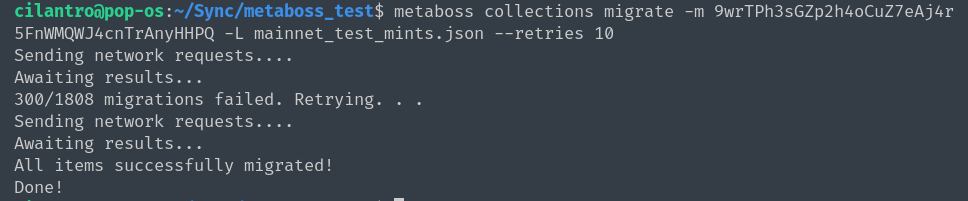
If it hits the maximum number of retries with errors remaining, it will write them to the cache file (`metaboss-cache-migrate-collections.json`).
To retry from a cache file, you can use the `--cache-file` option.
```metaboss
metaboss collections migrate -k my_keypair.json --cache-file metaboss-cache-migrate-collections.json --mint-address 9wtpdjMysSphxipTSJi7pYWGzSZFm2PRFtQucJiiXUzq
```
This will read the items from the cache file and retry them.
When retrying, if you consistently end up with the same number being retried each time it probably indicates those items cannot be migrated for some reason. Check the errors on the items that failed to migrate.
Example cache file:
```json
{
"FqKGC9CCVThn857VAyZtZQq5L31njnbeUTe1JoCsCX8J": {
"error": "Migration failed with error: RPC response error -32002: Transaction simulation failed: Error processing Instruction 0: custom program error: 0x39 [5 log messages]"
},
"H7xrCZwA7oqsFeRcPsP6EEYHCxqq7atUBuuQAursXvWF": {
"error": "Migration failed with error: RPC response error -32002: Transaction simulation failed: Error processing Instruction 0: custom program error: 0x39 [5 log messages]"
}
}
```
In this case [our error is](https://github.com/samuelvanderwaal/wtf-is):
```
0x39:
Token Metadata | IncorrectOwner: Incorrect account owner
```
which means these items cannot be migrated over as all items in the collection must have the same update authority as the Parent NFT.
### Output File
Use `--output-file` or `-o` to specify the path and name of the JSON file to write the cache results to.
e.g.:
```bash
metaboss collections migrate -L devnet_test_mints.json -m 9wtpdjMysSphxipTSJi7pYWGzSZFm2PRFtQucJiiXUzq -o ~/Desktop/my-cache3.json
```
This will override both the default cache file name ('mb-cache-migrate.json') and the cache file name passed in with `--cache-file`.
## Get and Check Collection Items
### Get-Items
Metaboss now has experimental support for getting all collection items from a given mint using off-chain, indexed data from https://theindex.io/. Other indexers or methods may be supported later. To use this feature, you need to sign up for a free account with TheIndex to get an API key.
```bash
metaboss collections get-items --collection-mint <COLLECTION_NFT_MINT_ADDRESS> --api-key <THE_INDEX_API_KEY>
```
where `--collection_mint` is the mint account of the parent collection NFT and `--api-key` is your API Key from theindex.io. There's an additional command `--method` which can be used to support other indexers in the future but defaults to theindex.io for now so can be elided.
This command creates a JSON file named `<COLLECTION_MINT>_collection_items.json` in the directory it is run in.
### Check-Items
Given a list of mint addresses and a collection mint address, this command checks all the items in the list to see if they belong to the specified collection.
```bash
metaboss collections check-items --collection-mint <COLLECTION_NFT_MINT_ADDRESS> -L <PATH_TO_MINT_LIST>
```
This command has a `--debug` flag, which creates a JSON file when set with a mapping of all collection NFTs found associated with the list of addresses and which ones belong to each.
Report bugs and questions to the [Metaboss Discord](https://discord.gg/2f7N25NJkg).