<h1 align="center">mdi v0.0.30</h1>
<p align="center">
<a href="#english-readme">English</a>
|
<a href="#中文说明 "> 中文说明 </a>
</p>
---
## English Readme
markdown include code / version / markdown ...
### Preface
Embedding version numbers and demo code in `readme.md` is a very common requirement.
There are some similar tools on the market, but none of them works well. So I wrote one myself ( executable size 200 KB ).
The function is to write a statement like `> ./demo.js` in markdown to embed the code, and the screenshot of the generated content is as follows :
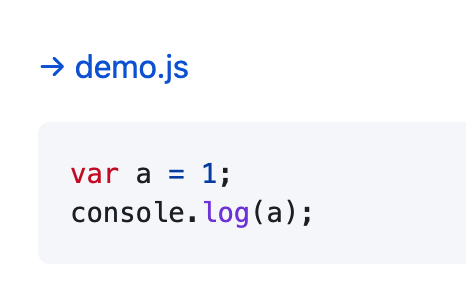
In addition, with the [markdown translation tool](https://rmw.link/log/2021-12-09-markdown-translate) based on deepl , you can automatically translate and render Chinese and English in the same `readme.md` file.
Then set an in-text anchor point (like this readme) at the top of the github readme, and click it to jump to the various language versions of the instructions, which will be a good user experience.
### Install
[Download from github](https://github.com/rmw-lib/mdi/releases) or `cargo install mdi`
### Use
`mdi [dir]`
Will search `xxx.mdi.md` in the directory , replace `> ./xxx.rs` into embed code and output it to `xxx.md`.
If the embed is a markdown file, the references are rendered recursively.
See example [readme.mdi.md](https://raw.githubusercontent.com/rmw-lib/mdi/master/readme.mdi.md) , and the resulting file [readme.md](https://raw.githubusercontent.com/rmw-lib/mdi/master/readme.md)
Demo for include code :
[→ demo.js](./demo.js)
```js
var a = 1;
console.log(a);
```
### About
This project is part of **[rmw.link](//rmw.link)** Code Project

---
## 中文说明
markdown 中嵌入代码 / 版本号 / markdown ...
### 序言
在 `readme.md` 中嵌入版本号、嵌入演示代码,是很常见的需求。
市面上有一些类似工具,但都不好用。于是自己写了一个 ( 可执行文件大小 200 KB )。
实现的功能是, markdown 中写类似 `> ./demo.js` 的语句就会嵌入代码,生成内容效果截图如下 :

另外,配合我写的 [基于 deepl 的 markdown 翻译工具](https://rmw.link/log/2021-12-09-markdown-translate),就可以中英自动翻译并呈现在同一个 `readme.md` 文件中。
再在 github readme 的顶部设置一个文内锚点(如本文),点击就可以跳转到各种语言版本的说明,用户体验会很好。
### 安装
[从 github 下载](https://github.com/rmw-lib/mdi/releases) 或者 `cargo install mdi`
### 使用
`mdi [dir]`
会搜索目录下的 `xxx.mdi.md` 把 `> ./xxx.rs` 替换为代码内容嵌入 ,然后输出到 `xxx.md` 。
如果嵌入的是一个 markdown 文件,会递归渲染其中的引用。
查看演示文件 [readme.mdi.md](https://raw.githubusercontent.com/rmw-lib/mdi/master/readme.mdi.md) ,以及生成的文件 [readme.md](https://raw.githubusercontent.com/rmw-lib/mdi/master/readme.md)
嵌入代码演示 :
[→ demo.js](./demo.js)
```js
var a = 1;
console.log(a);
```
### 关于
本项目隶属于 **人民网络 ([rmw.link](//rmw.link))** 代码计划。
