mdbook-content-loader
Zero-runtime-fetch content collections for mdBook
Injects your content-collections.json (generated by
mdbook-content-collections)
directly into your HTML as window.CONTENT_COLLECTIONS — no network request,
no path hacks, works offline.
By default, the data is injected on your landing page (index.md) only. You can
optionally enable the old behavior and inject it on every page via a config
flag.
This gives you true Astro/Zola-style content collections inside mdBook: instant, reliable access to posts, blog entries, notes, changelogs — anywhere in your theme.
Why this exists
The original mdbook-content-collections example used
fetch('content-collections.json') in the browser.
That works… until it doesn’t:
| Problem | With fetch() |
With mdbook-content-loader |
|---|---|---|
| Extra HTTP request | Yes | No |
Broken in file:// / offline mode |
Yes | Works perfectly |
| Fragile URL construction | Yes | No path logic needed |
| Flash of empty content | Yes | Instant |
| Fails silently on 404 | Yes | Build fails early |
| Works on GitHub Pages / custom domains | Sometimes | Always |
This crate fixes all of that permanently.
What you get
A single, ready-to-query global on every page (or just the landing page, by default)
-
window.CONTENT_COLLECTIONS.entries: all published items, sorted newest → oldest -
window.CONTENT_COLLECTIONS.collections: per‑collection buckets (blog, notes, changelog, etc.) -
window.CONTENT_COLLECTIONS.generated_at: build timestamp for cache busting or debugging
Each entry has the full shape from mdbook-content-collections (path, title,
date, description, tags, optional collection, preview_html, and draft
stripped out), so your theme code can immediately render lists, sidebars, tag
clouds, and “related posts” without any extra parsing or network calls.
Installation
# If not installed, install mdbook-content-collections
# cargo install mdbook-content-collections
Setup
Add the following to your book.toml:
[]
# Generates content-collections.json
[]
= "mdbook-content-loader"
= ["content-collections"] # make sure JSON is generated first
# Behavior:
# - default: inject window.CONTENT_COLLECTIONS only into index.md
# - set inject_all = true to inject into every chapter
# inject_all = true
The after key ensures the JSON exists before this loader runs, and
inject_all is an optional boolean that restores the old “every page” behavior.
mdBook exposes this table under [preprocessor.content-loader] to the
preprocessor via PreprocessorContext, which is where this flag is read.
Works best with an empty index.md, create one by adding this as the first line
of your SUMMARY.md:
()[index.md]
Then run mdbook build to create it.
Frontmatter Example
mdbook-content-loader injects the collection blog into index.md by
default, so for a chapter to be listed on the landing, the frontmatter would
look like:
---
title: "My first note"
date:
collection: "blog"
description: "Short note about using mdbook-content-loader."
draft: false
---
Chapters with the latest date will be listed first. Chapters with
draft: true will be skipped.
Usage in your theme
Drop this anywhere in theme/index.hbs (or any .hbs file).
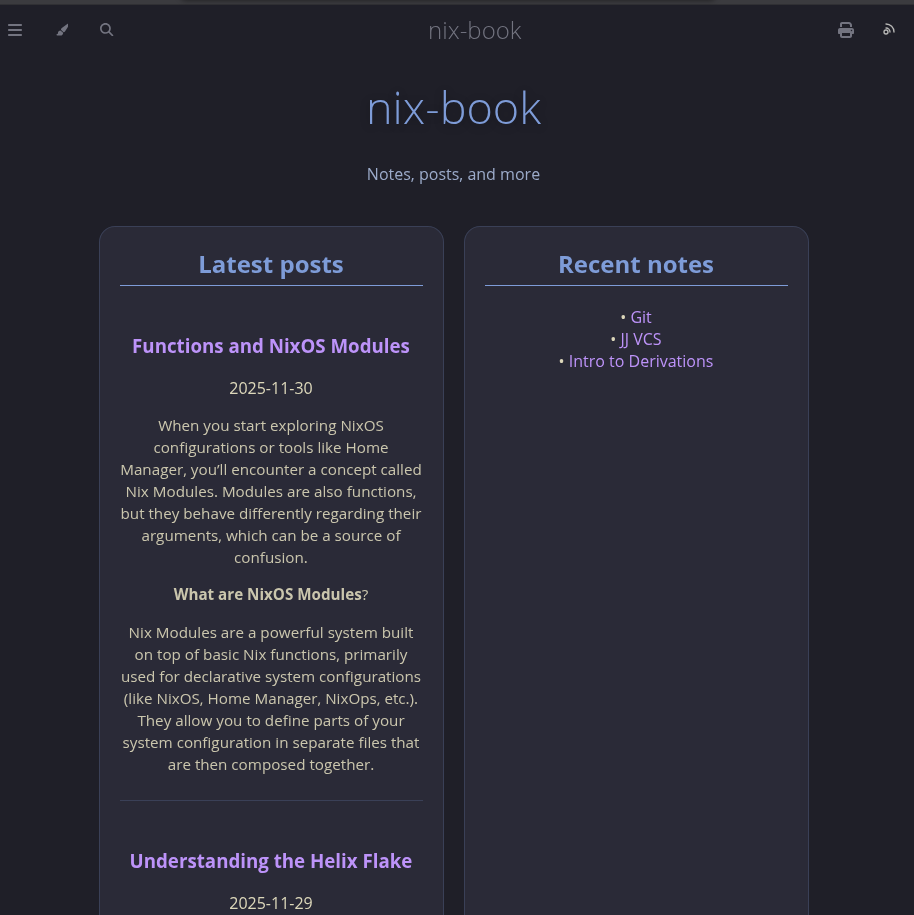
For example, placing it directly after this block works, and you'll have a landing page of your "Latest Edited Posts" placed right above the prev/next buttons:
Add the following block:
Entries with collection: "blog" end up in
window.CONTENT_COLLECTIONS.collections.blog.
Entries with collection: "posts" or with no collection at all end up in
window.CONTENT_COLLECTIONS.collections.posts as a general “all posts” bucket.
The “Latest posts” example code first prefers collections.blog and only falls
back to collections.posts if there are no blog items.
Want a sidebar? Tag cloud? Search index? Related posts? Just read from
window.CONTENT_COLLECTIONS.
Common patterns
// Latest 5 blog posts
window.CONTENT_COLLECTIONS..?.;
// All posts (any collection)
window.CONTENT_COLLECTIONS.;
// Posts with tag "rust"
window.CONTENT_COLLECTIONS..;
Data Shape of content-collections.json
Same as mdbook-content-collections, plus:
-
entries: all entries from content-collections.json, sorted newest → oldest -
collections: grouped views of the same entries, for example: -
collections.blog: all entries where collection === "blog" -
collections.posts: all entries (fallback/all posts) -
generated_at: ISO 8601 timestamp string of when the data was injected intowindow.CONTENT_COLLECTIONS -
All
draft: trueentries removed
See: mdbook-content-collections
Example Project built with content-collections / content-loader