# mcp-repl
[](https://crates.io/crates/mcp-repl)
[](https://docs.rs/mcp-repl)
[](https://github.com/joshrotenberg/mcp-repl/actions/workflows/ci.yml)
[](#license)
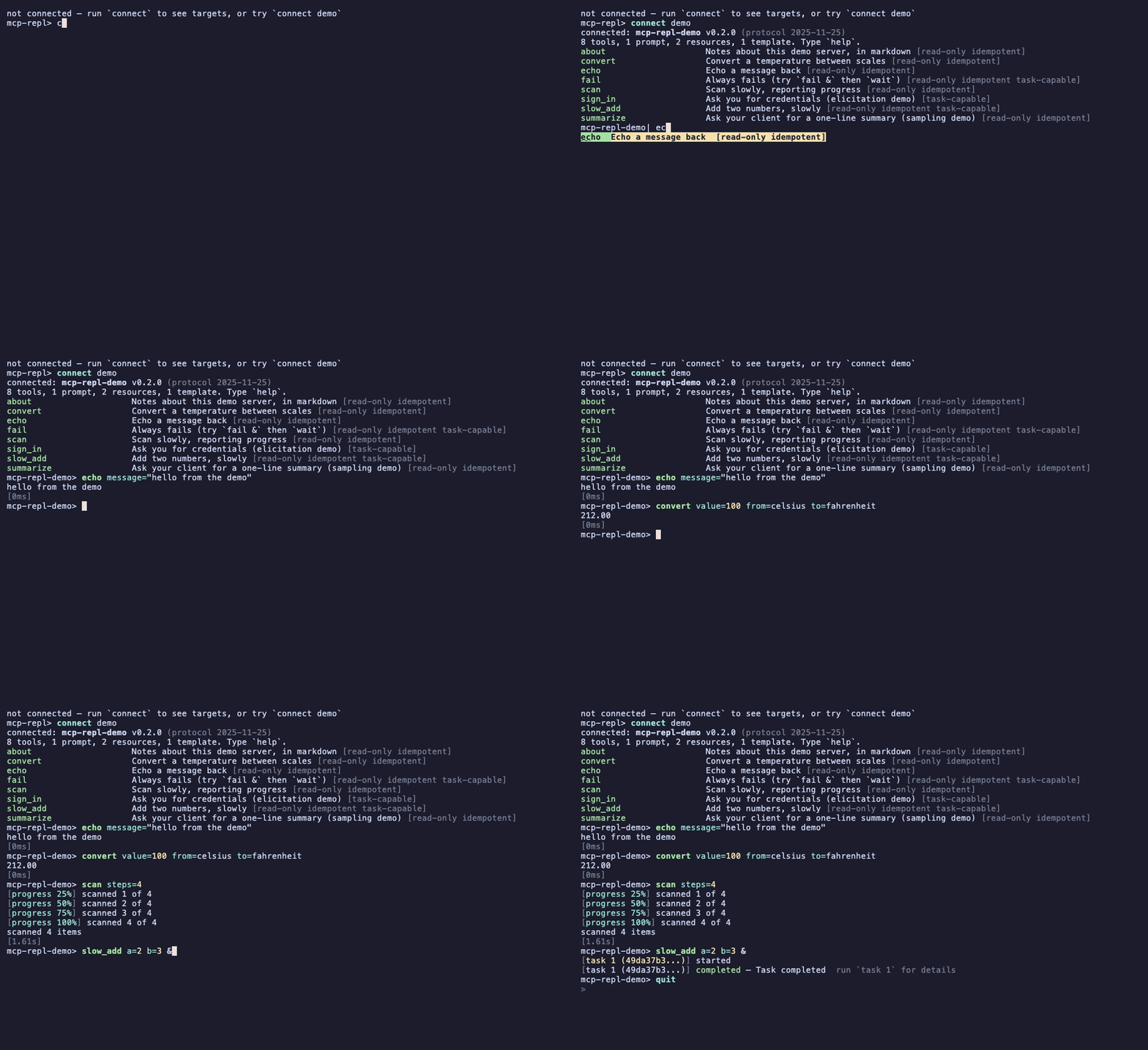
An interactive terminal REPL for any [MCP](https://modelcontextprotocol.io)
server. The server's surface *is* the command set: every tool becomes a
top-level command with schema-coerced `key=value` arguments, prompts and
resources get built-ins, tab completion is powered by the server itself where
the protocol allows, and the command table refreshes live when the server's
surface changes.
## Install
A prebuilt binary for macOS or Linux, on x86_64 or arm64:
```bash
It verifies the release's published checksum before unpacking, and installs
to `~/.local/bin` unless `MCP_REPL_INSTALL_DIR` says otherwise. Reading a
script before piping it to a shell is the better habit, and this one is
short.
Or from source, which is the only route on other platforms:
```bash
cargo install mcp-repl
```
Completions and a man page come from the binary itself, and ship in the
release archives:
```bash
mcp-repl --completions zsh > ~/.zfunc/_mcp-repl
mcp-repl --man > /usr/local/share/man/man1/mcp-repl.1
```
## Start here
No server needed: `--demo` runs one in this process.
```bash
mcp-repl --demo
```
Then point it at something real. mcp-repl speaks stdio and streamable HTTP,
reads the `.mcp.json` files other clients use, and can keep named profiles of
its own:
```bash
mcp-repl --http https://cratesio-mcp.fly.dev/ # a public server to try
mcp-repl -- ./my-server --stdio # spawn a stdio server
mcp-repl --scan # what other clients have configured
mcp-repl .mcp.json:local # one entry from a client config
mcp-repl --server prod # a saved profile
```
Inside, `help` lists the built-ins, `help <command>` explains one, and
`find <word>` searches the server's surface *and* the REPL's own commands.
See [docs/connecting.md](docs/connecting.md) for auth, OAuth, profiles, and
config imports.
## What it is good at
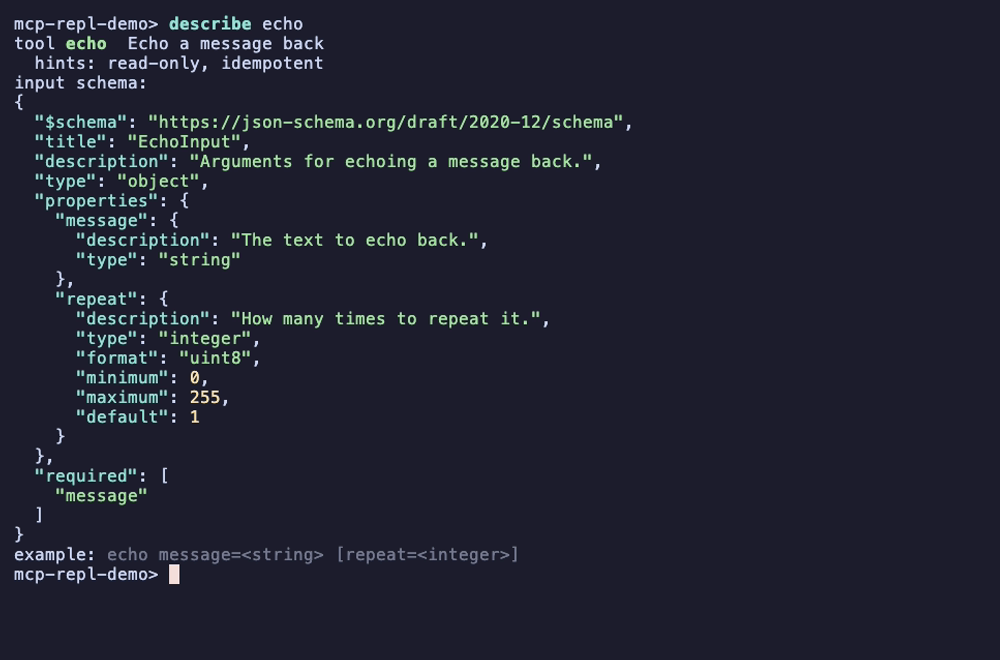
**Everything a tool declares, at the prompt.** Tab completes command names,
argument names, and enum values, reading them out of the tool's
`inputSchema` and following `$ref`s into `$defs` the way a generated schema is
shaped. `describe` shows the annotations, the schema, and a line you can copy
and run.
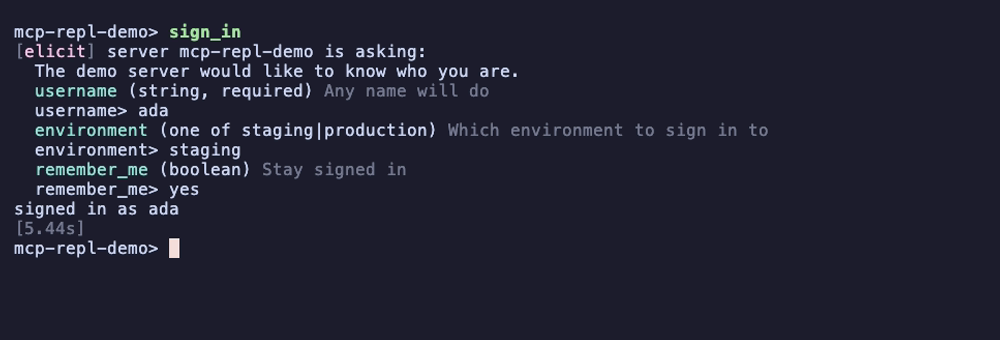
**The parts of MCP other clients skip.** Server-driven completion
(`completion/complete`), elicitation, and sampling all work here, and
SEP-2663 tasks run with a shell-style trailing `&`. When a server asks the
operator a question, the REPL says which server is asking and flags fields
whose names look like credentials before anything is typed. `--demo` has a
tool for each: `sign_in` asks you a question, `summarize` asks your client's
model for a completion.
**A shell, not just a viewer.** Capture a result into a variable, reference it
in a later command, filter it with a path, alias a command you type often, and
time a tool with `bench`. `wire on` prints the raw JSON-RPC frames, and `last`
reprints the previous exchange whether or not tracing was on.
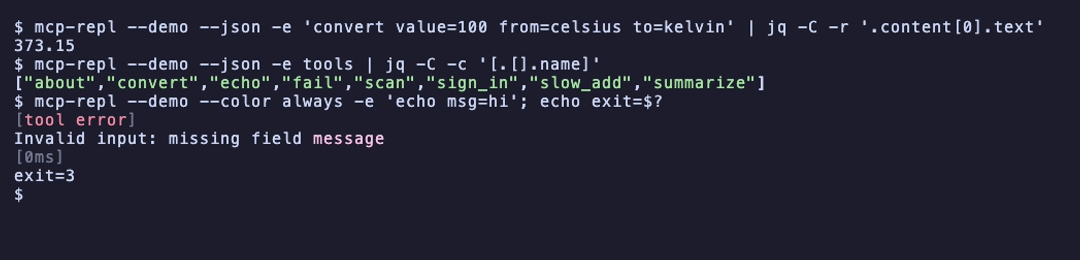
**Scriptable.** `-e/--exec` runs commands and exits; `--json` makes stdout
[NDJSON](https://github.com/ndjson/ndjson-spec), one value per command, with
typed exit statuses so a failure is distinguishable from an empty result.
## Documentation
| [Connecting](docs/connecting.md) | transports, bearer and OAuth auth, profiles, importing client configs, reconnecting, timeouts |
| [The command set](docs/commands.md) | every built-in, completion, aliases, capture and filtering, subscriptions, elicitation, output rendering |
| [Scripting](docs/scripting.md) | `--exec`, NDJSON, exit statuses, schema contracts |
| [Debugging a server](docs/debugging.md) | wire tracing, `last`, `bench` |
## Other MCP clients
mcp-repl is an interactive shell for driving one server. The neighbours are
shaped differently, and which one fits depends on what you are doing:
| [mcpc](https://github.com/apify/mcpc) | TypeScript | One-shot commands against persistent named sessions, aimed at agents driving MCP through a shell. Sessions outlive the process; no interactive prompt. |
| [MCP Inspector](https://github.com/modelcontextprotocol/inspector) | TypeScript | The official inspector: a web UI, plus a `--cli` mode for scripted calls. |
| [mcp-probe](https://github.com/conikeec/mcp-probe) | Rust | A ratatui debugging dashboard: protocol analysis, timing, compliance checks. |
| [mcptools](https://github.com/f/mcptools) | Go | One-shot tool, resource, and prompt calls from the shell. |
What mcp-repl has that the others largely do not: a real line editor with
schema-driven completion, plus elicitation, sampling, server-driven
completion, and SEP-2663 tasks on the 2026-07-28 protocol.
## Protocol versions
The binary compiles both the stable and the final lifecycle, and the choice is
explicit. `--protocol stable` (the default) uses
`initialize`/`notifications/initialized`; `--protocol 2026-07-28` (alias
`final`) uses `server/discover` and sends the selected protocol metadata on
every request. Keeping stable as the default means upgrading mcp-repl cannot
silently change how it talks to a server you already use.
## Contributing
Bug reports and pull requests are welcome. `cargo test` runs the unit tests
plus a black-box suite that launches the built binary against a fixture server
over stdio and localhost HTTP, on both lifecycles. See
[CONTRIBUTING.md](CONTRIBUTING.md).
The recordings above are generated with
[vhs](https://github.com/charmbracelet/vhs) from the tapes in
[docs/tapes](docs/tapes):
```bash
cargo build --release && vhs docs/tapes/hero.tape
```
## License
MIT or Apache-2.0, at your option.