IoT MCP Server





IoT device management engine for ADK-Rust Enterprise agents. Provides 22 MCP tools covering the full IoT lifecycle — device registry, telemetry ingestion, remote commands, alert rules with auto-triggering, digital twins with drift detection, fleet management, OTA firmware updates, and geofencing with haversine breach detection. Zero configuration, no external broker required.
Architecture
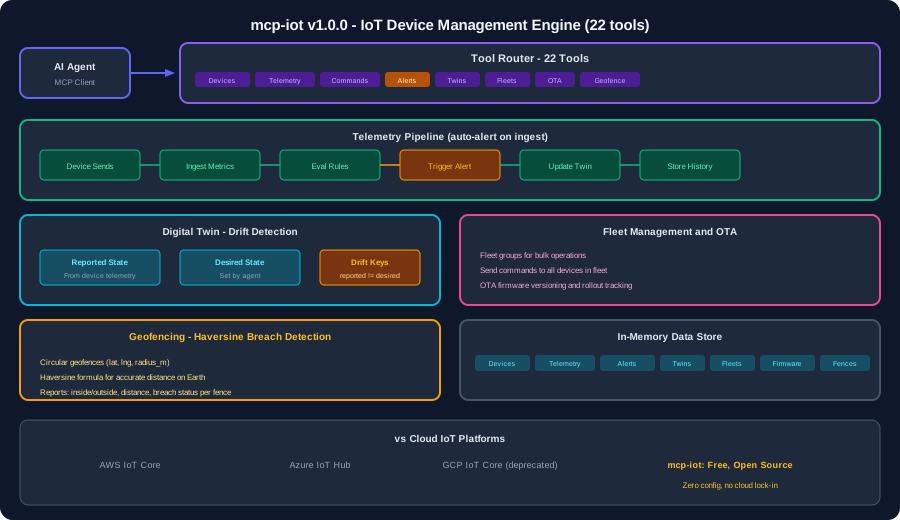
Key Principles
- Full device lifecycle — register, monitor, command, update, decommission
- Auto-alerting — telemetry ingestion automatically evaluates alert rules and triggers alerts
- Digital twins — reported vs desired state with drift detection
- Fleet operations — group devices and send bulk commands
- OTA management — firmware versioning and rollout tracking
- Geofencing — haversine distance calculation for breach detection
- Zero configuration — starts immediately with no MQTT broker or cloud dependency
Tools (22)
Device Registry (4)
| Tool |
Description |
device_register |
Register device (sensor, actuator, gateway, edge) with location, tags, coordinates |
device_list |
List all devices with online/offline status summary |
device_get |
Get device details including twin state and recent telemetry |
device_decommission |
Decommission device, remove from active fleet |
Telemetry (2)
| Tool |
Description |
telemetry_ingest |
Ingest metrics (temperature, humidity, pressure, voltage, etc). Auto-triggers alerts |
telemetry_query |
Query telemetry history by device, optional metric filter, configurable limit |
Remote Commands (2)
| Tool |
Description |
command_send |
Send command to device (reboot, configure, update_firmware, calibrate) |
command_list |
List command history for a device with execution status |
Alert Rules (3)
| Tool |
Description |
alert_rule_create |
Create alert rule (metric + condition + threshold). Conditions: gt, lt, gte, lte, eq |
alert_rule_list |
List all alert rules |
alert_list |
List triggered alerts (breaches) with device, metric, value vs threshold |
Digital Twins (2)
| Tool |
Description |
twin_update |
Update desired state — device reconciles reported vs desired |
twin_get |
Get twin state with drift detection (keys where reported != desired) |
Fleet Management (3)
| Tool |
Description |
fleet_create |
Create fleet group (logical grouping for bulk operations) |
fleet_list |
List all fleet groups |
fleet_command |
Send command to all devices in a fleet |
OTA Firmware (3)
| Tool |
Description |
ota_firmware_create |
Register firmware version (URL, checksum, target type) |
ota_deploy |
Deploy firmware to devices, track rollout |
ota_list |
List OTA deployments and status |
Geofencing (2)
| Tool |
Description |
geofence_create |
Create circular geofence (lat, lng, radius) for devices |
geofence_check |
Check device position against geofences — haversine breach detection |
Dashboard (1)
| Tool |
Description |
dashboard |
Summary: device counts by status, alert count, telemetry rate, fleet count |
Installation
cargo install mcp-iot
Client Configuration
{
  "mcpServers": {
    "iot": { "command": "mcp-iot" }
  }
}
Quick Start
1. Register devices
{"name": "device_register", "arguments": {"name": "Temp Sensor A1", "device_type": "sensor", "protocol": "mqtt", "location": "Warehouse 3", "lat": -1.286, "lng": 36.817, "tags": ["temperature", "warehouse"]}}
{"name": "device_register", "arguments": {"name": "Door Actuator B2", "device_type": "actuator", "location": "Gate 1"}}
2. Set up alert rules
{"name": "alert_rule_create", "arguments": {"name": "High Temp Alert", "metric": "temperature", "condition": "gt", "threshold": 45.0}}
{"name": "alert_rule_create", "arguments": {"name": "Low Battery", "metric": "voltage", "condition": "lt", "threshold": 3.2}}
3. Ingest telemetry (auto-triggers alerts)
{"name": "telemetry_ingest", "arguments": {"device_id": "dev_abc123", "metrics": {"temperature": 47.5, "humidity": 62.0, "voltage": 3.8}}}
Response: alerts triggered automatically if thresholds breached.
4. Digital twin management
{"name": "twin_update", "arguments": {"device_id": "dev_abc123", "desired": {"reporting_interval": 30, "mode": "low_power"}}}
{"name": "twin_get", "arguments": {"device_id": "dev_abc123"}}
5. Fleet operations
{"name": "fleet_create", "arguments": {"name": "Warehouse Sensors", "device_ids": ["dev_abc123", "dev_def456"]}}
{"name": "fleet_command", "arguments": {"fleet_id": "fleet_xyz", "command": "reboot"}}
6. Geofencing
{"name": "geofence_create", "arguments": {"name": "Warehouse Zone", "lat": -1.286, "lng": 36.817, "radius_m": 500, "device_ids": ["dev_abc123"]}}
{"name": "geofence_check", "arguments": {"device_id": "dev_abc123", "lat": -1.290, "lng": 36.820}}
IoT Flow
device_register --> telemetry_ingest --> alert_rule_create
                         |                      |
                    twin_update          alert triggered
                         |                      |
                    twin_get             alert_list
                         |
                fleet_create --> fleet_command
                         |
              ota_firmware_create --> ota_deploy
                         |
              geofence_create --> geofence_check (breach?)
Competitive Comparison
| Feature |
AWS IoT Core |
Azure IoT Hub |
GCP IoT |
Us |
| Device registry |
✅ |
✅ |
✅ |
✅ |
| Telemetry ingestion |
✅ |
✅ |
✅ |
✅ |
| Remote commands |
✅ |
✅ |
✅ |
✅ |
| Alert rules |
✅ |
✅ |
✅ |
✅ |
| Digital twins |
✅ |
✅ |
❌ |
✅ |
| Fleet management |
✅ |
✅ |
❌ |
✅ |
| OTA updates |
✅ |
✅ |
❌ |
✅ |
| Geofencing |
❌ |
❌ |
❌ |
✅ |
| Auto-alert on ingest |
❌ |
❌ |
❌ |
✅ |
| Drift detection |
❌ |
❌ |
❌ |
✅ |
| Zero config |
❌ |
❌ |
❌ |
✅ |
| Open source |
❌ |
❌ |
❌ |
✅ |
| No cloud dependency |
❌ |
❌ |
❌ |
✅ |
Error Codes
| Code |
Meaning |
DEVICE_NOT_FOUND |
Device ID does not exist |
FLEET_NOT_FOUND |
Fleet ID does not exist |
FIRMWARE_NOT_FOUND |
Firmware ID does not exist |
Integration
| Server |
How it connects |
mcp-observability |
Forward telemetry as metrics |
mcp-messaging |
Send alert notifications |
mcp-workflow |
Trigger workflows on alerts |
mcp-maps |
Geofence visualization |
License
Apache-2.0
Part of the ADK-Rust Enterprise MCP server ecosystem.
Built with ❤️ by Zavora AI
