# Matrix GUI
[](https://opensource.org/licenses/MIT)
[](https://www.rust-lang.org/)
[](https://github.com/embedded-graphics/embedded-graphics)
**[🇺🇸 English Documentation](README.md)**
一个立即模式的嵌入式GUI框架,受 [kolibri-embedded-gui](https://github.com/Yandrik/kolibri) 启发,基于 [embedded-graphics](https://github.com/embedded-graphics/embedded-graphics) 构建。该框架移除了自动布局功能,采用基于状态ID和预定义矩形作为布局。
## 特性
- **立即模式GUI**: 简单直观的API,最少的样板代码
- **零分配设计**: 除了控件状态值,所有数据都在栈上,适合资源受限的系统
- **基于区域的布局**: 灵活的自由布局和预定义矩形区域,提供布局设计工具(Matrix GUI Layout)
- **基于功能的模块化**: 只启用需要的功能以最小化二进制大小
- **`no_std`兼容**: 在裸机环境中无缝工作
- **基于整数的动画**: 轻量级动画系统,无需浮点运算
- **自定义控件**: 可参考内置Widgets轻松的自定义控件
- **字体混显**: 使用multi-mono-font库, 字体生成可以使用[PCtoLCD2022](https://gitee.com/merisy/PCtoLCD2022)工具生成
### 内置Widgets
#### 静态Widgets
- `Background` - 背景清除
- `Label` - 文本标签
- `PlainText` - 多行文本
- `StaticImage` - 静态图像
- `StaticLine` - 静态线条
- `Bar` - 进度条
- `ListBox` - 列表框
#### 交互式Widgets(需要 `interaction` 功能)
- `Button` - 按钮
- `Checkbox` - 复选框
- `RadioButton` - 单选按钮
- `Slider` - 滑块
- `ScrollArea` - 可拖拽滑动的滚动区域
- `Choice` - 弹出选择菜单(需要 `popup` 功能)
- `MessageBox` - 消息对话框(需要 `popup` 功能)
## 截图展示
### 基础示例
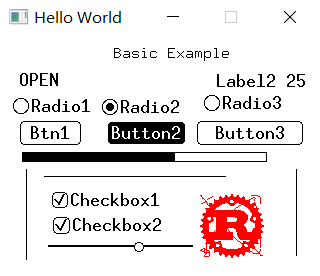
综合示例展示了各种widgets,包括按钮、滑块、复选框、单选按钮、标签和静态图像。
### 纯文本控件

多行文本显示控件,支持不同字体和样式。
### 消息框

模态对话框控件,具有背景变暗效果,用于显示消息和用户交互。
### 网格布局

编译时网格布局示例,展示了网格结构中有序的控件放置。
## 快速开始
### 安装
在 `Cargo.toml` 中添加:
```toml
[dependencies]
matrix-gui = "0.1.0"
```
## 功能特性
本库使用Cargo功能来启用可选功能。默认情况下,不启用任何功能,允许您精确选择所需的功能。
### 功能概览
| `interaction` | 用户交互支持(触摸/鼠标) | - |
| `focus` | 键盘焦点管理 | `interaction` |
| `animation` | 轻量级动画系统 | - |
| `popup` | 模态对话框支持 | - |
| `framebuffer` | 离屏渲染支持 | - |
| `fill-rect` | 硬件加速的快速矩形填充 | - |
| `debug-color` | 调试颜色可视化 | - |
| `log` | 日志支持 | `log` crate |
| `part` | 核心功能包 | `log`, `focus`, `debug-color`, `interaction`, `framebuffer` |
| `all` | 启用所有功能 | `part`, `fill-rect`, `popup` |
| `anim` | 动画功能包 | `animation`, `part` |
## 布局工具
项目提供矩形布局工具用于设计UI布局。请查看[发布页面](https://github.com/Merisy-Thing/matrix-gui/releases)获取布局工具和实用程序。
## 示例
- [basic-example](examples/basic-example.rs) - 包含各种widgets的综合示例
- [anim-demo](examples/anim-demo.rs) - 动画系统演示
- [anim-by-ui](examples/anim-by-ui.rs) - UI驱动的动画
- [fill-rect-fb](examples/fill-rect-fb.rs) - 带fill-rect优化的帧缓冲
- [list-box](examples/list-box.rs) - 列表框widget示例
- [msg-box](examples/msg-box.rs) - 消息框示例
- [plain-text](examples/plain-text.rs) - 纯文本widget
- [choice-demo](examples/choice-demo.rs) - 下拉选择器示例,弹出模态菜单
- [scrollarea](examples/scrollarea.rs) - 可滚动区域示例,支持拖拽、滚轮和键盘滚动
- [grid-layout](examples/grid-layout.rs) - 网格布局示例
- [const-grid-layout](examples/const-grid-layout.rs) - 编译时网格布局
运行示例:
```bash
cargo run --features part --example basic-example
cargo run --features anim --example anim-by-ui
cargo run --features popup,part --example msg-box
cargo run --features popup,part --example choice-demo
cargo run --features part --example scrollarea
```
## 许可证
本项目采用 MIT 许可证 - 详见 [LICENSE-MIT](LICENSE-MIT) 文件。
## 致谢
- 受 [kolibri-embedded-gui](https://github.com/Yandrik/kolibri) 启发
- 基于 [embedded-graphics](https://github.com/embedded-graphics/embedded-graphics) 构建
- 使用 [multi-mono-font](https://github.com/finnbear/multi-mono-font) 进行字体渲染
## 贡献
欢迎贡献!请随时提交 Pull Request。
## 支持
如有问题、疑问或建议,请在 GitHub 上提交 issue。