
markdown-reader
A terminal-based markdown file browser and viewer built with Rust and ratatui. Browse a repository, open multiple files as tabs, search across content, jump to lines, switch themes, and resume exactly where you left off.
Screenshots
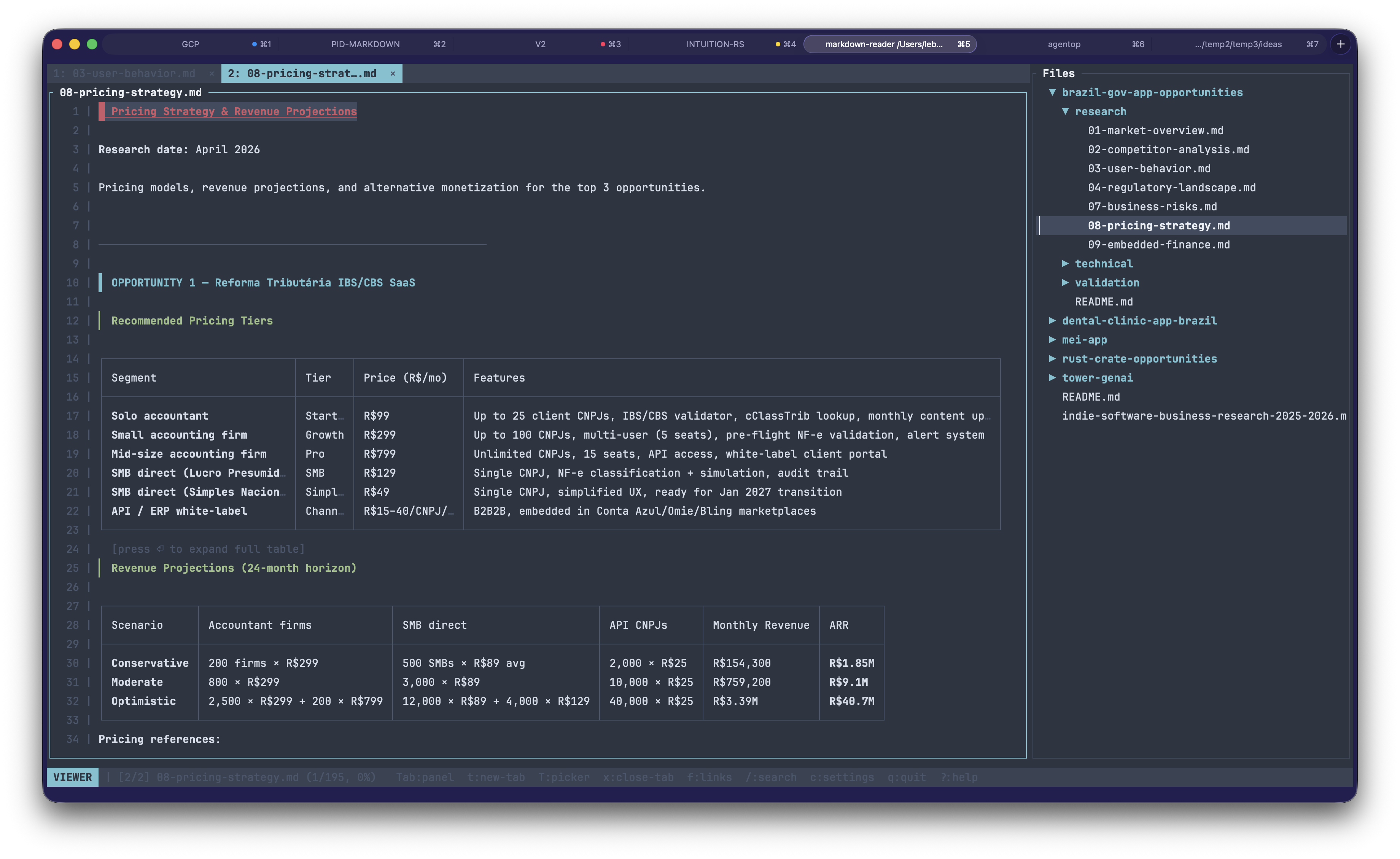
The viewer with tabs, tree, inline tables, and syntax-highlighted code — dark theme by default.
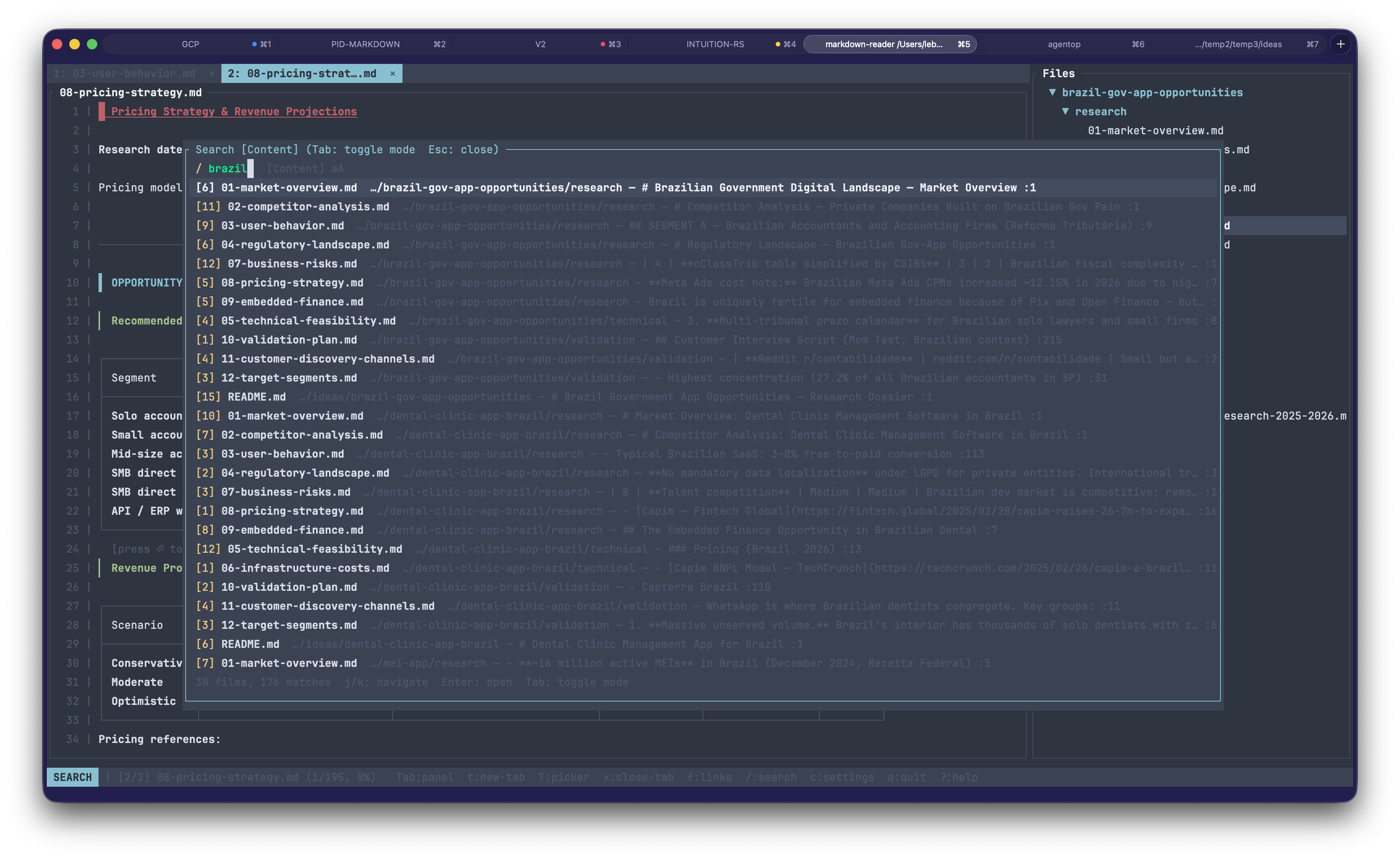
Global search across every markdown file in the tree — results are grouped per file with match counts and previews. Smartcase matching and a 500-file cap with a truncation footer.
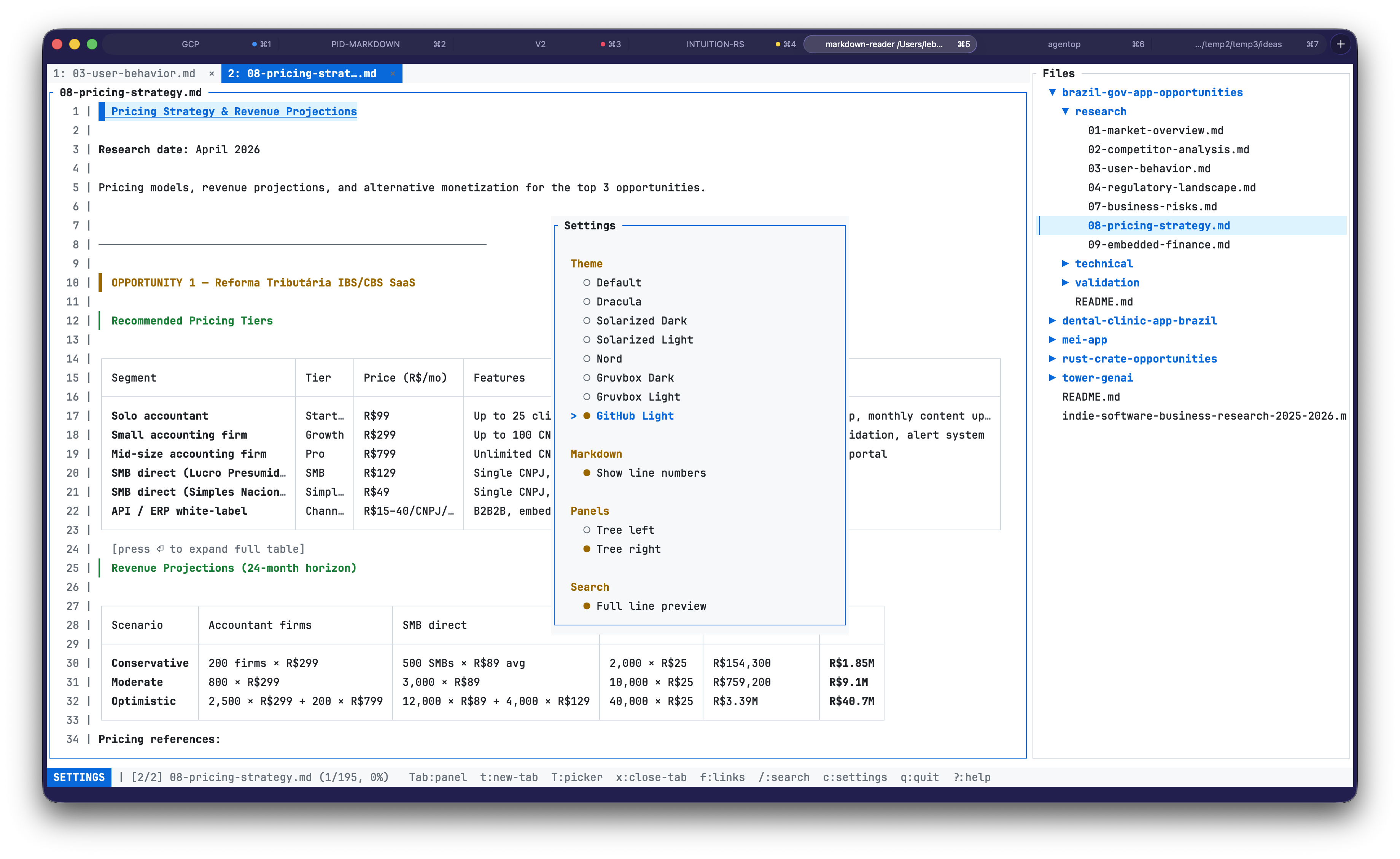
Eight themes ship built-in, including light variants. Settings modal
reached via c.
Layout
+-----------------+--------------------------------------------------+
|                 |  1: README.md   2: guide.md   3: CHANGELOG.md   |
|  Files          +--------------------------------------------------+
|                 |                                                  |
|  ▼ docs/        |  # Document Title                                |
|    README.md    |                                                  |
|    guide.md     |    1 │ Some rendered **markdown** content with   |
|  ▶ src/         |    2 │ headings, lists, tables, and code blocks  |
|    CHANGELOG.md |    3 │ rendered inline.                          |
|                 |                                                  |
|      30%        |                      70%                         |
+-----------------+--------------------------------------------------+
| Search [Files] (Tab to toggle)  / query█                           |
+---------------------------------------------------------------------+
| VIEWER [1/3] README.md (42%)  Tab:panel  t:new-tab  T:picker  ...  |
+---------------------------------------------------------------------+
The window is split into three stacked sections: a main area, an optional search bar, and a single-line status bar. The main area holds the file tree on the left and the viewer on the right. When one or more files are open, a tab strip is rendered above the viewer. An optional line-number gutter is drawn on the left of the viewer content when enabled.
Features
- Multiple tabs — open many markdown files at once, navigate them with
vim-style
gt/gT, jump by number (1–9,0for last), close withx, and useTfor a full tab picker overlay. Duplicate opens focus the existing tab instead of piling up. - Syntax highlighting for fenced code blocks — rust, python, javascript, go, json, bash, and many more are tokenised and colored inline via syntect with a pure-Rust regex backend (no C dependencies, no build-time grammars). Colors follow the active UI theme.
- LaTeX math rendering — inline math (
$...$) and display math ($$...$$) are converted to Unicode approximations: Greek letters (α,π,σ), operators (∑,∫,∇,∞), fractions (a/b), roots (√(x)), super/subscripts (x²,xᵢ). Display math renders in a bordered block labelledmath. Zero external dependencies. - Mermaid diagram rendering — fenced
```mermaidblocks are rasterized in pure Rust (no Node, no Chromium) and displayed inline as real images using the Kitty graphics protocol, Sixel, iTerm2 inline images, or Unicode halfblocks depending on your terminal. Falls back to styled source when running inside tmux or on terminals without graphics support. - Wide table handling — tables are rendered with fair-share column
widths that always fit the viewer, with overlong cells truncated to
…. When truncation happens, a[press ⏎ to expand full table]hint appears below the table. PressEnteranywhere a table is visible to open a full-screen modal that shows every cell at natural width. The modal supports column-boundary panning (h/lsnap to the next column,H/Lhalf-page pan), mouse scroll wheel (plain for rows,Shift+wheel for columns), and click-outside-to-close. - Themes — eight built-in palettes (Default, Dracula, Solarized Dark, Solarized Light, Nord, Gruvbox Dark, Gruvbox Light, GitHub Light). Switch live from the settings modal; every open document re-renders with the new colors.
- Session resume — per-project: the last open tabs, active tab, and scroll positions are saved and restored automatically on the next launch.
- Line numbers — optional left gutter in the viewer, togglable from settings.
- Global search —
/opens a full-screen modal. File-name mode lists matching paths; content mode scans every markdown file and groups matches per file with a count and a preview of the first hit (full line, or ~80-char snippet — your choice in Settings). Smartcase: lowercase query = case-insensitive; any uppercase = case sensitive, shown asAa/aAin the footer. Confirming a content-result opens the file in a new tab with the viewer cursor centred on the match line and the file tree expanded to reveal it. - Visual-line selection and copy — press
Vin the viewer to start a line-wise selection, extend withj/k/d/u/gg/G, pressyto copy the range to the system clipboard via OSC 52.yycopies the current line without entering visual mode. - In-document find —
Ctrl+fto search within the active document, with highlighted matches andn/Nto cycle. Per-tab state — switching tabs preserves each tab's find state independently. - Go to line —
:opens a prompt; type a line number, Enter jumps. Clamped to document bounds and aligned with the gutter numbering. - Mouse support — click tabs to activate, click
×to close, click file tree items to open, click internal links to jump, scroll the viewer or tree with the wheel. - Link navigation — click an internal
#anchorlink to scroll to the matching heading, or pressfto open a link picker listing every anchor in the document for keyboard navigation. - Copy to clipboard — press
yin the tree to copy the selected file's full path or filename to the system clipboard via OSC 52. - Git status colors — new/untracked files appear in green, modified files in yellow, with the entire ancestor directory chain colored so changed subtrees are easy to spot at a glance.
- Configurable tree position — place the file tree on the left (default) or right side of the viewer via the settings modal.
- Visible cursor and vim-style edit mode — a highlighted cursor row
tracks your position in the viewer (move with
j/k/d/u/gg/Gand friends). Pressito drop into a vim-style modal editor (edtui) at the exact source line you were reading.:wsaves atomically,:qreturns to the rendered view,:wqdoes both.:q!force-discards unsaved changes. - Rendered markdown preview — headings, lists, code blocks, tables, links, blockquotes, task lists, and more, styled from the active theme.
- Live file watching — the tree and open tabs reload when files change on disk, preserving per-tab scroll positions. All I/O is async so the UI never freezes.
- Respects .gitignore — uses the
ignorecrate to skip ignored files. Dotfile directories (.planning,.github, etc.) are included.
Installation
Prerequisites
- Rust toolchain (1.85+ recommended, edition 2024)
From crates.io
From GitHub
Building from source
The binary will be at target/release/markdown-reader.
Usage
# Browse the current directory
# Browse a specific directory
# Show help
Once inside the TUI, press ? at any time for the keyboard help overlay.
Press c to open the settings modal (themes, line numbers, tree
position). Press q
to quit — the current tabs and scroll positions are saved before exit, so
reopening the same directory resumes where you left off.
Keyboard shortcuts
Navigation (tree)
| Key | Action |
|---|---|
j / Down |
Move down |
k / Up |
Move up |
Enter / l / Right |
Open file (current tab) / expand directory |
h / Left |
Collapse directory |
gg |
Jump to first item |
G |
Jump to last item |
Tab |
Switch focus to viewer |
t |
Open selected file in a new tab |
Viewer
| Key | Action |
|---|---|
j / Down |
Move cursor down one line |
k / Up |
Move cursor up one line |
d / u |
Half-page cursor down / up |
PageDown / PageUp |
Full-page cursor down / up |
gg |
Jump to top |
G |
Jump to bottom |
i |
Enter edit mode |
V |
Enter visual-line selection mode |
yy |
Copy current line to clipboard |
y (visual) |
Copy selected range to clipboard and exit visual mode |
Ctrl+f |
Find in document |
n / N |
Next / previous match |
: |
Go to line (centred on target) — use :5 to jump to line 5 (<number>G vim-style count register is not yet implemented) |
f |
Open anchor link picker (jump to a heading) |
Enter |
Expand the first visible table into the modal viewer |
Tab |
Switch focus to tree |
Table modal
Press Enter in the viewer when a table is visible on screen to open a
centered modal that shows the table at its natural column widths with
every cell value intact. The modal supports horizontal and vertical
panning so you can reach any cell regardless of how many columns or how
long the cell content is.
| Key | Action |
|---|---|
h / Left |
Pan left by 1 cell |
l / Right |
Pan right by 1 cell |
H / Shift+Left |
Pan left by 10 cells |
L / Shift+Right |
Pan right by 10 cells |
0 |
Jump to the first column |
$ |
Jump to the last column |
j / Down |
Scroll rows down |
k / Up |
Scroll rows up |
d / u |
Half-page scroll down / up |
gg |
Jump to the top-left corner (row and column reset) |
G |
Jump to the last row |
q / Esc / Enter |
Close the modal and return to the viewer |
Tabs
| Key | Action |
|---|---|
gt |
Next tab |
gT |
Previous tab |
1–9 |
Jump to tab N (1-indexed) |
0 |
Jump to last tab |
` |
Jump to previously active tab |
x |
Close the active tab |
T |
Open the tab picker overlay |
The tab picker lists every open tab. Use j/k or arrows to navigate,
Enter to activate, x to close a tab from within the picker, and
Esc or T to dismiss.
A maximum of 32 tabs can be open at once. Attempting to open a 33rd tab is silently ignored; close an existing one first.
Panels
| Key | Action |
|---|---|
[ |
Shrink file tree |
] |
Grow file tree |
H |
Toggle file tree visibility |
y |
Copy path or filename to clipboard |
Search
| Key | Action |
|---|---|
/ |
Open search |
| Any character | Append to query |
Backspace |
Delete last character |
Tab |
Toggle file-name vs content search |
Down / Ctrl+n |
Next result |
Up / Ctrl+p |
Previous result |
Enter |
Open selected result (in a new tab) |
Esc |
Close search |
Settings
| Key | Action |
|---|---|
c |
Open settings (theme, line numbers, tree position, search preview) |
Esc / c |
Close settings |
General
| Key | Action |
|---|---|
? |
Toggle help overlay |
q |
Quit (saves session) |
Mouse support
The terminal must forward mouse events. Most modern terminals (iTerm2, Alacritty, Kitty, WezTerm, GNOME Terminal, Windows Terminal) do so out of the box.
| Action | Effect |
|---|---|
| Click a tab | Activate that tab |
| Click a file-tree item | Select and open it |
| Click a directory | Toggle expand/collapse |
| Click inside the viewer | Focus the viewer |
| Scroll wheel in the viewer | Scroll the document (3 lines per tick) |
| Scroll wheel in the tree | Move the tree selection |
| Click a row in the tab picker | Activate that tab |
Mermaid diagrams
Fenced code blocks tagged mermaid are rendered as real diagrams inline
with the surrounding text. The rendering pipeline is pure Rust:
mermaid-rs-rendererparses the diagram source and produces SVG.resvgrasterizes the SVG to a PNG at three times the intrinsic size (so there is enough pixel budget for the image to fill the viewer).ratatui-imagedetects the terminal's graphics protocol — Kitty, Sixel, iTerm2 inline images, or Unicode halfblocks — and displays the image inline.
Rendering runs on a background thread, so the UI never blocks on a slow
diagram. While a diagram is being rasterized for the first time, a
rendering… placeholder is shown in its reserved space. Results are
cached per-document and shared across tabs, so reopening the same file
or switching tabs does not trigger a re-render.
Terminal support. Kitty, Ghostty, WezTerm, and Konsole get the best quality via the Kitty graphics protocol. iTerm2 gets native inline images. Foot, xterm, mintty, and Contour get Sixel. Alacritty and other terminals without graphics support get a Unicode halfblock fallback — low-resolution but still readable.
tmux. When $TMUX is set, graphics are unconditionally disabled:
tmux strips image escape sequences unless it was compiled with passthrough
support and explicitly configured, and the failure mode is subtle. Inside
tmux, mermaid blocks fall back to showing their source with a
[mermaid — disable tmux for graphics] footer so you know the cause.
Partial scroll. When a diagram is only partially visible (scrolled
on- or off-screen), a bordered scroll to view diagram placeholder is
shown instead of a shrunken image. Scrolling the full block into view
brings the image back.
Supported diagram types. Everything mermaid-rs-renderer supports,
which covers flowcharts, sequence diagrams, state diagrams, class
diagrams, entity-relationship diagrams, Gantt charts, pie charts, and
more. Fidelity on subgraphs, styles, and complex layouts depends on the
renderer's pre-1.0 maturity — when a specific diagram fails, the source
is shown with a short error in the footer.
Wide tables
Markdown tables are rendered with a fair-share column-width algorithm
that always fits the viewer. Every column gets a minimum of six cells,
and the remaining horizontal space is distributed proportionally to each
column's natural width — so a table with one long column and two short
ones keeps the short columns legible while shrinking the long one. Cells
that are longer than their allotted column width are truncated with …,
and every data row renders on exactly one visual line so the grid never
breaks under wrapping.
When any truncation happened, a dim line
[press ⏎ to expand full table] is drawn directly below the table's
bottom border as a discoverability hint. Tables that fit without
truncation render without the hint.
On very narrow terminals where even the minimum six cells per column
would not fit, the table collapses to a single-line placeholder
[ table — too narrow, press ⏎ to expand ]. Enter still opens the
modal so no content is unreachable.
Table modal
Press Enter anywhere a table is visible (header, body row, top or
bottom border) to open the modal. Unlike the in-document render, the
modal renders every cell at its natural width with no truncation. Pan
the view with h/l (one cell) and H/L (ten cells); scroll rows
with j/k/d/u/gg/G; jump to column ends with 0 and $.
q, Esc, or Enter close the modal and return focus to the viewer.
If more than one table is visible, Enter opens the topmost one; scroll
it past the viewport and press Enter again for the next.
Themes
Eight built-in themes (five dark, three light), switchable live from
the settings modal (c):
- Default — balanced palette that works on dark terminals.
- Dracula — the classic pink/purple dark theme.
- Solarized Dark — Ethan Schoonover's dark palette.
- Solarized Light — Ethan Schoonover's warm cream light palette.
- Nord — cool blue-based Arctic palette.
- Gruvbox Dark — warm retro groove.
- Gruvbox Light — warm retro light variant.
- GitHub Light — bright palette for light terminals.
Theme changes re-render every open tab immediately, so switching feels instantaneous. The choice is persisted and restored on next launch.
Configuration and state files
Both files are TOML. Missing or corrupt files are silently ignored — the app starts with defaults rather than refusing to launch.
config.toml — user preferences
- Linux:
$XDG_CONFIG_HOME/markdown-reader/config.toml(typically~/.config/markdown-reader/config.toml) - macOS:
~/Library/Application Support/markdown-reader/config.toml - Windows:
%APPDATA%\markdown-reader\config.toml
Fields:
= "dracula" # default | dracula | solarized_dark | solarized_light | nord | gruvbox_dark | gruvbox_light | github_light
= true
= "left" # left | right
state.toml — per-project session
Holds a map of canonical root paths to their saved tab lists and active indices. Old (v0.1.0) single-file entries from prior versions are read transparently.
- Linux:
$XDG_STATE_HOME/markdown-reader/state.toml(typically~/.local/state/markdown-reader/state.toml) - macOS:
~/Library/Application Support/markdown-reader/state.toml - Windows:
%LOCALAPPDATA%\markdown-reader\state.toml
To reset a session (for example, if you want a fresh start on a project), delete the state file. Configuration is untouched.
Markdown rendering
Elements are rendered with styles from the active theme; the list below shows the default theme.
| Element | Rendering |
|---|---|
| H1 | Cyan, bold, underlined, with █ prefix |
| H2 | Blue, bold, with ▌ prefix |
| H3 | Magenta, bold, with ▎ prefix |
| H4–H6 | Bold |
| Bold / italic / strikethrough | Terminal modifiers |
| Inline code | Themed, wrapped in backticks |
| Code block | Box-drawn border, tinted background |
| Blockquote | Dim text with │ left border |
| Unordered list | Colored bullets •, ◦, ▪ by depth |
| Ordered list | Numbered, themed markers |
| Task list | Checked / unchecked boxes |
| Table | Box-drawn grid with bold header |
| Link | Underlined, themed |
| Horizontal rule | Full-width ─ line |
Dependencies
| Crate | Purpose |
|---|---|
| ratatui | Terminal UI framework |
| crossterm | Terminal backend, input and mouse events |
| pulldown-cmark | Markdown parsing |
| ignore | .gitignore-aware file discovery |
| tokio | Async runtime |
| notify-debouncer-mini | Filesystem change watching |
| clap | CLI argument parsing |
| anyhow | Error handling |
| serde | Config and state serialization |
| toml | TOML format for config and state files |
| dirs | Platform-native config/state directories |
| mermaid-rs-renderer | Pure-Rust mermaid → SVG renderer |
| resvg | SVG rasterization |
| image | Bitmap decoding and manipulation |
| ratatui-image | Terminal image display (Kitty, Sixel, iTerm2, halfblocks) |
| unicode-width | Display-width measurement for CJK and emoji |
| base64 | OSC 52 clipboard encoding |
License
MIT