<img src="https://raw.githubusercontent.com/Oeditus/marcli-rust/main/stuff/img/logo-128x128.png" alt="Marcli" width="128" align="right">
# Marcli
**CommonMark Markdown to ANSI-escaped terminal output**
Marcli converts Markdown into styled terminal text using ANSI escape sequences.
It parses via [comrak](https://docs.rs/comrak) and renders headings, lists, code blocks,
inline formatting, links, images, and more as richly styled output for terminal emulators.
Syntax highlighting for fenced code blocks is provided by [syntect](https://docs.rs/syntect).
This is a Rust port of the [Elixir `marcli` library](https://github.com/Oeditus/marcli).
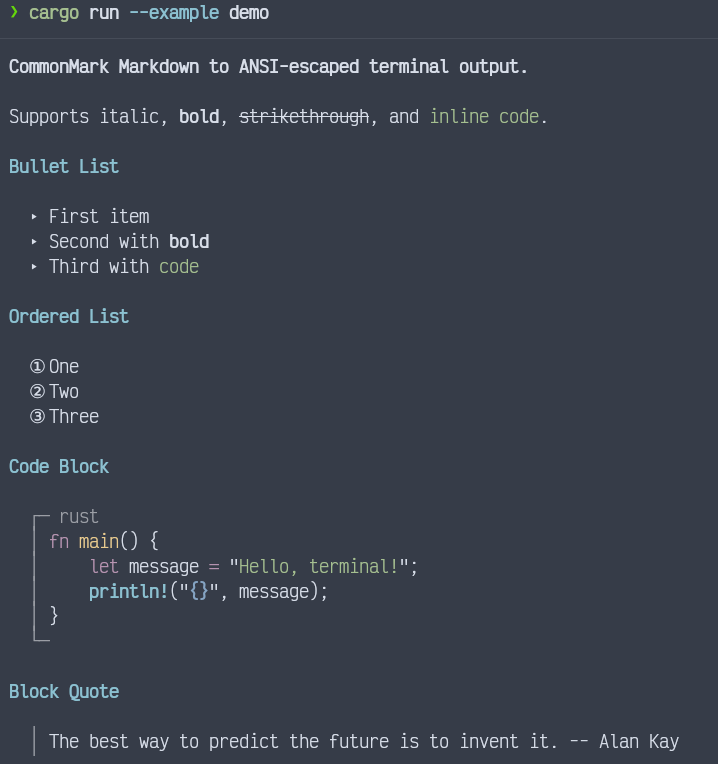
## Screenshot
## Supported Elements
- Headings (h1: bold yellow, h2: bold cyan, h3+: bold white)
- Bold, italic, strikethrough, inline code
- Bullet lists (triangle markers) and ordered lists (circled numbers)
- Code blocks with optional language headers (syntax-highlighted via syntect)
- Block quotes (vertical bar prefix)
- Thematic breaks (horizontal rules)
- Links (underlined blue with dimmed URL)
- Images (bracketed alt text with URL)
- Task list items (checkbox markers)
- Tables with box-drawing borders
## Installation
Add `marcli` to your `Cargo.toml`:
```toml
[dependencies]
marcli = "0.1"
```
## Usage
```rust
// Basic rendering
let output = marcli::render("# Hello\n\nSome **bold** text.", &Default::default());
println!("{}", output);
// With CRLF line endings (e.g. for xterm.js)
let opts = marcli::RenderOptions {
newline: "\r\n".into(),
..Default::default()
};
let output = marcli::render(markdown, &opts);
```
## Syntax Highlighting
Fenced code blocks tagged with a language identifier are automatically
syntax-highlighted using ANSI escape sequences via syntect's built-in
syntax definitions. No extra configuration is needed.
If no matching syntax definition is found for the specified language,
the block renders without highlighting.
Syntax highlighting can be disabled per-theme:
```rust
let mut theme = marcli::Theme::default();
theme.syntax_highlight = false;
let opts = marcli::RenderOptions { theme, ..Default::default() };
```
## Theming
All visual aspects of the output are controlled by the `Theme` struct.
A theme can be loaded from a TOML file:
```rust
let theme = marcli::Theme::load(".marcli.toml").unwrap_or_default();
let opts = marcli::RenderOptions { theme, ..Default::default() };
let output = marcli::render(markdown, &opts);
```
## Options
- `newline` -- the line ending to use (default: `"\n"`). Pass `"\r\n"` for xterm.js or other terminals that require CRLF.
- `theme` -- a `Theme` struct controlling all visual styles (default: `Theme::default()`).
- `escape_sequences` -- when `false`, strips all ANSI escape sequences from the output (default: `true`).
## Documentation
[docs.rs/marcli](https://docs.rs/marcli)
## Credits
Created as part of the [Oeditus](https://oeditus.com) code quality tooling ecosystem.
## License
MIT