# mara
A high-performance scraper that clears challenges over a rotating pool of egress IPs.
[](https://crates.io/crates/mara)
[](https://docs.rs/mara)
[](LICENSE)
[](https://github.com/apanloco/mara/actions/workflows/ci.yml)
[](https://tokio.rs)
## Features
- **API** - Rust api for scraping
- **Very high performance** - throughput scales with warm exits
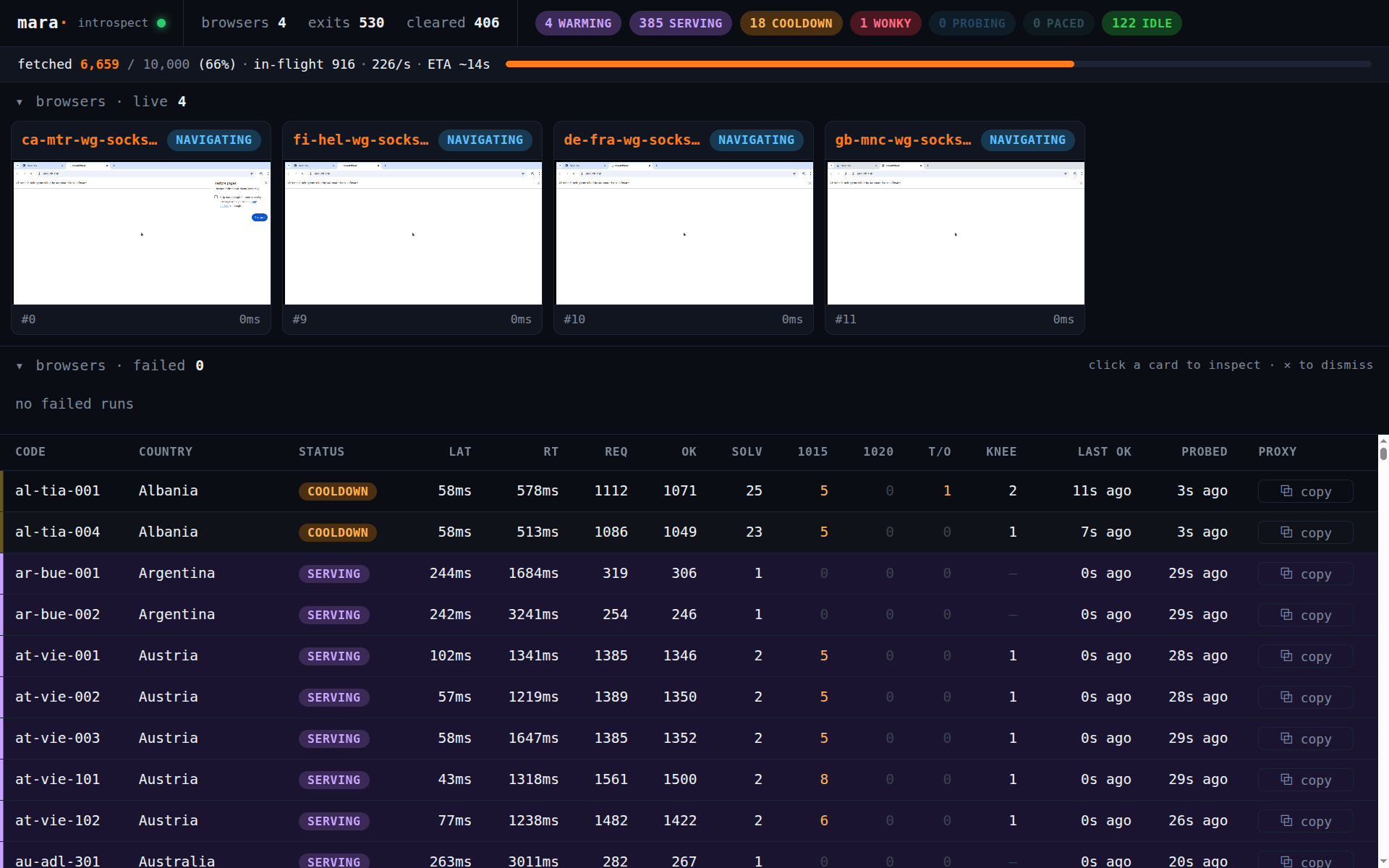
- **Live dashboard** - a single-page UI detailing how the scraping goes
- **Clears challenges** - solves challenges in real browsers on virtual framebuffers
- **Low resource usage** - scrapes with slim clients using cookies from completed challenges
- **Manages a pool of exits** - continuously monitors exit latency and distributes load
## Requirements
**Linux only.** mara solves challenges in a real browser on an off-screen X
framebuffer and drives it via X11 (`Xvfb`, `xtest`/`xfixes`), so it does not run
on macOS or Windows.
System dependencies (all checked by `mara doctor`):
- **Xvfb** — the off-screen display the browser renders into.
`apt install xvfb` (Debian/Ubuntu) · `dnf install xorg-x11-server-Xvfb` (Fedora).
- **Google Chrome / Chromium** — the challenge solver. Install a normal build (not
Chrome-for-Testing, which is more detectable), or point mara at a binary with
`CHROME=/path/to/chrome`.
Bumping the installed Chrome major must stay in lockstep with the pinned `wreq` /
`wreq-util` slim TLS profile — `mara doctor` warns on drift.
## Library usage
Add the crate:
```toml
[dependencies]
mara = "0.2"
```
```rust
use futures::StreamExt;
use mara::{Client, Config, Domain};
#[tokio::main]
async fn main() -> anyhow::Result<()> {
let client = Client::new(Config {
// Every host you fetch must be registered here — exact match, no suffix fallback.
domains: vec![
// Challenge-protected: solve once in a browser, then replay the cookie slim,
// paced to at most 20 req/min per exit (defends a per-IP rate limit).
Domain::solve("example.com").per_ip(20),
],
..Default::default()
})
.await?;
// One result per input URL, in completion order. Bare URL strings work directly.
let mut results = client.fetch_all(["https://example.com/a", "https://example.com/b"]);
while let Some(item) = results.next().await {
match item.result {
Ok(page) => println!("{} → {} bytes", item.url, page.value.len()),
Err(err) => eprintln!("{} failed: {err}", item.url),
}
}
Ok(())
}
```
## CLI
The command-line tool ships as an unpublished workspace binary (`mara-cli`). Build it from a
checkout of this repo:
```console
$ cargo run -p mara-cli --release -- fetch https://example.com/a https://example.com/b # clear + fetch pages
$ cargo run -p mara-cli --release -- fetch --mullvad --serve https://example.com # rotate the live Mullvad catalog, keep the dashboard up
$ cargo run -p mara-cli --release -- capture https://example.com # open a headed browser and clear interactively
$ cargo run -p mara-cli --release -- doctor # check the environment
```
The `fetch` command registers each target host as protected by default;
pass `--raw` to fetch a host as-is without the solve path.
## License
[MIT](LICENSE).