# MapVas
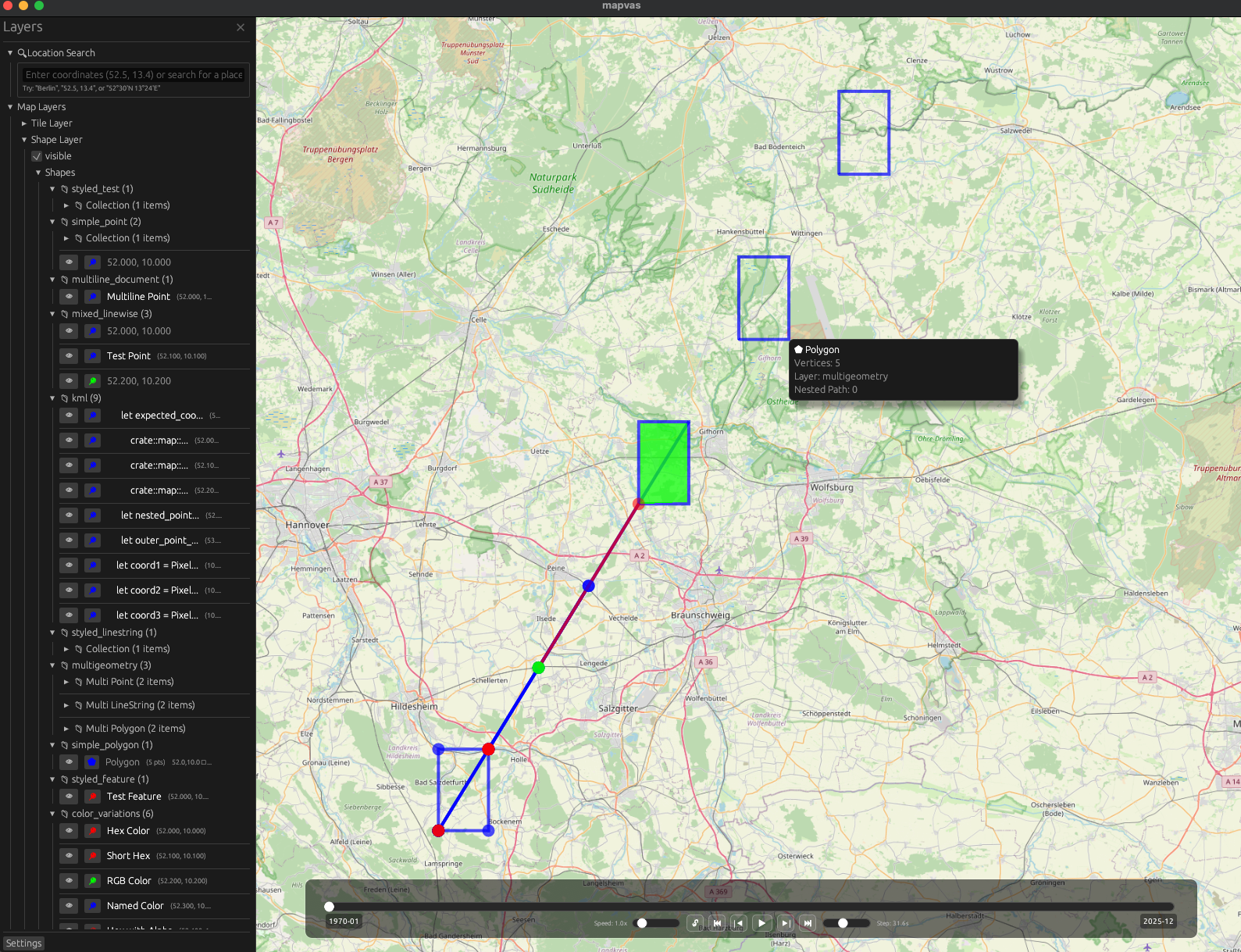
A **map** can**vas** showing [OSM](https://openstreetmap.org) tiles with advanced visualization capabilities including temporal data support, interactive controls, and drawing functionality.
The repo contains two binaries:
- **mapvas**: Interactive map viewer with timeline controls, search, filtering, and drawing
- **mapcat**: Command-line tool equivalent to [cat](<https://en.wikipedia.org/wiki/Cat_(Unix)>) for displaying geographic data on the map
## Setup
Make sure you have Rust installed (stable toolchain recommended).
- [Install Rust](https://rustup.rs).
Manually:
- Clone this repository.
- `cd mapvas ; cargo install --path .`
Via cargo from [crates.io](https://crates.io/crates/mapvas):
- `cargo install mapvas --locked`
Via brew on MacOs:
- `brew tap udho/mapvas && brew install mapvas`
## Usage
### mapvas
Start `mapvas` and a map window will appear.

#### Interface Controls
**Navigation & View:**
| **Mouse Wheel / +/-** | Zoom in and out |
| **Left Click + Drag** | Pan the map |
| **Arrow Keys** | Pan the map with keyboard |
| **F** | Focus/center all drawn elements |
| **S** | Take screenshot of current view |
**Sidebar & UI:**
| **F1 / Ctrl+B** | Toggle sidebar |
| **☰ Button** | Show sidebar |
| **✕ Button** | Close sidebar |
**Search & Navigation:**
| **/** | Open search mode (vim-style) |
| **&** | Open filtering mode |
| **:** | Enter command mode |
| **Double-Click** | Navigate nested collections or trigger popups |
| **Right-Click** | Show context menu with element information |
| **L** | Show label at mouse position (Mac-friendly) |
**Timeline Controls (when temporal data loaded):**
| **Ctrl+L** | Toggle interval lock mode |
| **Timeline Handles** | Drag to adjust time interval |
| **Play/Pause** | Control temporal animation |
| **Step Buttons** | Step forward/backward through time |
| **Speed Slider** | Adjust playback speed (0.25x-4x) |
**Data Management:**
| **V** | Paste clipboard content (auto-parsed) |
| **File Drop** | Drag and drop files onto map |
| **Delete/Fn+Delete** | Clear all elements |
| **C** | Copy label text (when label popup shown) |
### mapcat
Mapcat reads input from stdin or files and uses intelligent auto-parsing to detect the format, or you can specify a parser explicitly. It uses various [parsers](https://github.com/UdHo/mapvas/tree/master/src/parser) to handle different data formats.
It shows the parsed result on a single instance of mapvas, which it spawns if none is running.
#### Auto Parser (default)
The auto parser (default since v0.2.6) intelligently detects input format:
- **File extension detection**: Uses `.geojson`, `.json`, `.gpx`, `.kml`, `.xml` extensions with fallback chains
- **Content analysis**: For stdin/piped data, analyzes content patterns to determine format
- **Smart fallbacks**: TTJson → JSON → GeoJSON → Grep for JSON files, with format-specific chains for others
```bash
# Auto-detect format from file extension
mapcat data.geojson
mapcat routes.gpx
mapcat points.kml
# Auto-detect format from piped content
```
#### Explicit Parser Selection
You can override auto-detection and specify a parser explicitly:
```bash
# Force specific parser
mapcat -p grep data.txt
mapcat -p geojson data.json
mapcat -p ttjson routes.json
```
Available parsers: `auto` (default), `grep`, `ttjson`, `json`, `geojson`, `gpx`, `kml`
#### Grep Parser
This parser greps for coordinates latitude and longitude as float in a line. In addition it supports colors and filling of polygons.
The input can come from a pipe or from files.
```
mapcat <files_with_coordinates>
```
Examples:
- draws a point at Berlin Alexanderplatz:
```
echo "52.521853, 13.413015" | mapcat
```
- draws a line between Berlin and Cologne and a red line between Cologne and Amsterdam:
```
echo "50.942878, 6.957936 52.521853, 13.413015 green\n 50.942878, 6.957936 52.373520, 4.899766 red" | mapcat
```
- draws a yellow polyline Cologne-Berlin-Amsterdam:
```
echo "50.942878, 6.957936 random garbage words 52.521853, 13.413015 yellow spaces after the coordinate-comma is not important: 52.373520,4.899766" | mapcat
```
- draws a blue transparently filled polygon Cologne-Berlin-Amsterdam note that a fill ("transparent" or "solid"):
```
echo "50.942878, 6.957936 52.521853, 13.413015 52.373520,4.899766 blue transparent" | mapcat
```
Filling a polyline causes it to be drawn as closed polygon.
- drawing flexpolylines or google polylines
```
echo BFoz5xJ67i1B1B7PzIhaxL7Y | mapcat
echo '_p~iF~ps|U_ulLnnqC_mqNvxq@' | mapcat
```
- --invert-coordinates (-i) reverses the order of lat/lon:
```
echo "13.413015, 52.521853" | mapcat -i
```
- clears all elements from the map.
```
The -r parameter clears the map before drawing new elements.
```
- --label-pattern (-l) defines a label pattern. A near label is shown when right click on the map happens. The label is copied (when shown) via the c key.
The label requires exactly one capture group to be in the pattern. Default is `"(.*)"` which captures everything.
```
#### Configuration
MapVas uses a configuration file located at `~/.config/mapvas/config.json`. The configuration file is automatically created on first run with default settings.
You can also set `MAPVAS_CONFIG` environment variable to use a custom config directory.
Example configuration:
```json
{
"tile_provider": [
{
"name": "OpenStreetMap",
"url": "https://tile.openstreetmap.org/{zoom}/{x}/{y}.png"
},
{
"name": "TomTom",
"url": "https://api.tomtom.com/map/1/tile/basic/main/{zoom}/{x}/{y}.png?tileSize=512&key=***"
}
],
"tile_cache_dir": "/Users/username/.mapvas_tile_cache",
"commands_dir": "/Users/username/.config/mapvas/commands",
"search_providers": [
{ "Coordinate": null },
{ "Nominatim": { "base_url": null } }
],
"heading_style": "Arrow"
}
```
#### Tile Caching
Tile caching is enabled by default and tiles are stored in `~/.mapvas_tile_cache`. You can change this location in the config file or disable it by setting `tile_cache_dir` to `null`.
#### Performance Profiling
```bash
# Run with profiling enabled
cargo run --bin mapvas --features profiling
# View profiling data
cargo install puffin_viewer
puffin_viewer --url=http://127.0.0.1:8585
```
#### Environment Variables
| `MAPVAS_CONFIG` | Custom config directory | `~/.config/mapvas` |
| `MAPVAS_TILE_CACHE_DIR` | Custom tile cache directory | `~/.mapvas_tile_cache` |
| `MAPVAS_TILE_URL` | Custom tile provider URL (legacy) | Uses config file |
| `MAPVAS_SCREENSHOT_PATH` | Default screenshot save location | Current directory |