# Lumesh — Your Next Default Shell
[]()
[]()
[]()
[Codeberg](https://codeberg.org/santo/lumesh)
| [GitHub](https://github.com/superiums/lumesh)
| [Documentation](https://www.lumesh.cc.cd)
| [DeepWiki](https://deepwiki.com/superiums/lumesh)
| [Release Page 1](https://github.com/superiums/lumesh/releases)
| [Release Page 2](https://codeberg.org/santo/lumesh/releases)
| [Syntax Highlighting Plugin](https://github.com/superiums/tree-sitter-lumesh)
| [NEWS](NEWS.md)
```
⚡┓
┃ ┓┏┏┳┓┏┓
┗┛┗┻┛┗┗┗ Lightweight · Ultimate · Modern · Efficient
```
> **Write like JavaScript, works like Bash, runs like light.**

---
## Are You Still Enduring These Bash Pains?
```bash
# Bash: String comparison requires quotes, otherwise errors
if [ "$var" = "hello" ]; then ...
# Bash: Arrays? Associative arrays? Syntax is like solving a puzzle
declare -A map
map["key"]="value"
for k in "${!map[@]}"; do echo "$k: ${map[$k]}"; done
# Bash: Error handling relies almost entirely on set -e, one error crashes the whole script
set -e
some_command || echo "failed"
# Bash: Want to process a JSON list? Install jq first, write a bunch of pipelines, then pray it doesn't error
```
**Bash was born in 1989. It was never designed for modern developers.**
You fight its historical baggage every day:
- String and array syntax traps are maddening
- Error handling is either all-exit or all-ignore, no middle ground
- Structured data processing completely depends on external tools
- Long scripts become unmaintainable "shell spaghetti"
**It's time to switch to a shell designed for modern people.**
## Meet Lumesh — Your Next Shell

Lumesh is a modern shell and scripting language written in Rust, fully compatible with external commands while bringing JavaScript-like programming capabilities.
No need to abandon your existing knowledge. ls, git, grep, curl — all commands run as usual. You just get everything better.
---
## Compare and Feel the Difference
### Error Handling: From Nightmare to Elegant
```bash
# Bash way: fragile, verbose
if ! command_that_might_fail 2>/dev/null; then
echo "failed" >&2
exit 1
fi
```
```bash
# Lumesh way: 7 precise error operators
command ?. # Ignore error, continue execution
command ?: handler # Use default value/handler function on error
command ?! # Terminate entire pipeline on error
command ?~ # Convert error to boolean false
```
### Data Processing: Goodbye to awk/sed/jq Combo
```bash
# Filter large files, keep only entries above 5K, show only name and size
# Map/filter on lists, like writing JavaScript
# Batch operations: copy all files in current directory to /tmp/
### Variables and Data Structures: Finally Like a Normal Language
```bash
# Destructuring assignment
let user = {name: "Lume", age: 3}
let {name, age} = user
# Ranges and chained calls
"hello world".split(' ').join('-') # => "hello-world"
# Rich types: List, Map, Set, Range, all natively supported
let scores = [95, 87, 72, 88]
### Modular Scripting: Writing Large Projects Is No Longer a Disaster
```bash
use my_utils as utils
utils::send_report(data)
@retry(3) # Decorator: auto-retry 3 times on failure
@log_time # Decorator: auto-record execution time
fn deploy() { ... }
```
---
## Performance: Not Just Better to Use, But Faster
| Speed (million loops) | ★★★★★ | ★★★ | ★★★★ | Cannot complete |
| Syntax Friendliness | ★★★★★ | ★★ | ★ | ★★★★ |
| Error Message Quality | ★★★★★ | ★ | ★ | ★★★ |
| Error Handling Capability | ★★★★★ | ★ | ★ | ★ |
| Built-in Function Library | ★★★★★ | — | — | ★ |
| Interactive Experience | ★★★★★ | ★★ | ★ | ★★★★★ |
| Binary Size | ★★★★ | ★★★ | ★★★★★ | ★★ |
| Structured Pipeline | √ | — | — | — |
| AI Assistance | ✅√ | — | — | — |
> From v0.10.1, loop performance improved by about 2x; from v0.11.0, memory usage decreased by about 0.8 MB.
---
## Bash vs Lumesh Syntax Quick Reference
| Variable Assignment | `name="Alice"` | `let name = "Alice"` |
| String Interpolation | `echo "Hello $name"` | `` echo `Hello {name}` `` |
| Conditional Judgment | `if [ "$a" -gt 1 ]; then;do ... done` | `if a > 1 { ... }` |
| Loop | `for i in $(seq 1 10); do ... done` | `for i in 1..10 { ... }` |
| Function Definition | `myfunc() { ... }` | `fn myfunc() { ... }` |
| Array | `arr=(1 2 3)` | `let arr = [1, 2, 3]` |
| Dictionary/Map | Requires `declare -A` | `let m = {a: 1, b: 2}` |
| Destructuring Assignment | Not supported | `let {name, age} = user` |
| Error Ignoring | `command 2>/dev/null \|\| true` | `command ?.` |
| Pipeline Structured Data | Not supported (requires jq/awk) | Native support |
| Chained Calls | Not supported | `"hello".split(' ').join(',')` |
| Module Import | Not supported | `use mylib as lib` |
---
## Migration Guide: Replace Bash in Three Steps
### Step 1: Install Lumesh
**Method 1: Use Installation Script (Recommended)**
```bash
# Download and run installation script
curl -LO https://github.com/superiums/lumesh/releases/latest/download/install.sh
bash ./install.sh
```
**Method 2: Download Precompiled Binary**
- [GitHub Release Page](https://github.com/superiums/lumesh/releases)
- [Codeberg Release Page](https://codeberg.org/santo/lumesh/releases)
> For command parameter auto-completion, extract `data.tgz` from the release package to the data directory.
**Method 3: Compile from Source**
**Method 4: Install via Cargo**
---
### Step 2: Experience Interactive Shell
After installation, run `lume` directly to enter interactive mode:
```bash
lume
```
You'll immediately get:
- **Syntax Highlighting**: Real-time highlighting of commands, variables, and strings during input, errors visible at a glance
- **Smart Completion**: Automatic completion for paths, commands, parameters (including fish-style parameter hints), even AI-assisted completion (`ALT+i`)
- **Modern Hotkeys**: `Ctrl+/` command menu, `Alt+g` quick directory jump, `CTRL_SHIFT_f` quick file selection...
- **AI Assistance**: Let AI help you write code (`ALT+Enter`)
You can try:
- `help` command to understand built-in commands
- `help doc` to view online documentation
- Execute regular third-party commands
- Use built-in libraries to write functions and scripts
---
### Step 3: Set Lumesh as Default Shell
Execute in lume:
```bash
use lman
lman::chsh()
```
After re-login, your terminal default will be Lumesh.
---
## Migrate Existing Bash Scripts
Lumesh uses `.lm` as the script extension. When migrating Bash scripts, main changes focus on:
**1. Shebang Line**
```bash
#!/usr/bin/env lumesh
```
> `lumesh` can optionally link to `lume` or `lume-se`
> `lume-se` is a non-interactive lightweight script executor, suitable for CI/CD and automation scenarios.
**2. Add `let` to Variable Declarations**
```bash
# Bash
NAME="world"
# Lumesh
let NAME = "world"
```
**3. Conditional and Loop Syntax**
```bash
# Bash
for f in *.txt; do
echo "$f"
done
# Lumesh
for f in *.txt {
print f
}
```
**4. Command Calls Need No Changes**
Lumesh's CFM (Command First Mode) lets you call external commands directly like in Bash:
```bash
git status
docker ps -a
ping 1.1.1.1
chmod +x ./script.lm
```
---
### ⚡ Rich Built-in Modules (No Need to Install Third-Party Tools)
| `list` | map, filter, reduce, sort, unique… |
| `string` | split, join, trim, replace, pad… |
| `fs` | ls, read, write, copy, move… |
| `map` | Mapping operations |
| `table` | Table operations |
| `regex` | Regex matching, replacement, extraction |
| `time` | Time formatting, calculation, timezone |
| `math` | Complete math function library |
| `into` / `from` | Data type conversion |
| `ui` | Interactive selection, confirmation dialogs |
| `log` | Structured log output |
| ... | Use `help libs` to see more |
**Constant Modules**
- `COLOR`
- `MATH`
- `STYLE`
---
## Multiple Binaries, Choose as Needed
| `lume` | ~3.9 MB | Daily interactive Shell, includes REPL, completion, highlighting + local HTTP protocol AI assistance |
| `lume-se` | ~2.7 MB | Script execution, CI/CD, embedded, fast startup |
| `lume-ai-https` | ~5.4 MB | Interactive Shell + online HTTPS protocol AI assistance |
---
## Syntax Highlighting Support
- **In Terminal**: Out-of-the-box, real-time highlighting
- **In Editors**: Via [tree-sitter-lumesh](https://github.com/superiums/tree-sitter-lumesh) supporting Neovim, Helix and other editors
---
## Most Flexible Hotkey Support
- Users can bind custom hotkeys to custom functions
- This function can read and modify the currently entered command line
- This means you can unleash your creativity to accomplish any functionality you want
**For example**
- Auto-correct input errors
- Save/call history directory/bookmark commands
- Call `ui` module to create menus/dialogs for quick navigation
- Call `xdg-open` to quickly open files
- Create specific command menus for specific workspaces
- ...
---
## Version Highlights
- v0.8.0: CFM Command First Mode, daily commands need no quotes
- v0.10.0: Modular programming support
- v0.11.5: Middleware-style decorators, loop iterator optimization
- v0.11.6: Closure free variable capture, local variable support
- v0.12.7: HashMap/BTreeSet data types, constant support (COLOR/STYLE/MATH)
- v0.15.0: Rewritten editor for smoother experience
- v0.15.4: Richer auto-completion features
- v0.15.5: Rewritten lexer for higher parsing efficiency
---
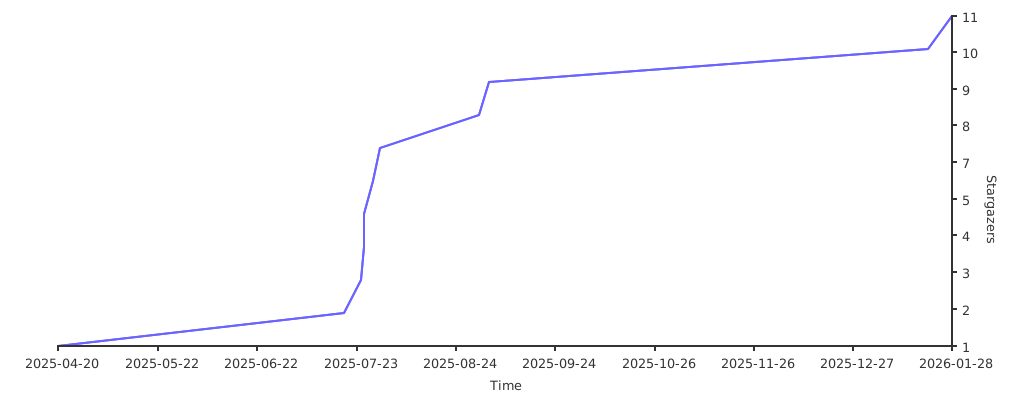
**Start your Lumesh journey now and say goodbye to Bash's historical baggage.**