# LocalGPT
A local device focused AI assistant built in Rust — persistent memory, autonomous tasks, ~27MB binary. Inspired by and compatible with OpenClaw.
`cargo install localgpt`
## Why LocalGPT?
- **Single binary** — no Node.js, Docker, or Python required
- **Local device focused** — runs entirely on your machine, your memory data stays yours
- **Persistent memory** — markdown-based knowledge store with full-text and semantic search
- **Autonomous heartbeat** — delegate tasks and let it work in the background
- **Multiple interfaces** — CLI, web UI, desktop GUI, Telegram bot
- **Multiple LLM providers** — Anthropic (Claude), OpenAI, Ollama
- **OpenClaw compatible** — works with SOUL, MEMORY, HEARTBEAT markdown files and skills format
## Install
```bash
# Full install (includes desktop GUI)
cargo install localgpt
# Headless (no desktop GUI — for servers, Docker, CI)
cargo install localgpt --no-default-features
```
## Quick Start
```bash
# Initialize configuration
localgpt config init
# Start interactive chat
localgpt chat
# Ask a single question
localgpt ask "What is the meaning of life?"
# Run as a daemon with heartbeat, HTTP API and web ui
localgpt daemon start
```
## How It Works
LocalGPT uses plain markdown files as its memory:
```
~/.localgpt/workspace/
├── MEMORY.md # Long-term knowledge (auto-loaded each session)
├── HEARTBEAT.md # Autonomous task queue
├── SOUL.md # Personality and behavioral guidance
└── knowledge/ # Structured knowledge bank (optional)
├── finance/
├── legal/
└── tech/
```
Files are indexed with SQLite FTS5 for fast keyword search, and sqlite-vec for semantic search with local embeddings
## Configuration
Stored at `~/.localgpt/config.toml`:
```toml
[agent]
default_model = "claude-cli/opus"
[providers.anthropic]
api_key = "${ANTHROPIC_API_KEY}"
[heartbeat]
enabled = true
interval = "30m"
active_hours = { start = "09:00", end = "22:00" }
[memory]
workspace = "~/.localgpt/workspace"
# Optional: Telegram bot
[telegram]
enabled = true
api_token = "${TELEGRAM_BOT_TOKEN}"
```
## Telegram Bot
Access LocalGPT from Telegram with full chat, tool use, and memory support.
1. Create a bot via [@BotFather](https://t.me/BotFather) and get the API token
2. Set `TELEGRAM_BOT_TOKEN` or add the token to `config.toml`
3. Start the daemon: `localgpt daemon start`
4. Message your bot — enter the 6-digit pairing code shown in the daemon logs
Once paired, use `/help` in Telegram to see available commands.
## CLI Commands
```bash
# Chat
localgpt chat # Interactive chat
localgpt chat --session <id> # Resume session
localgpt ask "question" # Single question
# Daemon
localgpt daemon start # Start background daemon
localgpt daemon stop # Stop daemon
localgpt daemon status # Show status
localgpt daemon heartbeat # Run one heartbeat cycle
# Memory
localgpt memory search "query" # Search memory
localgpt memory reindex # Reindex files
localgpt memory stats # Show statistics
# Config
localgpt config init # Create default config
localgpt config show # Show current config
```
## HTTP API
When the daemon is running:
| `GET /health` | Health check |
| `GET /api/status` | Server status |
| `POST /api/chat` | Chat with the assistant |
| `GET /api/memory/search?q=<query>` | Search memory |
| `GET /api/memory/stats` | Memory statistics |
## Blog
[Why I Built LocalGPT in 4 Nights](https://localgpt.app/blog/why-i-built-localgpt-in-4-nights) — the full story with commit-by-commit breakdown.
## Built With
Rust, Tokio, Axum, SQLite (FTS5 + sqlite-vec), fastembed, eframe
## Contributors
<a href="https://github.com/localgpt-app/localgpt/graphs/contributors">
<img src="https://contrib.rocks/image?repo=localgpt-app/localgpt" />
</a>
## Stargazers
[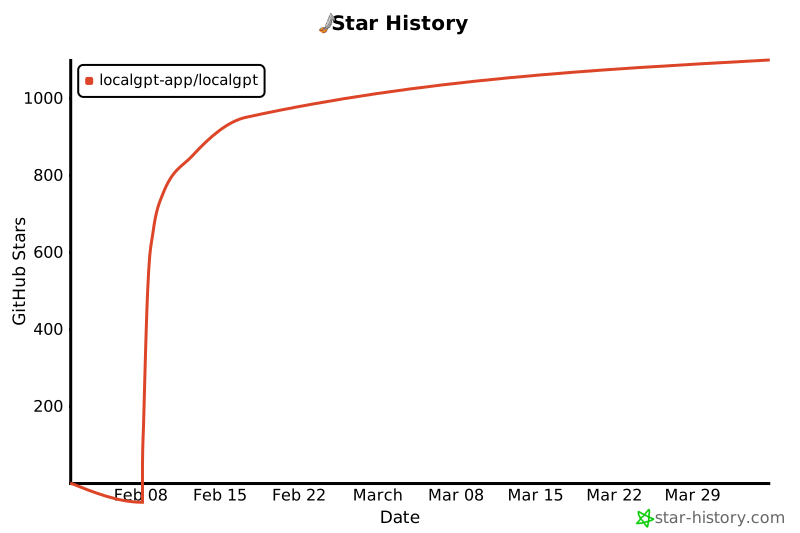](https://star-history.com/#localgpt-app/localgpt&Date)
## License
[Apache-2.0](LICENSE)