# INTRODUCING LNGCNV

The acronym 'lngcnv' may signify e.g., a 'language converter', a 'linguistic converter', or a 'lenguaje convertido' (Spanish for 'converted language').
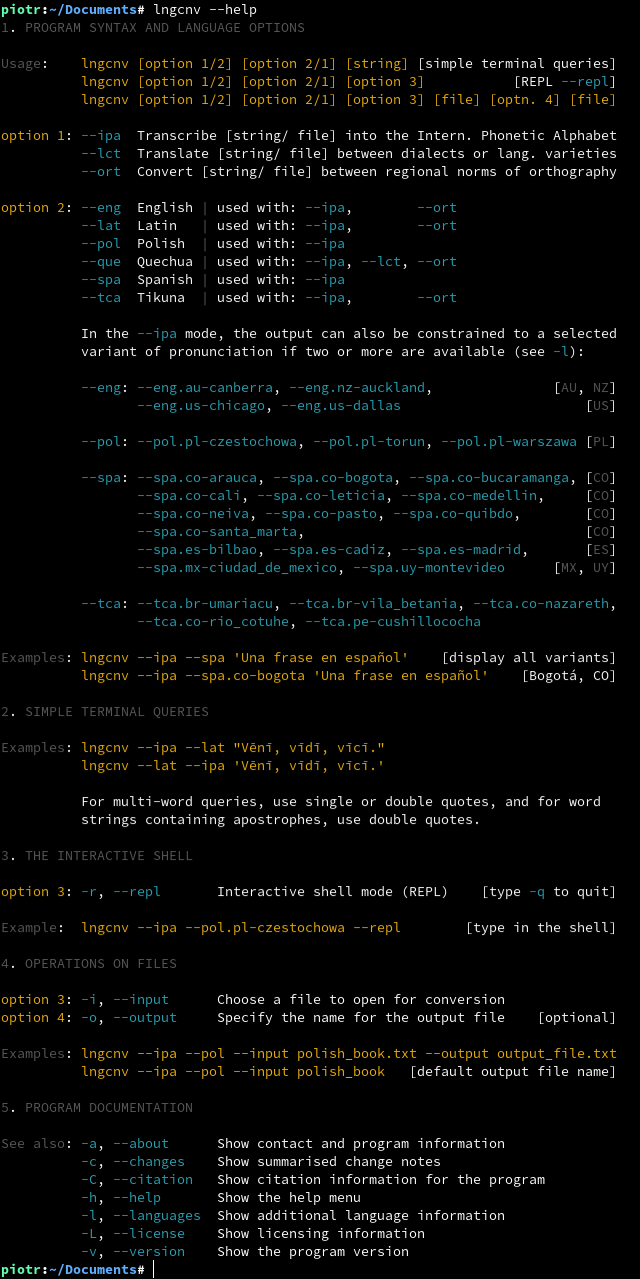
[lngcnv](https://github.com/piotrbajdek/lngcnv) is capable of presenting the precise pronunciation of a phrase using the International Phonetic Alphabet (IPA). It can also translate between various dialects of a language and convert between different orthographic norms.
The program can accept input in the form of a word or text either directly through the command line or by being included in a file, such as a lengthy book. There is also a REPL (read-eval-print loop) mode available for interactive use.
Six modern and ancient languages, including a range of dialects, are currently supported.
The program's source code and linguistic algorithms were created entirely from scratch and are distributed under the [MIT License](https://github.com/piotrbajdek/lngcnv/blob/main/LICENSE.md). [lngcnv](https://github.com/piotrbajdek/lngcnv) is written in Rust for high performance, code correctness, and ease of long-term development.
To display the International Phonetic Alphabet (IPA) characters accurately, it is recommended to use one of the following fonts: [Charis SIL](https://software.sil.org/charis/download/), [Doulos SIL](https://software.sil.org/doulos/download/), or [Gentium Plus](https://software.sil.org/gentium/download/). When showing IPA characters in the terminal, it is best to use the Unicode font [Noto Sans Mono](https://fonts.google.com/noto/specimen/Noto+Sans+Mono).
[keywords: foreign languages, language learning app, natural language processing]
# SUPPORTED LANGUAGES
**1. ENGLISH:** pronunciation and orthography
– Pronunciation of American English (Chicago, IL; Dallas, TX)
– Pronunciation of Australian English (Canberra, ACT)
– Pronunciation of New Zealand English (Auckland, NZ-AUK)
– Transcribe using the spelling of American English
**2. LATIN:** pronunciation and orthography
– Reconstructed pronunciation of Classical Latin
– Transcribe using the ancient orthographic convention (pre-2nd century AD)
**3. POLISH:** three variants of pronunciation
– Pronunciation from Częstochowa, Małopolska Region
– Pronunciation from Toruń, Wielkopolska Region
– Pronunciation from Warszawa, Mazowsze Region
**4. QUECHUA:** pronunciation, dialect translation and orthography
– Pronunciation of Chanka/ Ayacucho Quechua (Wanta, PE)
– Translate from other Southern Quechua varieties into Ayacucho Quechua
– Transcribe between the trivocalic and pentavocalic orthographies
**5. SPANISH:** fifteen variants of pronunciation
– Pronunciation of Colombian Spanish (Arauca; Bogotá; Bucaramanga; Cali; Leticia; Medellín; Neiva; Pasto; Quibdó; Santa Marta)
– Pronunciation of Mexican Spanish (Ciudad de México)
– Pronunciation of Spanish of Spain (Bilbao; Cádiz; Madrid)
– Pronunciation of Uruguayan Spanish (Montevideo)
**6. TIKUNA/ TICUNA:** pronunciation and orthography
– Five variants of pronunciation (Río Cotuhé, CO; Cushillococha, PE; Nazareth, CO; Umariaçu, BR; Vila Betânia, BR)
– Four distinct orthographies (Brazil; Colombia; Peru–ILV; Peru–FORMABIAP)
# USAGE
# INSTALLATION ON LINUX
The current version of lngcnv (v1.10.2) has been verified to work properly on NixOS 25.05.
## METHOD 1 – USING CARGO
**[Recommended for programmers]**
**1.** To install lngcnv from [crates.io](https://crates.io/crates/lngcnv), use the following [cargo](https://www.rust-lang.org/tools/install) command:
_cargo install lngcnv_
The executable will be saved in the hidden `.cargo/bin/` directory within your home directory.
**2a.** For easy access, you may want to copy the lngcnv file to either the `/usr/bin/` or the `~/.local/bin/` directory. This can be done by following the instructions in Method 3 (3a, 3b, 3c).
**2b.** As an alternative, you can add the `~/.cargo/bin/` directory to your system's PATH variable, which can be configured using [rustup](https://www.rust-lang.org/tools/install).
## METHOD 2 – SNAP INSTALLATION
The software can be obtained through the [Snap Store](https://snapcraft.io/lngcnv) and installed with just one command:
_sudo snap install lngcnv_
## METHOD 3 – UNIVERSAL LINUX BINARIES
**1.** To install lngcnv, first download the distro-independent [binary](https://github.com/piotrbajdek/lngcnv/releases/download/v1.10.2/lngcnv) from GitHub.
**2.** Then, make the file executable by running the command:
_sudo chmod +x ./lngcnv_
**3a.** On most Linux distributions, install lngcnv by copying the binary to `/usr/bin/`:
_sudo cp lngcnv /usr/bin/_
**3b.** For Fedora Silverblue / Kinoite, use this command:
_sudo cp lngcnv /var/usrlocal/bin/_
**3c.** As an alternative, consider installing locally in the `~/.local/bin/` directory:
_cp lngcnv $HOME/.local/bin/_
## METHOD 4 – DISTRO-SPECIFIC PACKAGES
**[Recommended for most users]**
Distro-specific packages for [.rpm](https://github.com/piotrbajdek/lngcnv/releases/download/v1.10.2/lngcnv-1.10.2-1.x86_64.rpm) and [.deb](https://github.com/piotrbajdek/lngcnv/releases/download/v1.10.2/lngcnv_1.10.2-1_amd64.deb)-based Linux distributions are also available for download. To install lngcnv on different Linux distributions, follow these instructions:
Fedora Linux / RHEL / openSUSE:
_sudo rpm -i lngcnv-1.10.2-1.x86_64.rpm_
Fedora Silverblue / Kinoite:
_rpm-ostree install lngcnv-1.10.2-1.x86_64.rpm_
Ubuntu:
_sudo dpkg -i lngcnv_1.10.2-1_amd64.deb_
## METHOD 5 – MANUAL COMPILATION
First, download and unpack the lngcnv [source code](https://github.com/piotrbajdek/lngcnv/archive/refs/tags/v1.10.2.zip) from GitHub. Next, to build and install the program, use the command:
_cargo build \--release && sudo cp target/release/lngcnv /usr/bin/_