<p align="center">
<img src="https://raw.githubusercontent.com/opral/lix/main/website/public/logo.svg" alt="Lix" height="60">
</p>
<h3 align="center">Version control system for every file format</h3>
<p align="center">
<a href="https://www.npmjs.com/package/@lix-js/sdk"><img src="https://img.shields.io/npm/dw/%40lix-js%2Fsdk?logo=npm&logoColor=red&label=npm%20downloads" alt="weekly downloads on NPM"></a>
<a href="https://discord.gg/gdMPPWy57R"><img src="https://img.shields.io/discord/897438559458430986?style=flat&logo=discord&labelColor=white" alt="Discord"></a>
<a href="https://github.com/opral/lix"><img src="https://img.shields.io/github/stars/opral/lix?style=flat&logo=github&color=brightgreen" alt="GitHub Stars"></a>
<a href="https://x.com/lixCCS"><img src="https://img.shields.io/badge/Follow-@lixCCS-black?logo=x&logoColor=white" alt="X (Twitter)"></a>
</p>
Lix tracks, reviews, branches, merges, and rolls back changes across Markdown, DOCX, XLSX, JSON, PDFs, and custom file formats.
Use Lix standalone or as the change-control backend for editors, knowledge bases, AI workflows, and file-based products. Lix stores files, tracks semantic changes, exposes history through SQL, and brings version control workflows beyond source code.
- 📌 **Supports any file format.** Create drafts, branches, checkpoints, and releases for Markdown, DOCX, XLSX, JSON, PDFs, and custom formats.
- 🔍 **Track semantic changes.** See the paragraph, cell, property, clause, or custom entity that changed.
- 🔀 **Review and merge changes.** Build change proposals, accept/reject flows, rollback, and merge workflows around files.
- 🤝 **Sync in real time.** Keep versions and changes in sync across users, agents, devices, and runtimes.
- ✅ **Validate and automate.** Run checks, enforce rules, and trigger workflows when files change.
- 🧠 **Query everything with SQL.** Ask what changed, where, when, and by whom without rereading whole files.
## Try a demo app
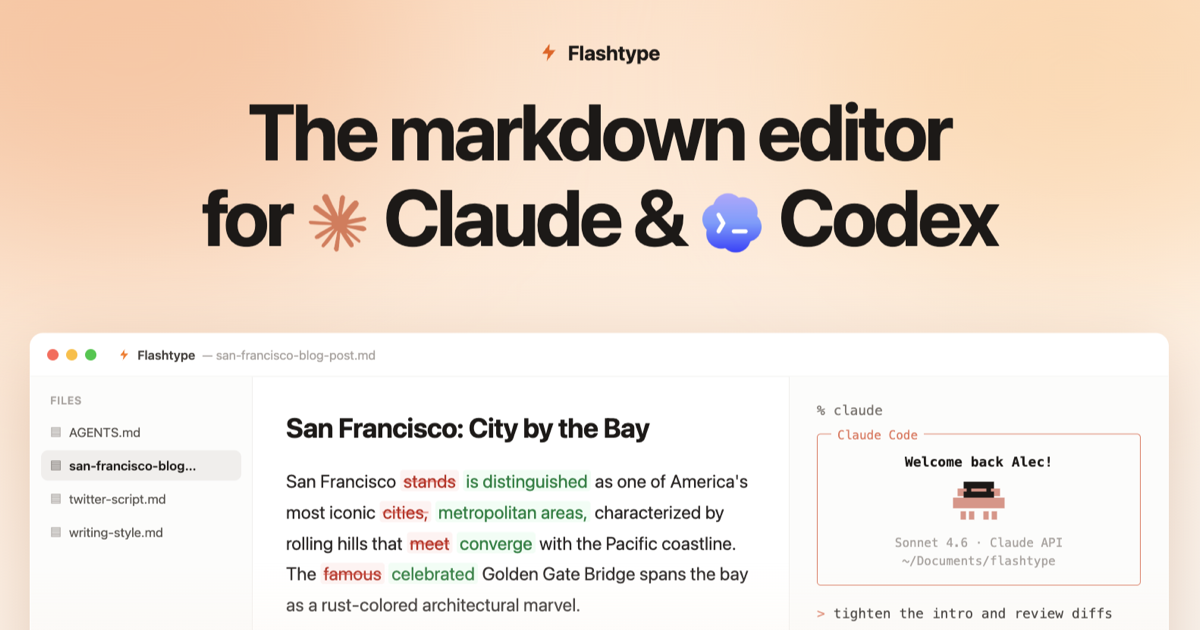
[Flashtype](https://flashtype.com) is a Markdown editor for Claude and Codex built on Lix. Open local Markdown files, let agents edit them, review changes as diffs, and restore previous versions from history.
[](https://flashtype.com)
## Getting started
<p>
<img src="https://cdn.simpleicons.org/javascript/F7DF1E" alt="JavaScript" width="18" height="18" /> JavaScript ·
<a href="https://github.com/opral/lix/issues/373"><img src="https://cdn.jsdelivr.net/gh/devicons/devicon/icons/python/python-original.svg" alt="Python" width="18" height="18" /> Python</a> ·
<a href="https://github.com/opral/lix/issues/371"><img src="https://cdn.simpleicons.org/rust/CE422B" alt="Rust" width="18" height="18" /> Rust</a> ·
<a href="https://github.com/opral/lix/issues/370"><img src="https://cdn.simpleicons.org/go/00ADD8" alt="Go" width="18" height="18" /> Go</a>
</p>
```bash
npm install @lix-js/sdk
```
```ts
import { FsBackend, openLix } from "@lix-js/sdk";
const lix = await openLix({
backend: new FsBackend({ path: "./workspace" }),
});
await lix.execute(
"INSERT INTO lix_file (path, data) VALUES ($1, $2) ON CONFLICT (path) DO UPDATE SET data = excluded.data",
["/notes/status.txt", new TextEncoder().encode("draft")],
);
const main = await lix.activeBranchId();
const draft = await lix.createBranch({ name: "Explore" });
await lix.switchBranch({ branchId: draft.id });
await lix.execute(
"INSERT INTO lix_file (path, data) VALUES ($1, $2) ON CONFLICT (path) DO UPDATE SET data = excluded.data",
["/notes/status.txt", new TextEncoder().encode("ready for review")],
);
await lix.switchBranch({ branchId: main });
const changes = await lix.execute(
"SELECT schema_key, count(*) AS count FROM lix_change GROUP BY schema_key",
);
```
## Why Lix?
### Version control should not stop at source code.
Most version control systems assume source code and text diffs. But many important products edit files where the useful change is a paragraph, spreadsheet cell, JSON property, PDF section, knowledge-base page, or custom entity.
Lix is built for those files. Plugins translate file updates into semantic changes that can be queried, reviewed, branched, merged, and rolled back.
[Flashtype](https://flashtype.com), a Markdown editor for Claude and Codex, uses Lix so every local Markdown edit can be checkpointed, reviewed as a diff, and restored.
[How does Lix compare to Git? →](https://lix.dev/docs/comparison-to-git)
### What Lix provides
#### Import as a library
Import Lix and open it inside your worker, service, CLI, browser, desktop app, or server-side runtime. No daemon, no protocol.
```ts
import { FsBackend, openLix } from "@lix-js/sdk";
const lix = await openLix({
backend: new FsBackend({ path: "./workspace" }),
});
```
#### ACID transactions
Write files, blobs, and history in one transaction.
```ts
const tx = await lix.beginTransaction();
try {
await tx.execute(
"INSERT INTO lix_file (path, data) VALUES ($1, $2) ON CONFLICT (path) DO UPDATE SET data = excluded.data",
["/spec.docx", body],
);
await tx.execute(
"INSERT INTO lix_file (path, data) VALUES ($1, $2) ON CONFLICT (path) DO UPDATE SET data = excluded.data",
["/spec.png", image],
);
await tx.commit();
} catch (error) {
await tx.rollback();
throw error;
}
```
#### Parallel branches
Give every draft, user, tool, or AI agent its own isolated branch.
```ts
const main = await lix.activeBranchId();
const copy = await lix.createBranch({ name: "Copy draft" });
const pricing = await lix.createBranch({ name: "Pricing draft" });
const qa = await lix.createBranch({ name: "QA draft" });
await lix.switchBranch({ branchId: copy.id });
await lix.execute(
"INSERT INTO lix_file (path, data) VALUES ($1, $2) ON CONFLICT (path) DO UPDATE SET data = excluded.data",
["/landing.md", copyDraft],
);
await lix.switchBranch({ branchId: pricing.id });
await lix.execute(
"INSERT INTO lix_file (path, data) VALUES ($1, $2) ON CONFLICT (path) DO UPDATE SET data = excluded.data",
["/plans.json", priceModel],
);
await lix.switchBranch({ branchId: qa.id });
await lix.execute(
"INSERT INTO lix_file (path, data) VALUES ($1, $2) ON CONFLICT (path) DO UPDATE SET data = excluded.data",
["/checks/report.json", testRun],
);
await lix.switchBranch({ branchId: main });
```
#### Semantic changes
Lix can track structured entities: XLSX rows, DOCX clauses, JSON properties, app records, custom entities, and more.
```ts
const changes = await lix.execute(`
SELECT created_at, schema_key, entity_pk, snapshot_content
FROM lix_change
ORDER BY created_at DESC
LIMIT 20
`);
```
For example, a workflow edits an orders spreadsheet:
```text
Before:
| order_id | product | status |
| -------- | -------- | ------- |
| 1001 | Widget A | shipped |
| 1002 | Widget B | pending |
After:
| order_id | product | status |
| -------- | -------- | ------- |
| 1001 | Widget A | shipped |
| 1002 | Widget B | shipped |
```
A text-based diff can only tell you the file changed:
```diff
-Binary files differ
```
Lix can expose the row field that changed:
```diff
order_id 1002 status:
- pending
+ shipped
```
[Read more about semantic changes →](https://lix.dev/docs/semantic-changes)
#### SQL interface
Answer version-control questions with SQL instead of whole-file rereads.
<img src="./website/public/assets/claude-sql-question.svg" alt="Claude Code asks: Which orders changed status in this branch? Executing SQL" width="460" />
```ts
const rows = await lix.execute(`
SELECT created_at, schema_key, entity_pk, snapshot_content
FROM lix_change
ORDER BY created_at DESC
LIMIT 20
`);
```
Every change, across every file and every branch, is a row in `lix_change`. Filter by branch, file, schema, or time without re-reading whole files.
#### Portable runtimes and storage
Use Lix standalone or plug it into the infrastructure your product already runs.
<p><img src="https://cdn.simpleicons.org/sqlite/003B57" alt="SQLite" width="18" height="18" /> SQLite · <img src="https://cdn.simpleicons.org/postgresql/4169E1" alt="Postgres" width="18" height="18" /> Postgres · <img src="https://api.iconify.design/logos:aws-s3.svg" alt="S3" width="18" height="18" /> S3 · <img src="https://cdn.simpleicons.org/cloudflareworkers/F38020" alt="Cloudflare Workers" width="18" height="18" /> Cloudflare Workers · <img src="https://cdn.simpleicons.org/supabase/3FCF8E" alt="Supabase" width="18" height="18" /> Supabase</p>
```ts
import { FsBackend, openLix } from "@lix-js/sdk";
const lix = await openLix({
backend: new FsBackend({ path: "./workspace" }),
});
```
Use `SqliteBackend` when a single `.lix` SQLite file is the application document itself, for example when defining a new file format and using Lix as the application's file format.
## How Lix works
Lix runs in-process inside your runtime.
It owns the version-control model: files, blobs, versions, history, transactions, and semantic changes. Use it standalone with `FsBackend` for filesystem workspaces, use SQLite for single-file application formats, or plug it into whatever backend you need: in-memory, Postgres, S3, Cloudflare, or your own adapter.
SQL is the query interface on top. Products, scripts, and agents can ask what changed without rereading whole files.
```
┌─────────────────────────────────────────────────┐
│ Your runtime │
│ browser · desktop · server · CLI · worker │
│ │
│ ┌─────────────────────────────────────────┐ │
│ │ Lix │ │
│ │ Filesystem · Versions · History · SQL │ │
│ └────────────────────┬────────────────────┘ │
│ │ │
└────────────────────────┼────────────────────────┘
▼
┌─────────────────────────────────────────────────┐
│ Backend │
│ SQLite, Postgres, S3, Cloudflare, custom │
└─────────────────────────────────────────────────┘
```
[Read more about Lix architecture →](https://lix.dev/docs/architecture)
## Learn More
- **[Getting Started Guide](https://lix.dev/docs/getting-started)** - Build your first app with Lix
- **[Documentation](https://lix.dev/docs)** - Full API reference and guides
- **[Discord](https://discord.gg/gdMPPWy57R)** - Get help and join the community
- **[GitHub](https://github.com/opral/lix)** - Report issues and contribute
## License
[MIT](./LICENSE)