# 🔎 lintspec
<div align="center">
<a href="https://github.com/beeb/lintspec"><img
alt="github"
src="https://img.shields.io/badge/github-beeb%2Flintspec-228b22?style=flat&logo=github"
height="20"
/></a>
<a href="https://crates.io/crates/lintspec"><img
alt="crates.io"
src="https://img.shields.io/crates/v/lintspec.svg?style=flat&color=e37602&logo=rust"
height="20"
/></a>
<a href="https://docs.rs/lintspec/latest/lintspec/"><img
alt="docs.rs"
src="https://img.shields.io/badge/docs.rs-lintspec-3b74d1?style=flat&labelColor=555555&logo=docs.rs"
height="20"
/></a>
<a href="https://docs.rs/lintspec/latest/lintspec/"><img
alt="MSRV"
src="https://img.shields.io/badge/MSRV-1.88.0-b83fbf?style=flat&labelColor=555555&logo=docs.rs"
height="20"
/></a>
<a href="https://codspeed.io/beeb/lintspec"><img
alt="CodSpeed"
src="https://img.shields.io/endpoint?url=https://codspeed.io/badge.json"
/></a>
</div>
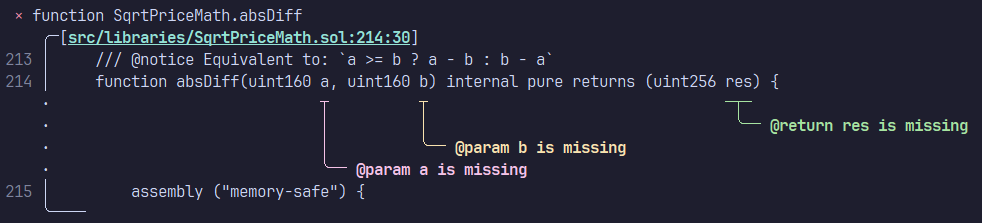
Lintspec is a command-line utility (linter) that checks the completeness and validity of
[NatSpec](https://docs.soliditylang.org/en/latest/natspec-format.html) doc-comments in Solidity code. It is focused on
speed and ergonomics. By default, lintspec will respect gitignore rules when looking for Solidity source files.
Dual-licensed under MIT or Apache 2.0.
> Note: the `main` branch can contain unreleased changes. To view the README information for the latest stable release,
> visit [crates.io](https://crates.io/crates/lintspec) or select the latest git tag from the branch/tag dropdown.
## Installation
#### Via `cargo`
```bash
cargo install lintspec
```
#### Via [`cargo-binstall`](https://github.com/cargo-bins/cargo-binstall)
```bash
cargo binstall lintspec
```
#### Via `nix`
```bash
nix-env -iA nixpkgs.lintspec
# or
nix-shell -p lintspec
# or
nix run nixpkgs#lintspec
```
#### Pre-built binaries and install script
Head over to the [releases page](https://github.com/beeb/lintspec/releases)!
### Experimental `solar` backend
An experimental (and very fast) parsing backend using [Solar](https://github.com/paradigmxyz/solar) can be tested
by installing with the `solar` feature flag enabled. This is only possible via `cargo install` at the moment.
```bash
cargo install lintspec --no-default-features -F cli,solar
```
With this backend, the parsing step is roughly 30x faster than with the default
[`slang`](https://github.com/NomicFoundation/slang) backend. In practice, overall gains of 4-5x can be expected on the
total execution time.
**Note that Solar only supports Solidity >=0.8.0.**
## Usage
```text
Usage: lintspec [OPTIONS] [PATH]... [COMMAND]
Commands:
init Create a `.lintspec.toml` config file with default values
completions Generate shell completion scripts
help Print this message or the help of the given subcommand(s)
Arguments:
[PATH]... One or more paths to files and folders to analyze
Options:
-e, --exclude <EXCLUDE> Path to a file or folder to exclude (can be used more than once)
--config <CONFIG> Optional path to a TOML config file
-o, --out <OUT> Write output to a file instead of stderr
--inheritdoc Enforce that all public and external items have `@inheritdoc`
--inheritdoc-override Enforce that `override` internal functions and modifiers have `@inheritdoc`
--notice-or-dev Do not distinguish between `@notice` and `@dev` when considering "required" validation rules
--skip-version-detection Skip the detection of the Solidity version from pragma statements
--notice-ignored <TYPE> Ignore `@notice` for these items (can be used more than once)
--notice-required <TYPE> Enforce `@notice` for these items (can be used more than once)
--notice-forbidden <TYPE> Forbid `@notice` for these items (can be used more than once)
--dev-ignored <TYPE> Ignore `@dev` for these items (can be used more than once)
--dev-required <TYPE> Enforce `@dev` for these items (can be used more than once)
--dev-forbidden <TYPE> Forbid `@dev` for these items (can be used more than once)
--param-ignored <TYPE> Ignore `@param` for these items (can be used more than once)
--param-required <TYPE> Enforce `@param` for these items (can be used more than once)
--param-forbidden <TYPE> Forbid `@param` for these items (can be used more than once)
--return-ignored <TYPE> Ignore `@return` for these items (can be used more than once)
--return-required <TYPE> Enforce `@return` for these items (can be used more than once)
--return-forbidden <TYPE> Forbid `@return` for these items (can be used more than once)
--json Output diagnostics in JSON format
--compact Compact output
--sort Sort the results by file path
-h, --help Print help (see more with '--help')
-V, --version Print version
```
## Configuration
### Config File
Create a default configuration with the following command:
```bash
lintspec init
```
This will create a `.lintspec.toml` file with the default configuration in the current directory.
### Environment Variables
Environment variables (in capitals, with the `LS_` prefix) can also be used and take precedence over the
configuration file. They use the same names as in the TOML config file and use the `_` character as delimiter for
nested items.
An additional `LS_CONFIG_PATH` variable is available to set an optional path to the TOML file (the default is `./.lintspec.toml`).
Examples:
- `LS_CONFIG_PATH=.config/lintspec.toml`
- `LS_LINTSPEC_PATHS=[src,test]`
- `LS_LINTSPEC_INHERITDOC=false`
- `LS_LINTSPEC_NOTICE_OR_DEV=true`: if the setting name contains `_`, it is not considered a delimiter
- `LS_OUTPUT_JSON=true`
- `LS_CONSTRUCTOR_NOTICE=required`
### CLI Arguments
Finally, the tool can be customized with command-line arguments, which take precedence over the other two methods.
To see the CLI usage information, run:
```bash
lintspec help
```
## Usage in GitHub Actions
You can check your code in CI with the lintspec GitHub Action. Any `.lintspec.toml` or `.nsignore` file in the
repository's root will be used to configure the execution.
The action generates
[annotations](https://docs.github.com/en/actions/writing-workflows/choosing-what-your-workflow-does/workflow-commands-for-github-actions#setting-a-warning-message)
that are displayed in the source files when viewed (e.g. in a PR's "Files" tab).
### Options
The following options are available for the action (all are optional if a config file is present):
| `working-directory` | `"./"` | Working directory path | `"./src"` |
| `paths` | `"[]"` | Paths to scan, relative to the working directory, in square brackets and separated by commas. Required unless a `.lintspec.toml` file is present in the working directory. | `"[path/to/file.sol,test/test.sol]"` |
| `exclude` | `"[]"` | Paths to exclude, relative to the working directory, in square brackets and separated by commas | `"[path/to/exclude,other/path.sol]"` |
| `extra-args` | | Extra arguments passed to the `lintspec` command | `"--inheritdoc=false"` |
| `version` | `"latest"` | Version of lintspec to use. For enhanced security, you can pin this to a fixed version | `"0.9.0"` |
| `fail-on-problem` | `"true"` | Whether the action should fail when `NatSpec` problems have been found. Disabling this only creates annotations for found problems, but succeeds | `"false"` |
### Example Workflow
```yaml
name: Lintspec
on:
pull_request:
jobs:
lintspec:
runs-on: ubuntu-latest
steps:
- uses: actions/checkout@v2
- uses: beeb/lintspec@v0.9.0
# all the lines below are optional
with:
working-directory: "./"
paths: "[]"
exclude: "[]"
extra-args: ""
version: "latest"
fail-on-problem: "true"
```
## Usage as a Library
`lintspec` can be used as a library, in which case the Solidity parser and CLI-specific dependencies are optional.
For example, consumers could declare the following in their `Cargo.toml`:
```toml
[dependencies]
lintspec = { version = "0.9.0", default-features = false }
```
### Feature flags
All feature flags are optional when used as a library. To compile the binary, at least the `cli` flag and one of the
parser flags must be enabled.
- `cli`: enables compilation as a binary and provides the required dependencies
- `slang`: enables the `slang_solidity` parser backend
- `solar`: enables the `solar` parser backend
## Credits
This tool walks in the footsteps of [natspec-smells](https://github.com/defi-wonderland/natspec-smells), thanks to
them for inspiring this project!
## Comparison with natspec-smells
### Benchmark
On an AMD Ryzen 9 7950X processor with 64GB of RAM, linting the
[Uniswap/v4-core](https://github.com/Uniswap/v4-core) `src` folder on WSL2 (Ubuntu), lintspec v0.6 is about 300x
faster, or 0.33% of the execution time:
```text
Benchmark 1: npx @defi-wonderland/natspec-smells --include 'src/**/*.sol' --enforceInheritdoc --constructorNatspec
Time (mean ± σ): 14.493 s ± 0.492 s [User: 13.851 s, System: 1.046 s]
Range (min … max): 14.129 s … 15.826 s 10 runs
Benchmark 2: lintspec src --compact --param-required struct
Time (mean ± σ): 44.9 ms ± 1.6 ms [User: 312.8 ms, System: 51.2 ms]
Range (min … max): 41.9 ms … 48.9 ms 67 runs
Summary
lintspec src --compact --param-required struct ran
322.47 ± 16.01 times faster than npx @defi-wonderland/natspec-smells --include 'src/**/*.sol' --enforceInheritdoc --constructorNatspec
```
Using the experimental [Solar](https://github.com/paradigmxyz/solar) backend improves that by a further factor of 4-5x:
```text
Benchmark 1: lintspec src --compact --skip-version-detection
Time (mean ± σ): 58.4 ms ± 4.3 ms [User: 484.7 ms, System: 16.6 ms]
Range (min … max): 50.1 ms … 66.9 ms 52 runs
Benchmark 2: lintspec-solar src --compact
Time (mean ± σ): 12.2 ms ± 1.3 ms [User: 21.5 ms, System: 8.5 ms]
Range (min … max): 9.9 ms … 16.5 ms 183 runs
Summary
lintspec-solar src --compact ran
4.77 ± 0.62 times faster than lintspec src --compact --skip-version-detection
```
### Features
| Identify missing NatSpec | ✅ | ✅ |
| Identify duplicate NatSpec | ✅ | ✅ |
| Include files/folders | ✅ | ✅ |
| Exclude files/folders | ✅ | ✅ |
| Enforce usage of `@inheritdoc` | ✅ | ✅ |
| Enforce NatSpec on constructors | ✅ | ✅ |
| Configure via config file | ✅ | ✅ |
| Configure via env variables | ✅ | ❌ |
| Respects gitignore files | ✅ | ❌ |
| Granular validation rules | ✅ | ❌ |
| Pretty output with code excerpt | ✅ | ❌ |
| JSON output | ✅ | ❌ |
| Output to file | ✅ | ❌ |
| Multithreaded | ✅ | ❌ |
| Built-in CI action | ✅ | ❌ |
| No pre-requisites (node/npm) | ✅ | ❌ |
