# 🔎 lintspec
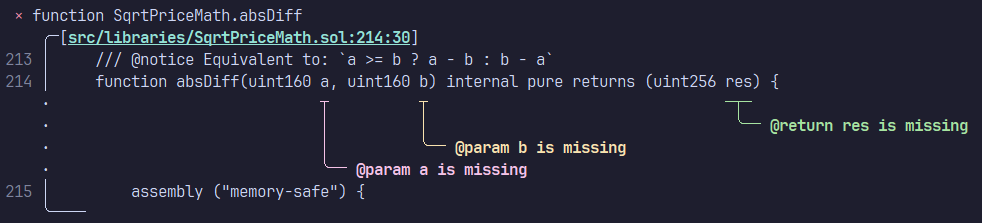
<div align="center">
<a href="https://github.com/beeb/lintspec"><img
alt="github"
src="https://img.shields.io/badge/github-beeb%2Flintspec-228b22?style=flat&logo=github"
height="20"
/></a>
<a href="https://crates.io/crates/lintspec"><img
alt="crates.io"
src="https://img.shields.io/crates/v/lintspec.svg?style=flat&color=e37602&logo=rust"
height="20"
/></a>
<a href="https://docs.rs/lintspec/latest/lintspec/"><img
alt="docs.rs"
src="https://img.shields.io/badge/docs.rs-lintspec-3b74d1?style=flat&labelColor=555555&logo=docs.rs"
height="20"
/></a>
<a href="https://docs.rs/lintspec/latest/lintspec/"><img
alt="MSRV"
src="https://img.shields.io/badge/MSRV-1.89.0-b83fbf?style=flat&labelColor=555555&logo=docs.rs"
height="20"
/></a>
<a href="https://codspeed.io/beeb/lintspec"><img
alt="CodSpeed"
src="https://img.shields.io/endpoint?url=https://codspeed.io/badge.json"
/></a>
</div>
Lintspec is a command-line utility (linter) that checks the completeness and validity of
[NatSpec](https://docs.soliditylang.org/en/latest/natspec-format.html) doc-comments in Solidity code. It is focused on
speed and ergonomics. By default, lintspec will respect gitignore rules when looking for Solidity source files.
Dual-licensed under MIT or Apache 2.0.
> Note: the `main` branch can contain unreleased changes. To view the README information for the latest stable release,
> visit [crates.io](https://crates.io/crates/lintspec) or select the latest git tag from the branch/tag dropdown.
## Installation
#### Via `cargo`
```bash
cargo install lintspec
```
#### Via [`cargo-binstall`](https://github.com/cargo-bins/cargo-binstall)
```bash
cargo binstall lintspec
```
#### Via `nix`
```bash
nix-env -iA nixpkgs.lintspec
# or
nix-shell -p lintspec
# or
nix run nixpkgs#lintspec
```
#### Pre-built binaries and install script
Head over to the [releases page](https://github.com/beeb/lintspec/releases)!
### Legacy `slang` Backend
Although the default parser backend is now the very fast [`solar`](https://github.com/paradigmxyz/solar), the legacy
[`slang`](https://github.com/NomicFoundation/slang) parser is still available when installing with `cargo install`.
```bash
cargo install lintspec --no-default-features -F cli,slang
```
This feature exposes an additional CLI flag `--skip-version-detection` which can help if `slang` doesn't support
the version of Solidity you target. Note that enabling `slang` makes the program 4-5x slower than with the default features.
## Usage
```text
Usage: lintspec [OPTIONS] [PATH]... [COMMAND]
Commands:
init Create a `.lintspec.toml` config file with default values
completions Generate shell completion scripts
help Print this message or the help of the given subcommand(s)
Arguments:
[PATH]... One or more paths to files and folders to analyze
Options:
-e, --exclude <EXCLUDE> Path to a file or folder to exclude (can be used more than once)
--config <CONFIG> Optional path to a TOML config file
-o, --out <OUT> Write output to a file instead of stderr
--inheritdoc Enforce that all public and external items have `@inheritdoc`
--inheritdoc-override Enforce that `override` internal functions and modifiers have `@inheritdoc`
--notice-or-dev Do not distinguish between `@notice` and `@dev` when considering "required" validation rules
--title-ignored <TYPE> Ignore `@title` for these items (can be used more than once)
--title-required <TYPE> Enforce `@title` for these items (can be used more than once)
--title-forbidden <TYPE> Forbid `@title` for these items (can be used more than once)
--author-ignored <TYPE> Ignore `@author` for these items (can be used more than once)
--author-required <TYPE> Enforce `@author` for these items (can be used more than once)
--author-forbidden <TYPE> Forbid `@author` for these items (can be used more than once)
--notice-ignored <TYPE> Ignore `@notice` for these items (can be used more than once)
--notice-required <TYPE> Enforce `@notice` for these items (can be used more than once)
--notice-forbidden <TYPE> Forbid `@notice` for these items (can be used more than once)
--dev-ignored <TYPE> Ignore `@dev` for these items (can be used more than once)
--dev-required <TYPE> Enforce `@dev` for these items (can be used more than once)
--dev-forbidden <TYPE> Forbid `@dev` for these items (can be used more than once)
--param-ignored <TYPE> Ignore `@param` for these items (can be used more than once)
--param-required <TYPE> Enforce `@param` for these items (can be used more than once)
--param-forbidden <TYPE> Forbid `@param` for these items (can be used more than once)
--return-ignored <TYPE> Ignore `@return` for these items (can be used more than once)
--return-required <TYPE> Enforce `@return` for these items (can be used more than once)
--return-forbidden <TYPE> Forbid `@return` for these items (can be used more than once)
--json Output diagnostics in JSON format
--compact Compact output
--sort Sort the results by file path
-h, --help Print help (see more with '--help')
-V, --version Print version
```
## Configuration
### Config File
Create a default configuration with the following command:
```bash
lintspec init
```
This will create a `.lintspec.toml` file with the default configuration in the current directory. Check out the
[example file](https://github.com/beeb/lintspec/blob/main/.lintspec.toml) for more information.
All items for which the default configuration suits you can be removed from the file if desired. Note that some
settings could change their default value in the future (in a new major release) which could alter behavior if they are
not specified.
### Environment Variables
Environment variables (in capitals, with the `LS_` prefix) can also be used and take precedence over the
configuration file. They use the same names as in the TOML config file and use the `_` character as delimiter for
nested items.
An additional `LS_CONFIG_PATH` variable is available to set an optional path to the TOML file (the default is `./.lintspec.toml`).
Examples:
- `LS_CONFIG_PATH=.config/lintspec.toml`
- `LS_LINTSPEC_PATHS=[src,test]`
- `LS_LINTSPEC_INHERITDOC=false`
- `LS_LINTSPEC_NOTICE_OR_DEV=true`: if the setting name contains `_`, it is not considered a delimiter
- `LS_OUTPUT_JSON=true`
- `LS_CONSTRUCTOR_NOTICE=required`
### CLI Arguments
Finally, the tool can be customized with command-line arguments, which take precedence over the other two methods.
To see the CLI usage information, run:
```bash
lintspec help
```
## Usage in GitHub Actions
You can check your code in CI with the lintspec GitHub Action. Any `.lintspec.toml` or `.nsignore` file in the
repository's root will be used to configure the execution.
The action generates
[annotations](https://docs.github.com/en/actions/writing-workflows/choosing-what-your-workflow-does/workflow-commands-for-github-actions#setting-a-warning-message)
that are displayed in the source files when viewed (e.g. in a PR's "Files" tab).
### Options
The following options are available for the action (all are optional if a config file is present):
| `working-directory` | `"./"` | Working directory path | `"./src"` |
| `paths` | `"[]"` | Paths to scan, relative to the working directory, in square brackets and separated by commas. Required unless a `.lintspec.toml` file is present in the working directory. | `"[path/to/file.sol,test/test.sol]"` |
| `exclude` | `"[]"` | Paths to exclude, relative to the working directory, in square brackets and separated by commas | `"[path/to/exclude,other/path.sol]"` |
| `extra-args` | | Extra arguments passed to the `lintspec` command | `"--inheritdoc=false"` |
| `version` | `"latest"` | Version of lintspec to use. For enhanced security, you can pin this to a fixed version | `"0.9.0"` |
| `fail-on-problem` | `"true"` | Whether the action should fail when `NatSpec` problems have been found. Disabling this only creates annotations for found problems, but succeeds | `"false"` |
### Example Workflow
```yaml
name: Lintspec
on:
pull_request:
jobs:
lintspec:
runs-on: ubuntu-latest
steps:
- uses: actions/checkout@v2
- uses: beeb/lintspec@v0.11.0
# all the lines below are optional
with:
working-directory: "./"
paths: "[]"
exclude: "[]"
extra-args: ""
version: "latest"
fail-on-problem: "true"
```
## Usage as a Library
`lintspec` can be used as a library, in which case the Solidity parser and CLI-specific dependencies are optional.
```bash
cargo add --no-default-features lintspec
```
Alternatively, in `Cargo.toml`:
```toml
[dependencies]
lintspec = { version = "0.11.0", default-features = false }
```
### Feature flags
All feature flags are optional when used as a library. To compile the binary, at least the `cli` flag and one of the
parser flags must be enabled.
- `cli`: enables compilation as a binary and provides the required dependencies (default)
- `solar`: enables the `solar_parse` parser backend (default)
- `slang`: enables the `slang_solidity` parser backend
## Credits
This tool walks in the footsteps of [natspec-smells](https://github.com/defi-wonderland/natspec-smells), thanks to
them for inspiring this project!
## Comparison with natspec-smells
### Benchmark
On an AMD Ryzen 9 7950X processor with 64GB of RAM, linting the
[Uniswap/v4-core](https://github.com/Uniswap/v4-core) `src` folder on WSL2 (Ubuntu), lintspec v0.11 is about 750x
faster, or 0.13% of the execution time:
```text
Benchmark 1: npx @defi-wonderland/natspec-smells --include 'src/**/*.sol' --enforceInheritdoc --constructorNatspec
Time (mean ± σ): 14.356 s ± 0.283 s [User: 13.824 s, System: 1.098 s]
Range (min … max): 14.058 s … 15.073 s 10 runs
Benchmark 2: lintspec src --compact --param-required struct
Time (mean ± σ): 19.3 ms ± 0.8 ms [User: 12.5 ms, System: 29.9 ms]
Range (min … max): 17.8 ms … 22.3 ms 153 runs
Summary
lintspec src --compact --param-required struct ran
743.05 ± 32.47 times faster than npx @defi-wonderland/natspec-smells --include 'src/**/*.sol' --enforceInheritdoc --constructorNatspec
```
### Features
| Identify missing NatSpec | ✅ | ✅ |
| Identify duplicate NatSpec | ✅ | ✅ |
| Include files/folders | ✅ | ✅ |
| Exclude files/folders | ✅ | ✅ |
| Enforce usage of `@inheritdoc` | ✅ | ✅ |
| Enforce NatSpec on constructors | ✅ | ✅ |
| Configure via config file | ✅ | ✅ |
| Configure via env variables | ✅ | ❌ |
| Respects gitignore files | ✅ | ❌ |
| Granular validation rules | ✅ | ❌ |
| Pretty output with code excerpt | ✅ | ❌ |
| JSON output | ✅ | ❌ |
| Output to file | ✅ | ❌ |
| Multithreaded | ✅ | ❌ |
| Built-in CI action | ✅ | ❌ |
| No pre-requisites (node/npm) | ✅ | ❌ |