leptos_struct_table/lib.rs
1//! Easily create Leptos table components from structs.
2//!
3//! 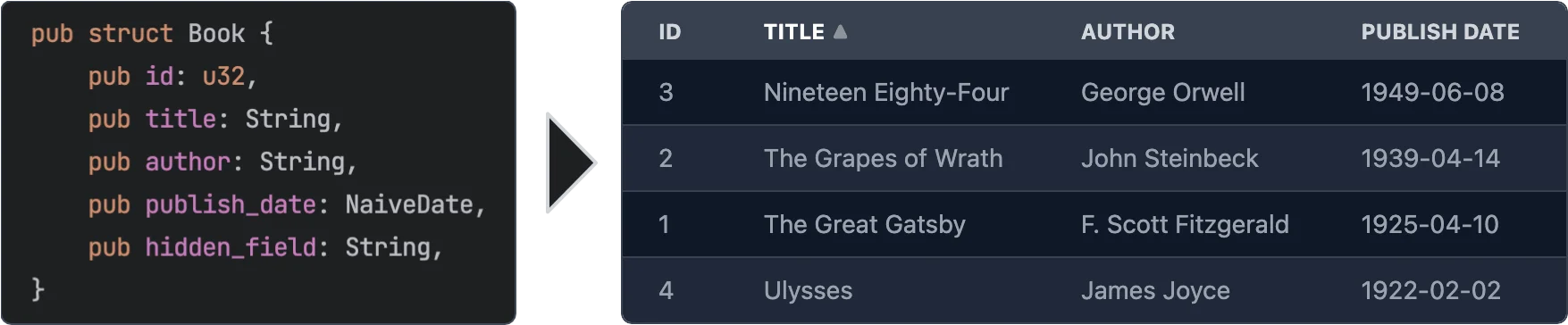
4//!
5//! # Features
6//!
7//! - **Easy to use** - yet powerful.
8//! - **Async data loading** - The data is loaded asynchronously. This allows to load data from a REST API or a database etc.
9//! - **Selection** - Can be turned off or single/multi select
10//! - **Customization** - You can customize every aspect of the table by plugging in your own components for rendering rows, cells, headers. See [Custom Renderers](#custom-renderers) for more information.
11//! - **Headless** - No default styling is applied to the table. You can fully customize the classes that are applied to the table. See [Classes customization](#classes-customization) for more information.
12//! - **Sorting** - Optional. If turned on: Click on a column header to sort the table by that column. You can even sort by multiple columns.
13//! - **Virtualization** - Only the visible rows are rendered. This allows for very large tables.
14//! - **Pagination** - Instead of virtualization you can paginate the table.
15//! - **Caching** - Only visible rows are loaded and cached.
16//! - **Editing** - Optional. You can provide custom renderers for editable cells. See [Editable Cells](#editable-cells) for more information.
17//!
18//! # Usage
19//!
20//! ```
21//! use leptos::prelude::*;
22//! use leptos_struct_table::*;
23//!
24//! #[derive(TableRow, Clone)]
25//! #[table(impl_vec_data_provider)]
26//! pub struct Person {
27//! id: u32,
28//! name: String,
29//! age: u32,
30//! }
31//!
32//! #[component]
33//! fn Demo() -> impl IntoView {
34//! let rows = vec![
35//! Person { id: 1, name: "John".to_string(), age: 32 },
36//! Person { id: 2, name: "Jane".to_string(), age: 28 },
37//! Person { id: 3, name: "Bob".to_string(), age: 45 },
38//! ];
39//!
40//! view! {
41//! <table>
42//! <TableContent rows scroll_container="html" />
43//! </table>
44//! }
45//! }
46//! ```
47//!
48//! # Leptos Compatibility
49//!
50//! | Crate version | Compatible Leptos version |
51//! |----------------------|---------------------------|
52//! | <= 0.2 | 0.3 |
53//! | 0.3 | 0.4 |
54//! | 0.4, 0.5, 0.6 | 0.5 |
55//! | 0.7 – 0.12 | 0.6 |
56//! | 0.14.0-beta | 0.7 |
57//! | 0.15, 0.16, 0.17 | 0.8 |
58//!
59//! # Server-Side Rendering
60//!
61//! To use this with Leptos' server-side rendering, you can have to add `leptos-use` as a dependency to your `Cargo.toml` and
62//! then configure it for SSR like the following.
63//!
64//! ```toml
65//! [dependencies]
66//! leptos-use = "<current version>"
67//! # ...
68//!
69//! [features]
70//! hydrate = [
71//! "leptos/hydrate",
72//! # ...
73//! ]
74//! ssr = [
75//! "leptos/ssr",
76//! # ...
77//! "leptos-use/ssr",
78//! ]
79//! ```
80//!
81//! Please see the [serverfn_sqlx example](https://github.com/Synphonyte/leptos-struct-table/blob/master/examples/serverfn_sqlx/Cargo.toml)
82//! for a working project with SSR.
83//!
84//! # Data Providers
85//!
86//! As shown in the initial usage example, when you add `#[table(impl_vec_data_provider)]` to your struct,
87//! the table will automatically generate a data provider for you. You can then directly pass a `Vec<T>` to the `rows` prop.
88//! Internally this implements the trait [`TableDataProvider`] for `Vec<T>`.
89//!
90//! To leverage the full power of async partial data loading with caching you should implement the trait
91//! [`PaginatedTableDataProvider`] or the trait [`TableDataProvider`] yourself. It's quite easy to do so.
92//! Which of the two traits you choose depends on your data source. If your data source provides
93//! paginated data, as is the case for many REST APIs, you should implement [`PaginatedTableDataProvider`].
94//! Otherwise you should probably implement [`TableDataProvider`].
95//!
96//! See the [paginated_rest_datasource example](https://github.com/Synphonyte/leptos-struct-table/blob/master/examples/paginated_rest_datasource/src/data_provider.rs)
97//! and the [serverfn_sqlx example](https://github.com/Synphonyte/leptos-struct-table/blob/master/examples/serverfn_sqlx/src/data_provider.rs)
98//! for working demo projects that implement these traits.
99//!
100//! # Macro options
101//!
102//! The `#[table(...)]` attribute can be used to customize the generated component. The following options are available:
103//!
104//! ## Struct attributes
105//!
106//! These attributes can be applied to the struct itself.
107//!
108//! - **`sortable`** - Specifies that the table should be sortable. This makes the header titles clickable to control sorting.
109//! You can specify two sorting modes with the prop `sorting_mode` on the `TableContent` component:
110//! - `sorting_mode=SortingMode::MultiColumn` (the default) allows the table to be sorted by multiple columns ordered by priority.
111//! - `sorting_mode=SortingMode::SingleColumn"` allows the table to be sorted by a single column. Clicking on another column will simply replace the sorting column.
112//!
113//! See the [simple example](https://github.com/synphonyte/leptos-struct-table/blob/master/examples/simple/src/main.rs) and the
114//! [selectable example](https://github.com/synphonyte/leptos-struct-table/blob/master/examples/selectable/src/main.rs) for more information.
115//! - **`classes_provider`** - Specifies the name of the class provider. Used to quickly customize all of the classes that are applied to the table.
116//! For convenience sensible presets for major CSS frameworks are provided. See [`TableClassesProvider`] and [tailwind example](https://github.com/synphonyte/leptos-struct-table/blob/master/examples/tailwind/src/main.rs) for more information.
117//! - **`head_cell_renderer`** - Specifies the name of the header cell renderer component. Used to customize the rendering of header cells. Defaults to [`DefaultTableHeaderRenderer`]. See the [custom_renderers_svg example](https://github.com/Synphonyte/leptos-struct-table/blob/master/examples/custom_renderers_svg/src/main.rs) for more information.
118//! - **`impl_vec_data_provider`** - If given, then [`TableDataProvider`] is automatically implemented for `Vec<ThisStruct>` to allow
119//! for easy local data use. See the [simple example](https://github.com/synphonyte/leptos-struct-table/blob/master/examples/simple/src/main.rs) for more information.
120//! - **`row_type`** - Specifies the type of the rows in the table. Defaults to the struct that this is applied to. See the [custom_type example](https://github.com/synphonyte/leptos-struct-table/blob/master/examples/custom_type/src/main.rs) for more information.
121//! - **`column_index_type`** - A type by which the columns are indexed, "usize" is the default. "enum" will generate an enum with the row-struct's field names as variants. See the [column_index_type example](https://github.com/synphonyte/leptos-struct-table/blob/master/examples/column_index_type/src/main.rs) for more information.
122//! - **`i18n`** - Allows to specify the i18n scope for all fields of the struct as well as the `i18n` module path which defaults to `crate::i18n`. See [I18n](#i18n) for more information.
123//!
124//! ## Field attributes
125//!
126//! These attributes can be applied to any field in the struct.
127//!
128//! - **`class`** - Specifies the classes that are applied to each cell (head and body) in the field's column. Can be used in conjunction with `classes_provider` to customize the classes.
129//! - **`head_class`** - Specifies the classes that are applied to the header cell in the field's column. Can be used in conjunction with `classes_provider` to customize the classes.
130//! - **`cell_class`** - Specifies the classes that are applied to the body cells in the field's column. Can be used in conjunction with `classes_provider` to customize the classes.
131//! - **`skip`** - Specifies that the field should be skipped. This is useful for fields that are not displayed in the table.
132//! - **`skip_sort`** - Only applies if `sortable` is set on the struct. Specifies that the field should not be used for sorting. Clicking it's header will not do anything.
133//! - **`skip_header`** - Makes the title of the field not be displayed in the head row.
134//! - **`title`** - Specifies the title that is displayed in the header cell. Defaults to the field name converted to title case (`this_field` becomes `"This Field"`).
135//! - **`renderer`** - Specifies the name of the cell renderer component. Used to customize the rendering of cells.
136//! Defaults to [`DefaultTableCellRenderer`].
137//! - **`format`** - Quick way to customize the formatting of cells without having to create a custom renderer. See [Formatting](#formatting) below for more information.
138//! - **`getter`** - Specifies a method that returns the value of the field instead of accessing the field directly when rendering.
139//! - **`none_value`** - Specifies a display value for `Option` types when they are `None`. Defaults to empty string
140//! - **`i18n`** - Overrides the i18n key for the field. See [I18n](#i18n) for more information.
141//!
142//! ### Formatting
143//!
144//! The `format` attribute can be used to customize the formatting of cells. It is an easier alternative to creating a custom renderer when you just want to customize some basic formatting.
145//! It is type safe and tied to the type the formatting is applied on. see [`CellValue`] and the associated type for the type you are rendering to see a list of options
146//!
147//! See:
148//! - [`cell_value::NumberRenderOptions`]
149#![cfg_attr(feature = "chrono", doc = r##"- [`chrono::RenderChronoOptions`]"##)]
150#![cfg_attr(
151 feature = "rust_decimal",
152 doc = r##"- [`rust_decimal::DecimalNumberRenderOptions`]"##
153)]
154//!
155//!
156#![cfg_attr(
157 feature = "chrono",
158 doc = r##"
159Example:
160
161```
162# use leptos::prelude::*;
163# use leptos_struct_table::*;
164# use ::chrono::{NaiveDate, NaiveDateTime, NaiveTime};
165#
166#[derive(TableRow, Clone)]
167pub struct TemperatureMeasurement {
168 #[table(title = "Temperature (°C)", format(precision = 2usize))]
169 temperature: f32,
170 #[table(format(string = "%m.%d.%Y"))]
171 date: NaiveDate,
172}
173```
174"##
175)]
176
177//! # Features
178//!
179//! - **`chrono`** - Adds support for types from the crate `chrono`.
180//! - **`rust_decimal`** - Adds support for types from the crate `rust_decimal`.
181//! - **`time`** - Adds support for types from the crate `time`.
182//! - **`uuid`** - Adds support for types from the crate `uuid`.
183//!
184//! # Classes Customization
185//!
186//! Classes can be easily customized by using the `classes_provider` attribute on the struct.
187//! You can specify any type that implements the trait [`TableClassesProvider`]. Please see the documentation for that trait for more information.
188//! You can also look at [`TailwindClassesPreset`] for an example how this can be implemented.
189//!
190//! Example:
191//!
192//! ```
193//! # use leptos::prelude::*;
194//! # use leptos_struct_table::*;
195//! #
196//! #[derive(TableRow, Clone)]
197//! #[table(classes_provider = "TailwindClassesPreset")]
198//! pub struct Book {
199//! id: u32,
200//! title: String,
201//! }
202//! ```
203//!
204//! # Field Getters
205//!
206//! Sometimes you want to display a field that is not part of the struct but a derived value either
207//! from other fields or sth entirely different. For this you can use either the [`FieldGetter`] type
208//! or the `getter` attribute.
209//!
210//! Let's start with [`FieldGetter`] and see an example:
211//!
212//! ```
213//! # use leptos::prelude::*;
214//! # use leptos_struct_table::*;
215//! # use serde::{Deserialize, Serialize};
216//! #
217//! #[derive(TableRow, Clone)]
218//! #[table(classes_provider = "TailwindClassesPreset")]
219//! pub struct Book {
220//! id: u32,
221//! title: String,
222//! author: String,
223//!
224//! // this tells the macro that you're going to provide a method called `title_and_author` that returns a `String`
225//! title_and_author: FieldGetter<String>
226//! }
227//!
228//! impl Book {
229//! // Returns the value that is displayed in the column
230//! pub fn title_and_author(&self) -> String {
231//! format!("{} by {}", self.title, self.author)
232//! }
233//! }
234//! ```
235//!
236//! To provide maximum flexibility you can use the `getter` attribute.
237//!
238//! ```
239//! # use leptos::prelude::*;
240//! # use leptos_struct_table::*;
241//! #
242//! #[derive(TableRow, Clone)]
243//! #[table(classes_provider = "TailwindClassesPreset")]
244//! pub struct Book {
245//! // this tells the macro that you're going to provide a method called `get_title` that returns a `String`
246//! #[table(getter = "get_title")]
247//! title: String,
248//! }
249//!
250//! impl Book {
251//! pub fn get_title(&self) -> String {
252//! format!("Title: {}", self.title)
253//! }
254//! }
255//! ```
256//!
257//! ## When to use `FieldGetter` vs `getter` attribute
258//!
259//! A field of type `FieldGetter<T>` is a virtual field that doesn't really exist on the struct.
260//! Internally `FieldGetter` is just a new-typed `PhantomData` and thus is removed during compilation.
261//! Hence it doesn't increase memory usage. That means you should use it for purely derived data.
262//!
263//! The `getter` attribute should be used on a field that actually exists on the struct but whose
264//! value you want to modify before it's rendered.
265//!
266//! # Custom Renderers
267//!
268//! Custom renderers can be used to customize almost every aspect of the table.
269//! They are specified by using the various `...renderer` attributes on the struct or fields or props of the [`TableContent`] component.
270//! To implement a custom renderer please have a look at the default renderers listed below.
271//!
272//! On the struct level you can use this attribute:
273//! - **`thead_cell_renderer`** - Defaults to [`DefaultTableHeaderCellRenderer`] which renders `<th><span>Title</span></th>`
274//! together with sorting functionality (if enabled).
275//!
276//! As props of the [`TableContent`] component you can use the following:
277//! - **`thead_renderer`** - Defaults to [`DefaultTableHeadRenderer`] which just renders the tag `thead`.
278//! - **`thead_row_renderer`** - Defaults to [`DefaultTableHeadRowRenderer`] which just renders the tag `tr`.
279//! - **`tbody_renderer`** - Defaults to the tag `tbody`. Takes no attributes.
280//! - **`row_renderer`** - Defaults to [`DefaultTableRowRenderer`].
281//! - **`loading_row_renderer`** - Defaults to [`DefaultLoadingRowRenderer`].
282//! - **`error_row_renderer`** - Defaults to [`DefaultErrorRowRenderer`].
283//! - **`row_placeholder_renderer`** - Defaults to [`DefaultRowPlaceholderRenderer`].
284//!
285//! On the field level you can use the **`renderer`** attribute.
286//!
287//! It defaults to [`DefaultTableCellRenderer`]
288//! Works for any type that implements the [`CellValue`] trait that is implemented for types in the standard library, popular crates with feature flags and for your own type if you implement this trait for them.
289//!
290//! Example:
291//!
292//! ```
293//! # use leptos::prelude::*;
294//! # use leptos_struct_table::*;
295//! #
296//! #[derive(TableRow)]
297//! pub struct Book {
298//! title: String,
299//! #[table(renderer = "ImageTableCellRenderer")]
300//! img: String,
301//! }
302//!
303//! // Easy cell renderer that just displays an image from an URL.
304//! #[component]
305//! fn ImageTableCellRenderer(
306//! class: String,
307//! value: Signal<String>,
308//! row: RwSignal<Book>,
309//! index: usize,
310//! ) -> impl IntoView
311//! {
312//! view! {
313//! <td class=class>
314//! <img src=value alt="Book image" height="64"/>
315//! </td>
316//! }
317//! }
318//! ```
319//!
320//! For more detailed information please have a look at the [custom_renderers_svg example](https://github.com/synphonyte/leptos-struct-table/blob/master/examples/custom_renderers_svg/src/main.rs) for a complete customization.
321//!
322//!
323//! ## Editable Cells
324//!
325//! You might have noticed the prop `row` in the custom cell renderer above. This can be used
326//! to edit the data. Simply use the `RwSignal` to access the row and change the fields.
327//!
328//! ```
329//! # use leptos::{prelude::*, logging};
330//! # use leptos_struct_table::*;
331//! #
332//! #[derive(TableRow, Clone, Default, Debug)]
333//! #[table(impl_vec_data_provider)]
334//! pub struct Book {
335//! id: u32,
336//! #[table(renderer = "InputCellRenderer")]
337//! title: String,
338//! }
339//!
340//! #[component]
341//! fn InputCellRenderer(
342//! class: String,
343//! value: Signal<String>,
344//! row: RwSignal<Book>,
345//! index: usize,
346//! ) -> impl IntoView {
347//! let on_change = move |evt| {
348//! row.write().title = event_target_value(&evt);
349//! };
350//!
351//! view! {
352//! <td class=class>
353//! <input type="text" value=value on:change=on_change />
354//! </td>
355//! }
356//! }
357//!
358//! // Then in the table component you can listen to the `on_change` event:
359//!
360//! #[component]
361//! pub fn App() -> impl IntoView {
362//! let rows = vec![Book::default(), Book::default()];
363//!
364//! let on_change = move |evt: ChangeEvent<Book>| {
365//! logging::log!("Changed row at index {}:\n{:#?}", evt.row_index, evt.changed_row.get_untracked());
366//! };
367//!
368//! view! {
369//! <table>
370//! <TableContent rows on_change scroll_container="html" />
371//! </table>
372//! }
373//! }
374//! ```
375//!
376//! Please have a look at the [editable example](https://github.com/Synphonyte/leptos-struct-table/tree/master/examples/editable/src/main.rs) for a fully working example.
377//!
378//! # Column index type
379//! Configured via the table annotation on a TableRow struct.
380//!
381//! ```rust
382//! #[table(columne_index_type = value)]
383//! ```
384//!
385//! Current supported column index type **values**: `"usize"` or `"enum"`.\
386//! The column type is used to refer to columns in various places, some of which listed below:
387//! - Custom cell renderers via [`DefaultTableCellRendererProps#index`](DefaultTableCellRendererProps#structfield.index)
388//! - Custom header cell renderers via [`DefaultTableHeaderCellRendererProps#index`](DefaultTableHeaderCellRendererProps#structfield.index)
389//! - Head events via [`TableHeadEvent#index`](TableHeadEvent#structfield.index)
390//! - In [`TableRow#col_name`](TableRow#tymethod.col_name) as `col_index` parameter type.
391//! - In [`get_sorting_for_column`] in both parameters.
392//!
393//! ## usize column index type
394//! This is the default index type.
395//!
396//! It can be set explicitely:
397//! ```rust
398//! # use leptos::{prelude::*, logging};
399//! # use leptos_struct_table::*;
400//! #
401//! #[derive(TableRow, Clone, Default, Debug)]
402//! #[table(impl_vec_data_provider, column_index_type = "usize")]
403//! pub struct Book {
404//! id: u32, // index = 0
405//! #[table(skip)]
406//! content: String, // no index (skipped)
407//! title: String, // index = 1
408//! }
409//! ```
410//! Usize indexes start at 0 at the first relevant struct field. Fields marked `skip` do not have an index.
411//!
412//! ## Enum column index type
413//!
414//! Used as follows:
415//! ```rust
416//! # use leptos::{prelude::*, logging};
417//! # use leptos_struct_table::*;
418//! #
419//! #[derive(TableRow, Clone, Default, Debug)]
420//! #[table(impl_vec_data_provider, column_index_type = "enum")]
421//! // Proc-macro `table` generates enum "{struct_name}Column", in this case: BookColumn
422//! pub struct Book {
423//! id: u32, // index = BookColumn::Id
424//! #[table(skip)]
425//! content: String, // no index (skipped)
426//! title: String, // index = BookColumn::Title
427//! }
428//! ```
429//!
430//! Fields are converted to UpperCammelCase for their generated enum variant.
431//! See the [column_index_type example](https://github.com/synphonyte/leptos-struct-table/blob/master/examples/column_index_type/src/main.rs) for more information.
432//!
433//! # Pagination / Virtualization / InfiniteScroll
434//!
435//! This table component supports different display acceleration strategies. You can set them through the `display_strategy` prop of
436//! the [`TableContent`] component.
437//!
438//! The following options are available. Check their docs for more details.
439//! - [`DisplayStrategy::Virtualization`] (default)
440//! - [`DisplayStrategy::InfiniteScroll`]
441//! - [`DisplayStrategy::Pagination`]
442//!
443//! Please have a look at the [pagination example](https://github.com/Synphonyte/leptos-struct-table/tree/master/examples/pagination/src/main.rs) for more information on how to use pagination.
444//!
445//! # I18n
446//!
447//! To translate the column titles of the table using `leptos-i18n` you can enable the `"i18n"`
448//! feature. The field names of the struct are used as keys by default and can be customized using the `i18n` attribute.
449//!
450//! Please have a look at the
451//! [i18n example](https://github.com/Synphonyte/leptos-struct-table/tree/master/examples/i18n)
452//! and at the sections [Struct attributes](#struct-attributes) and
453//! [Field attributes](#field-attributes) for more information.
454//!
455//! # Contribution
456//!
457//! All contributions are welcome. Please open an issue or a pull request if you have any ideas or problems.
458
459#![allow(non_snake_case)]
460
461mod cell_value;
462#[cfg(feature = "chrono")]
463pub mod chrono;
464mod class_providers;
465mod components;
466mod data_provider;
467mod display_strategy;
468mod events;
469mod loaded_rows;
470mod reload_controller;
471mod row_reader;
472#[cfg(feature = "rust_decimal")]
473pub mod rust_decimal;
474mod selection;
475mod sorting;
476mod table_row;
477#[cfg(feature = "time")]
478pub mod time;
479#[cfg(feature = "uuid")]
480mod uuid;
481
482pub use cell_value::*;
483pub use class_providers::*;
484pub use components::*;
485pub use data_provider::*;
486pub use display_strategy::*;
487pub use events::*;
488pub use leptos_struct_table_macro::TableRow;
489pub use loaded_rows::RowState;
490pub use reload_controller::*;
491pub use row_reader::*;
492pub use selection::*;
493pub use sorting::*;
494pub use table_row::*;
495
496use serde::{Deserialize, Serialize};
497use std::marker::PhantomData;
498
499/// Type of sorting of a column
500#[derive(Copy, Clone, Debug, PartialEq, Eq, Deserialize, Serialize)]
501pub enum ColumnSort {
502 Ascending,
503 Descending,
504 None,
505}
506
507impl ColumnSort {
508 /// Returns the a default class name
509 pub fn as_class(&self) -> &'static str {
510 match self {
511 ColumnSort::Ascending => "sort-asc",
512 ColumnSort::Descending => "sort-desc",
513 _ => "",
514 }
515 }
516
517 /// Returns the SQL sort order (ASC or DESC) or `None` if `ColumnSort::None`.
518 pub fn as_sql(&self) -> Option<&'static str> {
519 match self {
520 ColumnSort::Ascending => Some("ASC"),
521 ColumnSort::Descending => Some("DESC"),
522 _ => None,
523 }
524 }
525}
526
527/// Type of struct field used to specify that the value of this field is
528/// obtained by calling a getter method on the struct.
529///
530/// Please refer to the [`getter` example](https://github.com/Synphonyte/leptos-struct-table/tree/master/examples/getter) for how this is used
531#[derive(
532 Copy, Clone, Debug, PartialEq, Eq, Hash, PartialOrd, Ord, Default, Serialize, Deserialize,
533)]
534pub struct FieldGetter<T>(PhantomData<T>);