# Ridgeline Plot
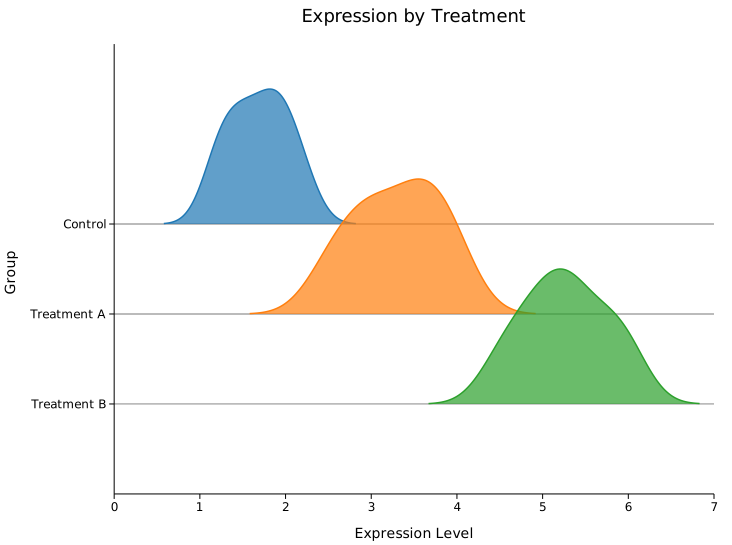
A ridgeline plot (also called a joyplot) stacks multiple KDE density curves vertically — one per group. Groups are labelled on the y-axis; the x-axis is the continuous data range. Curves can overlap for the classic "mountain range" look.
---
## Basic usage
```rust,no_run
use kuva::plot::ridgeline::RidgelinePlot;
use kuva::render::plots::Plot;
use kuva::render::layout::Layout;
use kuva::render::render::render_multiple;
use kuva::backend::svg::SvgBackend;
let plot = RidgelinePlot::new()
.with_group("Control", vec![1.2, 1.5, 1.8, 2.0, 2.2, 1.9, 1.6, 1.3])
.with_group("Treatment A", vec![2.5, 3.0, 3.5, 4.0, 3.8, 3.2, 2.8, 3.6])
.with_group("Treatment B", vec![4.5, 5.0, 5.5, 6.0, 5.8, 5.2, 4.8, 5.3]);
let plots = vec![Plot::Ridgeline(plot)];
let layout = Layout::auto_from_plots(&plots)
.with_title("Expression by Treatment")
.with_x_label("Expression Level")
.with_y_label("Group");
let svg = SvgBackend.render_scene(&render_multiple(plots, layout));
```
<img src="../assets/ridgeline/basic.svg" alt="Basic ridgeline plot with 3 groups" width="560">
---
## Per-group colors — seasonal temperature example
`.with_group_color(label, data, color)` lets you assign an explicit color to each group. A cold-to-warm gradient across months gives the plot an intuitive thermal feel.
```rust,no_run
use kuva::plot::ridgeline::RidgelinePlot;
use kuva::render::plots::Plot;
use kuva::render::layout::Layout;
use kuva::render::render::render_multiple;
use kuva::backend::svg::SvgBackend;
// (month, mean °C, std-dev) for a temperate-climate city
let months = [
("January", -3.0_f64, 5.0_f64),
("February", -1.5, 5.5),
("March", 4.0, 5.0),
("April", 10.0, 4.0),
("May", 15.5, 3.5),
("June", 20.0, 3.0),
("July", 23.0, 2.5),
("August", 22.5, 2.5),
("September", 17.0, 3.0),
("October", 10.5, 4.0),
("November", 3.5, 5.0),
("December", -1.0, 5.5),
];
// Blue → red gradient (cold → hot)
let colors = [
"#3a7abf", "#4589c4", "#6ba3d4", "#a0bfdc",
"#d4b8a0", "#e8c97a", "#f0a830", "#e86820",
"#d44a10", "#c06030", "#9070a0", "#5060b0",
];
let mut plot = RidgelinePlot::new()
.with_overlap(0.6)
.with_opacity(0.75);
for (i, &(month, mean, std)) in months.iter().enumerate() {
let data: Vec<f64> = vec![/* 200 samples from N(mean, std) */];
plot = plot.with_group_color(month, data, colors[i]);
}
let plots = vec![Plot::Ridgeline(plot)];
let layout = Layout::auto_from_plots(&plots)
.with_title("Daily Temperature Distributions by Month")
.with_x_label("Temperature (°C)")
.with_y_label("Month");
let svg = SvgBackend.render_scene(&render_multiple(plots, layout));
```
<img src="../assets/ridgeline/temperature.svg" alt="Ridgeline plot — daily temperature distributions by month" width="560">
---
## CLI
```bash
kuva ridgeline samples.tsv --group-by group --value expression \
--title "Ridgeline" --x-label "Expression"
```
---
## Builder reference
| `.with_group(label, data)` | — | Append a group |
| `.with_group_color(label, data, color)` | — | Append a group with explicit color |
| `.with_groups(iter)` | — | Add multiple groups at once |
| `.with_filled(bool)` | `true` | Fill the area under each curve |
| `.with_opacity(f64)` | `0.7` | Fill opacity |
| `.with_overlap(f64)` | `0.5` | Fraction of cell height ridges may overlap |
| `.with_bandwidth(f64)` | Silverman | KDE bandwidth |
| `.with_kde_samples(usize)` | `200` | Number of KDE evaluation points |
| `.with_stroke_width(f64)` | `1.5` | Outline stroke width |
| `.with_normalize(bool)` | `false` | Use PDF normalization instead of visual scaling |
| `.with_legend(bool)` | `false` | Show a legend (y-axis labels are usually sufficient) |
| `.with_line_dash(str)` | — | SVG stroke-dasharray for dashed outline |