# kuva
[](https://github.com/Psy-Fer/kuva/actions/workflows/ci.yml)
[](https://opensource.org/licenses/MIT)
A lightweight scientific plotting library in Rust. Zero heavy dependencies — just build your plot, render to SVG, done.
## Features
- **Builder pattern API** — chainable methods for constructing plots
- **Generic numeric inputs** — accepts `i32`, `u32`, `f32`, `f64` seamlessly via `Into<f64>`
- **SVG output** — clean, scalable vector graphics
- **Multi-plot support** — overlay multiple plots on shared axes with automatic legends
- **Subplot figures** — grid layouts with shared axes, merged cells, panel labels, and shared legends
- **Auto-layout** — automatic axis scaling, tick generation, and margin computation
- **Log-scale axes** — logarithmic scaling for data spanning orders of magnitude, with 1-2-5 tick marks
- **Annotations** — text labels with arrows, reference lines (horizontal/vertical), and shaded regions
- **Error bars & bands** — symmetric/asymmetric error bars on scatter and line plots, confidence interval bands
- **Built-in statistics** — linear regression, KDE, percentiles, Pearson correlation
- **Color palettes** — named colorblind-safe palettes (Wong, Tol, IBM) and general-purpose palettes (Category10, Pastel, Bold), with auto-cycling via `Layout::with_palette()`
- **Themes** — light (default), dark, minimal, and solarized themes
- **Tick formatting** — `TickFormat` enum for per-axis label control: smart auto, fixed decimals, integer, scientific notation, percentages, or fully custom
- **Terminal output** — `--terminal` renders any plot directly in the terminal using Unicode braille, block characters, and ANSI colour; ideal for HPC and remote-server workflows with no display
## Plot Types
| Scatter | Points with optional trend lines, error bars, bands, equation/correlation display |
| Line | Connected line segments with error bars, bands, and configurable stroke |
| Bar | Single, grouped, or stacked bars with categorical x-axis |
| Histogram | Binned frequency distribution with optional normalization |
| 2D Histogram | Bivariate density with colormaps and correlation |
| Box | Quartiles, median, whiskers (1.5×IQR) |
| Violin | Kernel density estimation shape |
| Pie | Slices with labels (inside/outside/auto), percentages, leader lines, donut charts, per-slice legend |
| Series | Index-based 1D data with line, point, or both styles |
| Heatmap | 2D matrix with colormaps (Viridis, Inferno, Grayscale, custom) |
| Band | Filled area between upper and lower curves (confidence intervals) |
| Brick | Character-level sequence visualization (DNA/RNA templates) |
| Waterfall | Floating bars showing cumulative change; Delta and Total bar kinds |
| Strip | Jitter/strip plots with center or swarm modes; overlayable on Box or Violin |
| Volcano | log2FC vs −log10(p) with threshold lines, up/down/NS colouring, gene labels |
| Manhattan | Genome-wide association plots with per-chromosome colouring, significance thresholds, gene labels |
| Dot | 2D grid of circles encoding two variables via size and colour; sparse/matrix input, stacked size-legend + colorbar |
| UpSet | Set-intersection visualisation: intersection-size bars, dot matrix, optional set-size bars |
| Stacked Area | Layered filled areas for part-to-whole time series; normalized (100%) variant |
| Candlestick | OHLC bars with optional volume overlay; up/down colors, continuous shading |
| Contour | Contour lines or filled contours from scattered (x, y, z) data via IDW interpolation |
| Chord | Flow matrix rendered as arc segments with cubic-Bézier ribbons; symmetric and directed |
| Sankey | Node-column flow diagram with tapered ribbons; source, gradient, or per-link coloring |
| Phylogenetic Tree | Rectangular, slanted, or circular dendrogram; Newick, edge-list, UPGMA, or linkage input; clade coloring |
| Synteny | Sequence bars connected by collinear-block ribbons; forward and inverted (bowtie) blocks |
## Gallery
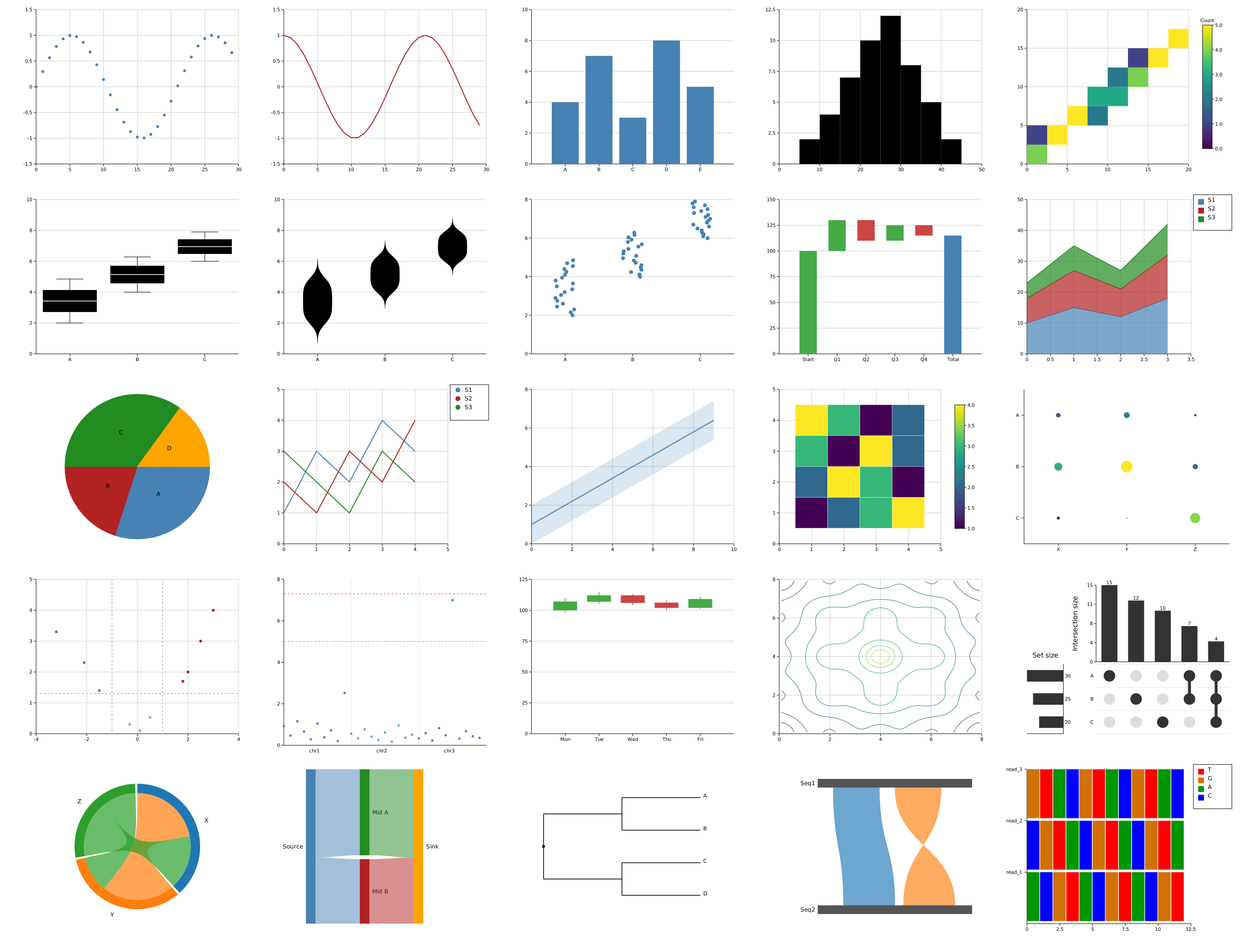
All 25 plot types in a single figure. See the [full gallery](docs/src/gallery.md) for the detailed version with titles, axis labels, and legends.
## Quick Start
```rust
use kuva::plot::ScatterPlot;
use kuva::backend::svg::SvgBackend;
use kuva::render::render::render_scatter;
use kuva::render::layout::Layout;
let plot = ScatterPlot::new()
.with_data(vec![(1.0, 5.0), (4.5, 3.5), (5.0, 8.7)])
.with_color("blue")
.with_size(5.0);
let layout = Layout::new((0.0, 10.0), (0.0, 10.0))
.with_title("My Plot")
.with_x_label("X")
.with_y_label("Y");
let scene = render_scatter(&plot, layout).with_background(Some("white"));
let svg = SvgBackend.render_scene(&scene);
std::fs::write("plot.svg", svg).unwrap();
```
## Multi-Plot Example
Overlay multiple plot types on the same axes with automatic legends:
```rust
use kuva::plot::{ScatterPlot, LinePlot};
use kuva::render::render::render_multiple;
use kuva::render::layout::Layout;
use kuva::render::plots::Plot;
use kuva::backend::svg::SvgBackend;
let line = LinePlot::new()
.with_data((0..100).map(|x| (x as f64 / 10.0, (x as f64 / 10.0).sin())).collect::<Vec<_>>())
.with_color("blue")
.with_legend("sine");
let points = ScatterPlot::new()
.with_data(vec![(1.57, 1.0), (3.14, 0.0), (4.71, -1.0)])
.with_color("red")
.with_legend("peaks");
let plots = vec![Plot::Line(line), Plot::Scatter(points)];
let layout = Layout::auto_from_plots(&plots)
.with_title("Sine Wave")
.with_x_label("Radians")
.with_y_label("Amplitude");
let scene = render_multiple(plots, layout).with_background(Some("white"));
let svg = SvgBackend.render_scene(&scene);
```
## Grouped Bar Chart Example
```rust
use kuva::plot::BarPlot;
use kuva::render::render::render_multiple;
use kuva::render::layout::Layout;
use kuva::render::plots::Plot;
let bar = BarPlot::new()
.with_group("Laptop", vec![(3.2, "tomato"), (7.8, "skyblue")])
.with_group("Server", vec![(5.8, "tomato"), (9.1, "skyblue")])
.with_legend(vec!["blow5", "pod5"]);
let plots = vec![Plot::Bar(bar)];
let layout = Layout::auto_from_plots(&plots)
.with_title("Software Performance")
.with_y_label("Time (s)");
let scene = render_multiple(plots, layout);
```
## Log-Scale Example
```rust
use kuva::plot::ScatterPlot;
use kuva::render::render::render_multiple;
use kuva::render::layout::Layout;
use kuva::render::plots::Plot;
use kuva::backend::svg::SvgBackend;
let scatter = ScatterPlot::new()
.with_data(vec![
(1.0, 0.001), (10.0, 0.1), (100.0, 10.0),
(1000.0, 1000.0), (10000.0, 10000.0),
])
.with_color("teal");
let plots = vec![Plot::Scatter(scatter)];
let layout = Layout::auto_from_plots(&plots)
.with_log_scale() // both axes log, or use .with_log_x() / .with_log_y()
.with_title("Log-Scale Scatter")
.with_x_label("X (log)")
.with_y_label("Y (log)");
let scene = render_multiple(plots, layout);
let svg = SvgBackend.render_scene(&scene);
```
## Subplot / Figure Layout Example
Arrange multiple independent subplots in a grid with shared axes, merged cells, and panel labels:
```rust
use kuva::plot::{ScatterPlot, LinePlot};
use kuva::render::figure::Figure;
use kuva::render::layout::Layout;
use kuva::render::plots::Plot;
use kuva::backend::svg::SvgBackend;
let scatter = ScatterPlot::new()
.with_data(vec![(1.0, 2.0), (3.0, 5.0), (5.0, 3.0)])
.with_color("blue");
let line = LinePlot::new()
.with_data(vec![(0.0, 0.0), (2.0, 4.0), (4.0, 3.0)])
.with_color("red");
let plots = vec![
vec![Plot::Scatter(scatter)],
vec![Plot::Line(line)],
];
let layouts = vec![
Layout::auto_from_plots(&plots[0]).with_title("Scatter"),
Layout::auto_from_plots(&plots[1]).with_title("Line"),
];
let figure = Figure::new(1, 2)
.with_title("My Figure")
.with_plots(plots)
.with_layouts(layouts)
.with_shared_y_all()
.with_labels();
let scene = figure.render();
let svg = SvgBackend.render_scene(&scene);
```
Features:
- **Grid layout** — `Figure::new(rows, cols)` creates an `rows x cols` grid
- **Merged cells** — `.with_structure(vec![vec![0,1], vec![2], vec![3]])` for spanning
- **Shared axes** — `.with_shared_y_all()`, `.with_shared_x_all()`, per-row/column/slice variants
- **Panel labels** — `.with_labels()` adds bold A, B, C labels (also numeric, lowercase, or custom)
- **Shared legends** — `.with_shared_legend()` or `.with_shared_legend_bottom()` for figure-wide legends
- **Figure title** — `.with_title()` adds a centered title above all subplots
- **Configurable sizing** — `.with_cell_size(w, h)`, `.with_spacing(px)`, `.with_padding(px)`
## Color Palettes
Use named palettes for colorblind-safe or publication-ready color schemes. Colors auto-cycle across plots:
```rust
use kuva::Palette;
use kuva::plot::{ScatterPlot, LinePlot};
use kuva::render::render::render_multiple;
use kuva::render::layout::Layout;
use kuva::render::plots::Plot;
// Auto-cycle: palette colors assigned to each plot automatically
let s1 = ScatterPlot::new().with_data(vec![(1.0, 2.0), (2.0, 3.0)]).with_legend("A");
let s2 = ScatterPlot::new().with_data(vec![(1.0, 4.0), (2.0, 1.0)]).with_legend("B");
let s3 = ScatterPlot::new().with_data(vec![(1.0, 5.0), (2.0, 6.0)]).with_legend("C");
let plots = vec![Plot::Scatter(s1), Plot::Scatter(s2), Plot::Scatter(s3)];
let layout = Layout::auto_from_plots(&plots)
.with_palette(Palette::wong()) // colorblind-safe
.with_title("Auto-Cycled Colors");
let scene = render_multiple(plots, layout);
```
Or index into a palette manually:
```rust
use kuva::Palette;
let pal = Palette::wong();
let color_a = &pal[0]; // "#E69F00"
let color_b = &pal[1]; // "#56B4E9"
// Wraps on overflow: pal[8] == pal[0]
```
Available palettes:
| `Palette::wong()` | 8 | Bang Wong, Nature Methods 2011 — colorblind-safe |
| `Palette::okabe_ito()` | 8 | Alias for Wong |
| `Palette::tol_bright()` | 7 | Paul Tol qualitative bright |
| `Palette::tol_muted()` | 10 | Paul Tol qualitative muted |
| `Palette::tol_light()` | 9 | Paul Tol qualitative light |
| `Palette::ibm()` | 5 | IBM Design Language |
| `Palette::category10()` | 10 | Tableau/D3 Category10 (default) |
| `Palette::pastel()` | 10 | Softer pastel |
| `Palette::bold()` | 10 | High-saturation vivid |
Condition-based aliases: `deuteranopia()`, `protanopia()` → Wong; `tritanopia()` → Tol Bright.
Custom palettes: `Palette::custom("mine", vec!["red".into(), "green".into(), "blue".into()])`.
## Tick Formatting
Control how tick labels are rendered on each axis with `TickFormat`:
```rust
use kuva::TickFormat;
use kuva::render::layout::Layout;
use std::sync::Arc;
// Both axes: smart auto (integers as "5", not "5.0"; sci notation for extremes)
let layout = Layout::new((0.0, 100.0), (0.0, 1.0));
// Per-axis: x as percentage, y as scientific notation
let layout = Layout::new((0.0, 1.0), (0.0, 100_000.0))
.with_x_tick_format(TickFormat::Percent) // 0.5 → "50.0%"
.with_y_tick_format(TickFormat::Sci); // 12300 → "1.23e4"
// Fixed decimal places
let layout = Layout::new((0.0, 10.0), (0.0, 10.0))
.with_tick_format(TickFormat::Fixed(2)); // 3.1 → "3.10"
// Custom formatter
let layout = Layout::new((0.0, 100.0), (0.0, 100.0))
.with_tick_format(TickFormat::Custom(Arc::new(|v| format!("{}px", v as i32))));
```
| `Auto` | `"5"`, `"3.14"`, `"1.23e4"` (smart default) |
| `Fixed(2)` | `"3.14"`, `"0.00"` |
| `Integer` | `"5"`, `"-3"` |
| `Sci` | `"1.23e4"`, `"3.5e-3"` |
| `Percent` | `"45.0%"` (value × 100) |
| `Custom(f)` | any string |
Log-scale axes retain their `1 / 10 / 100` style labels by default; specifying an explicit format overrides this.
## Waterfall Chart Example
Visualise how an initial value evolves through a sequence of positive and negative increments:
```rust
use kuva::plot::WaterfallPlot;
use kuva::render::render::render_multiple;
use kuva::render::layout::Layout;
use kuva::render::plots::Plot;
use kuva::backend::svg::SvgBackend;
let wf = WaterfallPlot::new()
.with_delta("Revenue", 500.0)
.with_delta("Cost", -200.0)
.with_total("Gross Profit") // bar from zero to running total
.with_delta("OpEx", -80.0)
.with_delta("Tax", -30.0)
.with_total("Net Profit")
.with_connectors() // dashed horizontal connector lines
.with_values(); // value labels above/below each bar
let plots = vec![Plot::Waterfall(wf)];
let layout = Layout::auto_from_plots(&plots)
.with_title("P&L Waterfall")
.with_y_label("USD");
let scene = render_multiple(plots, layout);
let svg = SvgBackend.render_scene(&scene);
```
Delta bars float from the running cumulative total; positive bars use `color_positive` (default green), negative bars use `color_negative` (default red). Total bars reach from zero to the current running total and use `color_total` (default steelblue). Override with `.with_color_positive()`, `.with_color_negative()`, `.with_color_total()`.
## UpSet Plot Example
Visualise set intersections with the standard UpSet layout — intersection-size bars on top, dot matrix in the centre, and optional set-size bars on the left:
```rust
use kuva::plot::UpSetPlot;
use kuva::render::render::render_multiple;
use kuva::render::layout::Layout;
use kuva::render::plots::Plot;
use kuva::backend::svg::SvgBackend;
// Build directly from raw element sets — intersections are computed automatically.
let up = UpSetPlot::new().with_sets(vec![
("Set A", vec!["apple", "banana", "cherry", "date"]),
("Set B", vec!["banana", "cherry", "elderberry"]),
("Set C", vec!["cherry", "fig", "grape"]),
]);
let plots = vec![Plot::UpSet(up)];
let layout = Layout::auto_from_plots(&plots).with_title("Gene Set Overlap");
let scene = render_multiple(plots, layout);
let svg = SvgBackend.render_scene(&scene);
std::fs::write("upset.svg", svg).unwrap();
```
Or supply precomputed `(mask, count)` pairs for large datasets:
```rust
let up = UpSetPlot::new()
.with_data(
vec!["DEG up", "DEG down", "GWAS hits"],
vec![312usize, 198, 87],
vec![
(0b001u64, 240), // DEG up only
(0b010, 150), // DEG down only
(0b100, 40), // GWAS only
(0b011, 48), // DEG up ∩ DEG down
(0b101, 30), // DEG up ∩ GWAS
(0b110, 22), // DEG down ∩ GWAS
(0b111, 17), // all three
],
)
.with_sort(kuva::plot::UpSetSort::ByFrequency)
.with_max_visible(10);
```
## Performance
kuva renders SVG directly without intermediate data structures or heavy runtimes. All benchmarks below use `cargo bench --features full` (release build, Criterion, AMD64 Linux).
| Scatter | 3.1 ms | 34.5 ms | 414 ms |
| Line | 2.5 ms | 28.6 ms | 308 ms |
| Violin (3 groups) | 12.7 ms | 89 ms | — |
| Manhattan (22 chr) | 3.9 ms | 42 ms | 501 ms |
| Heatmap n×n | 4.9 ms (100²) | 24.6 ms (200²) | 154 ms (500²) |
| SVG emit only | 2.0 ms | 19.9 ms | 213 ms |
All plot types scale O(n). SVG string generation costs ~200 ns/element; violin time is dominated by KDE (~28 ms for 100k samples, ~8 ns/exp). Error bars add 4–6× cost over plain scatter. See [`docs/src/benchmarks.md`](docs/src/benchmarks.md) for full tables, methodology, and how to reproduce the results.
## Documentation
The docs are built with [mdBook](https://rust-lang.github.io/mdBook/). Install it once with:
```bash
cargo install mdbook
```
### Regenerate SVG assets
Each plot type has a dedicated example that writes its SVG assets to `docs/src/assets/`. Regenerate all of them at once with:
```bash
bash scripts/gen_docs.sh
```
Or regenerate a single plot type:
```bash
cargo run --example scatter
```
### Build and preview
```bash
mdbook build docs # outputs to docs/book/
mdbook serve docs # live-reload preview at http://localhost:3000
```
---
## CLI (`kuva`)
The `kuva` binary lets you render plots directly from the shell — no Rust required.
### Build
```bash
cargo build --bin kuva # SVG only
cargo build --bin kuva --features png # adds PNG output
cargo build --bin kuva --features pdf # adds PDF output
cargo build --bin kuva --features full # all backends
```
### Quick start
These examples use the datasets in `examples/data/` and work from the repo root immediately after building:
```bash
# Scatter plot — SVG to stdout
kuva scatter examples/data/scatter.tsv --x x --y y
# Volcano plot — highlight top 20 genes
kuva volcano examples/data/volcano.tsv \
--name-col gene --x-col log2fc --y-col pvalue --top-n 20
# Box plot — pipe from stdin, save to file
```
### Subcommands
| `scatter` | x, y columns (+ optional group) | Scatter plot with optional trend line |
| `line` | x, y columns (+ optional group) | Line plot with optional fill |
| `bar` | label, value columns | Categorical bar chart |
| `histogram` | value column | Distribution histogram |
| `box` | group, value columns | Box-and-whisker by group |
| `violin` | group, value columns | Violin plot by group |
| `pie` | label, value columns | Pie / donut chart |
| `strip` | group, value columns | Strip / beeswarm plot by group |
| `waterfall` | label, value columns | Waterfall / bridge chart |
| `stacked-area` | x, group, y columns | Stacked area chart |
| `volcano` | name, log2fc, pvalue columns | Volcano plot for DE analysis |
| `manhattan` | chr, pos, pvalue columns | GWAS Manhattan plot |
| `candlestick` | label, open, high, low, close columns | OHLC candlestick chart |
| `heatmap` | row, col, value columns (long format) | Heatmap with optional clustering |
| `hist2d` | x, y columns | 2-D histogram / density grid |
| `contour` | x, y, z columns | Contour / filled-contour plot |
| `dot` | x, y columns with size/color | Dot plot with size and color encoding |
| `upset` | set membership TSV | UpSet intersection plot |
| `chord` | matrix TSV | Chord diagram |
| `sankey` | source, target, value columns | Sankey flow diagram |
| `phylo` | Newick string or edge list | Phylogenetic tree |
| `synteny` | sequence definitions + block file | Genome synteny ribbons |
### Input and output
Input is auto-detected TSV or CSV (by extension, then content sniff). Columns are selectable by 0-based index or header name — pass an integer (`--x-col 2`) or a name (`--x-col log2fc`). Pipe from stdin by omitting the file argument or passing `-`.
Output defaults to SVG on stdout; use `-o file.svg/png/pdf` to write a file. PNG and PDF output require the `png`/`pdf` feature flags at build time.
### Examples
```bash
# Scatter plot from a TSV, SVG to stdout
# Render directly in the terminal — no file, no display
kuva scatter data.tsv --x x --y y --terminal
```

```bash
# With explicit terminal dimensions
kuva manhattan gwas.tsv --chr-col chr --pvalue-col pvalue --terminal --term-width 120 --term-height 40
# Colour by a group column, write PNG
kuva scatter data.tsv --x-col time --y-col expression --color-by condition -o plot.png
# Box plot with swarm overlay
kuva box samples.tsv --group-col group --value-col expression --overlay-swarm --title "Expression"
# Histogram with 40 bins, dark theme
kuva histogram values.tsv --bins 40 --theme dark -o hist.svg
# Pie chart with percentages and outside labels
kuva pie shares.tsv --label-col feature --value-col percentage --percent --label-position outside
# Volcano plot, label top 20 genes
kuva volcano gene_stats.tsv --name-col gene --x-col log2fc --y-col pvalue --top-n 20
# Manhattan with hg38 base-pair positions
kuva manhattan gwas.tsv --chr-col chr --pos-col pos --pvalue-col pvalue --genome-build hg38
# Waterfall with connectors and value labels
kuva waterfall budget.tsv --label-col item --value-col amount --connectors --values
# Stacked area, normalized
kuva stacked-area abundance.tsv --x-col week --group-col species --y-col count --normalize
# UpSet intersection plot
kuva upset sets.tsv
# Sankey flow diagram, gradient links
kuva sankey flow.tsv --source-col from --target-col to --value-col reads --link-gradient
# Synteny ribbons
kuva synteny seqs.tsv --blocks-file blocks.tsv --proportional
```
See [`docs/src/cli/index.md`](docs/src/cli/index.md) for the complete flag reference for every subcommand, and `examples/data/` for ready-to-use example datasets.
## Development note
kuva was initially built by hand, with a working library and several plot types
already in place before AI tooling was introduced. From that point, development was
heavily assisted by Claude (Anthropic) — accelerating the addition of new plot types,
the CLI binary, tests, and documentation. The architecture, domain knowledge, and
direction remain the author's own; Claude was used as an accelerant, not an author.
*This disclaimer was written by Claude as an honest assessment of its own role in the project.*
## License
MIT