<p align="center">
<a href="https://github.com/orhun/kmon">
<img src="https://user-images.githubusercontent.com/24392180/73918056-d5c45500-48d1-11ea-8d18-9943827ab2ed.png" width="500"></a>
<br>
<b>Linux Kernel Manager and Activity Monitor 🐧💻</b>
<br>
<br>
<a href="https://github.com/orhun/kmon/releases">
<img src="https://img.shields.io/github/v/release/orhun/kmon?color=000000&style=flat-square">
</a>
<a href="https://crates.io/crates/kmon/">
<img src="https://img.shields.io/crates/v/kmon?color=000000&style=flat-square">
</a>
<a href="https://www.archlinux.org/packages/community/x86_64/kmon/">
<img src="https://img.shields.io/archlinux/v/community/x86_64/kmon?color=000000&style=flat-square">
</a>
<br>
<a href="https://github.com/orhun/kmon/actions?query=workflow%3A%22Continuous+Integration%22">
<img src="https://img.shields.io/github/workflow/status/orhun/kmon/Continuous Integration/master?color=000000&label=CI&style=flat-square">
</a>
<a href="https://github.com/orhun/kmon/actions?query=workflow%3A%22Continuous+Deployment%22">
<img src="https://img.shields.io/github/workflow/status/orhun/kmon/Continuous Deployment/master?color=000000&label=CD&style=flat-square">
</a>
<a href="https://codecov.io/gh/orhun/kmon">
<img src="https://img.shields.io/codecov/c/gh/orhun/kmon?color=000000&style=flat-square">
</a>
<a href="https://github.com/orhun/kmon/blob/master/LICENSE">
<img src="https://img.shields.io/crates/l/kmon?color=000000&style=flat-square">
</a>
<a href="https://github.com/orhun/kmon">
<img src="https://user-images.githubusercontent.com/24392180/77252333-35997400-6c64-11ea-9627-bb56ee14ae22.gif">
</a>
</p>
**The kernel** is the part of the operating system that facilitates interactions between *hardware* and *software* components. On most systems, it is loaded on startup after the *bootloader* and handles I/O requests as well as peripherals like keyboards, monitors, network adapters, and speakers. Typically, the kernel is responsible for **memory management**, **process management**, **device management**, **system calls**, and **security**.
Applications use the **system call** mechanism for requesting a service from the operating system and most of the time, this request is passed to the kernel using a library provided by the operating system to invoke the related kernel function. While the kernel performs these low-level tasks, it's resident on a separate part of memory named **protected kernel space** which is not accessible by applications and other parts of the system. In contrast, applications like browsers, text editors, window managers or audio/video players use a different separate area of the memory, **user space**. This separation prevents user data and kernel data from interfering with each other and causing instability and slowness, as well as preventing malfunctioning application programs from crashing the entire operating system.
There are different kernel designs due to the different ways of managing system calls and resources. For example, while **monolithic kernels** run all the operating system instructions in the same address space *for speed*, **microkernels** use different spaces for user and kernel services *for modularity*. Apart from those, there are **hybrid kernels**, **nanokernels**, and, **exokernels**. The hybrid kernel architecture is based on combining aspects of microkernel and monolithic kernels.
**The Linux kernel** is the open-source, monolithic and, Unix-like operating system kernel that used in the Linux distributions, various embedded systems such as routers and as well as in the all Android-based systems. **Linus Torvalds** conceived and created the Linux kernel in 1991 and it's still being developed by thousands of developers today. It's a prominent example of **free and open source software** and it's used in other free software projects, notably the **GNU operating system**.
Although the Linux-based operating systems dominate the most of computing, it still carries some of the design flaws which were quite a bit of debate in the early days of Linux. For example, it has the **largest footprint** and **the most complexity** over the other types of kernels. But it's a design feature that monolithic kernels inherent to have. These kind of design issues led developers to add new features and mechanisms to the Linux kernel which other kernels don't have.
Unlike the standard monolithic kernels, the Linux kernel is also **modular**, accepting **loadable kernel modules (LKM)** that typically used to add support for new *hardware* (as device drivers) and/or *filesystems*, or for adding *system calls*. Since LKMs could be loaded and unloaded to the system *at runtime*, they have the advantage of extending the kernel without rebooting and re-compiling. Thus, the kernel functionalities provided by modules would not reside in memory without being used and the related module can be unloaded in order to free memory and other resources.
Loadable kernel modules are located in `/lib/modules` with the `.ko` (*kernel object*) extension in Linux. While the [lsmod](https://linux.die.net/man/8/lsmod) command could be used for listing the loaded kernel modules, [modprobe](https://linux.die.net/man/8/modprobe) or [insmod](https://linux.die.net/man/8/insmod)/[rmmod](https://linux.die.net/man/8/rmmod) is used for loading or unloading a kernel module. insmod/rmmod are used for modules independent of modprobe and without requiring an installation to ```/lib/modules/$(uname -r)```.
Here's a simple example of a Linux kernel module that prints a message when it's loaded and unloaded. The build and installation steps of the [module](https://github.com/orhun/kmon/blob/master/example/lkm_example.c) using a [Makefile](https://github.com/orhun/kmon/blob/master/example/Makefile) are shown below.
```
make # build
sudo make install # install
sudo modprobe lkm_example # load
sudo modprobe -r lkm_example # unload
```
The [dmesg](https://linux.die.net/man/8/dmesg) command is used below to retrieve the message buffer of the kernel.
```
[16994.295552] [+] Example kernel module loaded.
[16996.325674] [-] Example kernel module unloaded.
```
**kmon** provides a [text-based user interface](https://en.wikipedia.org/wiki/Text-based_user_interface) for managing the Linux kernel modules and monitoring the kernel activities. By managing, it means loading, unloading, blacklisting and showing the information of a module. These updates in the kernel modules, logs about the hardware and other kernel messages can be tracked with the real-time activity monitor in kmon. Since the usage of different tools like [dmesg](https://en.wikipedia.org/wiki/Dmesg) and [kmod](https://www.linux.org/docs/man8/kmod.html) are required for these tasks in Linux, kmon aims to gather them in a single terminal window and facilitate the usage as much as possible while keeping the functionality.
kmon is written in [Rust](https://www.rust-lang.org/) and uses [tui-rs](https://github.com/fdehau/tui-rs) & [termion](https://github.com/redox-os/termion) libraries for its text-based user interface.
### Table of Contents
- [Installation](#installation)
- [Cargo](#cargo)
- [Arch Linux](#arch-linux)
- [Nixpkgs](#nixpkgs)
- [Docker](#docker)
- [Build](#build)
- [Run](#run)
- [Manual](#manual)
- [Note](#note)
- [Usage](#usage)
- [Flags](#flags)
- [Options](#options)
- [Subcommands](#subcommands)
- [Key Bindings](#key-bindings)
- [Features](#features)
- [Help](#help)
- [Navigating & Scrolling](#navigating--scrolling)
- [Scrolling Kernel Activities](#scrolling-kernel-activities)
- [Smooth Scrolling](#smooth-scrolling)
- [Block Sizes](#block-sizes)
- [Block Positions](#block-positions)
- [Kernel Information](#kernel-information)
- [Module Information](#module-information)
- [Displaying the dependent modules](#displaying-the-dependent-modules)
- [Jumping to dependent modules](#jumping-to-dependent-modules)
- [Searching a module](#searching-a-module)
- [Loading a module](#loading-a-module)
- [Unloading a module](#unloading-a-module)
- [Blacklisting a module](#blacklisting-a-module)
- [Reloading a module](#reloading-a-module)
- [Clearing the ring buffer](#clearing-the-ring-buffer)
- [Copy & Paste](#copy--paste)
- [Sorting/reversing the kernel modules](#sortingreversing-the-kernel-modules)
- [Customizing the colors](#customizing-the-colors)
- [Supported colors](#supported-colors)
- [Using a custom color](#using-a-custom-color)
- [Changing the accent color](#changing-the-accent-color)
- [Unicode symbols](#unicode-symbols)
- [Setting the terminal tick rate](#setting-the-terminal-tick-rate)
- [Roadmap](#roadmap)
- [Accessibility](#accessibility)
- [Dependencies](#dependencies)
- [Features](#features-1)
- [Testing](#testing)
- [Resources](#resources)
- [About the project](#about-the-project)
- [Articles](#articles)
- [In the media](#in-the-media)
- [Gallery](#gallery)
- [Social Media](#social-media)
- [Funding](#funding)
- [Patreon](#patreon)
- [Open Collective](#open-collective)
- [License](#license)
- [Copyright](#copyright)
## Installation
[](https://repology.org/project/kmon/versions)
### Cargo
**kmon** can be installed from [crates.io](https://crates.io/crates/kmon/) using Cargo if [Rust](https://www.rust-lang.org/tools/install) is installed.
```
cargo install kmon
```
Use the `--force` option to update.
```
cargo install kmon --force
```
### Arch Linux
**kmon** can be installed from the Arch Linux [official repository](https://www.archlinux.org/packages/community/x86_64/kmon/).
```
pacman -S kmon
```
There are also a development package on [AUR](https://aur.archlinux.org/packages/kmon-git/). Use your favorite [AUR helper](https://wiki.archlinux.org/index.php/AUR_helpers) to install. For example,
```
paru -S kmon-git
```
### Nixpkgs
**kmon** can be installed using [Nix package manager](https://nixos.org/nix/) from `nixpkgs-unstable` channel.
```
nix-channel --add https://nixos.org/channels/nixpkgs-unstable
nix-channel --update nixpkgs
nix-env -iA nixpkgs.kmon
```
On [NixOS](https://nixos.org/nixos/):
```
nix-channel --add https://nixos.org/channels/nixos-unstable
nix-channel --update nixos
nix-env -iA nixos.kmon
```
### Docker
[](https://hub.docker.com/r/orhunp/kmon) [](https://github.com/orhun/kmon/packages/95852)
```
docker run -it --cap-add syslog orhunp/kmon:tagname
```
#### Build
```
docker build -t kmon .
```
#### Run
```
docker run -it --cap-add syslog kmon
```
### Manual
1. Download the latest binary from [releases](https://github.com/orhun/kmon/releases).
```
wget https://github.com/orhun/kmon/releases/download/v[VERSION]/kmon-[VERSION].tar.gz
```
2. Extract the files.
```
tar -xvzf kmon-*.tar.gz
```
3. Run the binary.
```
./kmon
```
4. Move binary to `/usr/local/bin/` for running it from the terminal using `kmon` command.
5. Man page could be viewed if [kmon.8](https://github.com/orhun/kmon/blob/master/man/kmon.8) file is copied to `/usr/local/man/man8/` directory.
```
cp kmon.8 /usr/local/man/man8/
gzip /usr/local/man/man8/kmon.8
man kmon
```
#### Note
[libxcb](https://xcb.freedesktop.org/) should be installed for using the copy/paste commands of X11.
[*](https://github.com/aweinstock314/rust-clipboard/issues/67)
e.g: Install `libxcb1-dev` package for Debian/Ubuntu[*](https://github.com/orhun/kmon/issues/2) and `libxcb-devel` package for Fedora/openSUSE/Void Linux.
## Usage
```
kmon [FLAGS] [OPTIONS] [SUBCOMMANDS]
```
### Flags
```
-h, --help Prints help information
-r, --reverse Reverse the kernel module list
-u, --unicode Show Unicode symbols for the block titles
-V, --version Prints version information
```
### Options
```
-a, --accent-color <COLOR> Set the accent color using hex or color name [default: white]
-c, --color <COLOR> Set the main color using hex or color name [default: darkgray]
-t, --tickrate <MS> Set the refresh rate of the terminal [default: 250]
```
### Subcommands
```
help Prints this message or the help of the given subcommand(s)
sort Sort kernel modules
```
```
kmon sort [FLAGS]
FLAGS:
-n, --name Sort modules by their names
-s, --size Sort modules by their sizes
-d, --dependent Sort modules by their dependent modules
```
## Key Bindings
| | |
|------------------------- |--------------------------------------- |
| `[?], F1` | Help |
| `right/left, h/l` | Switch between blocks |
| `up/down, k/j, alt-k/j` | Scroll up/down [selected block] |
| `pgup/pgdown` | Scroll up/down [kernel activities] |
| `</>` | Scroll up/down [module information] |
| `alt-h/l` | Scroll right/left [kernel activities] |
| `ctrl-t/b, home/end` | Scroll to top/bottom [module list] |
| `alt-e/s` | Expand/shrink the selected block |
| `ctrl-x` | Change the block position |
| `ctrl-l/u, alt-c` | Clear the kernel ring buffer |
| `[d], alt-d` | Show the dependent modules |
| `[1]..[9]` | Jump to the dependent module |
| `[\], tab, backtab` | Show the next kernel information |
| `[/], s, enter` | Search a kernel module |
| `[+], i, insert` | Load a kernel module |
| `[-], u, backspace` | Unload the kernel module |
| `[x], b, delete` | Blacklist the kernel module |
| `ctrl-r, alt-r` | Reload the kernel module |
| `y/n` | Execute/cancel the command |
| `c/v` | Copy/paste |
| `r, F5` | Refresh |
| `q, ctrl-c/d, ESC` | Quit |
## Features
### Help
Press '`?`' while running the terminal UI to see key bindings.

### Navigating & Scrolling
`Arrow keys` are used for navigating between blocks and scrolling.

#### Scrolling Kernel Activities
Some kernel messages might be long enough for not fitting into the kernel activities block since they are not wrapped. In this situation, kernel activities can be scrolled horizontally with `alt-h & alt-l` keys. Vertical scrolling mechanism is the same as other blocks.

#### Smooth Scrolling
`alt-j & alt-k` keys can be used to scroll kernel activity and module information blocks slowly.

### Block Sizes
`alt-e & alt-s` keys can be used for expanding/shrinking the selected block.
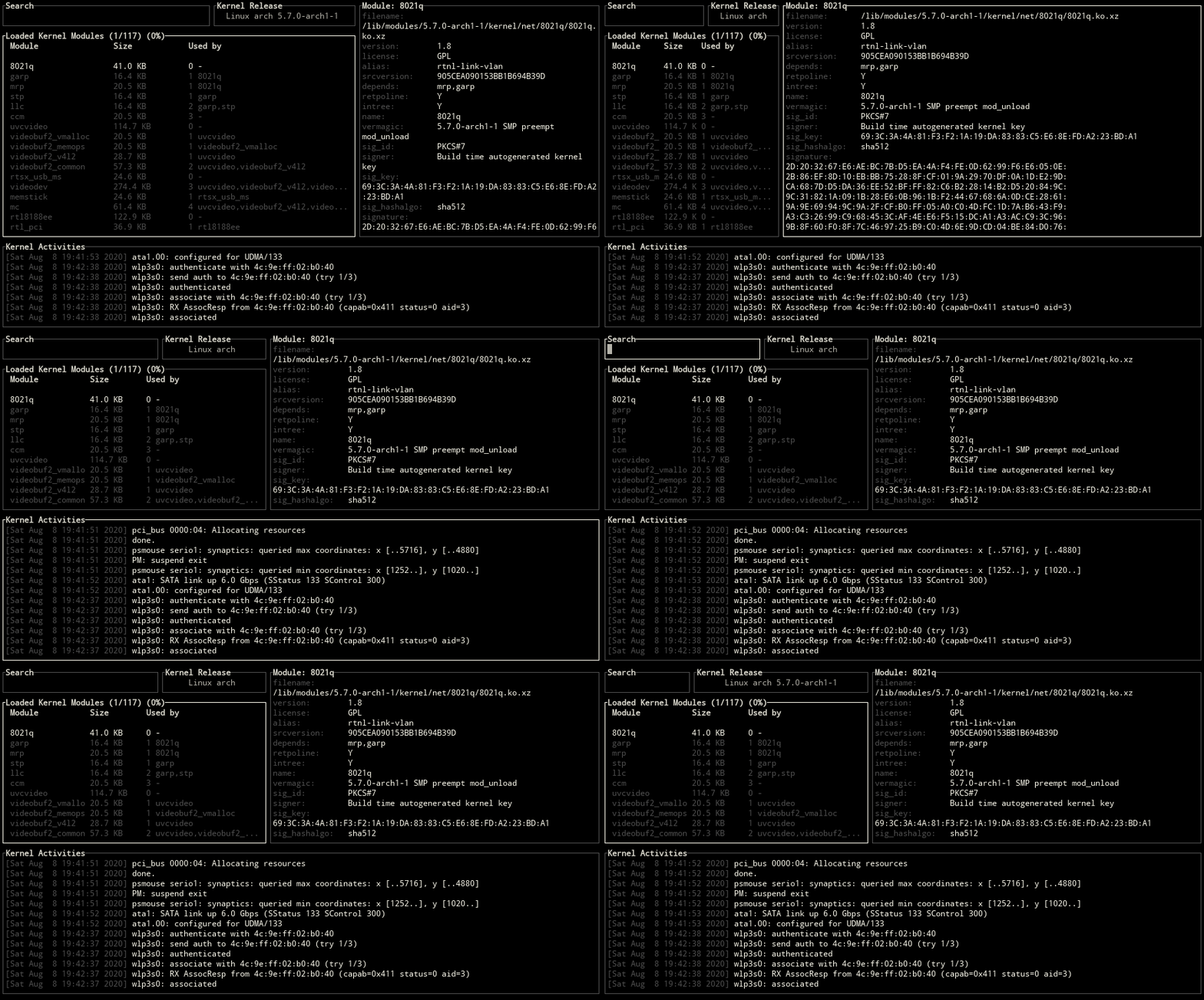
### Block Positions
`ctrl-x` key can be used for changing the positions of blocks.

### Kernel Information
Use one of the `\, tab, backtab` keys to switch between kernel release, version and platform informations.

### Module Information
The status of a kernel module is shown on selection.

#### Displaying the dependent modules
Use one of the `d, alt-d` keys to show all the dependent modules of the selected module.
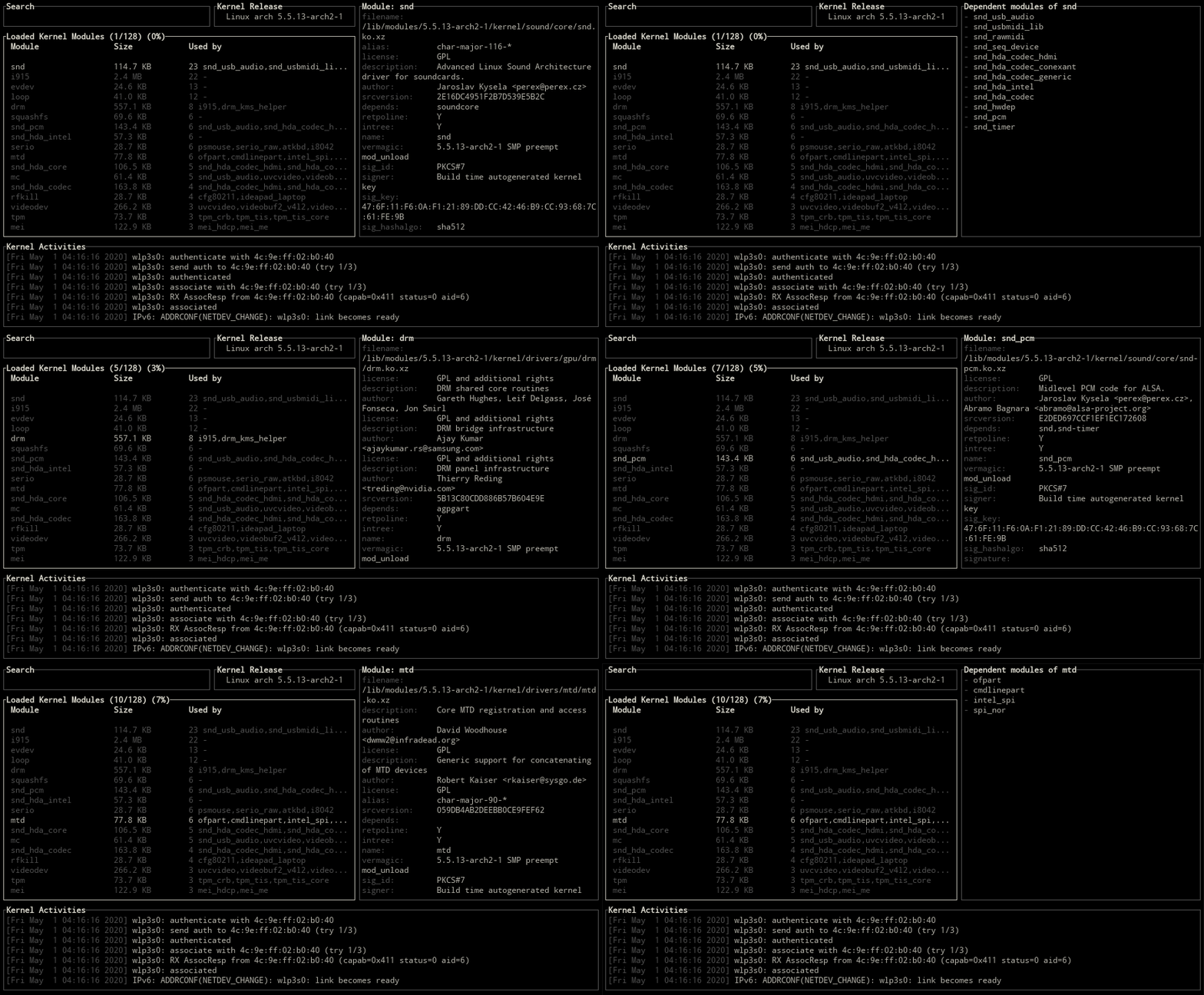
#### Jumping to dependent modules
For jumping to a dependent kernel module from its parent module, `number keys` (1-9) can be used for specifying the index of the module on the _Used By_ column.

### Searching a module
Switch to the search area with arrow keys or using one of the `/, s, enter` and provide a search query for the module name.

### Loading a module
For adding a module to the Linux kernel, switch to load mode with one of the `+, i, insert` keys and provide the name of the module to load. Then confirm/cancel the execution of the load command with `y/n`.

The command that used for loading a module:
```
modprobe <module_name> || insmod <module_name>.ko
```
### Unloading a module
Use one of the `-, u, backspace` keys to remove the selected module from the Linux kernel.

The command that used for removing a module:
```
modprobe -r <module_name> || rmmod <module_name>
```
### Blacklisting a module
[Blacklisting](https://wiki.archlinux.org/index.php/Kernel_module#Blacklisting) is a mechanism to prevent the kernel module from loading. To blacklist the selected module, use one of the `x, b, delete` keys and confirm the execution.
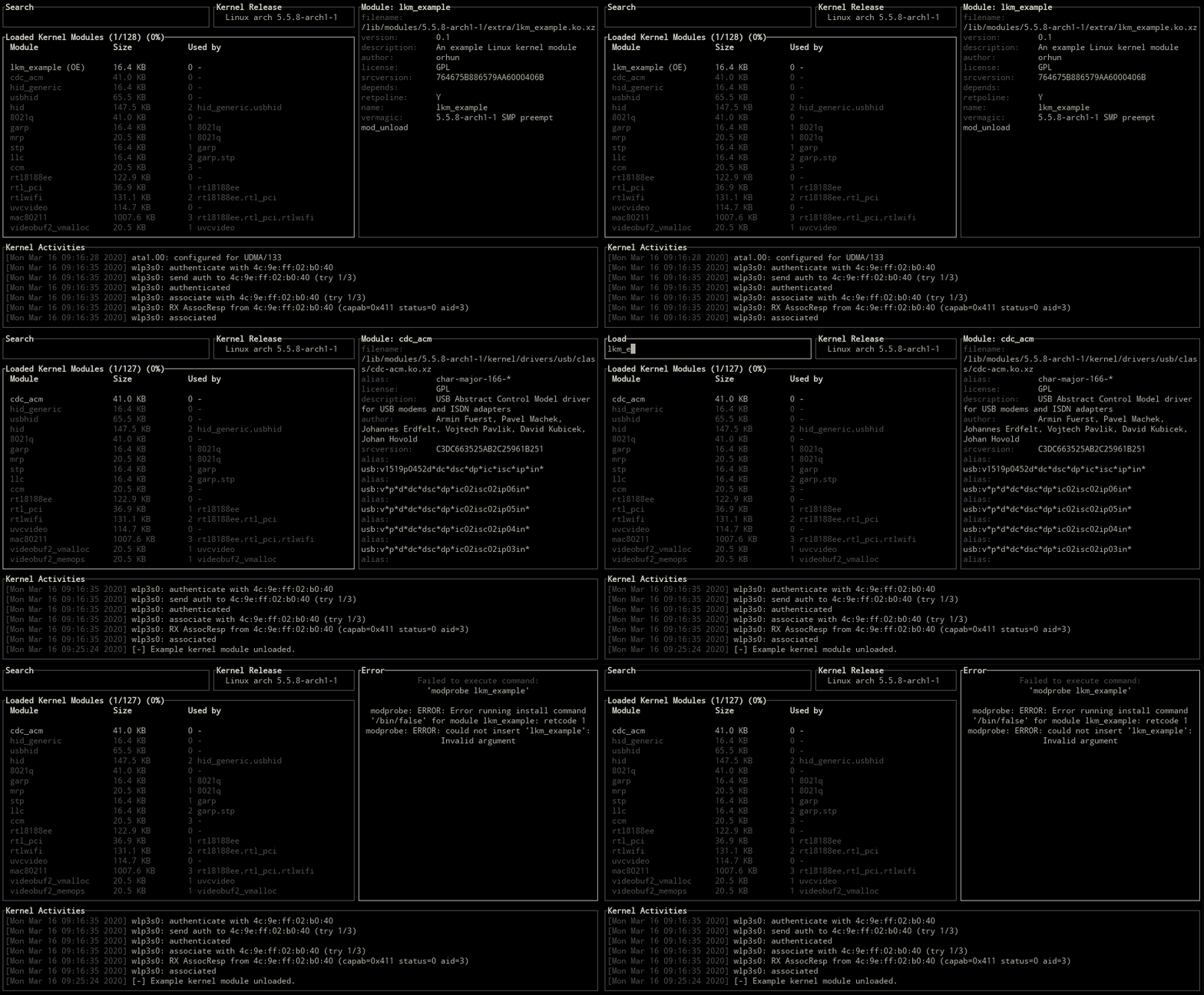
The command that used for blacklisting a module:
```
if ! grep -q <module_name> /etc/modprobe.d/blacklist.conf; then
echo 'blacklist <module_name>' >> /etc/modprobe.d/blacklist.conf
echo 'install <module_name> /bin/false' >> /etc/modprobe.d/blacklist.conf
fi
```
### Reloading a module
Use `ctrl-r` or `alt-r` key for reloading the selected module.

The command that used for reloading a module:
```
modprobe -r <module_name> || rmmod <module_name> && modprobe <module_name> || insmod <module_name>.ko
```
### Clearing the ring buffer
The kernel ring buffer can be cleared with using one of the `ctrl-l/u, alt-c` keys.

```
dmesg --clear
```
### Copy & Paste
`c/v` keys are set for copy/paste operations.
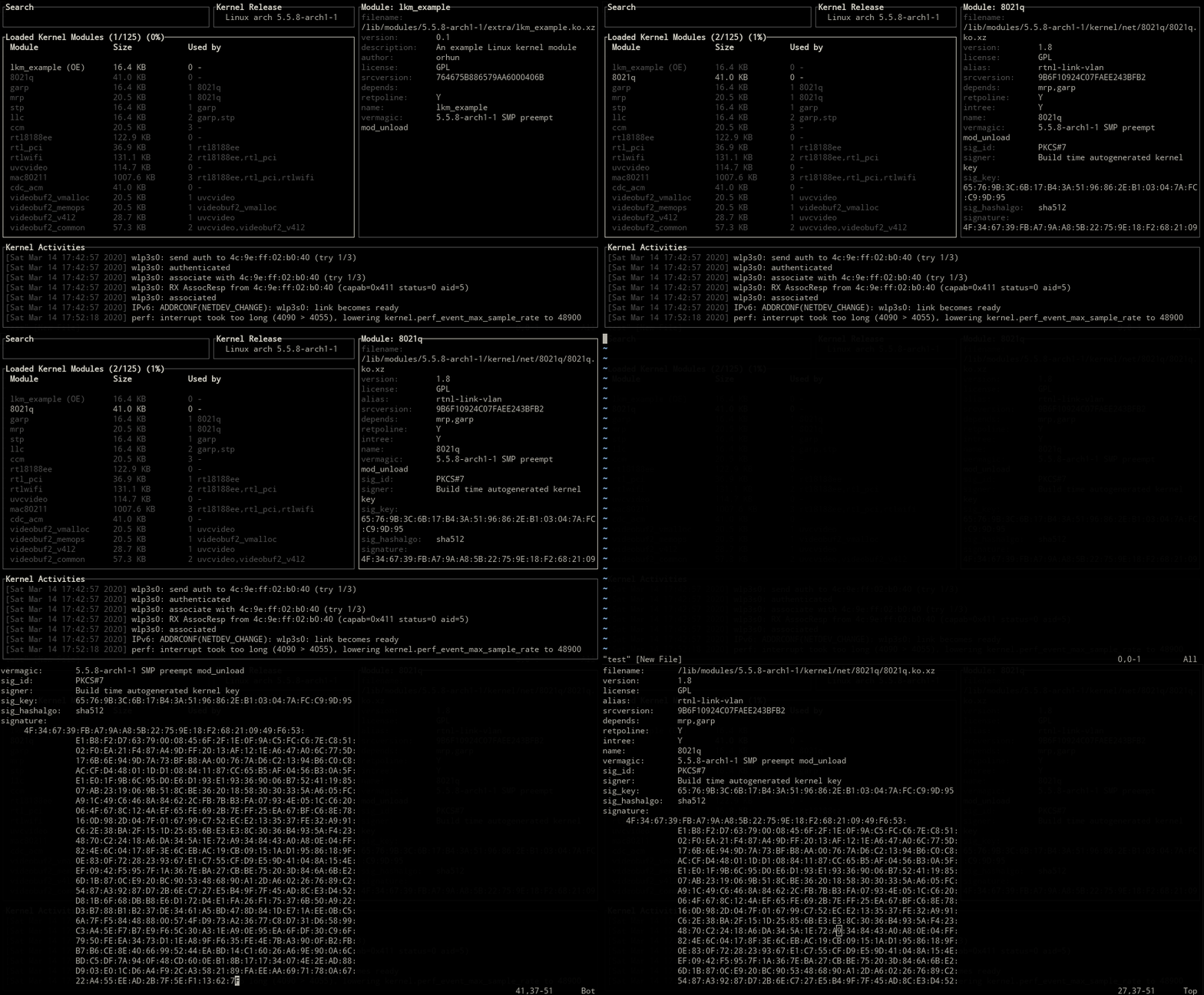
Use `ctrl-c/ctrl-v` for copying and pasting while in input mode.
### Sorting/reversing the kernel modules
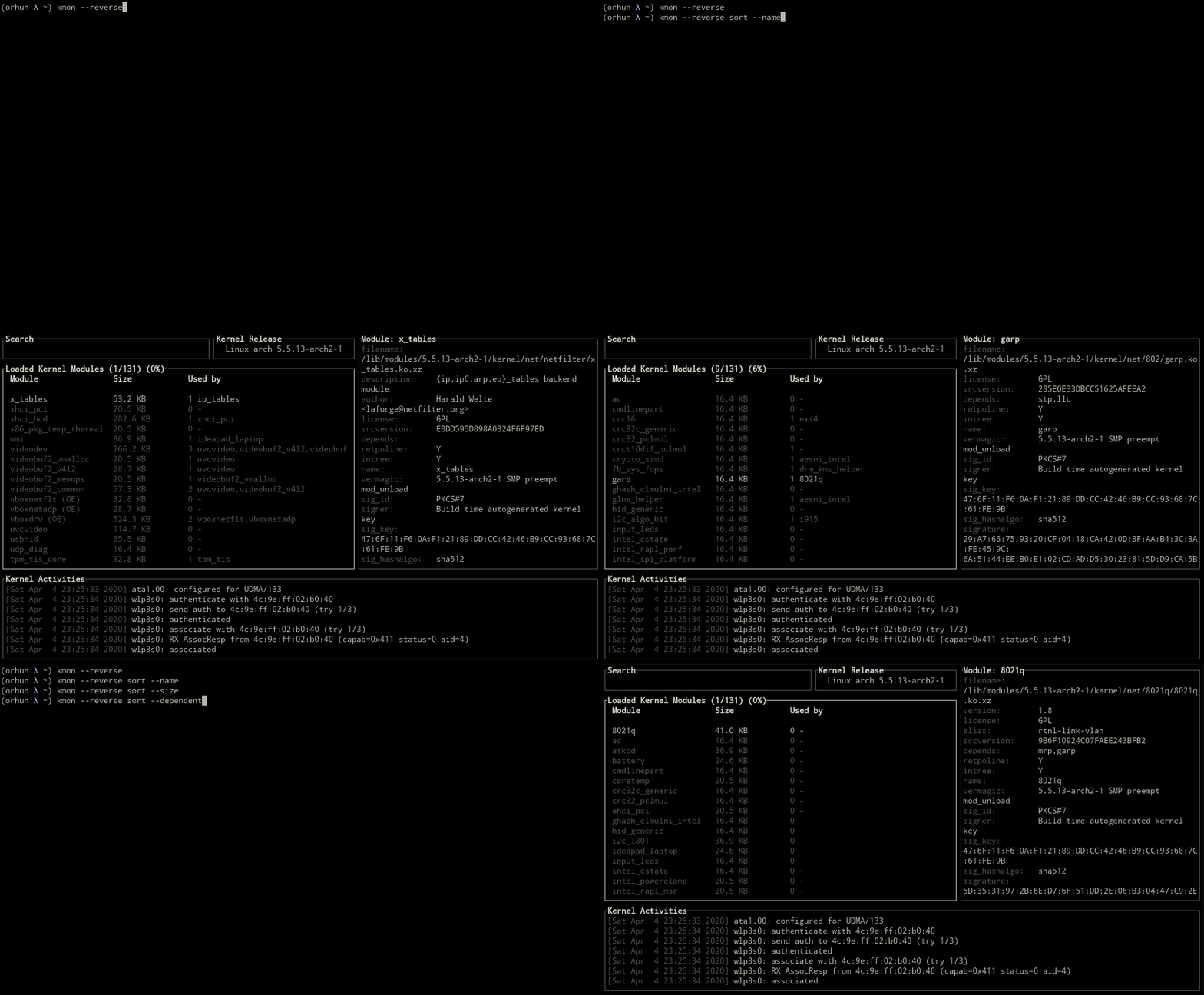
`sort` subcommand can be used for sorting the kernel modules by their names, sizes or dependent modules.
```
kmon sort --name
kmon sort --size
kmon sort --dependent
```

Also the `-r, --reverse` flag is used for reversing the kernel module list.
```
kmon --reverse
```
### Customizing the colors
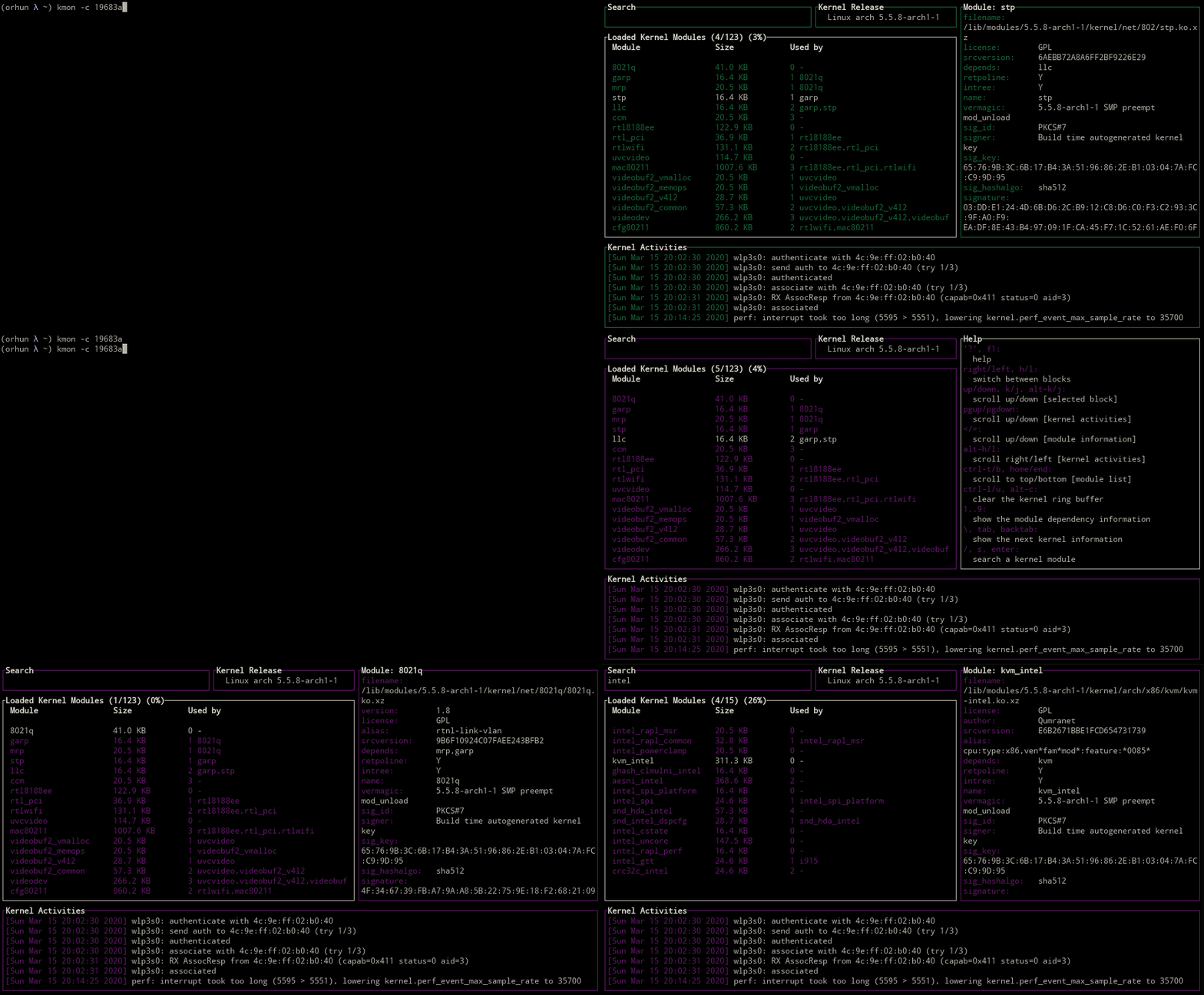
kmon uses the colors of the terminal as default but the highlighting color could be specified with `-c, --color` option. Alternatively, default text color can be set via `-a, --accent-color` option.
#### Supported colors
Supported terminal colors are `black, red, green, yellow, blue, magenta, cyan, gray, darkgray, lightred, lightgreen, lightyellow, lightblue, lightmagenta, lightcyan, white`.
```
kmon --color red
```

#### Using a custom color
Provide a hexadecimal value for the color to use.
```
kmon --color 19683a
```
#### Changing the accent color
Default text color might cause readability issues on some themes that have transparency. `-a, --accent-color` option can be used similarly to the `-c, --color` option for overcoming this issue.
```
kmon --color 6f849c --accent-color e35760
```

### Unicode symbols
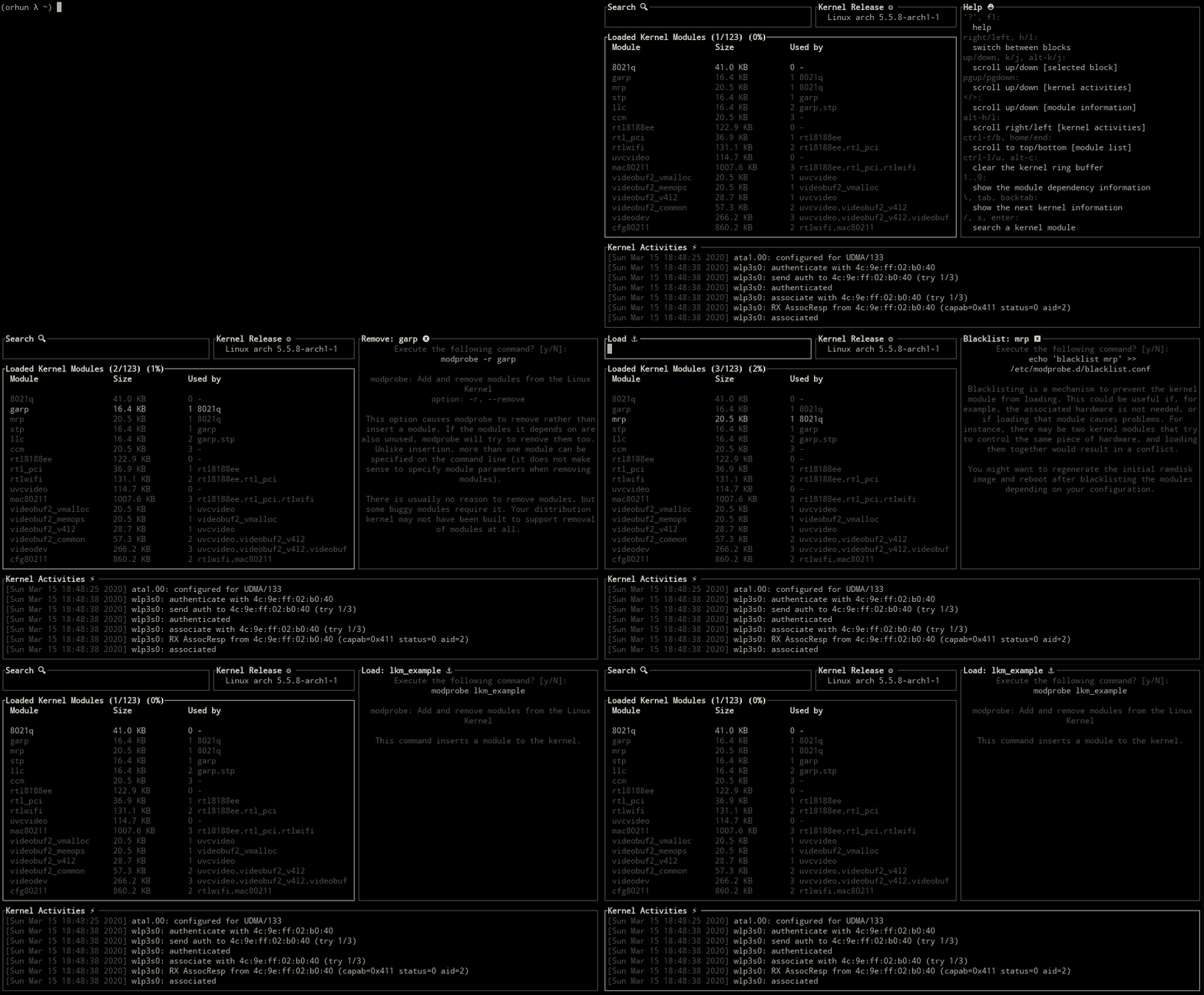
Use `-u, --unicode` flag for showing Unicode symbols for the block titles.
```
kmon --unicode
```
### Setting the terminal tick rate
`-t, --tickrate` option can be used for setting the refresh interval of the terminal UI in milliseconds.

## Roadmap
kmon aims to be a standard tool for Linux kernel management while supporting most of the Linux distributions.
### Accessibility
For achieving this goal, kmon should be accessible from different package managers such as [Snap](https://snapcraft.io/)[*](https://forum.snapcraft.io/t/unable-to-load-modules-to-kernel-and-get-module-information/16151) and [RPM](https://rpm.org/).
### Dependencies
It is required to have the essential tools like [dmesg](https://en.wikipedia.org/wiki/Dmesg) and [kmod](https://www.linux.org/docs/man8/kmod.html) on the system for kmon to work as expected. Thus the next step would be using just the system resources for these functions.
### Features
Management actions about the Linux kernel should be applicable in kmon for minimizing the dependence on to command line and other tools.
### Testing
kmon should be tested and reported on different architectures for further development and support.
## Resources
### About the project
* [Code of conduct](https://github.com/orhun/kmon/blob/master/CODE_OF_CONDUCT.md)
* [Contributing](https://github.com/orhun/kmon/blob/master/CONTRIBUTING.md)
* [Creating a release](https://github.com/orhun/kmon/blob/master/RELEASE.md)
### Articles
* [Exploring the Linux Kernel by Bob Cromwell](https://cromwell-intl.com/open-source/linux-kernel-details.html)
* [Anatomy of the Linux loadable kernel module by Terenceli](https://terenceli.github.io/%E6%8A%80%E6%9C%AF/2018/06/02/linux-loadable-module)
* [Managing kernel modules with kmod by Lucas De Marchi](https://elinux.org/images/8/89/Managing_Kernel_Modules_With_kmod.pdf)
### In the media
* [Manage And Monitor Linux Kernel Modules With Kmon](https://ostechnix.com/manage-and-monitor-linux-kernel-modules-with-kmon/) (
OSTechNix)
* [Kmon The Linux Kernel Management And Monitoring Software](https://www.youtube.com/watch?v=lukxf6CnR2o) (Brodie Robertson on YouTube)
### Gallery
Fedora 31 | Debian 10 | Manjaro 19
:-------------------------:|:-------------------------:|:-------------------------:
 |  | 
Ubuntu 18.04 | openSUSE | Void Linux
:-------------------------:|:-------------------------:|:-------------------------:
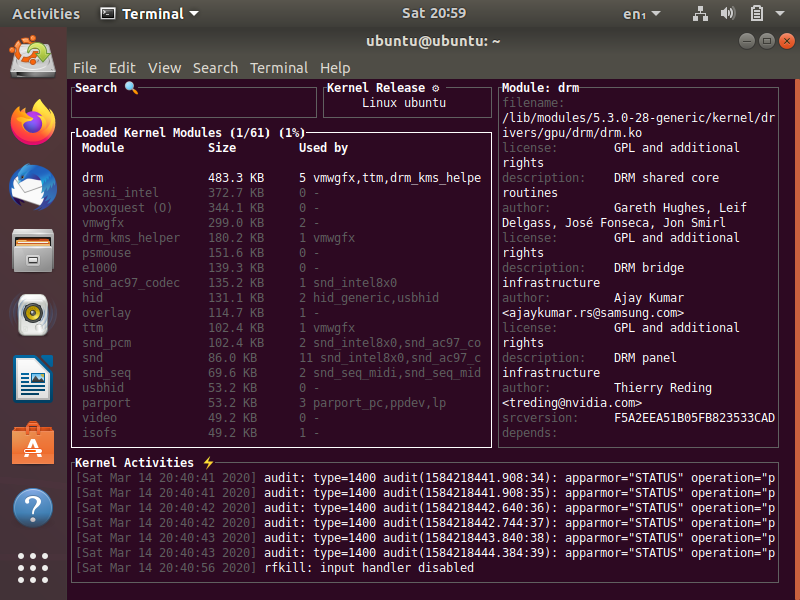 | 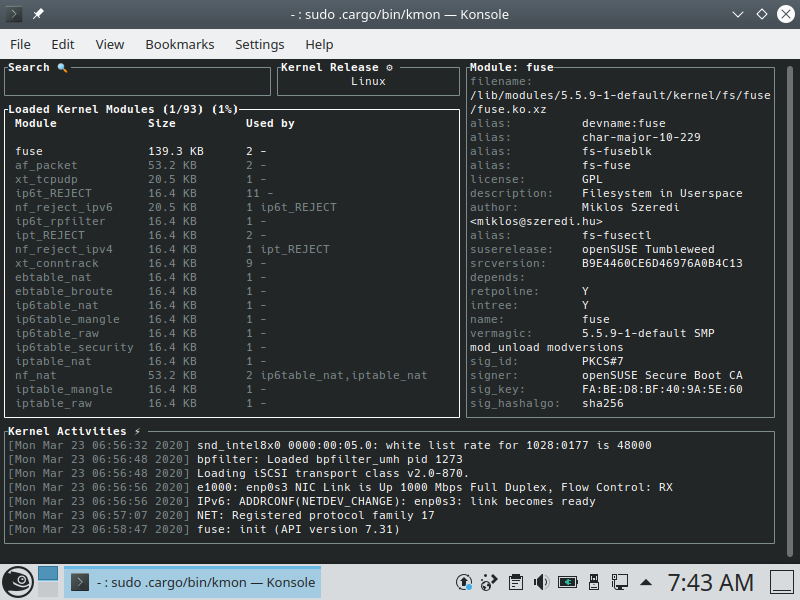 | 
### Social Media
* Follow [@kmonitor_](https://twitter.com/kmonitor_) on Twitter
* Follow the [author](https://orhun.dev/):
* [@orhun](https://github.com/orhun) on GitHub
* [@orhunp_](https://twitter.com/orhunp_) on Twitter
## Funding
### Patreon
Support the development of kmon and [other](https://www.patreon.com/orhunp) projects by becoming a [patron](https://www.patreon.com/join/orhunp).
[](https://www.patreon.com/join/orhunp)
### Open Collective
[](https://opencollective.com/kmon) [](https://opencollective.com/kmon)
Support the open source development efforts by becoming a [backer](https://opencollective.com/kmon/contribute/backer-15060/checkout) or [sponsor](https://opencollective.com/kmon/contribute/sponsor-15061/checkout).
[](https://opencollective.com/kmon/donate)
## License
GNU General Public License ([3.0](https://www.gnu.org/licenses/gpl.txt))
## Copyright
Copyright © 2020-2021, [Orhun Parmaksız](mailto:orhunparmaksiz@gmail.com)