<h1 align="center">kdam</h1>
<p align="center">
<a href="https://crates.io/crates/kdam">
<img src="https://img.shields.io/crates/d/kdam?style=flat-square">
</a>
<a href="https://crates.io/crates/kdam">
<img src="https://img.shields.io/crates/v/kdam?style=flat-square">
</a>
<a href="https://github.com/clitic/kdam">
<img src="https://img.shields.io/github/actions/workflow/status/clitic/kdam/tests.yml?logo=github&style=flat-square">
</a>
<a href="https://docs.rs/kdam/latest/kdam">
<img src="https://img.shields.io/docsrs/kdam?logo=docsdotrs&style=flat-square">
</a>
<a href="https://github.com/clitic/kdam#license">
<img src="https://img.shields.io/crates/l/kdam?style=flat-square">
</a>
<a href="https://github.com/clitic/kdam">
<img src="https://img.shields.io/github/repo-size/clitic/kdam?style=flat-square">
</a>
</p>
kdam is a console progress bar library for rust. It is port of [tqdm](https://github.com/tqdm/tqdm) library which is written in python. kdam supports almost all features of tqdm except a few. It also supports [jupyter notebook](https://github.com/clitic/kdam/tree/main/kdam/examples/notebook) same as tqdm does. Some features of tqdm can't be ported directly. So they are implemented in different way like, [RowManager](https://docs.rs/kdam/latest/kdam/struct.RowManager.html) which manages multiple progress bars but in tqdm progress bars are automatically managed using `nrows`. In addition to tqdm existing features kdam also provides extra features such as spinners, charset with fill, gradient colours etc. Since, kdam is written in rust its upto 4 times faster than tqdm.
Instantly make your loops show a smart progress meter. Just wrap any iterator with tqdm!(iterator) macro and you're done!
```rust
use kdam::tqdm;
fn main() {
for _ in tqdm!(0..100) {}
}
```
```
100%|█████████████████████████████| 100/100 [00:00<00:00, 25854.49it/s]
```
kdam also supports different bar animation styles. All available bar animation styles are:
[kdam/examples/showcase/animations.rs](https://github.com/clitic/kdam/blob/main/kdam/examples/showcase/animations.rs)
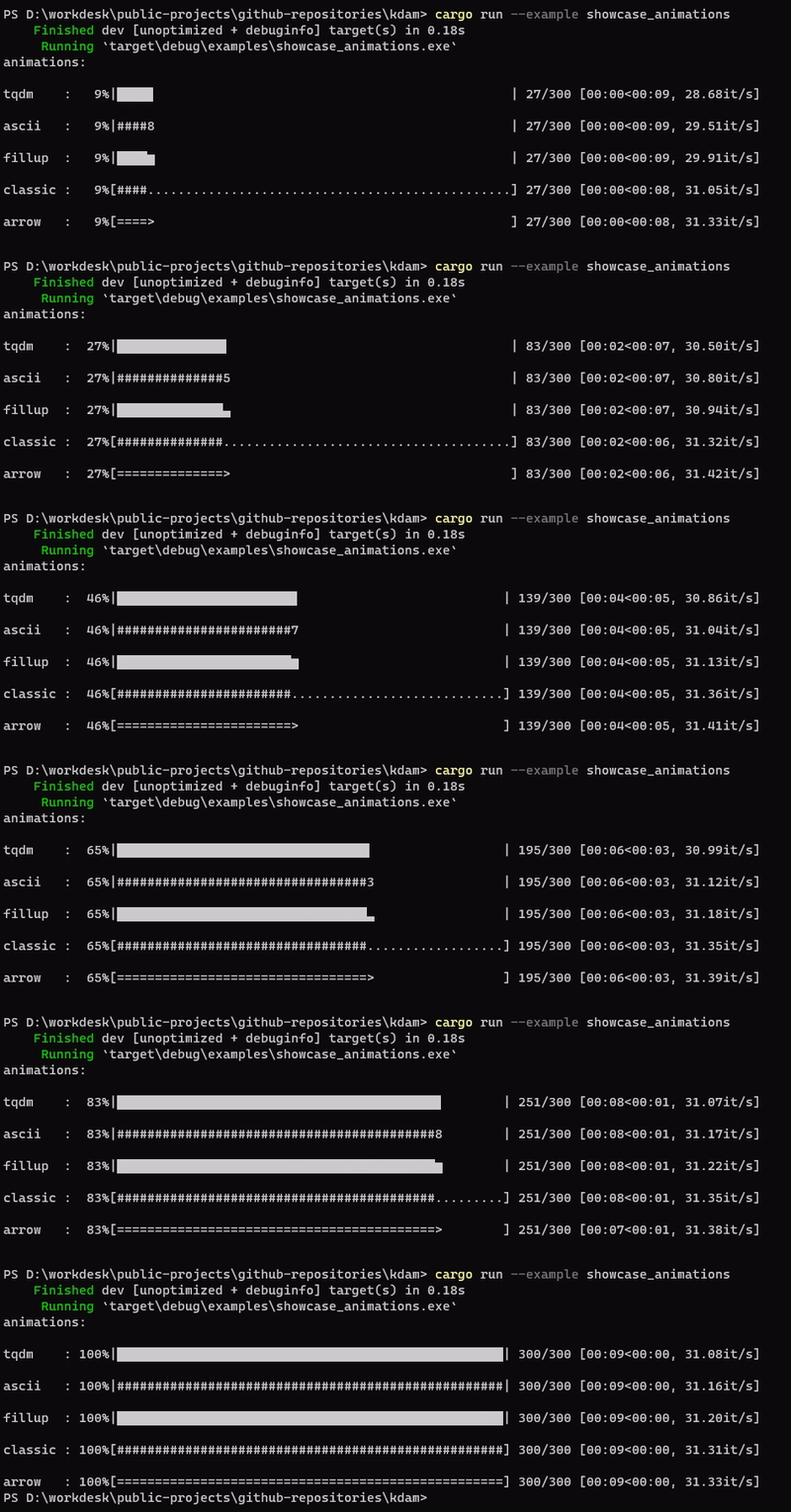
kdam also supports [rich.progress](https://rich.readthedocs.io/en/latest/progress.html) style bars with customizable columns.
[kdam/examples/rich.rs](https://github.com/clitic/kdam/blob/main/kdam/examples/rich.rs)

kdam doesn't restrict you to use default progress bar style. You can create your own progress bar using [bar_format](https://docs.rs/kdam/latest/kdam/struct.BarBuilder.html#method.bar_format) template. If you are not satisfied with bar_format limited options then you can also build your own [custom progress bar](https://github.com/clitic/kdam/blob/main/kdam/examples/miscellaneous/custom.rs).
This is clone of [alive-progress](https://github.com/rsalmei/alive-progress) using kdam.
[kdam/examples/template.rs](https://github.com/clitic/kdam/blob/main/kdam/examples/template.rs)

If you like colours then you can also create a gradient progress bar.
[kdam/examples/coloured/gradient.rs](https://github.com/clitic/kdam/blob/main/kdam/examples/coloured/gradient.rs)

## Getting Started
Add this to your Cargo.toml file.
```toml
[dependencies]
kdam = "0.6.2"
```
Or add from command line.
```bash
$ cargo add kdam
```
See [docs](https://docs.rs/kdam) and [examples](https://github.com/clitic/kdam/tree/main/kdam/examples) to
know how to use it.
## License
Dual Licensed
- [Apache License, Version 2.0](https://www.apache.org/licenses/LICENSE-2.0) ([LICENSE-APACHE](https://github.com/clitic/kdam/blob/main/kdam/LICENSE-APACHE))
- [MIT license](https://opensource.org/licenses/MIT) ([LICENSE-MIT](https://github.com/clitic/kdam/blob/main/kdam/LICENSE-MIT))