




Kache
Build once. Reuse the work.
Kache is a compiler cache for Rust, C/C++, and CUDA on Linux, macOS, and Windows. It restores matching compiler outputs across worktrees and CI runs, so you spend less time rebuilding and less disk space storing the same bytes.
Built by Kunobi.
Get started · Benchmarks · Kache vs sccache · CI setup
Install
kache init shows the changes before applying them. It configures Cargo's compiler
wrapper and offers a background service. On Unix it also sets up C/C++ compiler
shims. Run kache init --check for a preview.
Then use Cargo as usual in your project. Kache caches eligible compiler work automatically.
Cargo installation needs Rust 1.95 or newer. Prefer a prebuilt package? Homebrew, APT, Windows packages, mise, and Nix →
See it reuse a build
Build the same revision in two worktrees with separate target directories. The second can restore compatible outputs from the first. Try the walkthrough.

A new cache needs a build to fill it. Reuse requires matching inputs, toolchain, and build settings. Unsupported compiler invocations run normally. What can be cached →
Why use Kache?
- Reuse eligible Rust libraries, executables, and build scripts across worktrees. It also caches GCC, Clang, clang-cl, and single-source CUDA object compilations.
- Keep identical output bytes once in a cache with a disk budget. On filesystems with copy-on-write cloning, restored outputs share disk blocks with the cache.
- Run builds together. Compiles with the same cache key share one in-flight build, while the scheduler paces compiler processes.
- Share work through S3-compatible storage, Google Cloud Storage, a shared filesystem, or an OCI registry. The local cache works on its own.
- See what happened. Inspect hits and misses, then ask
kache explainwhat changed.
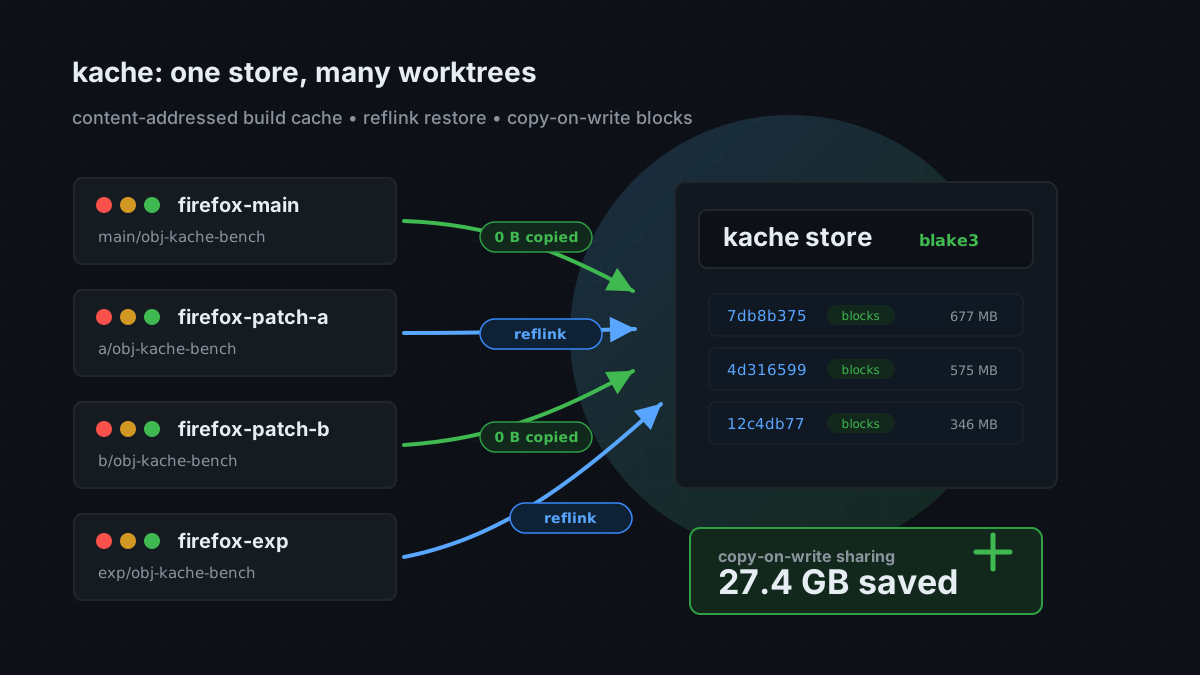
Rust executables and build-script runs are cached by default on Linux and macOS. See platform support and caching limits for Windows and other workload details.
Less disk per worktree
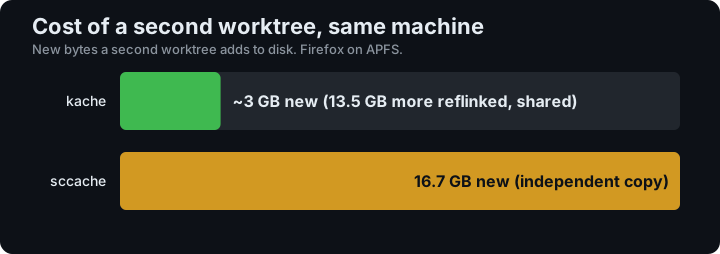
In a Firefox 151 benchmark with Kache 0.7.0 on macOS/APFS, the second worktree added about 3 GB of new data. Read the measurements and methodology →
Nightly workflows measure cold and warm builds of real projects, including Firefox, LLVM, and SurrealDB. Browse the benchmark reports to see the workload, platform, and validation behind each result.
Watch a build and explain a miss

See the current dashboard and controls →
Add it to CI
Install your Rust toolchain, then add the official action before your build:
- uses: kunobi-ninja/kache-action@v1
- run: cargo build --locked
The action can persist the local store through GitHub's cache service. For remote storage, credentials, and pull-request policy, follow the CI guide.
Find your next step
| I want to… | Guide |
|---|---|
| Confirm my first cache hits | Quick start |
| Cache Make, CMake, or CUDA builds | C/C++ · CUDA |
| Share a cache between machines | Remote cache |
| Change storage limits or build policy | Configuration |
| Investigate unexpected misses | Troubleshooting |
| Understand cache keys and correctness | How it works |
| Look up a command or flag | Command reference |
Help improve Kache
Report a bug, request a feature, or read CONTRIBUTING.md to contribute.
For Kubernetes and GitOps, Kunobi Desktop lets you inspect clusters and manage Flux and Argo CD.
Licensed under Apache 2.0.