[](https://github.com/kunobi-ninja/kache/actions/workflows/ci.yml)
[](https://github.com/kunobi-ninja/kache/actions/workflows/bench.yml)
[](https://crates.io/crates/kache)
[][docs-badge]
[][product-badge]
# Kache
Kache is a compiler cache for Rust, C/C++, and CUDA. It keys every compiler invocation by the content of its inputs, so a crate built once is restored instead of rebuilt in your next worktree, branch, or CI run. Outputs live in a local content-addressed store and can be shared through S3-compatible or filesystem remotes. Linux, macOS, and Windows are supported and release-tested.
Built by [Kunobi][kunobi-brand].
[Benchmarks][nav-benchmarks] · [Kache vs sccache][nav-comparison] · [CI setup][nav-ci]
[][hero-image]
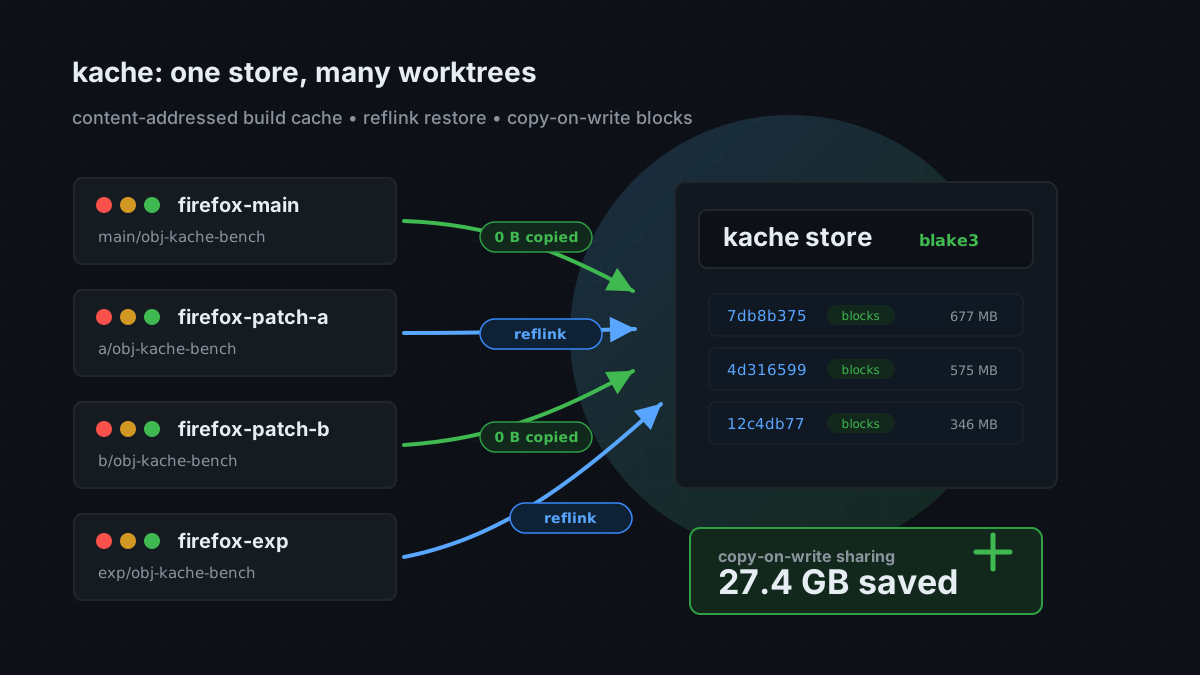
[See how Kache shares build outputs across worktrees →][hero-details]
## Install
```bash
cargo install kache
kache init
```
That's it. Your Cargo commands do not change.
`kache init` sets `rustc-wrapper` in Cargo's config. On Unix it also adds the `[env]` keys for build-script C and C++. Run `kache init --check` to preview the changes, or `kache init --no-service` to skip the OS service.

`cargo install` needs Rust 1.95 or newer. Prebuilt packages exist for Homebrew, APT, AUR, winget, Scoop, Chocolatey, mise, and Nix; release builds cover x86_64 and ARM on all three platforms. See [Install Kache](https://kunobi.ninja/docs/kache/getting-started/installation) for each channel.
## See your first cache hit
After `kache init`, [build the same revision in two temporary worktrees][first-reuse]. Each gets its own target directory, so your existing build outputs stay in place. The second tree's report lists the hits, and a bypass reason for every unit that still compiled.

## How it works
Kache has three parts: a compiler wrapper, a local store, and an optional daemon.
- The wrapper parses each `rustc`, `cc`, `c++`, or `nvcc` invocation, hashes the inputs that change the output, and normalizes the machine-local paths that do not. Two worktrees of the same revision produce the same key.
- The store keeps outputs as content-addressed blobs. Identical bytes are stored once. Restores use copy-on-write clones where the filesystem supports them, which is what keeps a second worktree cheap on disk.
- Concurrent builds that reach the same key join one flight, so the compiler runs once per key on a machine, however many Cargo processes ask for it.
- The daemon serves remote lookups after a local miss and uploads new entries in the background.
Hits, misses, and passthroughs are reported per unit, and `kache why-miss` explains what changed. [Read the architecture →](https://kunobi.ninja/docs/kache/how-it-works/architecture)
## What Kache caches
| Rust libraries and build scripts | Supported | Run `kache init` |
| Rust executables | Supported on Linux and macOS | Disabled by default on Windows |
| C and C++ object files | Supported | GCC, Clang, Apple Clang, and clang-cl. Build scripts via `kache init`; other builds via shims or `CC`/`CXX` |
| CUDA object files | Supported | Single-source `nvcc -c` and `-dc` via `CUDACXX="kache nvcc"` or a CMake launcher |
| Local storage | Built in | Content-addressed store with garbage collection |
| S3-compatible remote storage | Built in | Includes AWS S3, MinIO, and Cloudflare R2 |
| Filesystem remote storage | Built in | Useful for shared disks and CI volumes |
[][storage-chart]
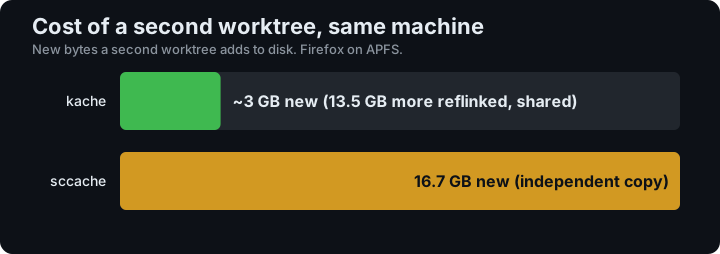
In a Firefox 151 benchmark with Kache 0.7.0 on macOS/APFS, the second worktree added about 3 GB of new data. [Read the measurements and methodology →][storage-report]
Need to choose between compiler caches? Read [Kache or sccache?](https://kunobi.ninja/docs/kache/getting-started/comparison).
## Tested nightly on real projects
The scheduled [benchmark workflow](https://github.com/kunobi-ninja/kache/actions/workflows/bench.yml) runs real cold/warm builds of Firefox, LLVM, Substrate, SurrealDB, Lance, OpenDAL, and eza on Linux, compares Firefox with sccache, and exercises Firefox on Windows. It also measures how much of a Firefox build survives a source update.
Each run checks its own measurement validity and uploads reports, traces, and logs for 30 days. Treat timing or hit-rate numbers as evidence only when the individual job succeeds and its benchmark verdict is `ok`.
[See the benchmark setup and report guide →][benchmark-guide]
## CI
The official action installs Kache and wires it into the build:
```yaml
- uses: kunobi-ninja/kache-action@v1
- run: cargo build --locked
```
See the [CI guide](https://kunobi.ninja/docs/kache/remote-cache/ci) for GitHub Actions and shell-based CI examples.
## C and C++
On Unix, install compiler-name shims and put that directory first in `PATH`. Make, CMake, autotools, and Arch PKGBUILDs that call `gcc` by name then go through Kache. No `CC=` edit and no shell wrapper.
```bash
kache install-shims
export PATH="$HOME/.local/lib/kache/shims:$PATH"
```
APT and AUR packages install `/usr/lib/kache`. Nix packages include the same symlinks in `${kache}/shims` and `${kache}/lib/kache`; see the [Nix configuration example](https://kunobi.ninja/docs/kache/getting-started/installation#nix).
`kache init` can create the user farm; it does not change `PATH`. For `makepkg`, put the same assignment in `~/.makepkg.conf`. Wrap extra names already on `PATH` with `kache install-shims --from-path`.
Kache inspects the real compiler invocation. Unsupported or unsafe invocations pass through. See [C and C++](https://kunobi.ninja/docs/kache/getting-started/c-cpp).
## Storage and remotes
The default local cache is:
- Linux: `$XDG_CACHE_HOME/kache` or `~/.cache/kache`
- macOS: `~/Library/Caches/kache`
- Windows: `%LOCALAPPDATA%\kache`
Open the configuration editor with `kache config`, or edit the TOML file directly. A minimal S3-compatible remote looks like this:
```toml
[cache.remote]
type = "s3"
bucket = "my-build-cache"
region = "us-east-1"
```
Credentials come from the standard AWS environment variables or credential chain. See [S3 setup](https://kunobi.ninja/docs/kache/remote-cache/s3-setup) and [filesystem setup](https://kunobi.ninja/docs/kache/remote-cache/filesystem-setup).
## Useful commands
```bash
kache monitor # live build and cache activity
kache stats # non-interactive summary
kache report --last-build # hits, misses, and bypass reasons of the latest build
kache doctor # setup and integrity checks
kache install-shims # Unix compiler-name PATH farm
kache why-miss <crate> # explain the latest miss
kache list # inspect cached entries
kache gc # enforce cache limits
kache sync # pull from and push to the configured remote
kache daemon status # inspect the background service
```

Run `kache help <command>` for exact flags. The [command reference](https://kunobi.ninja/docs/kache/commands/reference) covers every top-level command.
To pass one build through without changing the setup, run it with `KACHE_DISABLED=1`.
## Documentation
- [Product page](https://kunobi.ninja/product/kache)
- [Install Kache](https://kunobi.ninja/docs/kache/getting-started/installation)
- [Quick start](https://kunobi.ninja/docs/kache/getting-started/quick-start)
- [C and C++](https://kunobi.ninja/docs/kache/getting-started/c-cpp)
- [Configuration](https://kunobi.ninja/docs/kache/getting-started/configuration)
- [How cache keys work](https://kunobi.ninja/docs/kache/how-it-works/cache-key)
- [Daemon lifecycle](https://kunobi.ninja/docs/kache/daemon/lifecycle)
- [Benchmarks](https://kunobi.ninja/docs/kache/benchmarks)
## Also from Kunobi
For Kubernetes and GitOps, [Kunobi Desktop][kunobi-desktop] lets you inspect clusters and manage Flux and Argo CD.
## Questions and gaps
- [Open a bug report](https://github.com/kunobi-ninja/kache/issues/new?template=bug_report.md) when Kache behaves differently from the documentation.
- [Request a feature](https://github.com/kunobi-ninja/kache/issues/new?template=feature_request.md) for a missing compiler, remote backend, or build workflow.
## Development
```bash
git clone https://github.com/kunobi-ninja/kache.git
cd kache
cargo test --workspace --all-features
```
See [CONTRIBUTING.md](.github/CONTRIBUTING.md) before opening a pull request.
Kache is licensed under the [Apache License 2.0](LICENSE).
[docs-badge]: https://kunobi.ninja/docs/kache?utm_source=github&utm_medium=readme&utm_campaign=kache&utm_content=docs_badge
[product-badge]: https://kunobi.ninja/product/kache?utm_source=github&utm_medium=readme&utm_campaign=kache&utm_content=product_badge
[kunobi-brand]: https://kunobi.ninja/?utm_source=github&utm_medium=readme&utm_campaign=kache&utm_content=brand
[nav-benchmarks]: https://kunobi.ninja/docs/kache/benchmarks?utm_source=github&utm_medium=readme&utm_campaign=kache&utm_content=nav_benchmarks
[nav-comparison]: https://kunobi.ninja/docs/kache/getting-started/comparison?utm_source=github&utm_medium=readme&utm_campaign=kache&utm_content=nav_comparison
[nav-ci]: https://kunobi.ninja/docs/kache/remote-cache/ci?utm_source=github&utm_medium=readme&utm_campaign=kache&utm_content=nav_ci
[hero-image]: https://kunobi.ninja/product/kache?utm_source=github&utm_medium=readme&utm_campaign=kache&utm_content=hero_image
[hero-details]: https://kunobi.ninja/product/kache?utm_source=github&utm_medium=readme&utm_campaign=kache&utm_content=hero_details
[storage-chart]: https://kunobi.ninja/blog/kache-storage-worktrees?utm_source=github&utm_medium=readme&utm_campaign=kache&utm_content=storage_chart
[storage-report]: https://kunobi.ninja/blog/kache-storage-worktrees?utm_source=github&utm_medium=readme&utm_campaign=kache&utm_content=storage_report
[benchmark-guide]: https://kunobi.ninja/docs/kache/benchmarks?utm_source=github&utm_medium=readme&utm_campaign=kache&utm_content=benchmark_guide
[first-reuse]: https://kunobi.ninja/docs/kache/getting-started/quick-start?utm_source=github&utm_medium=readme&utm_campaign=kache&utm_content=first_reuse
[kunobi-desktop]: https://kunobi.ninja/product/desktop?utm_source=github&utm_medium=readme&utm_campaign=kache&utm_content=desktop