<p align="center">
<source media="(prefers-color-scheme: dark)" srcset="assets/jnv-dark.svg">
<img alt="Text describing the image" src="assets/jnv-light.svg" width="50%" height="50%">
</p>
[](https://github.com/ynqa/jnv/actions/workflows/ci.yml)
*jnv* is designed for navigating JSON,
offering an interactive JSON viewer and `jq` filter editor.

Inspired by [jid](https://github.com/simeji/jid)
and [jiq](https://github.com/fiatjaf/jiq).
## Features
- Interactive JSON viewer and `jq` filter editor
- Syntax highlighting for JSON
- Use [jaq](https://github.com/01mf02/jaq) to apply `jq` filter
- This eliminates the need for users to prepare `jq` on their own
- Configurable features via TOML configuration
- Toggle hint message display
- Adjust UI reactivity (debounce times and animation speed)
- Editor appearance and behavior
- JSON viewer styling
- Adjust completion feature display and behavior
- Keybinds
- Capable of accommodating various format
- Input: File, stdin
- Data: A JSON or multiple JSON structures
that can be deserialized with
[StreamDeserializer](https://docs.rs/serde_json/latest/serde_json/struct.StreamDeserializer.html),
such as [JSON Lines](https://jsonlines.org/)
- Auto-completion for the filter
- Only supports:
- [Identity](https://jqlang.github.io/jq/manual/#identity)
- [Object Identifier-Index](https://jqlang.github.io/jq/manual/#object-identifier-index)
- [Array Index](https://jqlang.github.io/jq/manual/#array-index)
- Hint message to evaluate the filter
## Installation
[](https://repology.org/project/jnv/versions)
### Homebrew
See [here](https://formulae.brew.sh/formula/jnv) for more info.
```bash
brew install jnv
```
Or install via Homebrew Tap:
```bash
brew install ynqa/tap/jnv
```
### MacPorts
See [here](https://ports.macports.org/port/jnv/) for more info.
```bash
sudo port install jnv
```
### Nix / NixOS
See [package entry on search.nixos.org](https://search.nixos.org/packages?channel=unstable&query=jnv) for more info.
```bash
nix-shell -p jnv
```
### conda-forge
See [here](https://prefix.dev/channels/conda-forge/packages/jnv) for more info.
```bash
pixi global install jnv
# or
conda install jnv
```
### Docker
Build
(In the near future, the image will be available on something of registries)
```bash
docker build -t jnv .
```
And Run
(The following commad is just an example. Please modify the path to the file you want to mount)
```bash
docker run -it --rm -v $(pwd)/debug.json:/jnv/debug.json jnv /jnv/debug.json
```
### Cargo
```bash
cargo install jnv
```
## Examples
```bash
jnv data.json
```
## Keymap
| <kbd>Ctrl + C</kbd> | Exit |
| <kbd>Ctrl + Q</kbd> | Copy jq filter to clipboard |
| <kbd>Ctrl + O</kbd> | Copy JSON to clipboard |
| <kbd>Shift + ↑</kbd>, <kbd>Shift + ↓</kbd> | Switch to another mode |
### Editor mode (default)
| <kbd>Tab</kbd> | Enter suggestion |
| <kbd>←</kbd> | Move cursor left |
| <kbd>→</kbd> | Move cursor right |
| <kbd>Ctrl + A</kbd> | Move cursor to line start |
| <kbd>Ctrl + E</kbd> | Move cursor to line end |
| <kbd>Backspace</kbd> | Delete character before cursor |
| <kbd>Ctrl + U</kbd> | Clear entire line |
| <kbd>Alt + B</kbd> | Move the cursor to the previous nearest character within set(`.`,`\|`,`(`,`)`,`[`,`]`) |
| <kbd>Alt + F</kbd> | Move the cursor to the next nearest character within set(`.`,`\|`,`(`,`)`,`[`,`]`) |
| <kbd>Ctrl + W</kbd> | Erase to the previous nearest character within set(`.`,`\|`,`(`,`)`,`[`,`]`) |
| <kbd>Alt + D</kbd> | Erase to the next nearest character within set(`.`,`\|`,`(`,`)`,`[`,`]`) |
#### Suggestion in Editor (after <kbd>Tab</kbd>)
| <kbd>Tab</kbd>, <kbd>↓</kbd> | Select next suggestion |
| <kbd>↑</kbd> | Select previous suggestion |
| Others | Return to editor |
### JSON viewer mode
| <kbd>↑</kbd>, <kbd>Ctrl + K</kbd> | Move up |
| <kbd>↓</kbd>, <kbd>Ctrl + J</kbd> | Move down |
| <kbd>Ctrl + H</kbd> | Move to last entry |
| <kbd>Ctrl + L</kbd> | Move to first entry |
| <kbd>Enter</kbd> | Toggle fold |
| <kbd>Ctrl + P</kbd> | Expand all |
| <kbd>Ctrl + N</kbd> | Collapse all |
## Usage
```bash
JSON navigator and interactive filter leveraging jq
Usage: jnv [OPTIONS] [INPUT]
Examples:
- Read from a file:
jnv data.json
- Read from standard input:
cat data.json | jnv
Arguments:
[INPUT] Optional path to a JSON file. If not provided or if "-" is specified, reads from standard input
Options:
-c, --config <CONFIG_FILE> Path to the configuration file.
--default-filter <DEFAULT_FILTER> Default jq filter to apply to the input data
-h, --help Print help (see more with '--help')
-V, --version Print version
```
## Configuration
jnv uses a TOML format configuration file to customize various features.
The configuration file is loaded in the following order of priority:
1. Path specified on the command line (`-c` or `--config` option)
2. Default configuration file path
### Default Configuration File Location
Following the `dirs` crate,
the default configuration file location for each platform is as follows:
- **Linux**: `~/.config/jnv/config.toml`
- **macOS**: `~/Library/Application Support/jnv/config.toml`
- **Windows**: `C:\Users\{Username}\AppData\Roaming\jnv\config.toml`
If the configuration file does not exist,
it will be automatically created on first run.
### Configuration Options
The following settings are available in `config.toml`:
```toml
# Whether to hide the hint message
no_hint = false
# Editor settings
[editor]
# Editor mode ("Insert" or "Overwrite")
mode = "Insert"
# Word break characters
word_break_chars = [".", "|", "(", ")", "[", "]"]
# Theme when editor is focused
[editor.theme_on_focus]
prefix = "❯❯ "
prefix_style = { foreground = "blue" }
active_char_style = { background = "magenta" }
inactive_char_style = {}
# Theme when editor is not focused
[editor.theme_on_defocus]
prefix = "▼ "
prefix_style = { foreground = "blue", attributes = ["Dim"] }
active_char_style = { attributes = ["Dim"] }
inactive_char_style = { attributes = ["Dim"] }
# JSON display settings
[json]
# Maximum number of JSON objects to read from stream
# max_streams =
# JSON theme settings
[json.theme]
indent = 2
curly_brackets_style = { attributes = ["Bold"] }
square_brackets_style = { attributes = ["Bold"] }
key_style = { foreground = "cyan" }
string_value_style = { foreground = "green" }
number_value_style = {}
boolean_value_style = {}
null_value_style = { foreground = "grey" }
# Completion feature settings
[completion]
lines = 3
cursor = "❯ "
active_item_style = { foreground = "grey", background = "yellow" }
inactive_item_style = { foreground = "grey" }
search_result_chunk_size = 100
search_load_chunk_size = 50000
# Keybind settings
[keybinds]
# Application exit key
exit = [{ Key = { modifiers = "CONTROL", code = { Char = "c" } } }]
# Copy query to clipboard key
copy_query = [{ Key = { modifiers = "CONTROL", code = { Char = "q" } } }]
# Copy result to clipboard key
copy_result = [{ Key = { modifiers = "CONTROL", code = { Char = "o" } } }]
# Mode switch keys
switch_mode = [
{ Key = { code = "Down", modifiers = "SHIFT" } },
{ Key = { code = "Up", modifiers = "SHIFT" } }
]
# Editor operation keybinds
[keybinds.on_editor]
# (Details omitted)
# JSON viewer keybinds
[keybinds.on_json_viewer]
# (Details omitted)
# Application reactivity settings
[reactivity_control]
# Delay time after query input
query_debounce_duration = "600ms"
# Redraw delay time after window resize
resize_debounce_duration = "200ms"
# Spinner animation update interval
spin_duration = "300ms"
```
For more details on configuration, please refer to [default.toml](./default.toml)
> [!WARNING]
> Depending on the type of terminal and environment,
> characters and styles may not be displayed properly.
> Specific key bindings and decorative characters may not
> display or function correctly in certain terminal emulators.
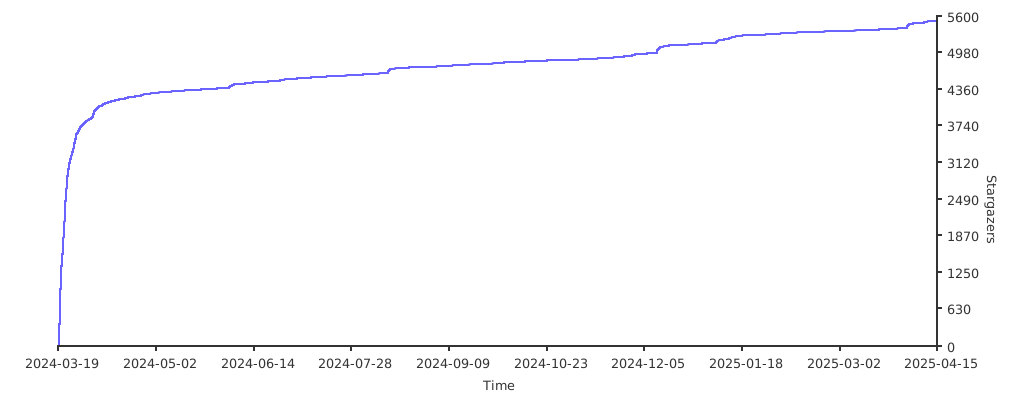
## Stargazers over time
[](https://starchart.cc/ynqa/jnv)