
jiq — Interactive JSON query tool with real-time output




Features
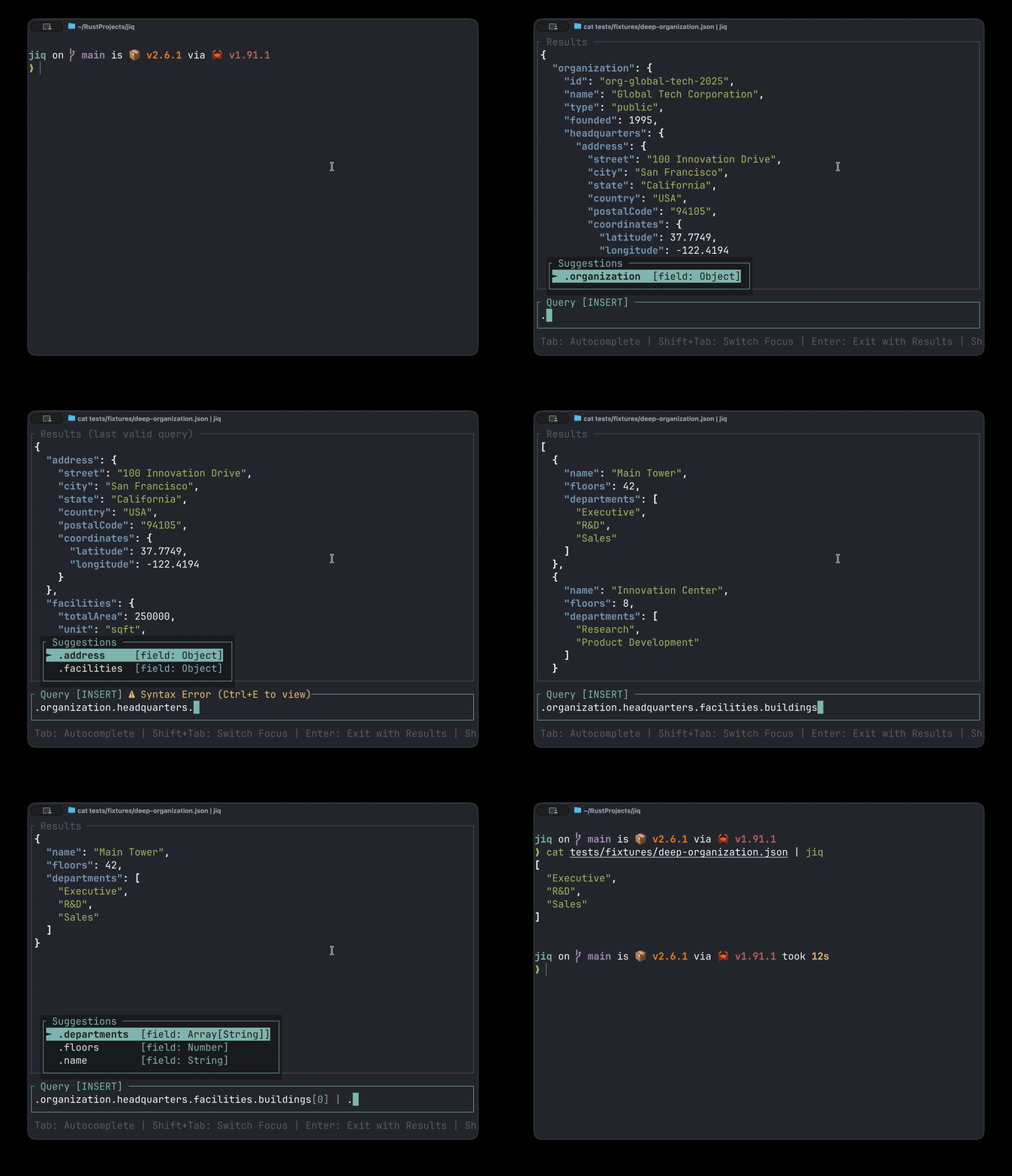
- Real-time query execution - See results as you type
- [EXPERIMENTAL] AI assistant - Get intelligent query suggestions, error fixes, and natural language interpretation
- [EXPERIMENTAL] Context-aware autocomplete - Intelligent suggestions with JSON type information for fields and functions
- Function tooltip - Quick reference help for jq functions with examples
- Search in results - Find and navigate text in JSON output with highlighting
- Query history - Searchable history of successful queries
- Clipboard support - Copy query or results to clipboard (also supports OSC 52 for remote terminals)
- Floating error overlay - Syntax errors appear in a non-disruptive overlay
- VIM keybindings - VIM-style editing for power users
- [EXPERIMENTAL] Syntax highlighting - Colorized JSON output and jq query syntax (experimental)
- Stats bar - Shows result type and count (e.g., "Array [5 objects]", "Stream [3 values]")
- Flexible output - Export results or query string
Demo
Installation
Requirements
- jq - JSON processor (installation guide)
Install via Script (macOS/Linux)
|
Install via Homebrew (macOS)
Install via Cargo
Download Binary
Download pre-built binaries from GitHub Releases
Quick Start
# From file
# From stdin
|
|
|
Usage
Workflow:
- Start typing your jq query (begins in INSERT mode)
- Use autocomplete suggestions for functions and fields (
Tabto accept) - See results update in real-time
- Press
Shift+Tabto navigate results - Press
Enterto output results, orCtrl+Qto output query
VIM users: Press ESC to enter NORMAL mode for advanced editing.
Keybindings
| Key | Action |
|---|---|
F1 or ? |
Toggle keyboard shortcuts help popup |
Shift+Tab |
Switch focus between Input and Results |
Ctrl+Y |
Copy current query or results to clipboard |
yy |
Copy current query or results to clipboard (NORMAL mode) |
Ctrl+T |
Toggle function tooltip (when cursor is on a function) |
Ctrl+E |
Toggle error overlay (when syntax error exists) |
Ctrl+A |
Toggle AI assistant popup |
Enter |
Exit and output filtered JSON |
Ctrl+Q |
Exit and output query string only (Shift+Enter may also work in some modern terminal emulators) |
q / Ctrl+C |
Quit without output |
| Key | Action |
|---|---|
| Type characters | Edit jq query (real-time execution) |
Tab |
Accept autocomplete suggestion |
↑ / ↓ |
Navigate autocomplete suggestions |
← / → |
Move cursor |
Home / End |
Jump to line start/end |
Backspace / Delete |
Delete characters |
ESC |
Switch to NORMAL mode / Close autocomplete |
Navigation
| Key | Action |
|---|---|
h / ← |
Move left |
l / → |
Move right |
0 / ^ / Home |
Line start |
$ / End |
Line end |
w |
Next word start |
b |
Previous word start |
e |
Word end |
Editing
| Key | Action |
|---|---|
i |
Enter INSERT at cursor |
a |
Enter INSERT after cursor |
I |
Enter INSERT at line start |
A |
Enter INSERT at line end |
x |
Delete char at cursor |
X |
Delete char before cursor |
Operators (delete/change + motion)
| Key | Action |
|---|---|
dw / db / de |
Delete word forward/back/end |
d$ / d0 / d^ |
Delete to end/start |
dd |
Delete entire line |
D |
Delete to end of line (same as d$) |
cw / cb / ce |
Change word forward/back/end |
c$ / c0 / c^ / cc |
Change to end/start/entire line |
C |
Change to end of line (same as c$) |
Undo/Redo
| Key | Action |
|---|---|
u |
Undo |
Ctrl+r |
Redo |
| Key | Action |
|---|---|
j / k / ↑ / ↓ |
Scroll 1 line |
J / K |
Scroll 10 lines |
h / l / ← / → |
Scroll 1 column |
H / L |
Scroll 10 columns |
0 / ^ |
Jump to left edge |
$ |
Jump to right edge |
Ctrl+d / PageDown |
Scroll half page down |
Ctrl+u / PageUp |
Scroll half page up |
g / Home |
Jump to top |
G / End |
Jump to bottom |
| Key | Action |
|---|---|
Ctrl+F |
Open search (from any pane) |
/ |
Open search (from results pane) |
Enter |
Confirm search and jump to next match |
n / Enter |
Next match |
N / Shift+Enter |
Previous match |
Ctrl+F / / |
Re-enter edit mode |
ESC |
Close search |
Note: Search is case-insensitive.
Successful queries are saved to your platform's application data directory:
- Linux:
~/.local/share/jiq/history - macOS:
~/Library/Application Support/jiq/history - Windows:
%APPDATA%\jiq\history
Quick Cycling (without opening popup):
| Key | Action |
|---|---|
Ctrl+P |
Previous (older) query |
Ctrl+N |
Next (newer) query |
History Search Popup:
| Key | Action |
|---|---|
Ctrl+R or ↑ |
Open history search |
↑ / ↓ |
Navigate entries |
| Type characters | Fuzzy search filter |
Enter / Tab |
Select entry and close |
ESC |
Close without selecting |
The AI assistant analyzes your query and data to provide intelligent suggestions for fixing errors, improving queries, or interpreting natural language.
Requires configuration (see Configuration section below)
| Key | Action |
|---|---|
Ctrl+A |
Toggle AI assistant popup |
Alt+1-5 |
Apply suggestion 1-5 directly |
Alt+↑ / Alt+↓ |
Navigate suggestions |
Alt+j / Alt+k |
Navigate suggestions (vim style) |
Enter |
Apply selected suggestion |
Ctrl+A |
Close popup |
Examples
Filter active users:
|
# Type: .users[] | select(.active == true)
# Press Enter to output results
Extract query for scripts:
|
# Experiment with: .items[] | select(.price > 100) | .name
# Press Ctrl+Q to get just the query string
Pipeline integration:
# Build query interactively, then reuse
QUERY= # Press Ctrl+Q after building query
|
Tips
- Empty query shows original JSON (identity filter
.) - Invalid queries display
Syntax Errormessage above input while preserving last successful output. - Results auto-scroll to top when query changes
Configuration
jiq looks for a configuration file at ~/.config/jiq/config.toml (or the platform default location).
[]
# Clipboard backend: "auto" (default), "system", or "osc52"
# - auto: tries system clipboard first, falls back to OSC 52
# - system: use only OS clipboard (may not work in SSH/tmux)
# - osc52: use terminal escape sequences (works in most modern terminals over SSH)
= "auto"
[]
# Enable AI assistant
# Prefer faster models like claude haiku or open ai mini or gemini flash
= true
# Provider: "anthropic" (default), "openai", or "bedrock"
= "anthropic"
[]
# Get your API key from: https://console.anthropic.com/settings/keys
= "your-api-key-here"
= "claude-haiku-4-5-20251001"
[]
# Get your API key from: https://platform.openai.com/api-keys
= "sk-proj-..."
# OpenAI model to use (e.g., "gpt-4o-mini", "gpt-4o")
= "gpt-4o-mini"
[]
= "us-east-1"
= "global.anthropic.claude-3-haiku-20240307-v1:0"
= "default" # Optional: AWS profile name (uses default credential chain if omitted)
Known Limitations
- Autocomplete - Suggestions are based on output visible in results area. Editing in the middle of a query may produce suboptimal or no suggestions.
- Syntax highlighting - Basic keyword-based only, does not analyze structure like tree-sitter.
Contributing
See CONTRIBUTING.md for guidelines on code architecture, testing, and pull requests.
License
Dual-licensed under MIT OR Apache-2.0