1
2
3
4
5
6
7
8
9
10
11
12
13
14
15
16
17
18
19
20
21
22
23
24
25
26
27
28
29
30
31
32
33
34
35
36
37
38
39
40
41
42
43
44
45
46
47
48
49
50
51
52
53
54
55
56
57
58
59
60
61
62
63
64
65
66
67
68
69
70
71
72
73
74
75
76
77
78
79
80
81
82
83
84
85
86
87
88
89
90
91
92
93
94
95
96
97
98
99
100
101
102
103
104
105
106
107
108
109
110
111
112
113
114
115
116
117
118
119
120
121
122
123
124
125
126
127
128
129
130
131
132
133
134
135
136
137
138
139
140
141
142
143
144
145
146
147
148
149
150
151
152
153
154
155
156
157
158
159
160
161
162
163
164
165
166
167
168
169
170
171
172
173
174
175
176
177
178
179
180
181
182
183
184
185
186
187
188
189
190
191
192
193
194
195
196
197
198
199
200
201
202
203
204
205
206
207
208
209
210
211
212
213
214
215
216
217
218
219
220
221
222
223
224
225
226
227
228
229
230
231
232
233
234
235
236
237
238
239
240
241
242
243
244
245
246
247
248
249
250
251
252
253
254
255
256
257
258
259
260
261
262
263
264
265
266
267
268
269
270
271
272
273
274
275
276
277
278
279
280
281
282
283
284
285
286
287
288
289
290
291
292
293
294
295
296
297
298
299
300
301
302
303
304
305
306
307
308
309
310
311
312
313
314
//! # Intuitive
//! Intuitive is a component-based library for creating text-based user interfaces
//! (TUIs) easily.
//!
//! It is heavily inspired by [React] and [SwiftUI], containing features that
//! resemble functional components, hooks, and a (mostly) declarative DSL.
//!
//! Check out the [Getting Started] section below for a brief introduction to using Intuitive.
//!
//! # Design
//! The main focus of Intuitive is to simplify the implementation of section-based TUIs,
//! such as [lazygit](https://github.com/jesseduffield/lazygit)'s, even at the slight
//! expense of performance. Intuitive attempts to make it easy to write reusable TUI
//! components that
//! - encapsulate logic around handling state and key events
//! - have complex layouts
//! - are easy to read
//!
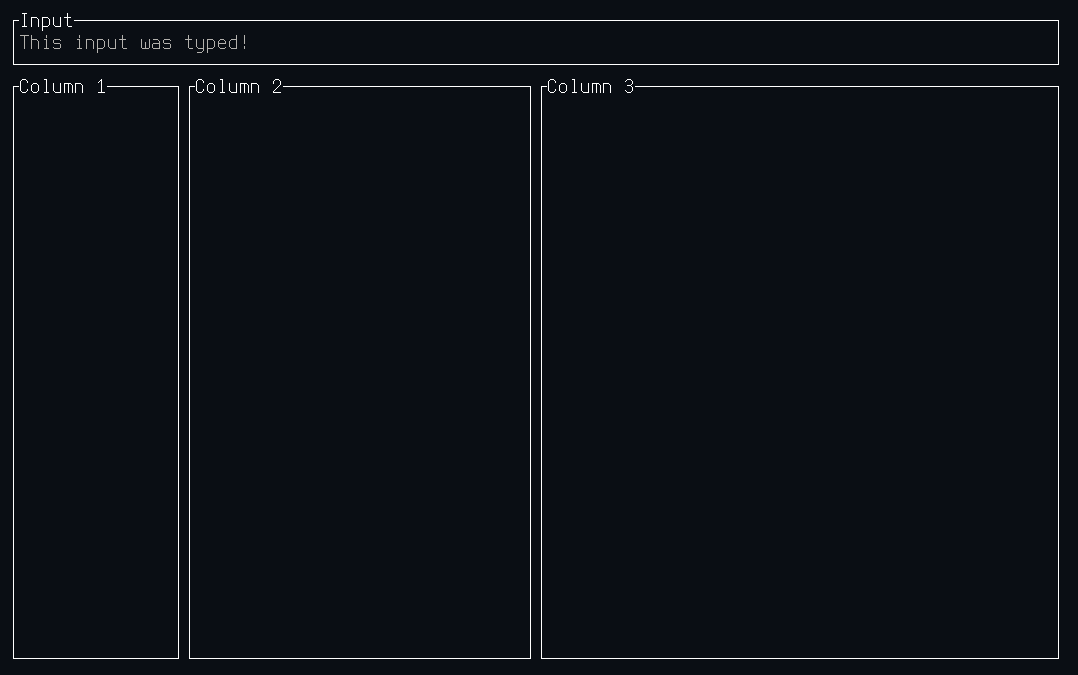
//! For example, a complex layout with an input box:
//! ```no_run
//! # use intuitive::{
//! # component,
//! # components::{stack::Flex::*, HStack, Section, Text, VStack},
//! # error::Result,
//! # on_key, render,
//! # state::use_state,
//! # terminal::Terminal,
//! # };
//! #
//! #[component(Root)]
//! fn render() {
//! let text = use_state(|| String::new());
//!
//! let on_key = on_key! { [text]
//! KeyEvent { code: Char(c), .. } => text.mutate(|text| text.push(c)),
//! KeyEvent { code: Backspace, .. } => text.mutate(|text| text.pop()),
//! KeyEvent { code: Esc, .. } => event::quit(),
//! };
//!
//! render! {
//! VStack(flex: [Block(3), Grow(1)], on_key) {
//! Section(title: "Input") {
//! Text(text: text.get())
//! }
//!
//! HStack(flex: [1, 2, 3]) {
//! Section(title: "Column 1")
//! Section(title: "Column 2")
//! Section(title: "Column 3")
//! }
//! }
//! }
//! }
//!
//! fn main() -> Result<()> {
//! Terminal::new(Root::new())?.run()
//! }
//! ```
//! And the output would look like this:
//!
//! 
//!
//! # Getting Started
//! Similarly to [React], Intuitive is built around components that are composable.
//! There is one root component, that is passed to [`Terminal::new()`], in order to
//! run the TUI.
//!
//! There are two main ways to build components:
//! - Functional components using the [`component` attribute macro]
//! - Custom components by implementing [`Component`] and (potentially [`Element`])
//!
//! Both of these are discussed in depth in the [`components`] module documentation. Other
//! useful resources are:
//! - The documentation for the [`render!`] and [`on_key!`] macros, as they are often used
//! when writing components.
//! - The [recipes] section of the [`components`] module documentation, describing ways to
//! achieve common UI interactions.
//! - The [examples] directory in the repository, which contains complete examples of simple
//! applications.
//!
//! # Disclaimer
//! Intuitive is closer to a proof-of-concept than to a crate that's ready for
//! prime-time use. There may also be some bugs in the library of components,
//! please [raise an issue] if you find any. Furthermore, since a large and
//! complex application has yet to be built using Intuitive, it is not a
//! guarantee that it does not have some major flaw making such development
//! difficult.
//!
//! [raise an issue]: https://github.com/enricozb/intuitive/issues
//! [`component` attribute macro]: attr.component.html
//! [`render!`]: macro.render.html
//! [`on_key!`]: macro.on_key.html
//! [`Component`]: components/trait.Component.html
//! [`components`]: components/index.html
//! [`Element`]: element/trait.Element.html
//! [examples]: https://github.com/enricozb/intuitive/tree/main/examples
//! [Getting Started]: #getting-started
//! [React]: https://reactjs.org/
//! [recipes]: components/index.html#recipes
//! [SwiftUI]: https://developer.apple.com/xcode/swiftui/
//! [`Terminal::new()`]: terminal/struct.Terminal.html#method.new
extern crate self as intuitive;
/// Helper attribute macro for creating functional components.
///
/// # Usage
/// This macro is used when creating functional components, where the name of
/// the generated component is the item in the attribute. For example,
/// ```rust
/// # use intuitive::{component, components::{Centered, Section, Text}, on_key, state::use_state, render};
/// #
/// #[component(Root)]
/// pub fn render(title: String) {
/// let text = use_state(String::new);
///
/// let on_key = on_key! { [text]
/// KeyEvent { code: Char(c), .. } => text.mutate(|text| text.push(c)),
/// KeyEvent { code: Char(c), .. } => text.mutate(|text| text.pop()),
/// KeyEvent { code: Esc, .. } => event::quit(),
/// };
///
/// render! {
/// Centered() {
/// Section(title) {
/// Text(text: text.get(), on_key)
/// }
/// }
/// }
/// }
/// ```
/// constructs a `Root` component, that can be used in a [`render!`] macro.
///
/// # Parameters
/// If the `render` function contains parameters, these will become parameters to the
/// generated component. These parameters can later be supplied when using the generated
/// component in a [`render!`] macro. The parameters' types **must** implement [`Default`],
/// as the generated component derives [`Default`]. If you need more control over the
/// default values of the parameters, consider implementing the [`Component`] trait instead
/// of using the `#[component(..)]` attribute macro.
///
/// # Managing State
/// State in functional components is managed similarly to how they are in [React],
/// using the [`use_state`] hook. Refer to the [`use_state`] documentation for details.
///
/// # Handling Key Events
/// In functional components, key events are sent to the component at the root of the
/// returned [`render!`] macro invocation. This means that in the example above, the
/// key event will be sent to an instance of the [`Centered`] component. However,
/// most components forward their key events to their children (especially those that
/// have only a single child), and therefore the `on_key` handler could have been
/// provided to any of the [`Centered`], [`Section`], or [`Text`] components above.
///
/// # Generics
/// When requiring generics, for example when accepting a variable number of children,
/// they can be added into the attribute and then used in the parameters. For example:
/// ```rust
/// # use intuitive::{component, components::{Centered, children::Children, Section, Text}, on_key, state::use_state, render};
/// #
/// #[component(Root<const N: usize>)]
/// pub fn render(title: String, children: Children<N>) {
/// let text = use_state(String::new);
///
/// let on_key = on_key! { [text]
/// KeyEvent { code: Char(c), .. } => text.mutate(|text| text.push(c)),
/// KeyEvent { code: Char(c), .. } => text.mutate(|text| text.pop()),
/// KeyEvent { code: Esc, .. } => event::quit(),
/// };
///
/// render! {
/// Centered() {
/// Section(title) {
/// Text(text: text.get(), on_key)
/// }
/// }
/// }
/// }
/// ```
///
/// # Generated Component
/// The generated component is a structure that implements the [`Component`] trait. It
/// also has a an associated function `new() -> component::Any` that is used to create the
/// component when passing it to `Terminal::new()`. If the component has parameters,
/// they will also be parameters to the associated function `new()`in the same order
/// they were specified in the `render` function.
///
/// # Nuances
/// There are a couple of nuances with this macro:
/// - The visibility of the generated component will be the same as that of the
/// `render` function the `#[component(..)]` attribute is applied to.
/// - The return type to `render` (and even the function name itself) are completely
/// ignored. In order to keep things consistent, it's recommended that the function
/// is called `render` and the return type is left empty.
///
/// [`Centered`]: components/struct.Centered.html
/// [`Component`]: components/trait.Component.html
/// [`Default`]: https://doc.rust-lang.org/std/default/trait.Default.html
/// [React]: https://reactjs.org/
/// [`render!`]: macro.render.html
/// [`Section`]: components/struct.Section.html
/// [`Text`]: components/struct.Text.html
/// [`use_state`]: state/fn.use_state.html
pub use component;
/// Helper macro for creating key handlers.
///
/// # Details
/// This macro is used to simplify a common pattern constructing a [`event::KeyHandler`] where:
/// - [`event`], [`event::KeyEvent`], [`event::KeyCode`]`::*`, and [`event::handler::Propagate`] are brought into scope
/// - [`state::State`]s need to be cloned before being moved into the key handler
/// - The event is immediately `match`ed
///
/// In addition to the above, this macro also:
/// - implicitly introduces the `|event|` closure parameter
/// - adds the catch-all `_ => ()` case to the `match` expression
/// - returns [`event::handler::Propagate::Stop`]
///
/// # Usage
/// An example usage looks like the following:
/// ```rust
/// # use intuitive::{state::use_state, on_key};
/// #
/// let text = use_state(String::new);
///
/// let on_key = on_key! { [text]
/// KeyEvent { code: Char(c), .. } => text.mutate(|text| text.push(c)),
/// KeyEvent { code: Char(c), .. } => text.mutate(|text| text.pop()),
/// };
/// ```
/// and expands to the following:
/// ```rust
/// # use intuitive::{state::use_state, on_key};
/// #
/// let text = use_state(String::new);
///
/// let on_key = {
/// let text = text.clone();
///
/// move |event| {
/// use intuitive::event::{self, KeyEvent, KeyCode::*};
///
/// match event {
/// KeyEvent { code: Char(c), .. } => text.mutate(|text| text.push(c)),
/// KeyEvent { code: Char(c), .. } => text.mutate(|text| text.pop()),
/// _ => (),
/// };
/// };
/// };
/// ```
pub use on_key;
/// Macro for rendering components.
///
/// # Usage
/// This macro is meant to be used when returning from [`components::Component::render`],
/// and uses a [SwiftUI](https://developer.apple.com/xcode/swiftui/)-like syntax.
///
/// For example:
/// ```rust
/// # use intuitive::{components::{Any as AnyComponent, Section, Text, VStack}, render};
/// #
/// let _: AnyComponent = render! {
/// VStack() {
/// Section(title: "Top Section") {
/// Text(text: "Hello")
/// }
///
/// Section(title: "Bottom Section") {
/// Text(text: "World")
/// }
/// }
/// };
/// ```
/// is rendering a `VStack` (with default parameters), and two children. The
/// child components are `Section`s, each with their own `Text` child components.
///
/// # Parameters
/// Parameters passed to components look like function arguments but are actually much
/// closer to structure initialization. Like struct fields, they can be passed in any
/// order, and they require the field name, unless the parameter and value are the same
/// identifier. Unlike struct fields, you can omit parameters, as any omitted parameters
/// are implicitly passed in with their default values.
///
/// ## Automatic Parameter Conversion
/// When passing parameters to components within a `render!` macro invocation, an implicit
/// [`TryInto::try_into`] call is made for each parameter. This means that you can omit
/// any `.into()` calls when passing parameters to components. This is very useful when
/// working with [`Spans`] and [`Style`], as they implement [`From`] from a variety
/// of types.
///
/// # Children
/// Children to a component come after the component surrounded by braces (`{ ... }`).
/// Like parameters, children are optional, but are only valid for components that
/// accept them (for example `Text` accepts no children, but `Section` does).
///
/// Children are passed as arrays (`[AnyComponent; N]`), so components specify exactly
/// how many children they take in. Some components, like `VStack` and `HStack` take
/// in a variable number of children, while some, like `Section`, only accept a single
/// child component.
///
/// [`From`]: https://doc.rust-lang.org/std/convert/trait.From.html
/// [`Spans`]: spans/struct.Spans.html
/// [`Style`]: style/struct.Style.html
/// [`TryInto::try_into`]: https://doc.rust-lang.org/std/convert/trait.TryInto.html#tymethod.try_into
pub use render;