# Inkhaven (blackInkhaven)
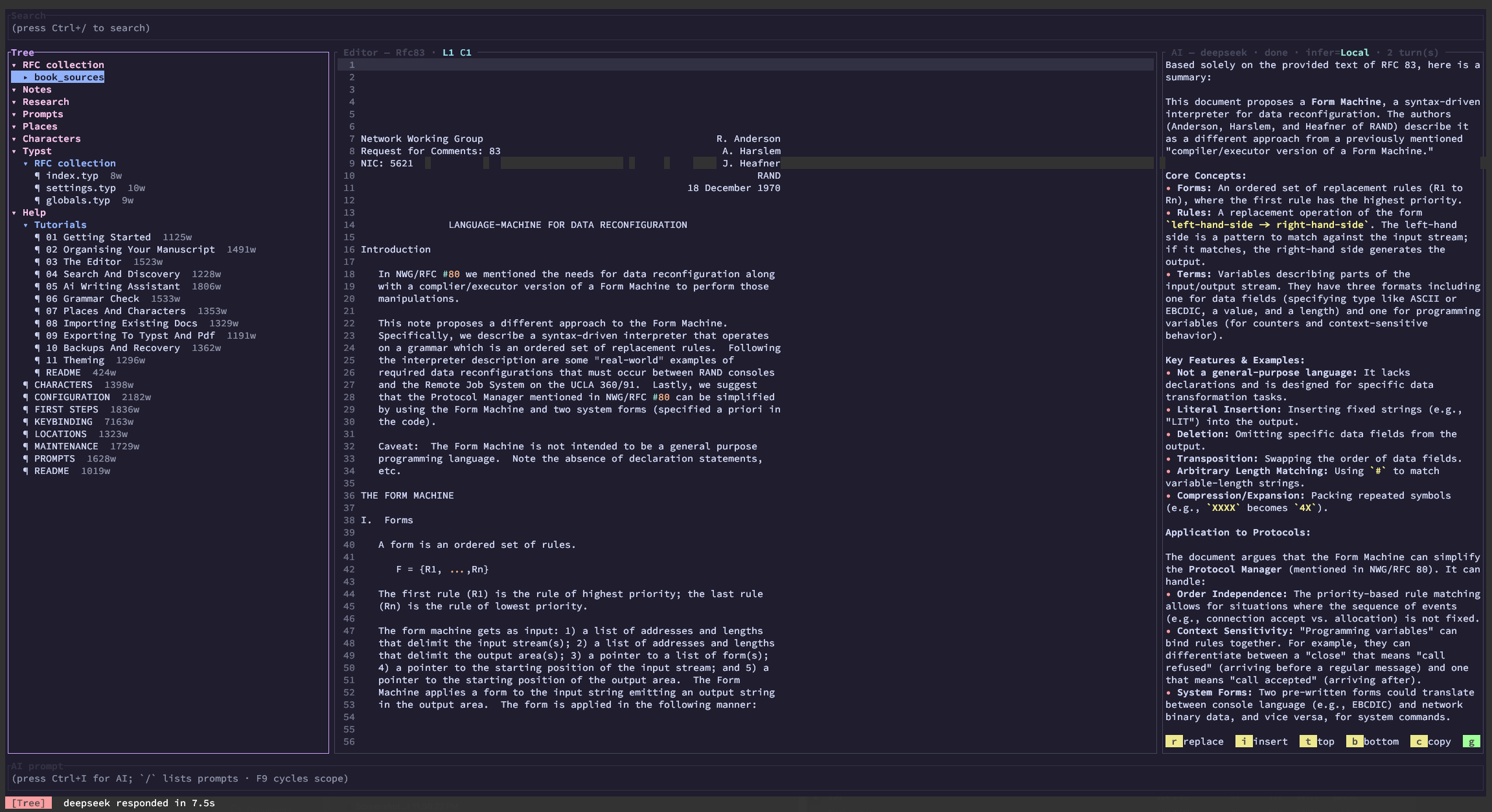
**Inkhaven** is a standalone terminal application for writing books and
long-form technical documentation. It pairs a full-screen Typst editor with
a local semantic index, an AI writing assistant, versioned snapshots, and a
backup pipeline — so the entire writing workflow lives inside one binary,
without leaving the terminal.
Your manuscript is organised as a hierarchy of `.typ` files
(Book → Chapter → Subchapter → Paragraph), with first-class **image**
leaves alongside paragraphs. Inkhaven stores metadata in a local DuckDB
database, indexes every paragraph for full-text and semantic search,
keeps versioned snapshots, and streams answers from your chosen LLM
provider — six are bundled (**Gemini**, **Claude**, **OpenAI**,
**DeepSeek**, **Grok**, **Ollama**) and any model
[genai](https://github.com/jeremychone/rust-genai) routes is one
HJSON line away.
## Latest release · 1.1
Read the full notes: [`Documentation/RELEASE_NOTES/1.1.md`](Documentation/RELEASE_NOTES/1.1.md)
Headlines:
- First-class **images** in the project tree with a ratatui-image preview.
- **Book assembly → typst compile → PDF** pipeline (`Ctrl+B A` / `B` / `O`).
- HJSON-driven `settings.typ` — change paper, fonts, margins, line spacing in config; the rest is synthesised on every build.
- Six bundled LLM providers, live-switchable via `Ctrl+B L`.
- **AI full-screen layout** (`Ctrl+B K`) with persistent chat history, chat search, and a turn-selection mode that pipes Assistant replies into the editor.
- **Document status workflow** — cycle `None → Napkin → First → … → Ready` with `Ctrl+B R`; filter the project by status with `Ctrl+B 1..7`.
- **Typewriter mode** (`Ctrl+B W`) hides every pane but the editor.
- **`inkhaven import-typst-help`** seeds the Help book with a curated typst reference so F1 RAG answers typst questions.
- HJSON as a first-class node type with syntax highlighting.
Every prior release lives under [`Documentation/RELEASE_NOTES/`](Documentation/RELEASE_NOTES/).
## Why Inkhaven
- **Terminal-first.** Inkhaven runs over SSH, in tmux, on a tiling WM — no
browser, no Electron. The TUI uses [ratatui](https://ratatui.rs/) and
[tui-textarea](https://github.com/rhysd/tui-textarea).
- **Your manuscript is plain files.** A paragraph lives in a `.typ` file
on disk; the metadata database tracks hierarchy and search but the prose
is text — you can read it, diff it, version-control it, and edit it with
another tool any time.
- **Semantic search out of the box.** Embeddings via fastembed and HNSW are
computed locally. Search for *"the moment the lighthouse fails"* and find
the paragraph even if it never uses those exact words.
- **AI is a co-author you steer.** Inferences stream live; you control the
**scope** (selection / paragraph / subchapter / chapter / book), the
**mode** (Local-only RAG vs. Full general knowledge), and the
**destination** (replace, insert, top, bottom, copy, grammar-apply).
- **Multilingual.** Snowball stemmers and multilingual embeddings make
Russian, German, French, Spanish, Italian and others first-class. The
shipped defaults cover English and Russian.
- **Help, characters, places, artefacts — built in.** Eight system
books are seeded on every project: `Notes`, `Research`, `Prompts`,
`Places`, `Characters`, `Artefacts`, `Typst`, `Help`. Mentions of
names from these books light up in the editor (cyan / amber / peach /
underline). `Ctrl+B P` / `C` / `Y` / `G` query each book via RAG.
`F1` answers questions about Inkhaven itself by RAG over `Help`.
- **First-class images.** Drop PNG / JPG / WebP / SVG into the tree;
Book assembly emits the right `wrap_image_*` calls and ships the
bytes into the typst tree. `Ctrl+B P` inside `#image("…")` opens a
sibling picker. Enter on an Image row pops a ratatui-image preview
(kitty / sixel / iterm2 / half-block).
- **From buffer to PDF in two chords.** `Ctrl+B A` assembles your tree
into a typst-compilable directory; `Ctrl+B B` compiles it; `Ctrl+B O`
builds and copies the PDF into your shell's cwd as
`<book>-YYYYDDMM-HHMM.pdf`. Compile failures route the captured
stderr into a fresh AI chat with a typst-aware system prompt.
## Features at a glance
### Editor
- Typst syntax highlighting via [tree-sitter-typst](https://github.com/uben0/tree-sitter-typst).
- Regex find / replace with same-line current-match highlighting.
- Split-edit with versioned snapshots — see two versions of a paragraph
side by side, accept either.
- Word-aware navigation and deletion shortcuts.
- Vertical block selection (Alt+arrows) with rectangular copy.
- System-clipboard cut / copy / paste, plus per-doc undo / redo.
- Live "changes since last save" bolding; grammar-correction highlights
what changed after a `g` apply.
### Tree
- Multi-level folding (`←` / `→` / `Z` / `X`).
- Per-kind row colours (book / chapter / subchapter / paragraph / image)
+ open-paragraph marker.
- Plain-letter shortcuts for add (`B`/`C`/`V`/`A`/`S`/`+`/`P`),
delete (`D`/`-`), reorder (`U`/`J`).
- **Document status badge** column — one character per row colour-
coded to the workflow stage (`n` / `1` / `2` / `3` / `F` / `R`).
- Mouse: click to focus + select; scroll wheel scrolls.
### AI pane
- Streaming markdown rendering — bold / italic / headings / code / lists.
- Six **scope modes** (cycled by `F9`): None, Selection, Paragraph,
Subchapter, Chapter, Book — each prepends the matching content to the
next prompt.
- Two **inference modes** (`F10`): **Local** (use only supplied context)
and **Full** (augment with general knowledge). Help inferences are pinned
to Local automatically.
- Persistent **chat history** with one-key clear (`Ctrl+B C`).
- **Full-screen AI layout** (`Ctrl+B K`) — AI pane + scrollable chat
history + AI prompt; persisted to `.inkhaven-chat.json` between
sessions; `Ctrl+F` searches; `Ctrl+C` enters a turn-selection mode.
- **Lexicon RAG** — `Ctrl+B P` / `C` / `G` / `Y` in the editor sweep
the selection through `Places` / `Characters` / `Notes` / `Artefacts`
and prepend the lookup to the next AI prompt.
- **F1 Help-manual** floating query → grounded answer over the Help book.
`inkhaven import-typst-help` seeds Help with a curated typst reference.
- **F7 Grammar check** with deterministic correction extraction (`g`
replaces the buffer with just the corrected text, preserving Typst
markup).
### Storage and backup
- DuckDB metadata + Tantivy full-text + HNSW vectors via
[bdslib](https://github.com/vulogov/bdslib).
- Snapshots: `F5` captures the buffer; `F6` opens the snapshot history
picker.
- `inkhaven backup --out <dir>` zips the entire project.
- `inkhaven restore <archive> --to <dir>` puts it back.
- Auto-backup on TUI exit when the last backup is older than
`backup.max_age` (humantime: `7d`, `12h`, `30m`, …) — splash screen with
a progress bar.
- Session persistence: cursor position, focus, tree-scroll, open paragraph
all survive restarts. Per-paragraph cursor memory: switch around and
every paragraph remembers where you were.
### CLI tools
- `init` — set up a fresh project (interactive confirmation if the
directory exists).
- `add` / `delete` / `mv` / `list` — manage the hierarchy from a script.
- `search "phrase"` — semantic search from the shell.
- `reindex` — re-walk `.typ` files into the database.
- `export typst` / `export pdf` — produce a single Typst manuscript or a
built PDF.
- `import-help --documents-directory <dir>` — populate the Help book from
a directory of markdown / text / typst files (wipes Help first).
- `backup` / `restore` — see above.
- `ai "prompt"` — one-shot inference from the shell (no TUI).
### Configuration
A single `inkhaven.hjson` in each project root drives every knob:
embedding model, LLM providers, autosave cadence, sync interval, hierarchy
depth, language, snowball stemmers, the full visual theme (per-pane
backgrounds and foregrounds, all syntax colours, lexicon highlight
colours), key bindings, and backup policy.
## Install
Inkhaven ships as a single static binary per platform. Three install paths:
### 1. `cargo binstall` (no compile)
If you already have [`cargo-binstall`](https://github.com/cargo-bins/cargo-binstall):
```bash
cargo binstall inkhaven
```
`cargo-binstall` reads `[package.metadata.binstall]` from `Cargo.toml`,
picks the right asset off GitHub Releases, and drops the binary into
`~/.cargo/bin`. Works on Linux (x86_64), macOS (Intel + Apple Silicon),
and Windows (x86_64).
### 2. GitHub Releases (direct download)
Grab the tarball for your platform from
[Releases](https://github.com/vulogov/blackInkhaven/releases), unpack,
and put `inkhaven` somewhere on your `PATH`. Builds are produced by
the [`release.yml`](.github/workflows/release.yml) workflow on every
tag push.
### 3. `cargo install --git` (compile from source)
```bash
cargo install --git https://github.com/vulogov/blackInkhaven --tag v1.0.0
```
This works because every dependency (including `bdslib` and
`tree-sitter-typst`) is vendored under `vendor/` — no separate registry
fetches, no GitHub auth needed. The first build takes ~10 minutes on a
modern laptop because of DuckDB + Tantivy + fastembed compilation; the
release binary above is the fast path.
> Inkhaven is **not** published on crates.io. See `Cargo.toml`'s
> `publish = false` line and the [`Documentation/`](Documentation/)
> notes for the rationale.
## Quick start
```bash
# Build (if installing from source)
cargo build --release
# Initialise a project (asks for confirmation if the directory exists)
./target/release/inkhaven init ~/Books/my-novel
# Build the hierarchy from the CLI…
./target/release/inkhaven --project ~/Books/my-novel add book "My Novel"
./target/release/inkhaven --project ~/Books/my-novel \
add chapter "The Beginning" --parent my-novel
./target/release/inkhaven --project ~/Books/my-novel \
add paragraph "Opening Scene" --parent my-novel/the-beginning
# …or skip the CLI and add everything from the TUI
./target/release/inkhaven --project ~/Books/my-novel
# Inside the TUI: B (book), C/V (chapter), A/S (subchapter), +/P (paragraph)
```
## Use cases
- **Long-form fiction.** Hierarchy fits novels naturally (Book → Part →
Chapter → Scene). Places / Characters / Research system books keep
worldbuilding next to prose.
- **Technical documentation.** Each chapter is a `.typ` file; the tree
doubles as a table of contents. Semantic search makes "where did I
document the retry policy?" a one-keystroke question.
- **Translation work.** Multilingual embeddings + per-language Snowball
stemmers let you keep source and target in two parallel books.
- **Research notebooks.** Snapshots track how a draft evolved; the AI pane
can summarise a chapter when you come back after a week.
- **Help and onboarding writing.** Ship docs as a directory and let
Inkhaven build a Help book your readers can query through F1.
## Documentation
The full docs live under [`Documentation/`](Documentation/).
Start here:
- [`Documentation/README.md`](Documentation/README.md) — entry point and
table of contents.
- [`Documentation/FIRST_STEPS.md`](Documentation/FIRST_STEPS.md) — compile,
install, initialise.
- [`Documentation/Tutorials/`](Documentation/Tutorials/) — narrative
walk-throughs, each focused on one workflow.
Reference:
- [`Documentation/KEYBINDING.md`](Documentation/KEYBINDING.md) — every
keystroke the TUI recognises, organised by pane and overlay.
- [`Documentation/CONFIGURATION.md`](Documentation/CONFIGURATION.md) —
the full HJSON reference.
- [`Documentation/MAINTENANCE.md`](Documentation/MAINTENANCE.md) — backup,
restore, reindex, logs.
- [`Documentation/PROMPTS.md`](Documentation/PROMPTS.md) — the prompt
library and the Prompts system book.
- [`Documentation/LOCATIONS.md`](Documentation/LOCATIONS.md) — managing
Places.
- [`Documentation/CHARACTERS.md`](Documentation/CHARACTERS.md) — managing
Characters.
## Built with
- [bdslib](https://github.com/vulogov/bdslib) — DuckDB + Tantivy +
fastembed + HNSW document store
- [ratatui](https://ratatui.rs/), [tui-textarea](https://github.com/rhysd/tui-textarea)
- [tree-sitter](https://tree-sitter.github.io/) +
[tree-sitter-typst](https://github.com/uben0/tree-sitter-typst)
- [genai](https://github.com/jeremychone/rust-genai) — provider-neutral
LLM streaming
- [pulldown-cmark](https://github.com/raphlinus/pulldown-cmark),
[rust-stemmers](https://github.com/CurrySoftware/rust-stemmers),
[zip](https://github.com/zip-rs/zip2),
[humantime](https://github.com/tailhook/humantime), and many others —
see [`Cargo.toml`](Cargo.toml).
## Licence
Apache 2.0 — see [`LICENSE`](LICENSE).
