
ilmari



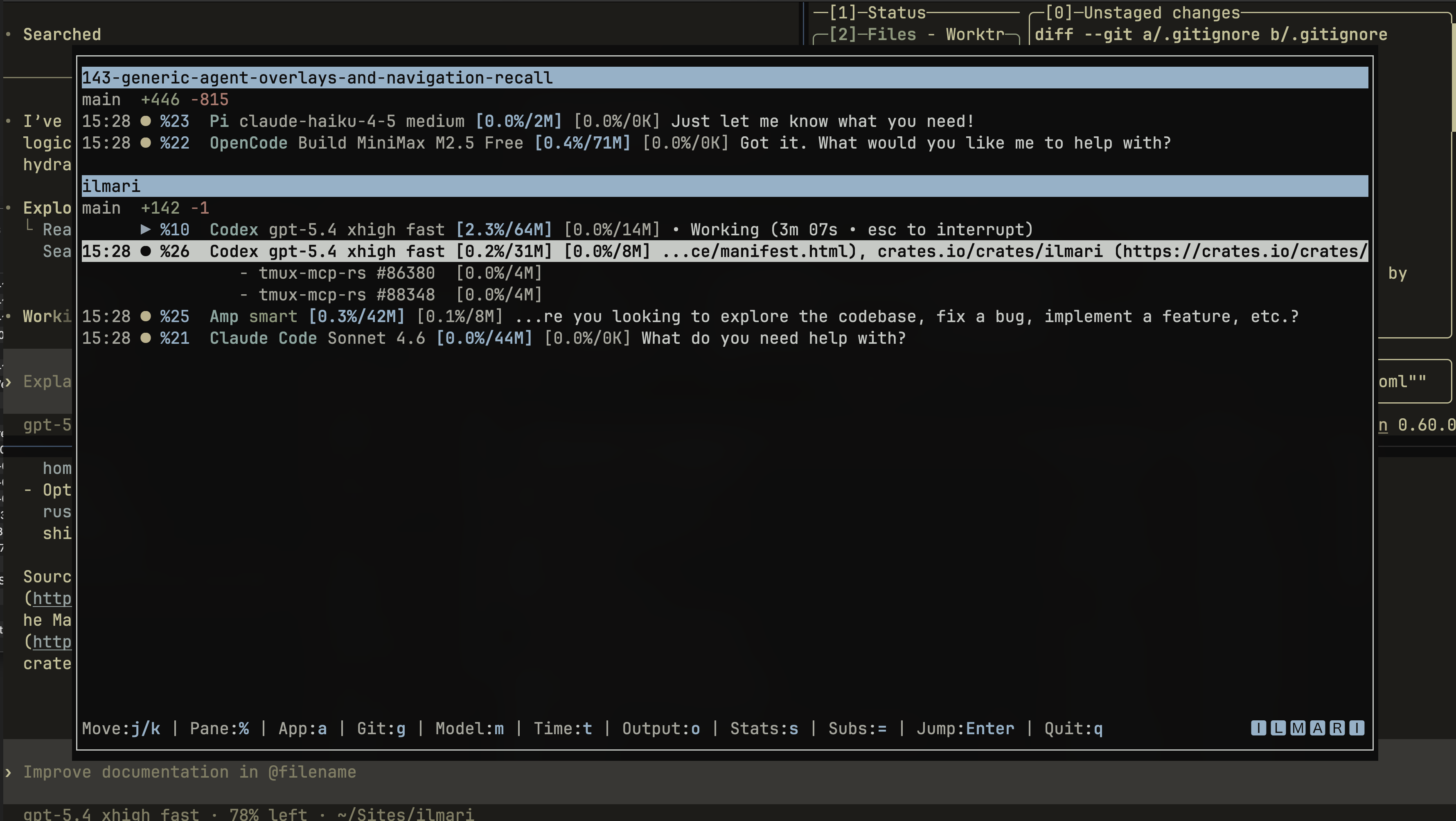
Ilmari is a tmux popup radar for coding-agent panes.
It scans the tmux panes you already have running, detects supported agent CLIs, groups panes by workspace, shows each pane's state and recent output, and jumps you back to the selected pane. It is observer-only: it does not launch agents, manage workflows, or own your tmux layout.

What it helps you answer
Use Ilmari when one tmux workspace has several agent sessions and you need to answer these questions quickly:
- Which agent pane is still running?
- Which pane is waiting for input?
- Which workspace does that pane belong to?
- What did the pane print most recently?
- How do I jump back to it without cycling through panes manually?
Ilmari can also run one provider-neutral collector daemon per tmux server. The daemon accelerates popup refreshes, publishes optional tmux badge/status fragments, and serves the same read-only pane state through a local Unix JSON socket or loopback MCP resource server.
Supported agents
Ilmari enables detection for these agent CLIs:
The table lists the canonical commands. Some adapters also recognize wrapped, remote, or title-based executions when tmux metadata, the process tree, or pane output identifies an enabled agent.
| Agent | Commands |
|---|---|
| Antigravity CLI | agy |
| Gemini CLI | gemini |
| Codex | codex |
| Amp | amp |
| Claude Code | claude |
| OpenCode | opencode |
| Pi | pi, pi-agent |
| Auggie | auggie |
| Grok | grok |
| GitHub Copilot CLI | copilot |
| Kiro CLI | kiro-cli |
Tracked but disabled agent adapters:
| Agent | Tracking issue |
|---|---|
| Cursor CLI | #11 |
| Aider | #12 |
| Cline CLI | #13 |
| Goose CLI | #14 |
| OpenHands CLI | #16 |
Platform support
Ilmari targets Unix-like tmux environments. Published release artifacts are
Linux and macOS binaries, and runtime usage assumes a Unix-like shell with
tmux available. Windows is currently out of scope because Windows tmux
behavior is not implemented or tested.
tmux popup usage requires tmux 3.2 or newer. Cargo builds require Rust 1.88.0 or newer.
Quickstart
Prerequisites
tmuxis installed and running.- tmux is version 3.2 or newer if you want popup mode.
- At least one supported agent CLI is already running in a tmux pane.
1. Install Ilmari
Verify the binary is on your PATH:
Expected output:
ilmari <version>
2. Connect Ilmari to tmux
TPM plugin (recommended)
Use TPM (Tmux Plugin Manager) when you
want the normal Ilmari experience: a popup key, a per-server collector daemon,
and cleanup when that daemon is stopped. TPM is tmux integration, not the
Ilmari installation. Install the ilmari binary first, and make it available
to the tmux server's PATH.
-
Add this line before TPM's
run ... tpmline in~/.tmux.conf:set -g @plugin 'bnomei/ilmari' -
Reload the tmux configuration:
-
Press
prefix + Iso TPM fetches the plugin, then reload the configuration once more.
With no @ilmari_* configuration, the plugin:
- binds
prefix + ito open the Ilmari popup; - starts one daemon for the tmux server that loaded the plugin;
- lets the popup use that daemon's fresh snapshot before falling back to a direct tmux scan; and
- publishes empty-safe badge and summary fragments for you to place in your own theme.
Run this from a pane in that tmux server to verify the default daemon started:
Expected output:
running
The plugin pins every lifecycle action to the tmux server that loaded it. A reload does not start a duplicate healthy daemon.
TPM options (optional)
Configure these options before TPM initializes its plugins. You do not need to set any of them for the defaults above.
| TPM option | Default | Purpose |
|---|---|---|
@ilmari_key |
i |
Prefix-table popup key. |
@ilmari_command |
ilmari |
Command executed inside the popup. |
@ilmari_popup_width |
90% |
Popup width. |
@ilmari_popup_height |
85% |
Popup height. |
@ilmari_popup_extra |
empty | Additional whitespace-separated display-popup arguments. |
@ilmari_bind_key |
on |
Whether the plugin installs the popup binding. |
@ilmari_daemon |
on |
Whether this tmux server should run an Ilmari daemon. |
@ilmari_daemon_command |
ilmari daemon start |
Foreground daemon command that the plugin starts in the background. |
@ilmari_daemon_stop_command |
ilmari daemon stop |
Command used to stop the daemon when daemon management is disabled. Set it explicitly whenever the start command is customized. |
If tmux cannot find the binary even though your interactive shell can, configure the popup and daemon commands as one matching absolute-path pair:
set -g @ilmari_command '/absolute/path/to/ilmari'
set -g @ilmari_daemon_command '/absolute/path/to/ilmari daemon start'
set -g @ilmari_daemon_stop_command '/absolute/path/to/ilmari daemon stop'
Set @ilmari_bind_key to off when you want TPM to manage the daemon but use a
different popup binding. Set @ilmari_daemon to off to stop the daemon for
that tmux server and clear Ilmari's published pane and global state.
The start and stop options are an explicit pair of shell commands; the plugin
does not try to derive one from the other. If the start command uses an absolute
path, wrapper, or additional arguments, configure a matching stop command too.
Both commands receive the same originating TMUX context, including custom
socket paths that contain commas.
Manual popup binding (without TPM)
Use this alternative when you do not use TPM, or when @ilmari_bind_key is set
to off and you want a custom key or popup shape. It opens the interactive
radar but does not start the daemon for you:
bind-key i display-popup -E -w 90% -h 85% "ilmari"
If you want daemon-backed refreshes and published tmux fragments without TPM, run this foreground collector from that tmux server in a dedicated pane or under your service manager:
Reload tmux after changing the binding:
3. Open the radar
Press your tmux prefix, then i.
Typical flow:
- Open
ilmari. - Move the selection with
j/kor the arrow keys. - Press
Enterto jump to the selected pane. - Press
q,Esc, orCtrl-Cto quit.
When Ilmari runs in a tmux popup, activating a pane returns you to that pane and closes the popup. When it runs directly in a pane, activation switches to the target pane and Ilmari keeps running.
Installation
Cargo
Cargo binstall
Download the matching prebuilt release binary instead of compiling it locally:
npm / npx
The npm package is a small launcher: on its first run it downloads the matching verified GitHub Release binary into a local cache, then forwards Ilmari's arguments. Node.js 18 or newer is required.
It supports macOS (Intel and Apple Silicon) and Linux (x86_64 and ARM64 musl)
only. Windows is intentionally unsupported because Ilmari requires a Unix-like
tmux environment. Set ILMARI_NPM_CACHE to choose a different binary cache
location.
Homebrew
GitHub Releases
Download a prebuilt Linux or macOS archive from
GitHub Releases, extract it, and
put ilmari on your PATH.
Windows archives are not published because Windows runtime behavior is not supported.
From source
Verify the build:
Popup controls
| Key | Action |
|---|---|
j, Down |
Move to the next visible pane. |
k, Up |
Move to the previous visible pane. |
%, then digits |
Select a pane by tmux pane id. |
Enter |
Jump to the selected pane. |
q, Esc, Ctrl-C |
Quit. |
a |
Toggle the agent/app column. |
m |
Toggle the model/detail column. |
n |
Toggle the sticky attention column. |
t |
Toggle inactive time. |
o |
Toggle recent output excerpts. |
g |
Toggle git summaries. |
s |
Toggle CPU and memory stats. |
R |
Clear remembered views and restore explicit TOML values or built-ins. |
= |
Expand or collapse subprocess stats for the selected pane. |
b |
Toggle terminal bell alerts. |
Ilmari sorts panes by workspace. Inside each workspace, running panes appear first, waiting panes appear next, and finished, terminated, or unknown panes follow. The most recent waiting pane is selected automatically when possible.
What the radar shows
| Field | Description |
|---|---|
| Workspace | Derived from each pane's current path. |
| Status | running, waiting-input, finished, terminated, or unknown. |
| Attention | The shared attention icon (default ?) only for an unacknowledged sticky attention latch; blank otherwise. |
| Pane id | Stable tmux pane id such as %12. |
| Agent | Detected agent kind, such as Codex or Claude Code. |
| Detail | Agent-specific model or mode label when the adapter can extract one. |
| Output | Recent, sanitized pane output excerpt when output-tail capture is enabled. |
| Git | Branch plus insertion/deletion summary for the workspace repository. |
| Stats | Agent and spawned subprocess CPU/memory samples when stats are visible. |
Terminal bell alerts fire when a pane transitions into a waiting-input or
finished state from a running, unknown, or retained terminated state. Use b or
--no-bell to disable them for the current run.
Ilmari applies the same detection and state model to every enabled agent adapter. A window containing several supported agent panes can therefore display several badges; there are no Codex-specific lifecycle hooks.
Daemon and popup fallback
TPM starts the daemon by default, or you can manage it directly:
daemon start is a foreground headless collector with its Unix socket enabled;
service managers may supervise it directly. It is singleton-safe for the
originating tmux server/socket. daemon stop requests a clean shutdown, and
daemon status reports whether a compatible daemon is available. Signals and
stop requests clear published options while that tmux server still exists. A
daemon also exits after repeated proof that its target tmux server has gone.
On every refresh, the popup prefers one compatible full daemon snapshot that is still within its advertised TTL. If the daemon is unavailable or its reply is stale, malformed, or from an incompatible schema, the popup retries the existing direct tmux scan and will try the daemon again later. If both sources fail after a successful refresh, the last good rows stay visible with a warning instead of being replaced by an empty display.
ilmari status prints the compact nonzero attention and lifecycle summary used by
command-based tmux status and menu helpers. It exits successfully without output
when the renderer is disabled or no daemon state is available.
Put Ilmari UI in your tmux theme
The default TPM setup starts the daemon and makes two format fragments
available, but it does not edit your tmux theme. Add the fragments after your
theme's own window-status-* and status-* settings. They are empty until a
daemon has published state, so leaving the placement in your configuration is
safe when no agents are running.
Add badges to window tabs
Append the window fragment to both ordinary and selected window formats:
set -ag window-status-format ' #{E:@ilmari_window_badges}'
set -ag window-status-current-format ' #{E:@ilmari_window_badges}'
-a preserves the format your theme already set. The one literal space before
#{E:...} is theme-owned separation; remove or change it if your existing
format already supplies spacing. #{E:...} expands the daemon-published
fragment as tmux format text. Set both options because tmux can use a different
format for the selected window.
@ilmari_window_badges can render more than one badge when a window contains
multiple agent panes. It preserves the enclosing tmux style for each badge, so
selected-window backgrounds remain continuous.
Add the global summary to the status line
Choose one side of your status line and append the summary there. This example uses the right side:
set -ag status-right ' #{E:@ilmari_status_summary}'
Use status-left instead when that is where your theme keeps global indicators.
Do not set both unless you intentionally want the same summary twice. The
summary uses the same configured glyphs as the popup and shows only nonzero
counts: sticky attention first, then ordinary waiting, finished, running,
terminated, and unknown states.
Control what is shown
Window badges include agent names only while the popup app column is enabled.
The built-in default is icon-only badges because view.app defaults to false.
Set view.app = true in Ilmari's TOML configuration, or press a in the
popup. With view.remember = true (the default), that popup choice is used by
the daemon on a later refresh.
Use these server-local tmux options to hide a placement without stopping the daemon or removing your theme configuration:
set -g @ilmari_badges_enabled 'off'
set -g @ilmari_status_enabled 'off'
A disabled renderer publishes an empty fragment; collection, snapshots, and
popup acceleration continue. Turn either option back to on to show it again.
Published fragment and counter reference
@ilmari_status_summary is the recommended global fragment. For a custom tmux
format or menu helper, notification totals remain available as
@ilmari_waiting_count and @ilmari_finished_count, while
@ilmari_running_count is the live running count and
@ilmari_attention_count is the combined sticky total. Ordinary counts are
published separately as @ilmari_waiting_state_count,
@ilmari_finished_state_count, @ilmari_terminated_count, and
@ilmari_unknown_count, so no pane is counted in both attention and an
ordinary state. Pane-local @ilmari_state and @ilmari_badge are available to
advanced custom formats. Pane-local @ilmari_attention is 0 or 1 and
carries the sticky attention latch across a popup's failed daemon snapshot
followed by a direct scan; it is cleared with the other pane options when state
is cleaned up or when the focused pane acknowledges attention.
Running state is live. Waiting-input and finished attention is sticky only after a qualifying transition occurs while that exact pane is not focused by any tmux client. Focusing the pane acknowledges it. An unchanged later scan does not recreate attention, but a later qualifying transition can. State for disappeared panes is removed.
Before uninstalling the TPM plugin, either set @ilmari_daemon off and reload
tmux or run ilmari daemon stop from that tmux server. This stops its daemon and
clears Ilmari's published fragments, counts, pane state, socket path, and MCP URL.
Then remove the @plugin line and uninstall through TPM.
Configuration
No configuration file is required. When present, Ilmari reads
$XDG_CONFIG_HOME/ilmari/config.toml, falling back to
~/.config/ilmari/config.toml. Malformed TOML, an unknown table/field, or an
invalid typed value produces a clear startup error rather than being silently
ignored.
This complete example also shows the built-in defaults:
[]
= 5
= 15
[]
= true
= true
[]
= true
= true
[]
# colors = "fg,bg,black,red,green,yellow,blue,magenta,cyan,white,bright_black,bright_red,bright_green,bright_yellow,bright_blue,bright_magenta,bright_cyan,bright_white"
[]
= false
# path = "/home/me/.local/run/ilmari.sock"
[]
= false
= 62778
[]
= false
= true
= true
= false
= true
= true
= false
= true
[]
= true
= " "
[]
= true
= " "
[]
= "▶"
= "palette:blue"
[]
= "●"
= "palette:yellow"
[]
= "●"
= "palette:yellow"
[]
= "✖"
= "palette:red"
[]
= "?"
= "palette:bright_black"
[]
= "?"
= "palette:yellow"
[states] is the shared presentation source for popup rows, window badges, and
the global tmux summary. The ordinary states default to blue ▶ for running,
yellow ● for waiting and finished, red ✖ for terminated, and a bright-black
? for unknown. attention is separate: it is the yellow ? used by sticky
tmux badges for panes that need focus. Attention takes precedence over a
waiting or finished pane's ordinary glyph until that pane is focused or leaves
that state. When any
[states.*] subtable is present, it wins over legacy nested renderer formats.
Every state has a plain icon and a validated color; colors accept
palette:<slot> for any of Ilmari's sixteen palette slots, ansi:<name-or-index>
(or a bare ANSI name/index), #RRGGBB, or default. Palette references use the
active popup palette's resolved color in both the popup and tmux. Icons must be
exactly one Unicode scalar with terminal display width one, and reject tmux
format/control delimiters. Colors are rendered from typed values rather than
inserted as raw tmux style strings.
[badges] and [status] continue to own only their enable flags and
separators. Existing legacy nested templates remain supported when [states]
is absent and at least one legacy state field is explicitly set:
[]
= "run"
= "fg=cyan"
[]
= "done"
= "fg=green"
tui.enabled defaults to true when the binary includes the tui feature and
to false otherwise. Omitting [palette].colors uses the terminal ANSI/reset palette. A socket path
implies socket.enabled = true unless explicitly disabled; specifying an MCP
port likewise implies mcp.enabled = true unless explicitly disabled. Use port
0 for an OS-assigned free port.
Command-line flags override TOML for one run:
| Flag | Description |
|---|---|
--refresh-seconds <SECONDS> |
Main tmux scan cadence. Positive integer seconds. |
--process-refresh-seconds <SECONDS> |
CPU and memory sampling cadence. Positive integer seconds. |
--palette <CSV> |
18-slot terminal palette override. |
--no-tui |
Run without the terminal UI. Use with --socket or --mcp for headless publishing. |
--no-git |
Start with git summaries hidden. |
--no-output-tail |
Disable tmux capture-pane output tails. |
--no-bell |
Disable terminal bell alerts. |
--socket / --no-socket |
Enable or disable local JSON socket publishing. |
--socket-path <PATH> |
Override the local JSON socket path; implies --socket unless --no-socket is also supplied. |
--mcp / --no-mcp |
Enable or disable the loopback MCP resource server. |
--mcp-port <PORT> |
Override the MCP loopback port; implies --mcp unless --no-mcp is also supplied. |
-h, --help |
Print help. |
-V, --version |
Print version. |
The non-secret ILMARI_* settings used by older releases are no longer read.
Standard discovery variables remain in use: TMUX and TMUX_PANE identify the
active tmux context, XDG_CONFIG_HOME, XDG_STATE_HOME, and XDG_RUNTIME_DIR
select standard storage locations, and normal home/user/runtime-directory lookup
supplies fallbacks.
Remembered views
With view.remember = true (the default), toggling app, attention, git, detail,
time, output, or stats writes only those seven booleans to a versioned JSON file at
$XDG_STATE_HOME/ilmari/view.json, falling back to
~/.local/state/ilmari/view.json. The replacement is atomic and private on
Unix. Pane output text, bell state, selection, subprocess expansion, and agent
state are never saved.
Each field resolves independently: a CLI override wins when one exists, then an
explicit TOML value, then the remembered value, then the built-in default.
Configured and remembered choices remain pinned instead of being changed by
responsive layout defaults. Press uppercase R to clear remembered state and
restore explicit TOML choices or built-ins. A corrupt state file is left in
place, ignored, and reported as a visible warning.
Palette format
--palette and [palette].colors accept an 18-slot CSV palette in this order:
fg,bg,black,red,green,yellow,blue,magenta,cyan,white,bright_black,bright_red,bright_green,bright_yellow,bright_blue,bright_magenta,bright_cyan,bright_white
Accepted color formats:
#RRGGBB0xRRGGBB0XRRGGBBRRGGBBrgb:RR/GG/BBrgb:RRRR/GGGG/BBBB
Malformed palette values produce a clear configuration or argument error.
Build-time features
The default Cargo build includes the TUI and both publishing endpoints:
You can remove features when building:
| Feature | Effect |
|---|---|
tui |
Builds the terminal UI and pulls in ratatui and crossterm. |
socket |
Builds the local Unix JSON socket endpoint. |
mcp |
Builds the loopback MCP resource endpoint and pulls in rmcp, axum, tokio, and tokio-util. |
rmcp |
Alias for mcp, for builds that name the backing crate explicitly. |
Runtime flags remain parseable when an endpoint is compiled out. Enabling a
compiled-out endpoint reports a status warning such as socket support was not compiled in or MCP support was not compiled in. Builds without feature tui
run in headless mode.
Local JSON socket
Enable the socket:
Run it without the TUI:
The socket is a local Unix-domain socket, not a network listener. By default,
Ilmari puts it under $XDG_RUNTIME_DIR when that variable is set, otherwise
under /tmp/ilmari-<user>/<tmux-hash>/ilmari.sock. When Ilmari owns the
socket, it publishes the active path to the tmux global option
@ilmari_socket_path:
If another live Ilmari process already owns the configured socket path, the later process keeps running without taking over that endpoint.
The socket accepts one line command per request and returns one JSON object:
ping
list
ls
snapshot
detail 12
detail %12
detail tmux:%12
detail ilmari://1/7/12
read ilmari://1/7/12
detail accepts bare pane numbers, tmux pane ids, tmux:%12 ids, and Ilmari
resource URIs. read accepts Ilmari resource URIs. Responses use canonical tmux
pane ids such as %12.
snapshot is an additive, render-neutral full-state response for one refresh.
Its versioned JSON includes the enabled sessions, pane/session/window identity,
agent status and detail, output excerpt, process usage, workspace and git facts,
activity timestamps, warnings, revision, observation time, and TTL. Consumers
should reject incompatible versions and stale observations. The existing ping,
list/ls, detail, and read request/response contracts remain available.
list returns a compact action queue for consumers. Each item includes the pane
id, resource URI, consumer state, agent slug, workspace path, and a suggested
next action:
State mapping:
| Ilmari status | Consumer state | Next intent |
|---|---|---|
running |
running |
wait |
waiting-input |
needs-input |
inspect |
finished |
done |
result |
terminated |
gone |
cleanup |
unknown |
unknown |
inspect |
MCP resources
Enable the MCP server:
By default, Ilmari starts a local-only Streamable HTTP MCP server at
http://127.0.0.1:62778/mcp. Use [mcp].port or --mcp-port <PORT> to select
another port, or use port 0 for an OS-assigned free port.
When the server starts, Ilmari publishes the active URL to the tmux global
option @ilmari_mcp_url:
The MCP server exposes resources only. It does not expose tools.
| Resource | Shape |
|---|---|
ilmari://list |
Same JSON as socket list. |
ilmari://<session>/<window>/<pane> |
Same JSON as socket detail, using sigil-free tmux ids such as ilmari://1/7/12. |
Resource descriptors are plain for client compatibility. Resource contents carry read-only metadata. Resource subscriptions are supported:
- Subscribers to a pane URI receive
notifications/resources/updatedwhen that pane resource changes. - Subscribers to
ilmari://listreceivenotifications/resources/updatedwhen the list JSON changes. - Subscribers to
ilmari://listreceivenotifications/resources/list_changedwhen the visible resource set changes.
Pane output privacy
By default, Ilmari captures recent output from supported agent panes with
tmux capture-pane so it can classify waiting states and show output excerpts.
Pane buffer text can contain prompts, command output, file paths, tokens, or
other sensitive information.
Disable output-tail capture when you do not want Ilmari to read pane contents:
Set scanner.output_tail = false in config.toml, or disable capture for one
run:
Disabling output tails can reduce classification quality for adapters that need recent terminal text.
The JSON socket is local-only and the default managed socket directories are created as private user-owned directories. The MCP server binds to loopback only. Both endpoints still expose pane state to local clients that can reach the configured socket path or loopback port.
Troubleshooting
no supported agent sessions detected
Cause: tmux has no visible panes matching enabled agent adapters, or output-tail capture is disabled for an adapter that needs recent terminal text.
Fix:
- Start one of the supported agent CLIs in a tmux pane.
- Run
ilmarifrom inside tmux. - Re-enable output-tail capture if you disabled it.
The popup does not open
Cause: tmux popup support needs tmux 3.2 or newer, or the binding is not loaded.
Fix:
-
Check the tmux version:
-
Reload your tmux config:
-
Confirm
ilmariis on thePATHvisible to tmux.
Headless mode appears to do nothing
Cause: --no-tui disables the terminal UI. Without --socket or --mcp, there
is no consumer-facing endpoint.
Fix:
socket support was not compiled in
Cause: the binary was built without the socket feature.
Fix:
MCP support was not compiled in
Cause: the binary was built without the mcp feature.
Fix:
refusing to use socket directory
Cause: the configured socket parent directory is not private, is not owned by the current user, or is not a directory.
Fix: choose a private socket path or update the directory ownership and permissions before starting Ilmari.
Development
Run the same checks as CI:
For endpoint feature coverage, also run:
Source map:
| Area | Source |
|---|---|
| CLI flags and help text | src/cli.rs |
| Runtime config, refresh loop, key handling | src/app.rs |
| Agent support and classification | src/agents/mod.rs, src/agents/adapters |
| Shared status and view model types | src/model.rs |
| tmux snapshot, output capture, and pane jumps | src/tmux.rs |
| Unix JSON socket and published JSON shapes | src/ipc.rs |
| MCP resource server | src/mcp.rs |
| Terminal rendering and footer controls | src/ui.rs |
| Palette parsing | src/colors.rs |
License
MIT. See LICENSE.