<p align="center">
<img src="./_docs/iconmate_logo.png" alt="iconmate logo" width="180" />
</p>
<h1 align="center">iconmate</h1>
<p align="center"><strong>Add SVG icons to your JS apps without icon libraries.</strong></p>
<p align="center">
<img src="./_docs/iconmate_banner.jpg" alt="iconmate banner" width="100%" />
</p>
<p align="center">
<a href="#quick-start">Quick Start</a>
·
<a href="#installation">Install</a>
·
<a href="#framework-presets">Presets</a>
·
<a href="#command-line">CLI Commands</a>
·
<a href="#ai-ready-workflows">AI Ready</a>
·
<a href="#configuration">Configuration</a>
</p>
Built from my blog post on [Why you might not need an icon library](https://carlotaleon.net/blog/why-you-dont-need-an-icon-library), `iconmate` is a Rust-powered CLI for developers who want the speed and control of plain files without icon-package bloat.
Use [icones.js.org](https://icones.js.org), a direct SVG URL, or raw SVG markup. `iconmate` drops the icon straight into your project and keeps your exports tidy.
## Why iconmate?
- **Made with Rust🦀**: Fast TUI that you can use on any IDE (powered by ratatui, nucleo).
- **AI-ready automation** 🤖: Let your coding agents get icons and add it to your project! A CLI is basically an MCP, just let AI use `iconmate --help` and it should be able to get everything running!
- **Zero dependencies** 📦: No icon library runtime added to your app
- **Framework-native output** 🧩: Generate files for React, Vue, Svelte, Solid, or plain SVG
- **Interactive by default** 🎮: Run `iconmate` and have a pleasant interactive TUI
- **Multiple sources** 🌐: Pull icons from Iconify names, URLs, or even raw SVG (which means it works with your private icon packs i.e. Anron)
- **Fast workflow** ⚡: Generate file + export line in one step
- **Prototype-friendly** 🏗️: Create empty SVG placeholders when needed
## Quick Start
```bash
# Install
brew install blankeos/tap/iconmate # Homebrew (macOS/Linux)
npm install -g iconmate
# Run the TUI in your project 🚀
iconmate
```
✨ That's it. The interactive TUI guides you through adding icons to your project.
```tsx
// 👇 Then, you can just easily use any icon on your project like this!
import { IconHeart } from "@/assets/icons";
function MyApp() {
return <IconHeart />;
}
```
## Configuration
You can also add sensible defaults by passing flags as configs:
```bash
iconmate --folder src/components/Icons/ --folder src/components/icons
iconmate --folder src/components/Icons/ --icon heroicons:heart --name Heart
```
Iconmate now includes config schemas + TS type definitions in the repo:
- Local config schema (repo): [`iconmatelocal.schema.json`](https://github.com/Blankeos/iconmate/blob/main/iconmatelocal.schema.json)
- Global config schema (repo): [`iconmateglobal.schema.json`](https://github.com/Blankeos/iconmate/blob/main/iconmateglobal.schema.json)
- Local config schema (raw): `https://raw.githubusercontent.com/Blankeos/iconmate/main/iconmatelocal.schema.json`
- Global config schema (raw): `https://raw.githubusercontent.com/Blankeos/iconmate/main/iconmateglobal.schema.json`
- Schema source: `config-gen/src/schema.ts`
- TS type definitions: `config-gen/src/types.ts`
Regenerate schemas from project root:
```bash
just config-schema
```
`just config-schema` installs `config-gen` deps and generates both schema files.
### Local Config (`iconmate.config.json`)
```json
{
"$schema": "https://raw.githubusercontent.com/Blankeos/iconmate/main/iconmatelocal.schema.json",
"folder": "src/assets/icons",
"preset": "normal",
"svg_view_cmd": "zed %filename%",
"flutter_barrel_file": "lib/icons.dart",
"flutter_barrel_class": "AppIcons"
}
```
Use the raw URL for `$schema` so editors can fetch JSON directly.
Local config keys:
- `folder` (default: `src/assets/icons`, or `assets/icons` when `preset` is `flutter`)
- `preset` (default: `normal`, meaning plain `.svg` mode; auto-switches to `flutter` in detected Flutter projects)
- `svg_view_cmd` (supports `%filename%` token)
- `flutter_barrel_file` (Flutter preset only; default: `lib/icons.dart`)
- `flutter_barrel_class` (Flutter preset only; default: `AppIcons`)
Allowed `preset` values:
- `normal` (plain SVG mode)
- `react`
- `svelte`
- `solid`
- `vue`
- `emptysvg`
- `flutter` (SVGs + Dart barrel at `lib/icons.dart`)
### Global Config (user-level)
Global config is for user-wide defaults and currently documents `svg_view_cmd`.
Suggested paths:
- macOS: `~/Library/Application Support/iconmate/config.json`
- Linux: `~/.config/iconmate/config.json`
- Windows: `%APPDATA%\\iconmate\\config.json`
Example global config:
```json
{
"$schema": "https://raw.githubusercontent.com/Blankeos/iconmate/main/iconmatelocal.schema.json",
"svg_view_cmd": "code %filename%"
}
```
> [!NOTE]
> This release adds config schemas and generated docs/types. Runtime loading/precedence wiring in the CLI/TUI is tracked in `folder-system-plan.md`.
## Installation
```sh
brew install blankeos/tap/iconmate # Homebrew (macOS/Linux)
npm install -g iconmate # or npm
bun install -g iconmate # or bun
cargo binstall iconmate # or cargo-binstall (prebuilt binary, faster)
cargo install iconmate # or cargo (build from source)
## Framework Presets
Determines the output filetype and the contents inside that file type.
| `normal` | `.svg` | Vanilla HTML/CSS |
| `react` | `.tsx` | React Components |
| `svelte` | `.svelte` | Svelte Components |
| `solid` | `.tsx` | Solid Components |
| `vue` | `.vue` | Vue Components |
| `emptysvg` | `.svg` | Placeholder |
| `flutter` | `.svg` | Dart barrel (`lib/icons.dart` / `AppIcons.*`) |
> [!IMPORTANT]
> If you want to use `.svg` file types, make sure to setup [svgr](https://github.com/gregberge/svgr) for your js apps. I covered how to do this in:
>
> - [SolidJS (Vite)](https://carlotaleon.net/blog/why-you-dont-need-an-icon-library#use-svg-only-with-solidjs)
> - [React (Vite)](https://carlotaleon.net/blog/why-you-dont-need-an-icon-library#use-svg-only-with-react-vite)
> - [React (NextJS)](https://carlotaleon.net/blog/why-you-dont-need-an-icon-library#use-svg-only-with-react-nextjs)
> - Vue - contribution welcome!
> - Svelte - couldn't find an svgr integration. Just use the svg preset.
### Flutter preset
Run `iconmate add --preset flutter --icon heroicons:heart` and you'll get:
- `assets/icons/heart.svg` on disk (default folder for Flutter projects).
- `lib/icons.dart` created or updated, with a generated `AppIcons` class:
```dart
// GENERATED by iconmate — do not edit by hand.
class AppIcons {
AppIcons._();
static const String heart = 'assets/icons/heart.svg';
}
```
Use it at call sites:
```dart
import 'package:my_app/icons.dart';
import 'package:flutter_svg/flutter_svg.dart';
SvgPicture.asset(AppIcons.heart, width: 24);
```
One-time setup in `pubspec.yaml`:
```yaml
dependencies:
flutter_svg: ^2.0.0
flutter:
assets:
- assets/icons/
```
Notes:
- Dart identifiers are always lowerCamelCase (`constant_identifier_names` lint). iconmate normalizes whatever you pass.
- iconmate fully owns `lib/icons.dart` — don't hand-edit inside the class body; changes get overwritten on the next add/delete/rename.
## Command Line
### Interactive TUI Mode (Recommended)
```bash
iconmate
```
This section is helpful for AI:
### Add Specific Icon
```bash
iconmate add --folder src/assets/icons --icon heroicons:heart --name Heart
```
### With URL
```bash
iconmate add --folder src/assets/icons --icon https://api.iconify.design/mdi:heart.svg --name Heart
```
### Raw SVG Content
```bash
iconmate add --folder src/assets/icons --icon '<svg>...</svg>' --name Heart
```
You can also pull raw SVG directly from the Iconify API:
```bash
iconmate add --folder src/assets/icons --icon "$(curl -fsSL https://api.iconify.design/mdi:heart.svg)" --name Heart
```
### Delete icons
```bash
iconmate delete --folder src/assets/icons
```
### Rename icons
Rename an icon from the TUI (`iconmate` → select an icon → press `r`).
> [!NOTE]
> iconmate only renames the **SVG file on disk** and updates the path reference in the export line / barrel. To rename the **exported alias** (e.g. `IconHeart` → `IconFavorite`, or `AppIcons.heart` → `AppIcons.favorite`), use your IDE's LSP rename so every call site updates in one shot.
### Sync icons
Reconciles the barrel (`index.ts` / `lib/icons.dart`) with the SVGs on disk — useful if someone dropped an SVG in manually or deleted one without iconmate.
```bash
iconmate sync # dry-run: print the plan
iconmate sync --apply # add orphan files to the barrel
iconmate sync --apply --prune # also remove entries whose SVG is gone
```
Dry-run by default. Never touches SVG files — only the barrel. From the TUI, press `Shift+S` for a read-only view of the current drift.
### List current icons
```bash
iconmate list --folder src/assets/icons
# or use the default folder (src/assets/icons)
iconmate list
```
### Iconify API Commands
```bash
# Search by keyword (text: one prefix:icon per line)
iconmate iconify search heart
# Search with pagination and JSON output
iconmate iconify search heart --limit 20 --start 0 --format json
# Include collection metadata in JSON search output
iconmate iconify search heart --format json --include-collections
# List all available collections
iconmate iconify collections
# List icons from one collection prefix
iconmate iconify collection mdi
# Get one icon as raw SVG (default)
iconmate iconify get mdi:heart
# Get one icon as raw Iconify JSON
iconmate iconify get mdi:heart --format json
```
`iconmate iconify get <prefix:icon> --format json` uses Iconify's JSON endpoint format,
for example `https://api.iconify.design/mdi.json?icons=heart`.
### AI-Ready Workflows
`iconmate` is designed to be easy for AI agents and scripts to drive end-to-end.
```bash
# 1) Search in machine-readable JSON
iconmate iconify search heart --format json --limit 20 --include-collections
# 2) Add an icon non-interactively from prefix:name
iconmate add --folder src/assets/icons --icon mdi:heart --name Heart
# 3) Or fetch raw SVG from Iconify API and add directly
iconmate add --folder src/assets/icons --icon "$(curl -fsSL https://api.iconify.design/mdi:heart.svg)" --name Heart
```
This means an AI can search, choose, and add icons without opening a browser.
#### Agent Skill
For the best AI experience, install the [iconmate skill](https://github.com/Blankeos/iconmate/tree/main/skills/iconmate) so your agent knows all the commands automatically:
```bash
npx skills add Blankeos/iconmate
```
### Package.json Scripts
Best practice: Add sensible defaults to your script runner.
```jsonc
"scripts": {
// Usage: npm run iconmate (usually this is the only command you need)!
"iconmate": "iconmate --folder src/assets/icons/"
}
```
## Supported Platforms
- macOS (Intel & Apple Silicon) 🍎
- Linux (x64 & ARM64) 🐧
- Windows (x64) 🪟
## How It Works
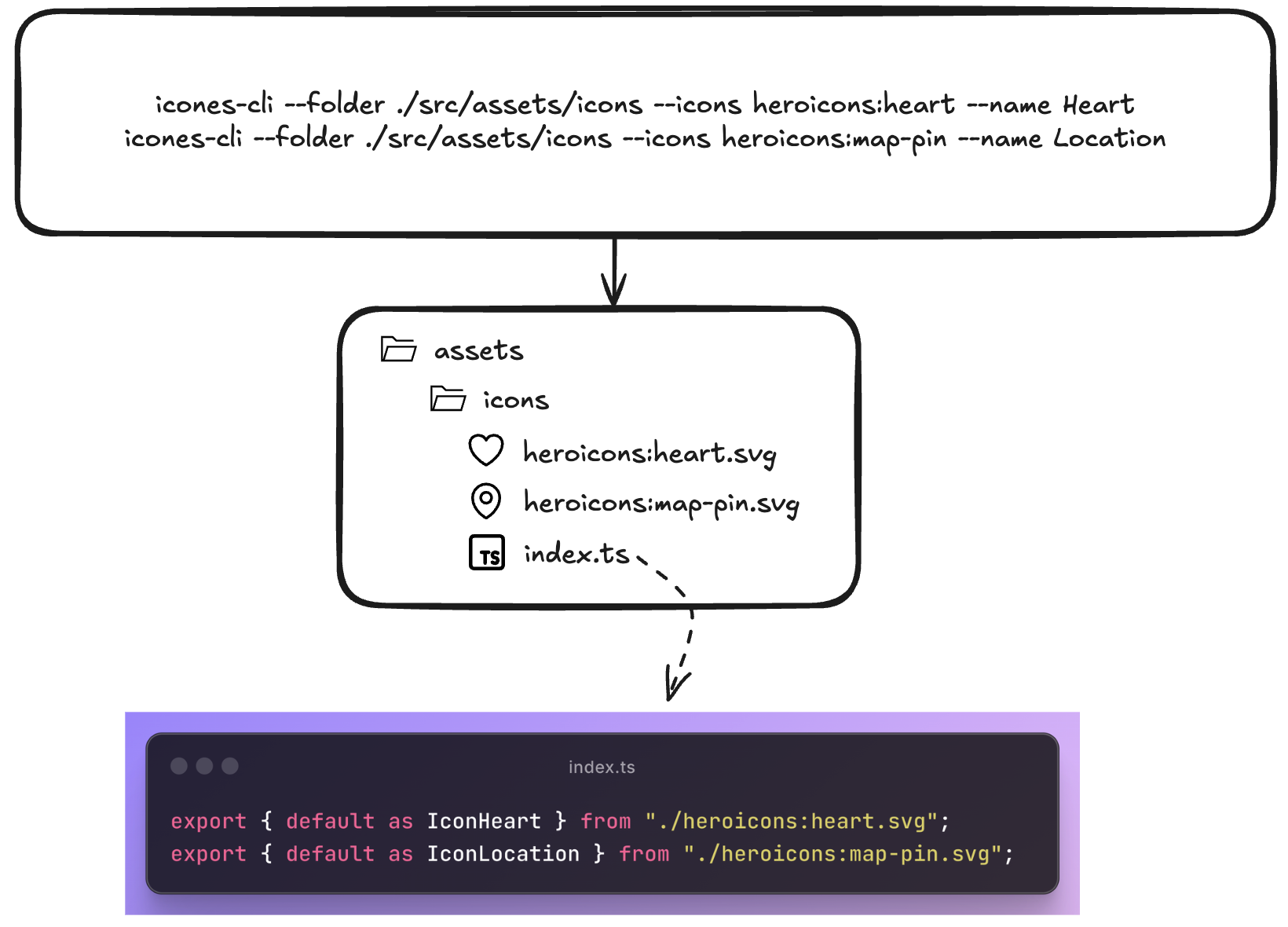
1. **Find your icon**: Use https://icones.js.org _or_ `iconmate iconify search <query>`.
2. **Pick the icon id**: For example `heroicons:heart`.
3. **Add with iconmate**: Interactive (`iconmate`) or direct (`iconmate add ...`).
## Why this structure?
1. **Copy-paste workflow**: Find icon on icones.js.org → copy name → paste into iconmate
2. **Organized by default**: Everything goes into `index.ts` exports automatically and just typing `<Icon` will autosuggest from your current collection. Just regular TS behavior.
3. **TypeScript ready**: Generated code is fully typed. Pass custom width, height, fills, you name it.
4. **Customizable** 🎨: Want to add a default Tailwind class on every icon? custom props? Just add it to the file!
5. **Git-friendly**: Plain SVG files, no binary assets
6. **Lightning fast**: Native Rust binary, no Node.js startup time
## Contributing
Contributions are welcome—pull requests for bug fixes, new framework presets, or improvements are appreciated.
🐱 Repo: [github.com/Blankeos/iconmate](https://github.com/Blankeos/iconmate) - Star it if you love it ⭐
## What's Completed from the Roadmap
- ✅ Interactive prompt mode
- ✅ Framework presets (React, Vue, Svelte, Solid)
- ✅ URL and raw SVG support
- ✅ Custom export templates
- ✅ Zero-config installation
### Roadmap & Out-of-scoped
- [x] An empty command. Creates an .svg, adds it to the index.ts with a name you can specify.
- [x] Paste an actual svg instead of an icon `name`.
- [x] Presets (`normal`, `react`, `solid`, `svelte`, `vue`, `emptysvg`) override output templates and file types.
- [x] Prompt Mode via `iconmate` - Interactive mode so you won't need to pass arguments.
- [x] Delete an icon using `iconmate delete`
- [x] An interactive TUI instead of prompt-mode.
- [x] Rename in the TUI (but recommended for you to just use the LSP to do it)
- [x] A lot of TUI functionalities wokr
- [x] `iconmate iconify --help` commands for AI to easily look for icons itself.
- [x] Search and add Iconify icons directly inside the TUI (no need to open https://icones.js.org).
- [x] `--preset=flutter` (SVGs + generated Dart barrel).
- [ ] Other frameworks i.e. Go/Rust GUI apps? (Not sure how they work yet though).
- [ ] ~Zed or VSCode Extension~ (seems unnecessary now, it's just a CLI)
### Near-Term Roadmap
---
[my_blog]: https://carlotaleon.net/blog/why-you-dont-need-an-icon-library
[my_blog#svgr]: https://carlotaleon.net/blog/why-you-dont-need-an-icon-library#bonus-just-save-them-as-svg-files