
iconmate 💚
Your new favorite way to manage icons for your Vite, NextJS projects without icon libraries!
Based on my blog post on Why you might not need an icon library. Built with 🦀 Rust, ⚡️ designed for speed, 🦅 made for developers who hate icon library bloat.
Stop installing bloated icon libraries. All you need is icones.js.org or your designer's Figma icon pack and paste them into your project with surgical precision.
What Makes It Special ✨
- Zero Dependencies 📦: Just a CLI, No icon libraries to bundle
- Framework Native 🧩: Works with React, Vue, Svelte, Solid - generates components automatically
- Interactive Mode 🎮: Just run
iconmateand let it guide you - URL Support 🌐: Fetch from any SVG URL, not just iconify
- Raw SVG 📋: Copy-paste SVG code directly
- Empty SVG 🏗️: Create placeholder icons for rapid prototyping
Quick Start
# Install
# Run inside your project 🚀
> 📁 ) # Enter
> ✨ > 🚀 > 💎 ✨ That's it. The interactive CLI guides you through adding icon to your project!
// 👇 Then, you can just easily use any icon on your project like this!

import { IconHeart } from "@/assets/icons";

function MyApp() {
  return <IconHeart />;
}
You can also add sensible defaults by passing flags:
Installation
NPM 🦖
# or
# or
For one-off usage:
# or
# or
[!NOTE] Note for Bun users: Bun doesn't run
postinstallscripts by default which is needed to install the iconmate binary. Add"trustedDependencies": ["iconmate"]to yourpackage.jsonto do it! But you're only limited to running it with a package.json.Recommended: Just use pnpx for quick one-off usage. If in a project, either install globally or configure trustDependencies.
Install from Cargo 🦀
Or clone and install from source:
Framework Presets
Determines the output filetype and the contents inside that file type.
| Preset | File Type | Framework |
|---|---|---|
normal |
.svg |
Vanilla HTML/CSS |
react |
.tsx |
React Components |
svelte |
.svelte |
Svelte Components |
solid |
.tsx |
Solid Components |
vue |
.vue |
Vue Components |
emptysvg |
.svg |
Placeholder |
[!IMPORTANT] If you want to use
.svgfile types, make sure to setup svgr. I covered how to do this in:
- SolidJS (Vite)
- React (Vite)
- React (NextJS)
- Vue - contribution welcome!
- Svelte - couldn't find an svgr integration :(
Command Line
Interactive Mode (Recommended)
# Description of each prompt:
> 📁 ) # where your icons will be saved.
> ✨
> 🚀
> 🌄
> 💎 Add Specific Icon
With URL
Raw SVG Content
Custom Export Template
Delete icons
Package.json Scripts
Best practice: Add sensible defaults to your script runner.
"scripts": {
  // Usage: npm run iconmate (usually this is the only command you need)!
  "iconmate": "iconmate --folder src/assets/icons/"

  // Usage: npm run iconmate-react
  "iconmate-react": "iconmate --folder ./src/assets/icons/ --preset react",

  // Usage: npm run iconmate-empty
  "iconmate-empty": "iconmate --folder ./src/assets/icons/ --preset emptysvg",
}
Supported Platforms
- macOS (Intel & Apple Silicon) 🍎
- Linux (x64 & ARM64) 🐧
- Windows (x64) 🪟
How It Works
- Find your icon: Visit https://icones.js.org.
- Copy the name: Like
heroicons:heart. - Run iconmate:
iconmate
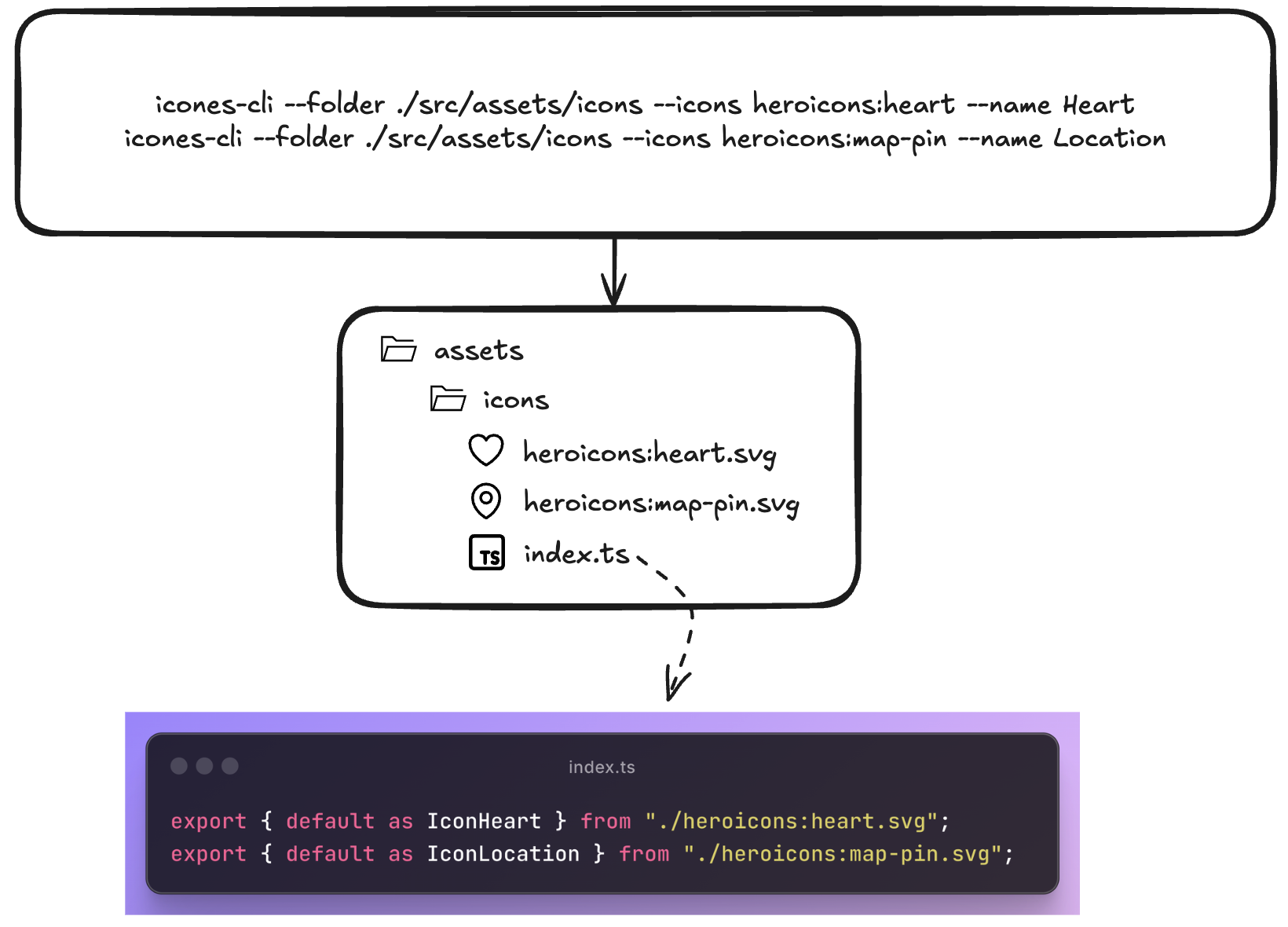
Why this structure?
- Copy-paste workflow: Find icon on icones.js.org → copy name → paste into iconmate
- Organized by default: Everything goes into
index.tsexports automatically and just typing<Iconwill autosuggest from your current collection. Just regular TS behavior. - TypeScript ready: Generated code is fully typed. Pass custom width, height, fills, you name it.
- Customizable 🎨: Want to add a default Tailwind class on every icon? custom props? Just add it to the file!
- Git-friendly: Plain SVG files, no binary assets
- Lightning fast: Native Rust binary, no Node.js startup time
Contributing
Contributions are welcome—pull requests for bug fixes, new framework presets, or improvements are appreciated.
🐱 Repo: github.com/Blankeos/iconmate - Star it if you love it ⭐
What's Completed from the Roadmap
- ✅ Interactive prompt mode
- ✅ Framework presets (React, Vue, Svelte, Solid)
- ✅ URL and raw SVG support
- ✅ Custom export templates
- ✅ Zero-config installation
Original Future Plans
- An empty command. Creates an .svg, adds it to the index.ts with a name you can specify.
- Paste an actual svg instead of an icon
name. - Just a
--preset=svg,react,solid,svelte,vue- which basically overrides templates. Default issvg. - Prompt Mode via
iconmate- Interactive mode so you won't need to pass arguments. - Delete an icon using
iconmate delete - Other frameworks i.e. --preset=flutter or Go/Rust GUI apps? (Not sure how they work yet though).
-
Zed or VSCode Extension(seems unnecessary now, it's just a CLI)
Made with Rust 🦀 | Based on my blog post