# IconPie
[](https://crates.io/crates/icon-pie)
[](https://github.com/rust-random/rand#rust-version-requirements)
A simple command-line tool to generate application icons from raster graphics or vector graphics images.
Quickly combine multiple images and create professional-looking icons for most versions of Windows,
macOS, iOS & Linux.
# Features
* Simple interface.
* Sane defaults for the domain of icon composition.
* Supports outputting to `stdout`, allowing for piping.
* Available as a single executable.
# Overview
An _icon_ consists of a set of _entries_. An _entry_ is simply an image that has a particular size.
For example, this is an icon that has a _32x32_ entry, a _64x64_ entry and a _128x128_ entry:

## What does it do?
Notice that, in the example above, most entries are basically the same picture re-scaled to
multiple sizes. **IconPie** simply automates the process of re-scaling the picture and combining
those re-scaled entries into an icon.
## How does it do it?
### Re-scaling
When re-scaling pictures, **IconPie** preserves their original aspect-ratios. It also ensures that
the all re-scaled images are square, by adding transparent borders if necessary. If the picture
presents a transparent background, the transparency is preserved in the re-scaled images.

### Interpolation
For _[raster graphics](https://en.wikipedia.org/wiki/Raster_graphics)_ (`jpeg`, `png`, ...), **IconPie**
uses _[nearest-neighbor interpolation](https://en.wikipedia.org/wiki/Nearest-neighbor_interpolation)_
by default, optimizing for small-resolution images.
Furthermore, when using _nearest-neighbor interpolation_, it only up-scales images on an integer
scale, preserving as much detail as possible.

You can choose to opt-out of the default interpolation scheme for _raster graphics_ by specifying a
resampling filter with the `-r` flag, as described in the **[Usage](#Usage)** section.
For _[vector graphics](https://en.wikipedia.org/wiki/Vector_graphics)_ (`svg`),
**IconPie** _always_ uses _[linear interpolation](https://en.wikipedia.org/wiki/Linear_interpolation)_
regardless of any specified resampling filter.
# Usage
The formal [`docopt`](http://docopt.org/) syntax for using **IconPie** is as follows:
```$ icon-pie ((-e <file path> <size>... [-r (nearest | linear | cubic)])... (-ico | -icns | -png) [<output path>]) | -h | --help | -v | --version```
* `-e <options>` Specify an entry's source image, target sizes and resampling filter (optional).
* `-r <filter>` Specify a resampling filter: `nearest`, `linear` or `cubic`. Defaults to `nearest`.
* `-ico [<output path>]` Outputs to an `.ico` file. If no output path is specified the app outputs to
`stdout`.
* `-icns [<output path>]` Outputs to an `.icns` file. If no output path is specified the app outputs
to `stdout`.
* `-png [<output path>]` Outputs a `.png` sequence as a `.tar` file. If no output path is specified the
app outputs to `stdout`.
* `-h`, `--help` Help.
* `-v`, `--version` Display version information.
## Examples
Let's say you have the following files saved at your file system.

We'll walk trought some practical examples of **IconPie** usage.
### Simple Usage
> Take `big.svg`, resize it to _32x32_, _64x64_ and _128x128_. Then save it at `icon.ico`.
```
$ icon-pie -e big.svg 32 64 128 -ico icon.ico
```

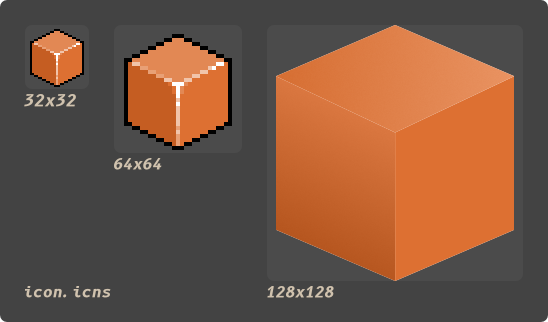
### Sampling From Multiple Files
> Take `small.png`, resize it to _32x32_ and _64x64_. Then take `big.svg` and resize it _128x128_.
> Then combine the re-scaled entries in `icon.icns`.
```
$ icon-pie -e small.png 32 64 -e big.svg 128 -icns icon.icns
```
### Specifying a Resampling Filter
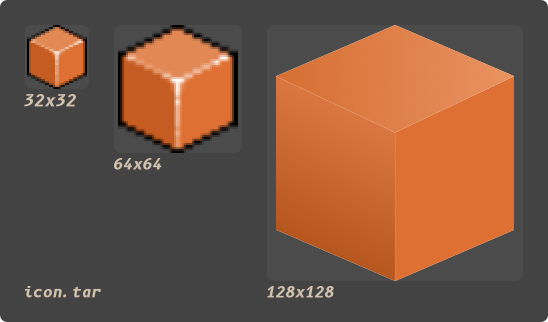
> Take `small.png`, resize it to _32x32_ and _64x64_ **_using linear interpolation_**. Then take
> `big.svg` and resize it _128x128_. Then combine the re-scaled entries in `icon.tar` as a `png`
> sequence.
```
$ icon-pie -e small.png 32 64 -r linear -e big.svg 128 -png icon.tar
```
# Support
## Icon Formats
This are the file formats **IconPie** can output to:
* `ico`
* `icns`
* `png` sequence (`tar`)
### Icns Support
| `ICON` | 32×32 1-bit entry | No |
| `ICN#` | 32×32 1-bit entry with 1-bit mask | No |
| `icm#` | 16×12 1-bit entry with 1-bit mask | No |
| `icm4` | 16×12 4-bit entry | No |
| `icm8` | 16×12 8-bit entry | No |
| `ics#` | 16×16 1-bit mask | No |
| `ics4` | 16×16 4-bit entry | No |
| `ics8` | 16x16 8-bit entry | No |
| `is32` | 16×16 24-bit entry | Yes |
| `s8mk` | 16x16 8-bit mask | Yes |
| `icl4` | 32×32 4-bit entry | No |
| `icl8` | 32×32 8-bit entry | No |
| `il32` | 32x32 24-bit entry | Yes |
| `l8mk` | 32×32 8-bit mask | Yes |
| `ich#` | 48×48 1-bit mask | No |
| `ich4` | 48×48 4-bit entry | No |
| `ich8` | 48×48 8-bit entry | No |
| `ih32` | 48×48 24-bit entry | Yes |
| `h8mk` | 48×48 8-bit mask | Yes |
| `it32` | 128×128 24-bit entry | Yes |
| `t8mk` | 128×128 8-bit mask | Yes |
| `icp4` | 16x16 32-bit `png`/`jp2` entry | `png` only |
| `icp5` | 32x32 32-bit `png`/`jp2` entry | `png` only |
| `icp6` | 64x64 32-bit `png`/`jp2` entry | `png` only |
| `ic07` | 128x128 32-bit `png`/`jp2` entry | `png` only |
| `ic08` | 256×256 32-bit `png`/`jp2` entry | `png` only |
| `ic09` | 512×512 32-bit `png`/`jp2` entry | `png` only |
| `ic10` | 512x512@2x "retina" 32-bit `png`/`jp2` entry | `png` only |
| `ic11` | 16x16@2x "retina" 32-bit `png`/`jp2` entry | `png` only |
| `ic12` | 32x32@2x "retina" 32-bit `png`/`jp2` entry | `png` only |
| `ic13` | 128x128@2x "retina" 32-bit `png`/`jp2` entry | `png` only |
| `ic14` | 256x256@2x "retina" 32-bit `png`/`jp2` entry | `png` only |
## Image Formats
This are the formats **IconPie** can use as input:
| `png` | All supported color types |
| `jpeg` | Baseline and progressive |
| `gif` | Yes |
| `bmp` | Yes |
| `ico` | Yes |
| `tiff` | Baseline(no fax support), `lzw`, PackBits |
| `webp` | Lossy(Luma channel only) |
| `pnm ` | `pbm`, `pgm`, `ppm`, standard `pma` |
| `svg` | Limited |
### Svg Support
**IconPie** uses the [`nsvg`](https://crates.io/crates/nsvg) crate to rasterize `svg` files.
According to the authors of the crate:
> Like NanoSVG, the rasterizer only renders flat filled shapes. It is not particularly fast or
> accurate, but it is a simple way to bake vector graphics into textures.
The author of `icon-pie` is inclined to search for alternatives to `nsvg` if inquired to.
Help would be appreciated.
# License
Licensed under MIT license([LICENSE-MIT](https://github.com/GarkGarcia/icon-pie/blob/master/LICENSE)
or http://opensource.org/licenses/MIT).
# Contribution
Unless you explicitly state otherwise, any contribution intentionally submitted for inclusion in the
work by you shall be licensed as above, without any additional terms or conditions.