# *httpdirectory*'s readme
This project is in an early stage of development.
## Description
This library provides a convenient way to scrape directory indexes
(like the ones created by `mod_autoindex` with apache or `autoindex`
with nginx) and get a structure that abstracts it. For instance one
may have the following website:
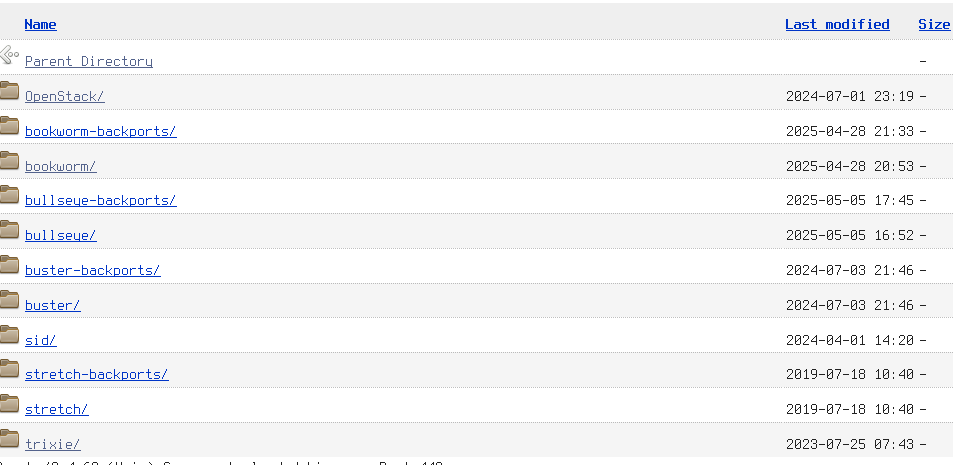
The library will insert in an `HttpDirectory` structure all the
information that is to say, name, link, size and date of files
or directories. Printing it will produce the following output:
```text
https://cloud.debian.org/images/cloud/
DIR - ..
DIR - 2024-07-01 23:19 OpenStack/
DIR - 2025-04-28 21:33 bookworm-backports/
DIR - 2025-04-28 20:53 bookworm/
DIR - 2025-05-12 23:57 bullseye-backports/
DIR - 2025-05-12 23:22 bullseye/
DIR - 2024-07-03 21:46 buster-backports/
DIR - 2024-07-03 21:46 buster/
DIR - 2024-04-01 14:20 sid/
DIR - 2019-07-18 10:40 stretch-backports/
DIR - 2019-07-18 10:40 stretch/
DIR - 2023-07-25 07:43 trixie/
```
## Usage
First obtain a directory from an url using `HttpDirectory::new(url)`
method, then you can use `dirs()`, `files()`, `parent_directory()` or
`filter_by_name()`, `cd()`, `sort_by_name()`, `sort_by_date()` to get
respectively all directories, all files, the `ParentDirectory`,
filtering by the name (with a Regex), changing directory, sorting by
name or by date of this `HttpDirectory` listing entries:
```rust
use httpdirectory::httpdirectory::HttpDirectory;
async fn first_example() {
if let Ok(httpdir) = HttpDirectory::new("https://cloud.debian.org/images/cloud/").await {
println!("{:?}", httpdir.dirs());
}
}
```
You can see [onedir example](examples/onedir.rs) for a small but
more complete example.
