# http-stat-rs
Imitation is the sincerest form of flattery.
A **zero-dependency, single-binary** HTTP diagnostics tool written in pure Rust. Visualizes the full request lifecycle — DNS, TCP, TLS, server processing, content transfer — in one clear timeline. Inspired by [httpstat](https://github.com/davecheney/httpstat).
[中文](./README_zh.md)
## Highlights
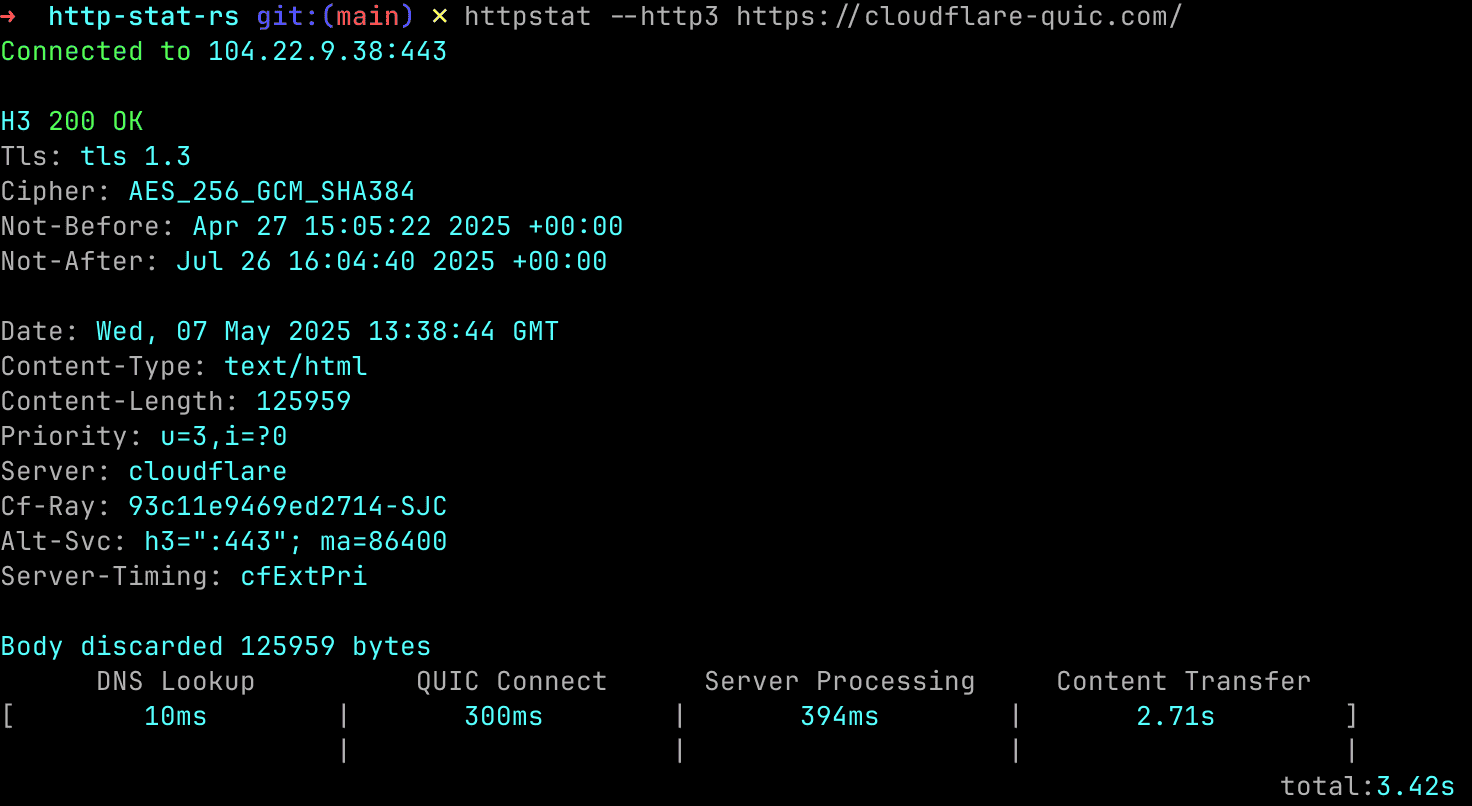
- **HTTP/1.1, HTTP/2 & HTTP/3 (QUIC)** — first-class support for all modern protocols, switch with a single flag
- **gRPC health check** — use `grpc://` or `grpcs://` scheme to probe gRPC services; `grpcs://` performs a real rustls handshake (honoring `-k` and mTLS) and reports the TLS timing and certificate details
- **Request Send phase** — request body upload is timed separately from Server Processing, so a slow POST upload no longer hides as "server is slow"
- **Server-Timing inspection** — parses the `Server-Timing` response header (RFC 8673) and displays the server-reported breakdown *inside* TTFB (CDN edge vs origin vs worker, etc.)
- **Benchmark mode** — `-n 10` repeats N times with min/max/avg/p50/p95/p99; add `-K` to reuse the connection and compare cold vs warm latency
- **Multi-IP concurrent testing** — `--resolve` tests multiple IPs in parallel, results sorted by success
- **Transparent decompression** — auto-decodes `gzip`, `br`, `zstd` responses with `--compressed`
- **Custom DNS** — specify DNS servers by IP or use built-in presets: `google`, `cloudflare`, `quad9`; DoH/DoT presets: `google-doh`, `cloudflare-doh`, `quad9-doh`, `google-dot`, `cloudflare-dot`, `quad9-dot`
- **DoH/DoT phase split** — when DoH or DoT is in use, the DNS column splits into `DNS Connect` (TCP+TLS to the resolver) and `DNS Query`, so you can tell whether "DoH is slow" means slow handshake to the resolver or slow query processing
- **Kernel TCP statistics** — on Linux and macOS, samples `getsockopt(TCP_INFO)` right after `connect(2)` and again after the response body is read. Shown under `--verbose` or with the dedicated `--tcp-info` flag; surfaces RTT, MSS, cwnd, and retransmits-during-request, which isolates "Content Transfer slow" into packet loss vs TCP slow start vs application latency. Through an HTTP/SOCKS proxy the sample reflects the client↔proxy socket, not the origin.
- **Download throughput with slow-start split** — for response bodies larger than 1 MiB, a `Throughput: X MB/s` line is shown next to `Body size`. Under `--verbose`, it also breaks down into "first 100 KB" vs "tail" so you can tell TCP slow-start–dominated downloads from servers that simply stream slowly the whole way.
- **Bilingual output (English / Simplified Chinese)** — `--lang en|zh` overrides the display language; when omitted, the locale is sniffed from `LC_ALL` / `LC_MESSAGES` / `LANG` (anything starting with `zh` → Chinese), with English as the safe fallback. JSON output keeps English keys so machine consumers aren't affected by user locale.
- **JSON output** — `--json` for scripting, CI/CD pipelines, and monitoring integration. The full output contract is documented in [JSON_SCHEMA.md](./JSON_SCHEMA.md), including exit codes, optional blocks, and ready-to-use `jq` recipes
- **TLS inspection** — verbose mode shows full certificate chain, cipher suite, SAN domains, and validity
- **TLS handshake diagnostics** — every HTTPS request reports whether the handshake was `Full` or `Resumed`, whether the server stapled an OCSP response, and (in `-n` benchmark mode, where runs 2+ can resume) whether 0-RTT early data was accepted
- **Cookie support** — `-b 'k=v'` or `-b @file`, auto-carried across same-host `-L` redirects with `Set-Cookie` merging
- **Standards-correct redirects** — `-L` follows up to 10 hops and resolves relative `Location` URLs; the request method downgrades per RFC 9110 (303 → GET, 301/302 POST → GET, 307/308 preserved), and `Authorization`, cookies and `--resolve` pins are all dropped when the redirect crosses to a different host
- **ALPN negotiation display** — every response line shows the final protocol agreed between client and server (`HTTP/1.1`, `H2`, `H3`), so you always know which version was actually used
- **Alt-Svc auto-upgrade** — `--alt-svc` detects an advertised HTTP/3 endpoint (RFC 7838) in the response and automatically retries once over h3, so you see the real h3 timing without manually passing `--http3`
- **JSON field selector** — `--jq '.items[].name'` extracts fields directly from the response body (supports `.a.b`, `.[0]`, `.[]`); an unsupported filter or a non-JSON body prints a clear error instead of silently dumping the full body
- **Pretty JSON** — `--pretty` formats the response body in-place; combine with `--jq` for focused, readable output
- **Response header filtering** — `--include-header` shows only the headers you care about; `--exclude-header` hides the noisy ones
- **curl-like UX** — familiar flags (`-H`, `-X`, `-d`, `-L`, `-k`, `-o`, `-4`/`-6`) for a smooth transition
- **Waterfall chart** — `--waterfall` renders each phase as a horizontal bar, making bottlenecks instantly visible (like Chrome DevTools Network panel)
- **`--connect-to`** — redirect `HOST1:PORT1` to `HOST2:PORT2` at the TCP level; TLS SNI and `Host` header stay unchanged, like curl's `--connect-to`
- **Proxy support** — `--proxy` for HTTP/HTTPS/SOCKS5 proxies; also reads `HTTP_PROXY`, `HTTPS_PROXY`, `ALL_PROXY` environment variables
- **Source IP binding** — `--bind <IP>` pins outbound connections to a specific local address; essential for multi-NIC hosts, policy routing, or validating which interface reaches a target
- **mTLS (mutual TLS)** — `--cert`/`--key` sends a client certificate for zero-trust and service mesh authentication
- **Config file** — `~/.httpstatrc` sets persistent defaults (DNS, timeout, headers, etc.); CLI flags always win
- **Fine-grained timeouts** — `--timeout` caps every phase, including the wait for response headers and the body transfer, so a server that accepts the connection but never answers can't hang the process; `--connect-timeout` bounds only the connection phase (DNS + TCP + TLS/QUIC); `--max-time` is an overall wall-clock cap covering the response body and any followed redirects
- **Automatic retry** — `--retry N` retries transient failures (timeouts, connection errors, HTTP 408/429/500/502/503/504) with exponential backoff, or a fixed `--retry-delay`; ideal for flaky CI gates
- **Response body cap** — bodies are buffered in memory, so `--max-filesize` aborts any transfer that would exceed the limit (default 1GB, `0` = unlimited) before a runaway response can exhaust memory
- **Semantic exit codes** — distinct codes for DNS, TCP, TLS, timeout, 4xx, 5xx failures for easy scripting
- **Tiny binary** — release build uses LTO + `opt-level=z` + strip, typically < 5 MB
- **Truly zero system dependencies** — statically linked, no libcurl, no OpenSSL, no libc on musl builds; drop the binary directly into a `scratch` or `alpine` Docker image for production diagnostics
## Installation
### One-line install (Linux & macOS)
```bash
### Pre-built binaries
[Pre-built binaries](https://github.com/vicanso/http-stat-rs/releases) for Windows, macOS and Linux.
```bash
# Linux
# macOS
```
### From source
```bash
cargo install http-stat
```
## Request Lifecycle
Every HTTP request goes through up to six sequential phases. httpstat measures each one independently:
```
DNS Lookup TCP Connect TLS Handshake Request Send Server Processing Content Transfer
[────────────][────────────][──────────────][────────────][──────────────────][───────────────]
│ │ │ │ │ │
hostname 3-way SYN TLS/SSL headers + waiting for downloading
→ IP handshake negotiation request body first byte response
(HTTPS) on the wire
▲
Total = all phases
```
| DNS Lookup | Time to resolve the hostname to an IP address |
| TCP Connect | Time for the 3-way TCP handshake |
| TLS Handshake | Time to negotiate the TLS session (HTTPS/HTTP2/HTTP3 only) |
| Request Send | Time to write request headers and body to the transport — matters for POST/PUT uploads |
| Server Processing | Time from the last request byte sent to the first response byte received — pure server latency |
| Content Transfer | Time to download the complete response body |
> For HTTP/3, **QUIC Connect** replaces both TCP Connect and TLS Handshake (QUIC combines transport and crypto in a single handshake).
If the server emits a `Server-Timing` response header, httpstat parses it and displays the server-reported sub-phases right above the timeline — useful for splitting a slow Server Processing into CDN edge / origin / worker components without leaving the terminal.
## Usage
```bash
# Basic — auto-negotiates HTTP/2 via ALPN
httpstat https://www.cloudflare.com/
# HTTP/3 (QUIC) with compressed response
httpstat --http3 --compressed https://cloudflare-quic.com/
# Auto-upgrade to HTTP/3 when the server advertises it via Alt-Svc
httpstat --alt-svc https://cloudflare.com
# Test multiple IPs concurrently in silent mode
httpstat --resolve=183.240.99.169,2409:8c54:870:310:0:ff:b0ed:40ac -s https://www.baidu.com/
# POST with request body from file
httpstat -X POST -d @payload.json -H 'Content-Type: application/json' https://httpbin.org/post
# POST with request body from stdin
# gRPC health check
httpstat grpc://localhost:50051
# Verbose mode — full cert chain + request headers
httpstat -v https://github.com
# JSON output for scripting
httpstat --json https://example.com
# JSON benchmark output (pipe to jq, etc.)
httpstat --json -n 5 https://example.com
# Send cookies
httpstat -b 'session=abc123; lang=en' https://httpbin.org/cookies
# Custom DNS server (plain UDP)
httpstat --dns-servers=cloudflare https://example.com
# DNS-over-HTTPS
httpstat --dns-servers=cloudflare-doh https://example.com
# DNS-over-TLS
httpstat --dns-servers=google-dot https://example.com
# Pretty-print JSON response
httpstat --pretty https://httpbin.org/get
# Benchmark — repeat 10 times, show percentile stats
httpstat -n 10 https://example.com
# Benchmark with connection reuse — measure warm request latency
httpstat -n 10 -K https://example.com
# Only show specific response headers
httpstat --include-header content-type --include-header server https://example.com
# Hide noisy response headers
httpstat --exclude-header date --exclude-header via https://example.com
# Set a timeout for every phase
httpstat --timeout 5s https://example.com
# Bound only the connection phase, plus an overall wall-clock cap
httpstat --connect-timeout 3s --max-time 30s https://example.com
# Retry transient failures with exponential backoff (great for CI gates)
httpstat --retry 3 https://example.com
# Retry with a fixed delay instead of backoff
httpstat --retry 5 --retry-delay 2s https://example.com
# Abort if the response body exceeds 10MB (default cap is 1GB)
httpstat --max-filesize 10MB https://example.com/big.bin
# mTLS — send client certificate
httpstat --cert client.crt --key client.key https://mtls.example.com
# Waterfall bar chart — spot bottlenecks at a glance
httpstat --waterfall https://example.com
# Connect-to: test a specific backend without changing DNS or Host header
httpstat --connect-to example.com:443:staging.internal:443 https://example.com
# Repeatable for multiple overrides
httpstat --connect-to api.example.com:443:192.168.1.10:8443 https://api.example.com
# HTTP proxy
httpstat --proxy http://proxy.corp:8080 https://example.com
# SOCKS5 proxy
httpstat --proxy socks5://127.0.0.1:1080 https://example.com
# Proxy from environment variable
HTTPS_PROXY=http://proxy.corp:8080 httpstat https://example.com
# Bind to a specific local IP (multi-NIC / policy routing)
httpstat --bind 192.168.1.100 https://example.com
```
## Options
```
httpstat visualizes curl(1) statistics in a way of beauty and clarity.
Usage: httpstat [OPTIONS] [URL_ARG]
Arguments:
[URL_ARG] url to request
Options:
-u, --url <URL> URL to request (optional, can be provided as the last argument)
-H <HEADERS> set HTTP header; repeatable: -H 'Accept: ...' -H 'Range: ...'
-4 resolve host to ipv4 only
-6 resolve host to ipv6 only
-k skip verify tls certificate
-o <OUTPUT> output file
-L follow 30x redirects
-X <METHOD> HTTP method to use (default GET)
-d, --data <DATA> the body of a POST or PUT request; from file use @filename, from stdin use @-
--resolve <RESOLVE> resolve the request host to specific ip address (e.g. 1.2.3.4,1.2.3.5)
--compressed request compressed response: gzip, br, zstd
--http3 use http/3
--http2 use http/2
--http1 use http/1.1
--alt-svc if the response advertises HTTP/3 via Alt-Svc, retry once over h3
-s silent mode, only output the connect address and result
--dns-servers <DNS_SERVERS> dns server address to use, format: 8.8.8.8,8.8.4.4; presets: google, cloudflare, quad9, google-doh, cloudflare-doh, quad9-doh, google-dot, cloudflare-dot, quad9-dot
-v, --verbose verbose mode
--pretty pretty mode
--waterfall show timing as a waterfall bar chart
--tcp-info show kernel TCP_INFO stats (RTT, cwnd, retransmits); Linux + macOS
--lang <LANG> display language: en | zh (default: system)
--timeout <TIMEOUT> timeout for every phase (DNS, TCP, TLS, request, QUIC)
--connect-timeout <DUR> max time for the connection phase only (DNS + TCP + TLS/QUIC), e.g. 5s
--max-time <DUR> overall time limit for the whole operation incl. body and redirects, e.g. 30s
--retry <RETRY> retry up to N times on transient failure (timeout, conn error, 408/429/5xx)
--retry-delay <DUR> fixed delay between retries (e.g. 2s); default is exponential backoff
--max-filesize <SIZE> max response body size to buffer, e.g. 100MB (default 1GB); 0 = unlimited
-n, --count <COUNT> number of requests for benchmarking, show min/max/avg/p50/p95/p99 stats
-K, --reuse reuse connection in benchmark mode (requires -n), test warm request performance
-b, --cookie <COOKIE> send cookies: 'name=value; name2=value2' or from file use @filename
--json output results as JSON for scripting and CI/CD
--connect-to <CONNECT_TO> redirect HOST1:PORT1 to HOST2:PORT2 (repeatable); TLS SNI and Host header stay unchanged
--proxy <PROXY> proxy URL: http://host:port, https://host:port, socks5://host:port
--cert <CERT> client certificate for mTLS (PEM file)
--key <KEY> client private key for mTLS (PEM file)
--bind <BIND> bind to a specific local IP address (e.g. 192.168.1.100 or ::1)
--jq <JQ> filter JSON response body with a jq-style selector (e.g. ".items[].name")
--include-header <HEADER> only show these response headers (repeatable, case-insensitive)
--exclude-header <HEADER> hide these response headers (repeatable, case-insensitive)
-h, --help Print help
-V, --version Print version
```
## Config File (`~/.httpstatrc`)
Set persistent defaults so you don't have to repeat flags on every invocation.
Create `~/.httpstatrc` as a JSON object — any field can be omitted. CLI flags always override config values.
```json
{
"compressed": true,
"dns_servers": "cloudflare",
"timeout": "10s",
"connect_timeout": "5s",
"max_time": "30s",
"retry": 3,
"retry_delay": "2s",
"max_filesize": "1GB",
"verbose": false,
"pretty": false,
"silent": false,
"follow_redirect": false,
"skip_verify": false,
"http1": false,
"http2": false,
"http3": false,
"alt_svc": false,
"json": false,
"headers": ["Accept: application/json"],
"include_header": [],
"exclude_header": ["date", "via"]
}
```
## Exit Codes
| 0 | Success |
| 1 | General / unknown error |
| 2 | DNS resolution failure |
| 3 | TCP connection failure |
| 4 | TLS / SSL error |
| 5 | Timeout |
| 6 | HTTP 4xx client error |
| 7 | HTTP 5xx server error |
## License
http-stat-rs is provided under the MIT license. See [LICENSE](LICENSE).
