[](https://codecov.io/gh/jonhoo/hanabot)
This is a Slack [bot](https://api.slack.com/bot-users) that allows users
to play the cooperative card game
[Hanabi](https://en.wikipedia.org/wiki/Hanabi_(card_game)) with one
another.
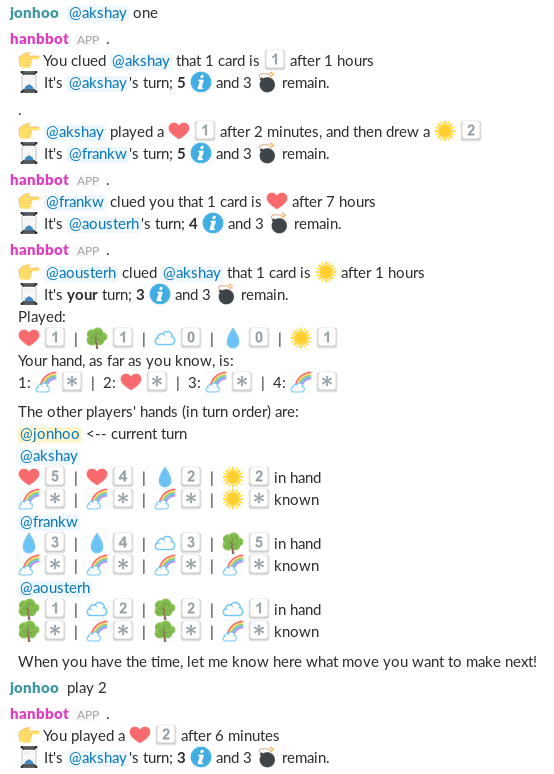
## Testing it locally
```console
$ cargo run --bin stdio
1: help
@1 Welcome to the game Hanabi!
@1
@1 All gameplay happens through your interactions with this bot.
@1 To indicate your interest in joining a game, type `join`.
@1 Once you've done so, you can type `help` again to get game-specific help.
@1
@1 If you want more information, try <https://en.wikipedia.org/wiki/Hanabi_(card_game)> or <https://github.com/jonhoo/hanabot>.
1: join
user 1 joined game
@1 Welcome! I'll get you started with a game as soon as there are some other players available.
2: join
user 2 joined game
@2 Welcome! I'll get you started with a game as soon as there are some other players available.
@2 I have 1 other available players, so we can start a game.
@2 Use `start` to do so. You can optionally pass the number of players to include.
@1 I have 1 other available players, so we can start a game.
@1 Use `start` to do so. You can optionally pass the number of players to include.
1: start
starting game #1 with 2 users: [SlackUserId("1"), SlackUserId("2")]
@1 You are now in a game with 1 other players: <@2>
@1 :hourglass: It's *your* turn; *8* :information_source: and 3 :bomb: remain.
```
## Installation
0. Download and install [Rust](https://www.rust-lang.org/).
1. Create a new Slack App [here](https://api.slack.com/apps). When it
asks you how you want it to create the app, select "From Manifest",
and paste in the JSON from `slack-manifest.json`.
2. Go to the "App Home" tab, and under "Show Tabs", check the box that
says "Allow users to send ..." so that users can DM the bot.
3. Go to the "Basic Information" tab, and generate an "App-Level
Token". Give it `connections:write` access so that it can be used
for socket communication. Copy that token.
4. While you're on that page, go ahead and add `icon.png` as the app's
icon and fiddle with its colors (if you want).
5. Next, open the "Install App" tab and hit "Install to <Your
Workspace>". If you're an admin for the workspace, this step will
take you to the workspace to approve the bot, otherwise, it'll
request the bot to be installed by your admins.
6. When the bot is approved, this page will show a "Bot User OAuth
Token". Copy that token as well.
7. Finally, run the bot with
```console
$ env "SLACK_APP_TOKEN=XXX" "SLACK_API_TOKEN=YYY" cargo run
```
where `XXX` is the "App-Level Token" and `YYY` is the "Bot User
OAuth Token". Note that the app persists its state to `state.json`
every time a game progresses, and loads that file on startup, so
you'll want to run the bot from the same persistent storage each
time.
At this point, players should be able to join by messaging the Hanabi
app with the word "join"!
## Usage
Players must first notify the Hanabi bot that they wish to play. They do
so by sending the bot `join` in a direct message. If you no longer wish
to participate in games, use `leave`.
The bot will try to construct games of five players. Once there are two
or more players, any player can instruct the bot to `start`, which
causes it to start a game with however many players are available.
A player can only be in one game at any given point in time.
During play, a player can play, clue, and discard:
- To play, use `play <card>`, where `<card>` is the index of the card
you wish to play from the left, starting at 1
- To discard, use `discard <card>`, where `<card>` is the same as for
`play`.
- To clue, use `clue @player <specifier>` where `@player` is the user
to clue, and `<specifier>` is either a color (e.g., `red`), or a
number (e.g., `two`). The leading `clue` keyword is optional.
In addition, use `hands` to show all players' hands, and what each
player knows about their hand, `discards` to show the discard pile,
`deck` to show the number of cards left in the deck, and `ping` to
remind the current player that it's their turn. You can also terminate
the current game using `quit`.
When new cards are drawn, they appear on the right-hand side of your
hand.
## Known limitations
- No spectator mode.
- No support for playing with the rainbow suit.
- No support for playing with character cards.
- No long-term statistics tracking.
All of these are fixable. PRs are welcome.

