<p align="center" dir="auto">
<img style="height:240px;width:240px" src="https://s2.loli.net/2024/09/08/uDKESYW7ks9eRyf.png" alt="Logo逃走啦~"/>
</p>
<h1 align="center" tabindex="-1" class="heading-element" dir="auto">GXCI</h1>
<p align="center">
<a href="https://crates.io/crates/gxci" target="_blank"><img src="https://img.shields.io/crates/v/gxci"/></a>
<a href="https://docs.rs/gxci" target="_blank"><img src="https://img.shields.io/docsrs/gxci/0.2.1"/></a>
</p>
<p align="center">
Rust-based safe interface development for Daheng Industrial Camera GxIAPI
</p>
<hr />
# New Things in 2.0
1. [x] All the lib functions are safe now
2. [x] The inner error handling
3. [x] The readme images are on cloud now
# Plan in 3.0
1. [ ] no-opencv feature
# Introduction
gxci(Galaxy Camera Interface)是一款用Rust基于大恒工业相机GxIAPI的库进行的接口开发;
目前已实现USB单相机的HAL库封装,raw内包含着C语言接口除去网络相机的全部内容(句柄、常量、结构、枚举、回调函数等)的直接rust实现;HAL内做了硬件抽象层的封装(目前包括连接、采图、推流),适合实际开发使用;utils内则是一些工具类函数(常用的Builder模式和Facade模式函数封装);
旧版是一个叫做[gxi_hako](https://crates.io/crates/gxi_hako)的crate库,里面raw部分和utils部分的不完全实现,现在已经暂时弃用了;
新版也就是这一款gxci,里面包含了raw、HAL、utils三个部分的实现;
截至目前,2024年7月11日23点45分,已经完成了`features=["solo"]`部分的HAL库编写,多相机的feature还未实现,等再次闲下来再来更新吧(๑˃ᴗ˂)ﻭ
2024年9月8日21点15分,2.0更新!主要是错误处理和安全化,现在所有的库函数都是安全的了,同时建立了非常规范和健壮的错误处理。此外也更新了所有例子,消除了所有的Warning。
Gxci (Galaxy Camera Interface) is an interface developed using Rust based on the Daxi API library of Daheng Industrial Camera;
At present, HAL library encapsulation for USB single camera has been implemented, and raw contains a direct Rust implementation of all contents (handles, constants, structures, enumerations, callback functions, etc.) of the C language interface except for the network camera; HAL has encapsulated the hardware abstraction layer (currently including connections, image capture, and streaming), which is suitable for practical development and use; Inside the utilities are some utility class functions (encapsulated with commonly used Builder and Facade pattern functions);
The old version was a crate library called [gxi_hako](https://crates.io/crates/gxi_hako), which had incomplete implementations of the raw and utilities parts and has now been temporarily abandoned;
The new version, also known as gxci, includes the implementation of three parts: raw, HAL, and utilities;
As of 23:45 on July 11, 2024, the HAL library for the 'features=["solo"]' section has been completed, but the multi camera features have not been implemented yet. i'll update it when i have more free time (๑˃ᴗ˂)ﻭ.
As of 21:15 on September 8, 2024, 2.0 update! Mainly error handling and security, now all library functions are safe, and very standardized and robust error handling has been established. In addition, all examples have been updated and all Warnings have been resolved.
# Overview
You can get the sdk-dev-doc from the SDK of Daheng Imaging you have installed.
# Quick Start
1. Ensure you have OpenCV Rust Bindings installed,
2. Ensure your camera version is supported by the GxIAPI SDK,and ensure you have installed the GxIAPI SDK.
the document of the environment config is follow the quick start part.
in your Cargo.toml, add the following dependencies:
```toml
[dependencies]
gxci = "0.2.1"
```
then, you can use the following code to get a single image from the camera and save it as png.
```rust
use gxci::hal::device::*;
use gxci::hal::base::*;
use gxci::utils::debug::print_device_info;
fn main()->Result<()> {
let dll_path = "C:\\Program Files\\Daheng Imaging\\GalaxySDK\\APIDll\\Win64\\GxIAPI.dll";
gxci_init(dll_path)?;
let device_num = gxi_count_devices( 1000);
println!("Device number: {}", device_num.unwrap());
let base_info = gxi_list_devices().unwrap();
for device in &base_info {
print_device_info(&device);
}
gxi_open_device()?;
gxi_get_image()?;
gxi_save_image_as_png("test.png")?;
gxi_close_device()?;
gxci_close()?;
Ok(())
}
```
The terminal output should be like this:
```shell
Finished `dev` profile [unoptimized + debuginfo] target(s) in 0.84s
Running `target\debug\examples\hal_get_image.exe`
Device number: 1
p_device_info: 0x1ad375f3cd0, p_buffer_size: 0xaa9f0ff8d8
Vendor Name: Daheng Imaging
Model Name: MER-132-43U3M
Serial Number: FS0170060031
Display Name: MER-132-43U3M(FS0170060031)
Device ID: MER-132-43U3M(FS0170060031)
User ID:
Access Status: GX_ACCESS_STATUS_UNKNOWN
Device Class: GX_DEVICE_CLASS_U3V
-----------------------
Device handle: Some(0x1ad3738f3e0)
Successfully opened device index 1
Successfully sent command
int_value: 0xaa9f0ff250
int_value: 0xaa9f0ff258
enum_value: 0xaa9f0ff270
enum_value: 0xaa9f0ff260
int_value: 0xaa9f0ff268
p_frame_data: 0xaa9f0ff6f8
frame_data: GX_FRAME_DATA { nStatus: 0, pImgBuf: 0x1ad39635040, nWidth: 1292, nHeight: 964, nPixelFormat: 17301505, nImgSize: 9963904, nFrameID: 0, nTimestamp: 0, reserved: [17301505] }
Frame data: GX_FRAME_DATA { nStatus: 0, pImgBuf: 0x1ad39635040, nWidth: 1292, nHeight: 964, nPixelFormat: 17301505, nImgSize: 1245488, nFrameID: 0, nTimestamp: 61947717921575, reserved: [17301505] }
Successfully sent command
Successfully got image
Image saved successfully.
Device handle: Some(0x0)
Successfully closed device
```
if your camera is as the following:
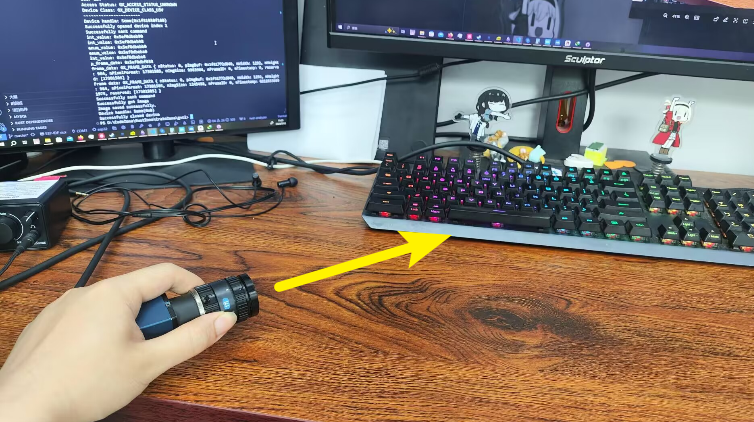
then you will get a test.png as

more codes just see the examples.
if you want to use raw functions, you can see [gxi_hako](https://crates.io/crates/gxi_hako) crate.
# Example
Here 5 raw-examples and 3 hal-example are provided, they are:
- raw-examples
- [x] raw_open_device_by_index
- [x] raw_open_device_by_sn
- [x] raw_list_device_info
- [x] raw_get_image
- [x] raw_capture_callback
- hal-examples
- [x] hal_list_device_info
- [x] hal_get_image
- [x] hal_capture_callback
you can run them like:
```shell
cargo run --example hal_list_device_info
```
# Dependencies
## OpenCV Environment
The OpenCV lib here is used to easily matlization the image and provide a GUI to show the image.
Anyway I think OpenCV is exactly a necessary lib in image processing region.
But the shortcoming is that the OpenCV is a little bit heavy, I'm trying to find a lighter lib to replace it in a feature like `no-opencv`. But it's also need time.
(Now the newest OpenCV is 4.10.0, but I haven't try it yet. So here is a 4.9.0 tutorial)
### Install LLVM and OpenCV 4.9.0
In Windows 10/11, I would like using choco as the following command to install LLVM and OpenCV 4.9.0:
```shell
choco install llvm opencv
```
Following are the websites:
- [LLVM](https://releases.llvm.org/download.html)
- [OpenCV](https://opencv.org/releases/)
- [choco](https://chocolatey.org/)
### Add the path environment variable
You can add the following path to the path environment variable:
- opencv bin path ...\opencv\build\bin
- opencv x64 bin path ...\opencv\build\x64\vc16\bin
- choco bin path C:\ProgramData\chocolatey\bin
- LLVM bin path C:\Program Files\LLVM\bin
Here is an example:
```
D:\ProgramUnsigned\Embedded\opencv\build\bin
D:\ProgramUnsigned\Embedded\opencv\build\x64\vc16\bin
C:\ProgramData\chocolatey\bin
C:\Program Files\LLVM\bin
```
### Add opencv environment variable(System Variable)
OPENCV_INCLUDE_PATHS ...\opencv\build\include
OPENCV_LINK_LIBS opencv_world490
OPENCV_LINK_PATHS ...\opencv\build\x64\vc16\lib
here is an example:
```
OPENCV_INCLUDE_PATHS D:\ProgramUnsigned\Embedded\opencv\build\include
OPENCV_LINK_LIBS opencv_world490
OPENCV_LINK_PATHS D:\ProgramUnsigned\Embedded\opencv\build\x64\vc16\lib
```
### Copy opencv_world490.dll to the target directory (if needed)
Sometimes, you need to copy the opencv_world490.dll to the target directory, which is the same as the exe file.
## GxIAPI Environment
You also need to install the GxIAPI SDK, which can be downloaded from the [official website](https://www.daheng-imaging.com/downloads/).
Just install the SDK for your platform.
## Camera Environment
You need to connect the camera to your computer's USB, and make sure the camera is powered on.
Then all the environment is ready.
# Camera Support
- [x] USB3.0 Camera
- [x] Mer Camera (Mono8, Mono10)
- [ ] Gige Camera
# Platform Support
Now, is Windows only.
# Licensing
Licensed under the MIT License.
# Contributing
Uhmmm... placeholder,I think i will do this solo in a part of time.
if you have some problem,just issue it.
other ways you can contact me by email: zoneherobrine@gmail.com;
or by Tencent QQ: 2212540603 (with related information in the friend request)
# Acknowledgments
GXCI(GalaXy Camera Interface)的命名要感谢[MoonWX](https://github.com/MoonWX)同学的建议,这是一个简洁明确并且很帅的名字ヽ(・∀・)ノ;
同时也感谢同专业李同学的帮助,在gx_enum的冗长的类型转换中,他与我协力在十分钟之内完成了C枚举到Rust枚举的转换;
也感谢[西西](https://github.com/Ben-Phantom)帮忙找的免费图床网站,进一步压缩了包的大小( - ω - )
同时也感谢OpenAI的GPT模型DELTA·E绘制的炫酷LOGO :D
he naming of GXCI (GalaXy Camera Interface) is thanks to [MoonWX](https://github.com/MoonWX)'s suggestion, which is a concise, clear, and handsome nameヽ(・∀・)ノ;
Also, I would like to express my gratitude to fellow student Li for his assistance in the lengthy type conversion process at gx-enum. Together with me, we were able to complete the conversion from the C enum to the Rust enum within ten minutes;
Thanks to [Sisyphus](https://github.com/Ben-Phantom) for helping me find a free image hosting website, which further compressed the package size ( - ω - )
Also thanks to OpenAI's GPT model DELTA·E for drawing the cool LOGO :D
# HAL Functions implemented status
- basement
- [x] gxi_check()
- [x] gxci_init()
- [x] gxci_close()
- device
- [x] gxi_count_devices()
- [x] gxi_list_devices()
- [x] gxci_open_device()
- [x] gxci_close_device()
- [x] gxi_send_command()
- [x] gxi_get_image()
- [x] gxi_open_stream()
- [x] gxi_open_stream_interval()
- [x] gxi_close_stream()
- config
- todo!()
- event
- todo!()
- network
- todo!()
# DLL RAW implemented status
- [x] 302 0 0001C020 GXCloseDevice
- [x] 101 1 0001BBC0 GXCloseLib
- [x] 700 2 0001E9E0 GXExportConfigFile
- [ ] 707 3 0001EA50 GXExportConfigFileW ?在开发文档里面没介绍这个函数
- [x] 602 4 0001E920 GXFlushEvent
- [x] 505 5 0001E6E0 GXFlushQueue
- [x] 201 6 0001BDE0 GXGetAllDeviceBaseInfo
- [x] 414 7 0001D5F0 GXGetBool
- [x] 419 8 0001E080 GXGetBuffer
- [x] 418 9 0001DF50 GXGetBufferLength
- [ ] 205 A 0001BE80 GXGetDeviceIPInfo
- [ ] 423 B 0001C0B0 GXGetDevicePersistentIpAddress
- [x] 411 C 0001D3C0 GXGetEnum
- [x] 410 D 0001CF50 GXGetEnumDescription
- [x] 409 E 0001CE20 GXGetEnumEntryNums
- [x] 506 F 0001E970 GXGetEventNumInQueue
- [x] 422 10 0001C1E0 GXGetFeatureName
- [x] 408 11 0001CCF0 GXGetFloat
- [x] 406 12 0001C960 GXGetFloatRange
- [x] 504 13 0001E670 GXGetImage
- [x] 404 14 0001C730 GXGetInt
- [x] 403 15 0001C590 GXGetIntRange
- [x] 204 16 0001BC40 GXGetLastError
- [ ] 709 17 0001F370 GXGetOptimalPacketSize (Windows Only)
- [x] 416 18 0001DAA0 GXGetString
- [x] 415 19 0001D820 GXGetStringLength
- [x] 425 1A 0001D970 GXGetStringMaxLength
- [ ] 705 1B 0001EEF0 GXGigEForceIp
- [ ] 704 1C 0001ECC0 GXGigEIpConfiguration
- [ ] 706 1D 0001F170 GXGigEResetDevice
- [x] 701 1E 0001EAC0 GXImportConfigFile
- [ ] 708 1F 0001EB40 GXImportConfigFileW ?在开发文档里面没介绍这个函数
- [x] 100 20 0001BB70 GXInitLib
- [x] 400 21 0001C260 GXIsImplemented
- [x] 401 22 0001C370 GXIsReadable
- [x] 402 23 0001C480 GXIsWritable
- [x] 301 24 0001BFB0 GXOpenDevice
- [x] 300 25 0001BF10 GXOpenDeviceByIndex
- [ ] 702 26 0001EBC0 GXReadRemoteDevicePort
- [ ] 710 27 0001F3E0 GXReadRemoteDevicePortStacked
- [x] 500 28 0001E5B0 GXRegisterCaptureCallback
- [x] 600 29 0001E730 GXRegisterDeviceOfflineCallback
- [x] 603 2A 0001E820 GXRegisterFeatureCallback
- [x] 421 2B 0001E480 GXSendCommand
- [x] 507 2C 0001F100 GXSetAcqusitionBufferNumber
- [x] 413 2D 0001D720 GXSetBool
- [x] 420 2E 0001E350 GXSetBuffer
- [ ] 424 2F 0001C160 GXSetDevicePersistentIpAddress
- [x] 412 30 0001D4F0 GXSetEnum
- [x] 407 31 0001CBE0 GXSetFloat
- [x] 405 32 0001C860 GXSetInt
- [x] 417 33 0001DDC0 GXSetString
- [x] 501 34 0001E620 GXUnregisterCaptureCallback
- [x] 601 35 0001E7B0 GXUnregisterDeviceOfflineCallback
- [x] 604 36 0001E8B0 GXUnregisterFeatureCallback
- [x] 206 37 0001BD70 GXUpdateAllDeviceList
- [x] 200 38 0001BD00 GXUpdateDeviceList
- [ ] 703 39 0001EC40 GXWriteRemoteDevicePort
- [ ] 711 3A 0001F450 GXWriteRemoteDevicePortStacked (Windows Only)