# gwx — git worktree, extended
[](https://github.com/ktakada42/gwx/actions/workflows/ci.yml)
[](https://github.com/ktakada42/gwx/actions/workflows/release.yml)
[](https://codecov.io/gh/ktakada42/gwx)
[](https://github.com/ktakada42/gwx/releases/latest)
[](https://crates.io/crates/gwx)
[](https://github.com/ktakada42/gwx/blob/main/LICENSE)
A friendly `git worktree` manager, written in Rust. The name is what it does:
`git worktree` with the parts you would otherwise do by hand.
`git worktree` is great, but it makes you repeat yourself: you type the branch
name, then a path for it, then you copy over your `.env`, then you reinstall
dependencies, and finally you `cd` into a directory you have to remember.
`gwx` takes care of all of that.
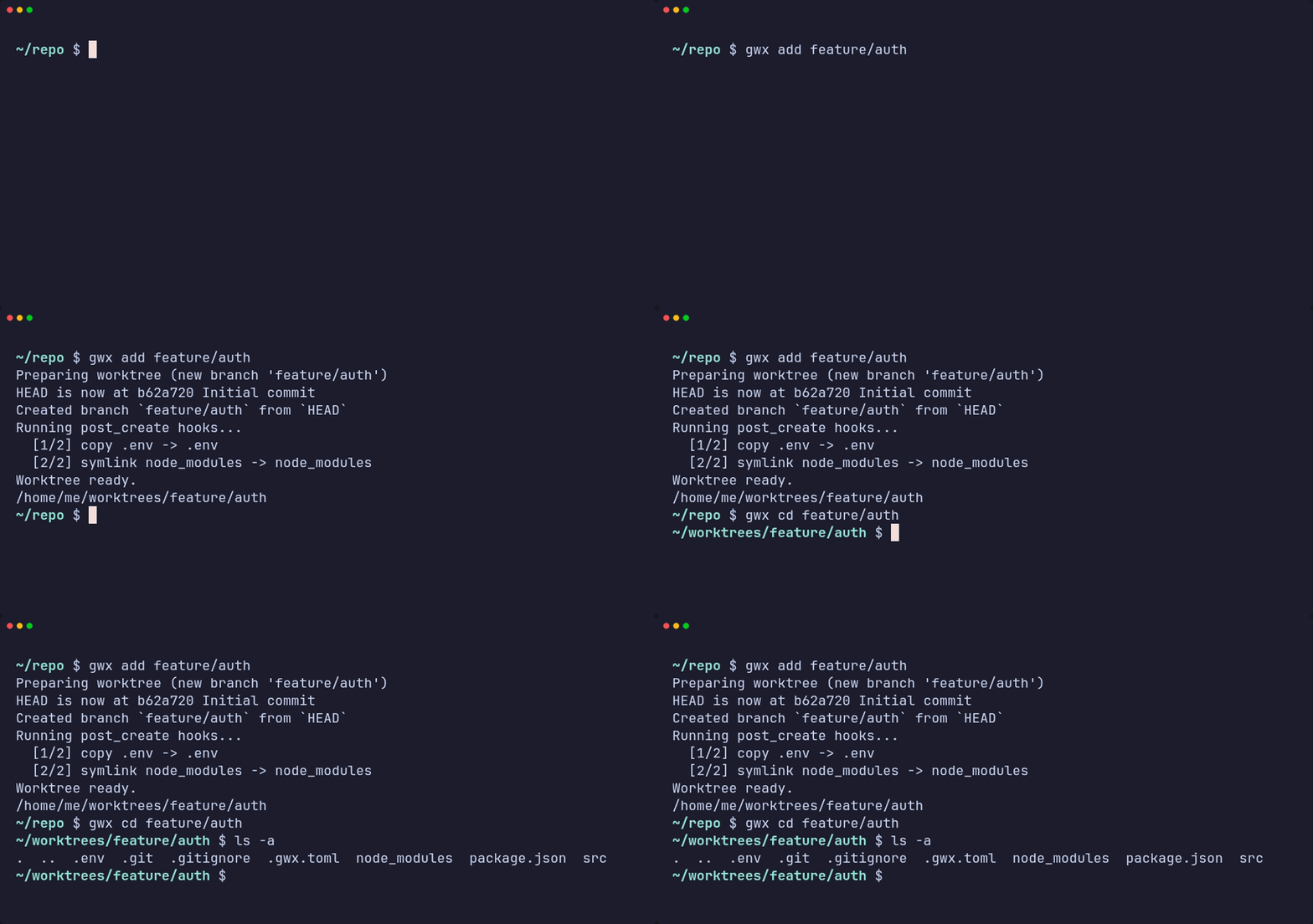
**`gwx add <branch>`** — a branch name is all it takes. The branch is created
when it does not exist, the worktree lands at a path derived from its name, and
the hooks in `.gwx.toml` bring the `.env` and the dependencies along.
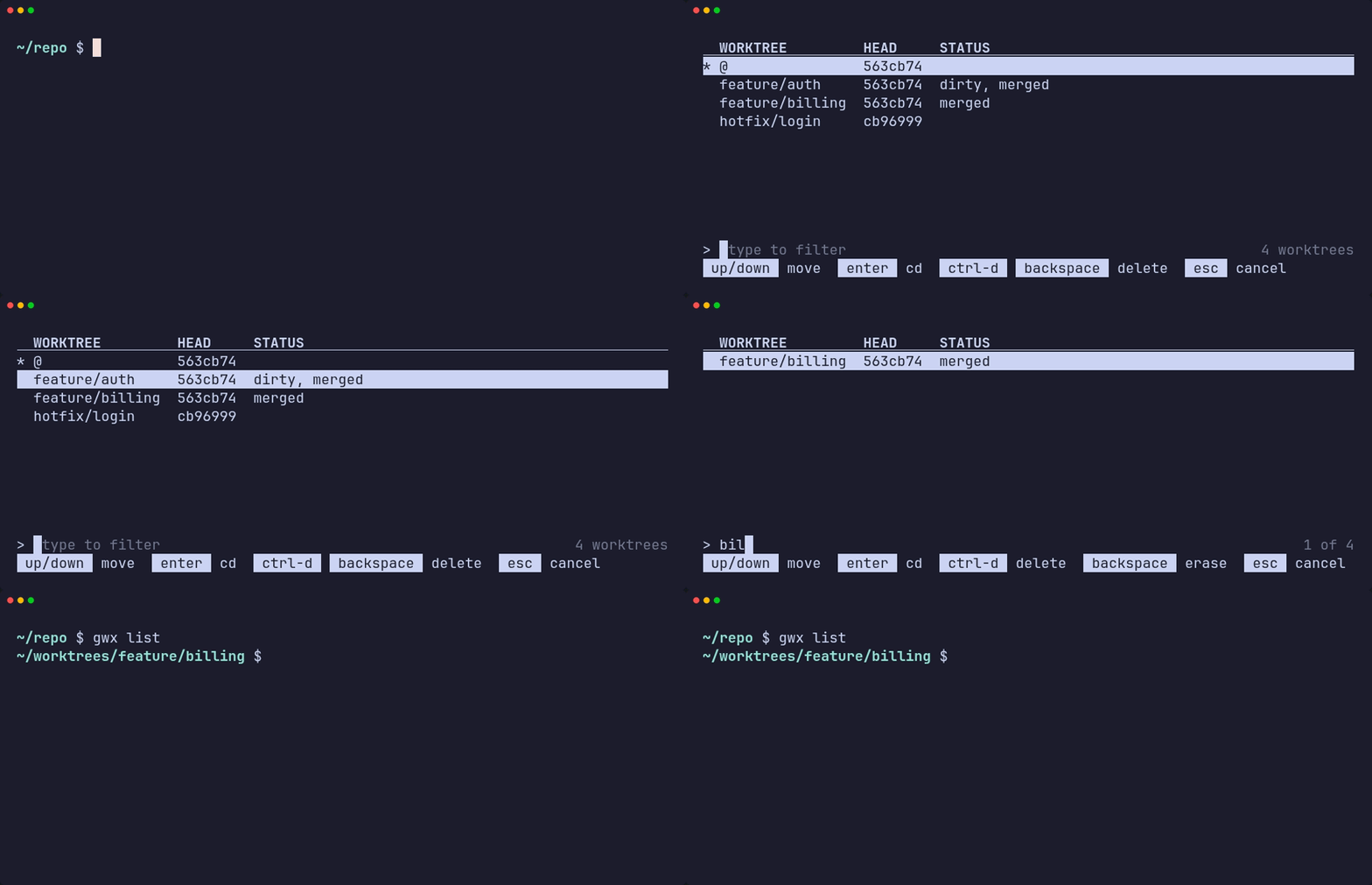
**`gwx list`** — the picker. Type to filter, <kbd>Enter</kbd> to change into the
worktree, <kbd>Ctrl</kbd>+<kbd>d</kbd> to remove it. `--plain` prints the table
instead, for reading or piping.
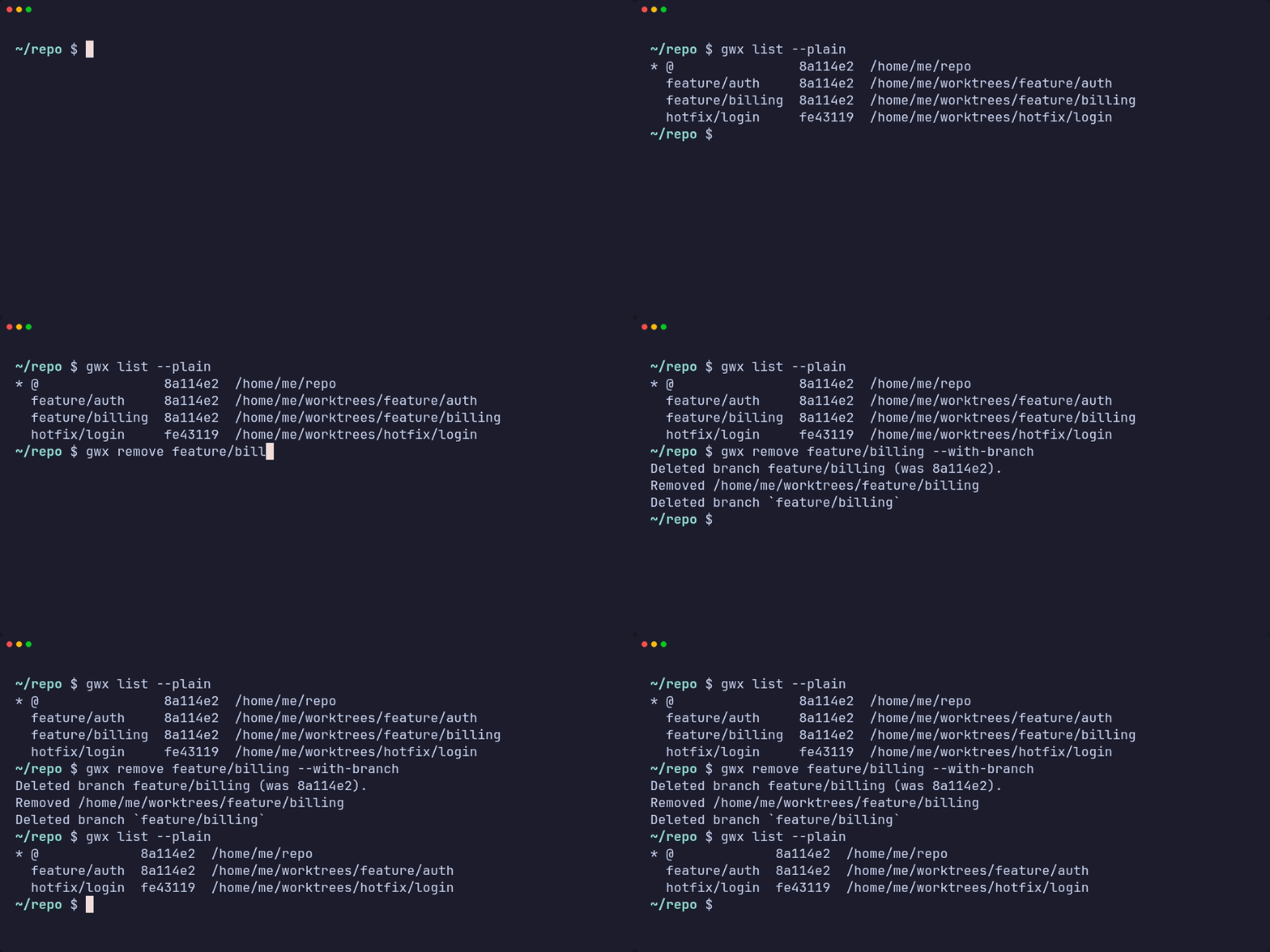
**`gwx remove <name>`** — the worktree, and with `--with-branch` the branch it
was for, as long as it is merged.
> [!NOTE]
> `gwx` is inspired by [satococoa/wtp](https://github.com/satococoa/wtp), a Go
> tool with the same goal that is no longer actively maintained. `gwx` is an
> independent reimplementation in Rust — the configuration file and the CLI are
> similar in spirit but not compatible.
## Features
- **One command per branch.** `gwx add <branch>` creates the worktree at a
predictable path, so you never type a directory name.
- **Branches are created when missing.** An existing local branch is checked
out, a remote-only branch is tracked, and anything else becomes a new branch.
- **Hooks.** Copy files, create symlinks and run commands around creation and
removal, configured per repository in `.gwx.toml` — so the containers and
caches a worktree brought up leave with it.
- **Clean up in one pass.** `gwx clean` sorts the worktrees by what removing
them would cost — merged and clean, pushed, local-only, or holding
uncommitted work — and removes the ones you tick.
- **List and navigate.** `gwx list` opens an interactive list — move, filter,
press <kbd>Enter</kbd> to go there or <kbd>Ctrl</kbd>+<kbd>d</kbd> to delete.
`gwx cd <name>` jumps straight to one, with tab completion.
## Installation
### Homebrew (macOS / Linux)
```bash
brew install ktakada42/tap/gwx
```
To upgrade:
```bash
brew upgrade gwx
```
### Shell script (macOS / Linux)
```bash
Installs to `~/.local/bin` by default. Override with `INSTALL_DIR`:
```bash
### cargo install
Requires a [Rust](https://rustup.rs) toolchain.
```bash
cargo install gwx
```
For the unreleased `main` instead of the latest release:
```bash
cargo install --git https://github.com/ktakada42/gwx
```
### Build from source
```bash
git clone https://github.com/ktakada42/gwx
cd gwx
cargo build --release
./target/release/gwx --help
```
Requires Rust 1.85+ to build and Git 2.17+ at runtime.
### Platforms
Linux and macOS. Both are built and tested in CI on every commit.
Windows is not supported natively: the picker draws to `/dev/tty`, and
`shell-init` speaks bash, zsh and fish but not PowerShell, so `gwx list` would
fall back to its plain table and `gwx cd` would only print a path.
**On Windows, use the Linux build under WSL2** — that is a supported platform
and needs nothing special. Keep the repository inside the WSL filesystem rather
than under `/mnt/c`: crossing the boundary is slow, and Windows and Linux
disagree about file modes and symlinks in ways that leave `git status` dirty on
one side or the other.
### Shell integration
A process cannot change the directory of the shell that started it, so `gwx cd`
prints a path and a small shell function does the actual `cd`. Add one line to
your shell config; the same snippet registers tab completion.
```bash
# ~/.bashrc
eval "$(gwx shell-init bash)"
# ~/.zshrc (after compinit)
eval "$(gwx shell-init zsh)"
# ~/.config/fish/config.fish
gwx shell-init fish | source
```
Without it everything still works, `gwx cd` and the picker just cannot move
you: `cd "$(gwx cd feature/auth)"`.
## Commands
| Command | What it does |
| --- | --- |
| `gwx add <branch>` | Create a worktree for `<branch>`, creating the branch if needed |
| `gwx list` (`ls`) | Pick a worktree interactively; `--plain` or `--paths` for text |
| `gwx cd [<name>]` | Move into a worktree; with no argument, to the main one |
| `gwx remove <name>` (`rm`) | Remove a worktree, optionally with its branch |
| `gwx clean` | Review the worktrees you are done with and remove the ones you pick |
| `gwx init` | Write a `.gwx.toml` template |
| `gwx shell-init <shell>` | Print the `cd` function and the completion hookup |
| `gwx completion <shell>` | Print the completion hookup only |
`<name>` is matched against branch names first, then paths below `base_dir`,
then directory names — so `gwx cd feature/auth` and `gwx cd auth` both work
when they are unambiguous. Every command has a man page (`man gwx-add`).
## Documentation
| | |
| --- | --- |
| [Commands](https://github.com/ktakada42/gwx/blob/main/docs/commands.md) | Every command and flag, how names are resolved, and what `gwx clean` judges safe |
| [The picker](https://github.com/ktakada42/gwx/blob/main/docs/picker.md) | Keys, the delete dialog, and when it does not open |
| [Configuration](https://github.com/ktakada42/gwx/blob/main/docs/configuration.md) | `.gwx.toml`, the user-wide config, and `base_dir` |
| [Hooks](https://github.com/ktakada42/gwx/blob/main/docs/hooks.md) | Phases, types, environment, and what a failure leaves behind |
## Contributing
Issues and pull requests are welcome — bug reports, ideas for the picker, hook
types you wanted and did not find. See
[CONTRIBUTING.md](https://github.com/ktakada42/gwx/blob/main/CONTRIBUTING.md)
for how to build, test and propose a change.
## License
MIT — see [LICENSE](https://github.com/ktakada42/gwx/blob/main/LICENSE).