Gutenberg-RS
This package makes filtering and getting information from Project Gutenberg easier from Rust. It started as a port for the python one but it is now different in multiple ways.
It's target audience is people working in machine learning that need data for their project, but may be freely used by anybody.
The package:
- Generates a local cache (of all gutenberg informations) that you can interogate to get book ids. The Local cache may be sqlite (default)
- Downloads and cleans raw text from gutenberg books
The package has been tested with Rust 1.64.0 on both Windows and Linux It is faster and smaller than the python one.
Usage
Building the sqlite cache
let settings = GutenbergCacheSettings::default();
setup_sqlite(&settings, false).await?;
This will use the default settings and build the cache (if it is not already built). It will download the archive from gutenberg, unpack, parse and store the info.
After building the cache you may get it and query it via a helper function or native sqlite queries:
let mut cache = SQLiteCache::get_cache(&settings).unwrap();
let res = cache.query(&json!({
                    "language": "\"en\"",
                }))?;
The helper query function will return book ids which you can then use to get the text like this:
use gutenberg_rs::sqlite_cache::SQLiteCache;
use gutenberg_rs::text_get::get_text_from_link;
....
 for (idx, r) in res.iter().enumerate() {
        println!("getting text for gutenberg idx: {}", r);
        let links = cache.get_download_links(vec![*r])?;
        for link in links {
            let res = get_text_from_link(&settings, &link).await.unwrap();
        }
The above code will download the book text by id and cache it locally so the next time you need it it will be faster.
You may also strip the headers of text using
...
let res = get_text_from_link(&settings, &link).await.unwrap();
let only_content = strip_headers(res)
You may find more in the examples folder.
for even better control you may set the GutenbergCacheSettings:
- CacheFilename
- CacheUnpackDir
- CacheArchiveName
- CacheRDFDownloadLink
- TextFilesCacheFolder
let mut settings = GutenbergCacheSettings::default();
settings.CacheFilename = "testcachename.db".to_string();
The rust version of this library is faster than the python one but the increase is not ten-fold as it could have been as the bottleneck is probably hdd speed (for parsing) and download speed (for getting the content).
Standard query fields:
- language
- author
- type
- title
- subject
- publisher
- bookshelve
- downloadtype
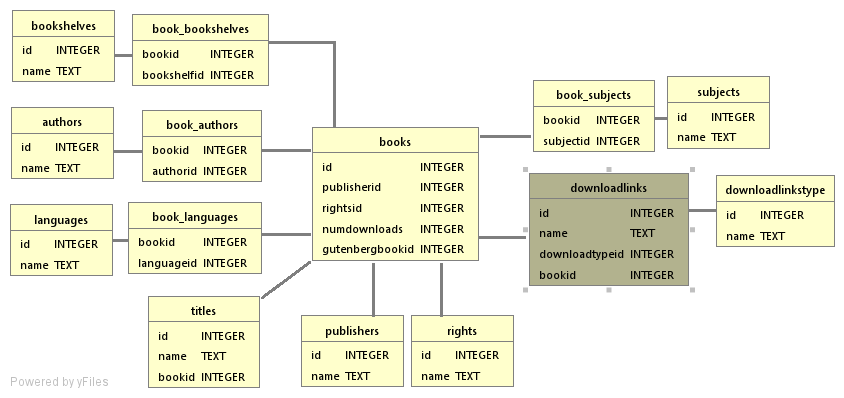
If you want to do native queries, the sqlite table structure is presented in the image below:
As a quick cool example, we can use the library to get some english books of a particular category and see if we find a certain time in any of them (the beginings of a literary clock):
fn time_to_text(hour: usize, minute: usize) -> Result<String, Error> {
let nums = vec![
"zero",
"one",
"two",
"three",
"four",
"five",
"six",
"seven",
"eight",
"nine",
"ten",
"eleven",
"twelve",
"thirteen",
"fourteen",
"fifteen",
"sixteen",
"seventeen",
"eighteen",
"nineteen",
"twenty",
"twenty one",
"twenty two",
"twenty three",
"twenty four",
"twenty five",
"twenty six",
"twenty seven",
"twenty eight",
"twenty nine",
];
match minute {
0 => Ok(format!("{} o'clock", nums[hour])),
1 => Ok(format!("one minute past {}", nums[hour])),
59 => Ok(format!("one minute to {}", nums[hour])),
15 => Ok(format!("quarter past {}", nums[hour])),
30 => Ok(format!("half past {}", nums[hour])),
45 => Ok(format!("quarter to {}", nums[hour])),
_ => {
if minute <= 30 {
Ok(format!("{} minutes past {}", nums[minute], nums[hour]))
} else if minute > 30 {
Ok(format!(
"{} minutes to {}",
nums[60 - minute],
nums[(hour % 12) + 1]
))
} else {
Err(Error::InvalidResult(String::from("bad time")))
}
}
}
}
async fn exec() -> Result<(), Error> {
let settings = GutenbergCacheSettings::default();
setup_sqlite(&settings, false).await?;
let mut cache = SQLiteCache::get_cache(&settings).unwrap();
let res = cache.query(&json!({
"language": "\"en\"",
"bookshelve": "'Romantic Fiction',
'Astounding Stories','Mystery Fiction','Erotic Fiction',
'Mythology','Adventure','Humor','Bestsellers, American, 1895-1923',
'Short Stories','Harvard Classics','Science Fiction','Gothic Fiction','Fantasy'",
}))?;
let max_number_of_texts = 10;
let mut big_string = String::from("");
for (idx, r) in res.iter().enumerate() {
println!("getting text for gutenberg idx: {}", r);
let links = cache.get_download_links(vec![*r])?;
for link in links {
let text = get_text_from_link(&settings, &link).await?;
let stripped_text = strip_headers(text);
big_string.push_str(&stripped_text);
break;
}
if idx >= max_number_of_texts {
break;
}
}
let output_filename = "big_file.txt";
if std::path::Path::new(output_filename).exists() {
fs::remove_file(output_filename)?;
}
fs::write(output_filename, &big_string)?;
let word_time = time_to_text(6, 0)?;
println!("The time is {}, now lets search the books", &word_time);
let index = big_string.find(&word_time);
match index {
Some(found) => {
let search_window_size = 1000;
let back_search = &big_string[found - search_window_size..found];
let start_paragraph = match back_search.rfind("\n\r") {
Some(x) => found + x - search_window_size,
None => found - search_window_size,
};
let end_search = &big_string[found..found + search_window_size];
let end_paragraph = match end_search.find("\n\r") {
Some(x) => x + found,
None => found + search_window_size,
};
let slice = &big_string[start_paragraph..end_paragraph];
print!(
"{}-{} [{}] {}",
start_paragraph, end_paragraph, found, slice
);
}
None => {
println!("could not find text in books")
}
}
Ok(())
}
