# Guillotine
[](https://github.com/mempirate/guillotine/actions/workflows/ci.yml)
[](https://crates.io/crates/guillotine)
[](https://crates.io/crates/guillotine)
[](https://docs.rs/guillotine)
[](https://deepwiki.com/mempirate/guillotine)
A `no-std`, allocation-free graphical user interface framework for embedded devices prioritizing efficiency and ergonomics. The UI declaration API is heavily inspired by [GPUI](https://github.com/zed-industries/zed/tree/main/crates/gpui). Built with (and inherits compatibility from)
[`embedded-graphics`](https://docs.rs/embedded-graphics/latest/embedded_graphics/).
## Demo
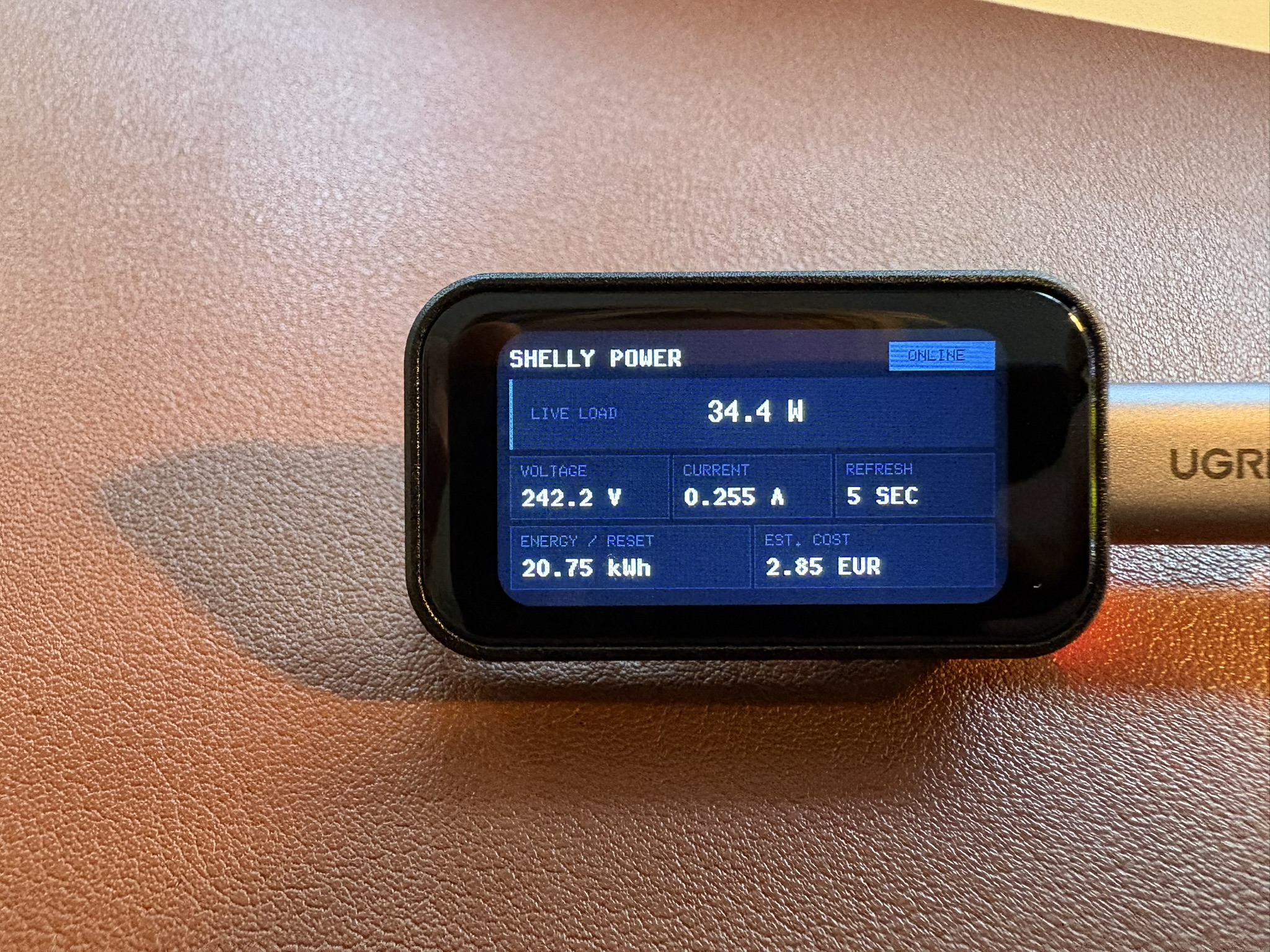
A demo Guillotine UI on a Waveshare ESP32-C6 1.47" LCD board from the [`shellyctl`](https://github.com/mempirate/shellyctl) project:
## Quickstart
This example uses the optional `flexbox` feature.
```rust,ignore
use embedded_graphics::{
mock_display::MockDisplay,
mono_font::ascii::{FONT_6X10, FONT_9X18_BOLD},
pixelcolor::Rgb565,
prelude::Size,
};
use guillotine::{style::JustifyContent, *};
const CANVAS: Rgb565 = Rgb565::new(2, 4, 6);
const PANEL: Rgb565 = Rgb565::new(4, 9, 12);
const ACCENT: Rgb565 = Rgb565::new(7, 47, 25);
struct BasicView {
greeting: &'static str,
}
impl Render for BasicView {
// Render lets you declaratively build your UI tree.
fn render(&self, cx: &Context<'_>) -> impl ElementBuilder {
cx.column()
.size(Size::new(320, 172))
.padding(12)
.gap(8)
.background(CANVAS)
.justify_content(JustifyContent::Center)
.child(
cx.row()
.child(cx.text("GUILLOTINE").flex_grow(1).font(Font::mono(&FONT_9X18_BOLD)))
.child(
cx.text("READY")
.padding((4, 9))
.background(ACCENT)
.font(Font::mono(&FONT_6X10)),
),
)
.child(
cx.row()
.gap(8)
.child(
cx.text(self.greeting)
.font(Font::mono(&FONT_6X10))
.flex(3)
.padding(10)
.background(PANEL),
)
.child(
cx.text("7 nodes, 54 bytes")
.font(Font::mono(&FONT_6X10))
.flex(2)
.padding(6)
.background(ACCENT),
),
)
}
}
fn main() {
// Displays implement embedded-graphics' `DrawTarget`.
let display = MockDisplay::<Rgb565>::new();
let view = BasicView { greeting: "Build tiny interfaces." };
// Initialize stack-based storage for the frame. Capacity: 32 nodes
// and 128 bytes of UTF-8 text.
let storage = FrameStorage::<Rgb565, 32, 128>::default();
// Create a new UI with a direct display target. Used here for brevity;
// if you have memory available, use `BufferedTarget`.
let mut ui = Ui::new(DirectTarget::new(display), storage).with_background(CANVAS);
// Render the view.
ui.render(&view).unwrap();
}
```
## Frame Buffers
The `framebuffer` feature (on by default) provides a `BufferedTarget` type that
works with caller-provided frame buffers. It is highly recommended to use this
over `DirectTarget`, since it can dramatically increase frame rates and reduce
flicker to near unnoticeable if you can cover the whole display.
```rust,ignore
use embedded_graphics::{mock_display::MockDisplay, pixelcolor::Rgb565};
use static_cell::ConstStaticCell;
use guillotine::{buffered::BufferedTarget, *};
// The frame buffer should ideally cover the whole display (width * height).
const FRAMEBUFFER_PIXELS: usize = 320 * 172;
// Allocate the buffer in static memory with your chosen color.
static FRAMEBUFFER: ConstStaticCell<[Rgb565; FRAMEBUFFER_PIXELS]> =
ConstStaticCell::new([Rgb565::new(0, 0, 0); FRAMEBUFFER_PIXELS]);
fn main() {
let mut display = MockDisplay::<Rgb565>::new();
// Initialize stack-based storage for the frame. Capacity: 32 elements
// and 128 bytes of UTF-8 text.
let storage = FrameStorage::<Rgb565, 32, 128>::default();
// Initialize the buffered display target.
let target = BufferedTarget::new(&mut display, FRAMEBUFFER.take());
let mut ui = Ui::new(target, storage);
// ... render something
}
```
Large buffers should generally use static storage (with [`static_cell`](https://docs.rs/static_cell/latest/static_cell/struct.ConstStaticCell.html)).
Small buffers can live on the stack if the stack size permits it.
Note that the memory used by an `Rgb565` buffer is `pixels x 2 bytes`.
### Picking Sizes
Ideally, your frame buffer covers the whole display. However, you can provide a
buffer of any size, and `render()` will execute a greedy top-down traversal to
find the first subtree that fits.
Passing buffers that are smaller than the area of any element on the screen will
fall back to direct drawing.
> [!NOTE]
> If your frame buffer doesn't fit the root element, it is painted directly
> before its children are considered. An opaque root background may therefore
> appear as a visible clear before buffered children are presented, so you
> may still notice a flicker.
## Memory Management
Guillotine does not require an allocator, and uses [`heapless`](https://docs.rs/heapless/latest/heapless/) to store fixed-capacity node and text arrays inline.
This library exposes `FrameStorage` as the frontend for frame memory. Its signature is:
```rust,ignore
pub struct FrameStorage<
C,
const N: usize = 64,
const T: usize = 1024,
CE = NoCustomElement,
>
```
Since `heapless` stores data inline, capacity has to be specified upfront through const generics.
`FrameStorage` contains two buffers:
1. `nodes`, with capacity `N`, stores the frame's element tree. The default is 64 nodes.
2. `text`, with capacity `T`, stores the UTF-8 bytes for all text elements in the frame. The
default is 1024 bytes.
`CE` is the application-defined custom element type. It defaults to `NoCustomElement` for UIs that
only use Guillotine's built-in elements.
It's recommended to tune `N` and `T` to fit the specifics
of your UI. `FrameStorage` exposes some methods to help you do that:
- `usage()` returns the used length of both buffers.
- `capacity()` returns the capacity of both buffers.
> [!NOTE]
> These buffers are only populated *after* calls to `render()`, and will contain the element tree and
> text bytes for the currently rendered frame.
## Layout
By default, Guillotine supports a limited subset of the flexbox layout engine. Rows are start-aligned
containers along the horizontal axis with support for gaps, and columns are their vertical counterpart.
### Flexbox
More complete flexbox support is gated behind a `flexbox` feature and is turned off by default,
because these flexbox properties require the layout tree to be traversed
twice, demanding extra compute and slightly higher rendering latency.
With `flexbox` on, you'll get access to CSS-like flexbox functionality, including `justify-content` and
`align-items` (for containers), and `flex-grow` and `flex` for items.
> [!TIP]
> Some properties, like `AlignItems::Stretch`, currently have a complexity of `O(N x D)`,
> where `N` is the number of nodes and `D` is the tree depth. For small trees, this shouldn't be a problem,
> but keep it in mind if you have more complex layouts.
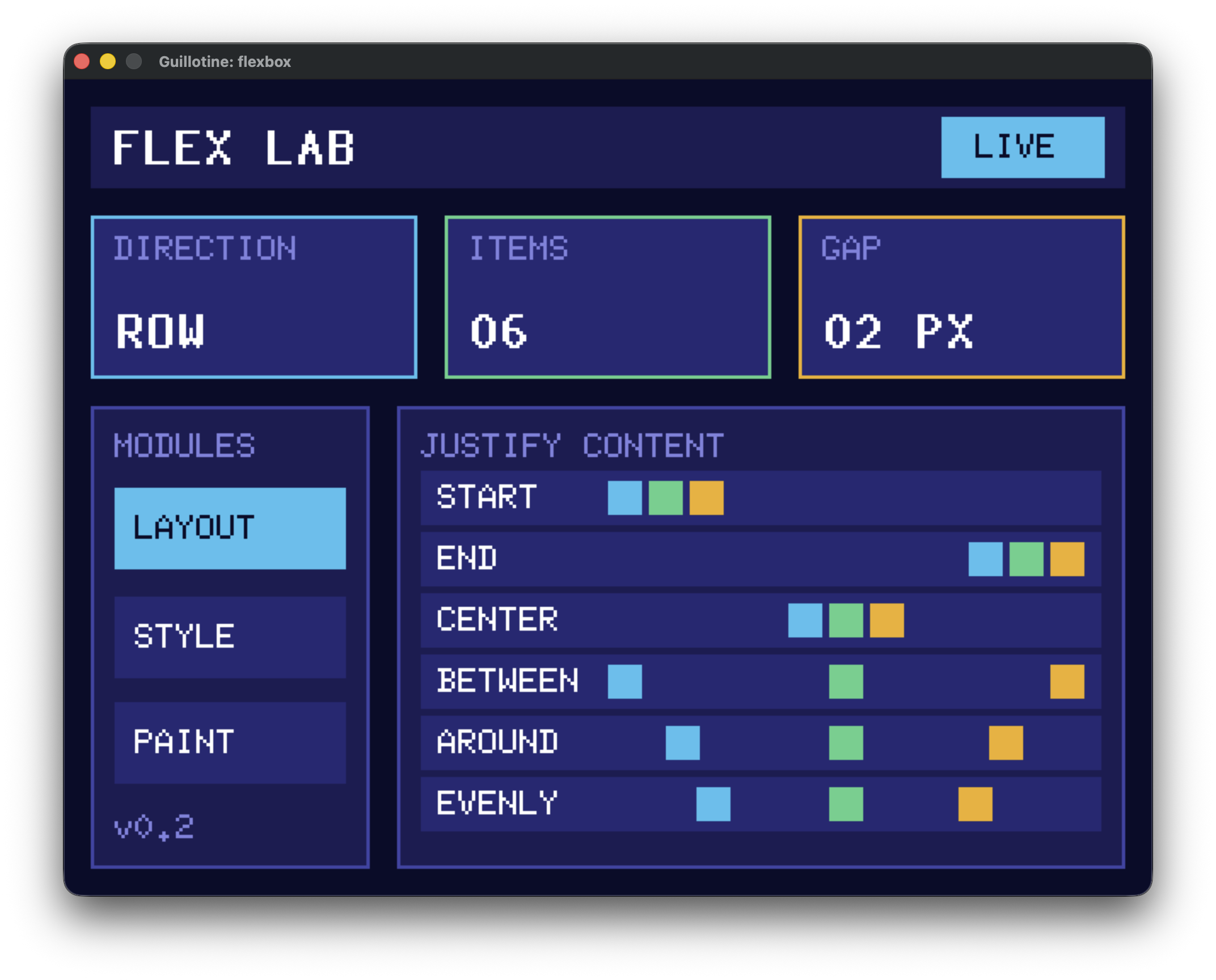
Refer to [`flexbox.rs`](/examples/flexbox.rs) for a flexbox layout example:
## Styling
### Insets and the box model
Margin, padding, and border widths accept CSS-like physical-edge shorthands:
```rust,ignore
cx.column()
.margin(10) // all edges
.padding((4, 8)) // vertical, horizontal
.border((1, 2, 3)) // top, horizontal, bottom
.margin((4, 8, 12, 16)); // top, right, bottom, left
```
Use `Insets::new(top, right, bottom, left)` when a named value is clearer. Insets are non-negative
pixel lengths. Guillotine doesn't currently support percentages, `auto`, logical edges, negative
margins, margin collapsing, per-edge border colors, or border styles. Adjacent margins in rows and
columns add together.
`size`, `width`, and `height` configure border-box dimensions: padding and border are placed inside
them, and margin is added outside. Width and height are independent; an omitted dimension is sized
automatically from the element's contents. Configured dimensions grow to contain padding and border
when parent constraints allow.
## Custom Elements
Guillotine supports custom elements that implement their own `embedded-graphics`-based drawing.
For example, a custom `BatteryGauge` can implement the `CustomElement` trait:
```rust,ignore
pub trait CustomElement<C: PixelColor> {
/// Returns the element's natural content size before common style and parent constraints.
fn intrinsic_size(&self) -> Size;
/// Draws the element inside its absolute content bounds.
fn draw<D>(&self, bounds: &Rectangle, theme: &Theme<C>, target: &mut D) -> Result<(), D::Error>
where
D: DrawTarget<Color = C>;
}
```
Then add it to a view with `cx.custom()`:
```rust,ignore
impl Render<Color, BatteryGauge> for AppView {
fn render(&self, cx: &Context<'_, Color, BatteryGauge>) -> impl ElementBuilder {
cx.custom(BatteryGauge::new(100))
.padding(4)
.border(1)
.border_color(Color::new(0, 0, 0))
}
}
```
The `bounds` passed to `draw` are the absolute content rectangle after margin, border, and padding
have been resolved. Guillotine clips the draw target to that rectangle and passes the active theme.
If an application has multiple custom element types, define an enum with one variant per type and
delegate `CustomElement` from the enum. See [`custom_element.rs`](examples/custom_element.rs) for a
complete example.
> [!IMPORTANT]
> Custom elements are stored inline. A large `CE` type can
> therefore increase the size of every node in the UI tree. Keep custom element values compact.
## Examples
See the [examples README](./examples).
## Core Concepts
Each call to `Ui::render` declaratively rebuilds an element tree in `FrameStorage`, lays it out, and
draws it. Application state remains in the view; the frame tree is temporary and is cleared before
the next render.
Layout follows a constraints-based model: parent constraints flow down the tree, child sizes flow
back up, and final positions flow down. Rows arrange children horizontally, columns arrange them
vertically, and custom elements act as leaf content with an intrinsic size.
## Why?
I was trying to build a clean-looking dashboard on a small LCD screen powered by an ESP32-C6, that's supposed to monitor and display the power consumption of my home lab (project [here](https://github.com/mempirate/shellyctl)). I wanted to do this in Rust, with the esp-rs ecosystem. The ecosystem is quite mature, but I couldn't really find a UI framework that was:
1. Performant
2. Very low memory footprint (no Slint / LVGL)
3. Beautiful
Additionally, I wanted to learn what it would take to build something like this.
## Roadmap
### v0.0.1
- [x] Try to mimic GPUI declaration style: <https://github.com/zed-industries/zed/blob/main/crates/gpui/examples/hello_world.rs>
- [x] Low-level `ElementBuilder` / `ParentElement` traits for composing elements and widgets
- [x] Support generic `PixelColor`
- [x] Full immediate mode redrawing
- [x] Make repo ready for publishing:
- [x] README documentation (a la Dioxus)
- [x] Rustdoc documentation
- [x] Examples
- Sizing (insets)
- Fonts
- Cool
- ESP32
- [x] Fix exports
- [x] Dual Apache / MIT license
- [x] Fix sdl2 vendoring for embedded-graphics-simulator
- [x] `TextStyle` fonts
- [x] Support for non-interactive elements:
- [x] Row
- [x] (formatted) Text
- [x] Column
### v0.1.0
- [x] No alloc
### v0.2.1
- [x] `framebuffer` feature with frame buffer support
### v0.3.0
- [x] Refactored layout engine
- [x] Support flexbox layout (`flexbox` feature)
### v0.4.0
- [x] Support custom elements
### v0.4.1
- [ ] Support for [absolute positioning](https://taffylayout.com/docs/styling/position)
(relative by default). Introduces a new explicit `position` property to `Style`.
### v0.4.2
- [ ] New elements
- [ ] Dialogs / Modals (floating containers)
- [ ] Charts
- [ ] Spinner (going to be interesting as this is essentially a self-rendering element). Will
probably require a global `frame_rate` to be set on the `Ui`. However, this would be a full
retained mode approach with an async polling loop.
Another approach is to first implement incremental redrawing, and rely
on the caller to call `render()` at their chosen rate. However, each `render()` would do
a bunch of compute, so probably not super efficient?
### Backlog
- [ ] Mirrored debugger / inspector:
- When plugged into an MCU, this feature launches an interactive inspector
on your host machine (think the Chrome inspector). Displays real-time total and per-element
memory consumption, frame rendering times, boxes, frame buffer utilization, etc.
Builds on the embedded-graphics simulator.
- [ ] Add memory usage for examples
- cargo binutils for examples in CI (cargo size). This will detect regressions.
- [ ] Documentation
- [ ] Guide for finding the ideal `FrameStorage` capacity.
- [ ] Benchmarks for:
- [ ] Frame rendering
- [ ] Frame drawing
- [ ] Stats for frame buffers (to determine optimal sizing)
- [ ] Incremental drawing behind an `incremental` feature
- [ ] Explicit behaviour:
- [x] Hidden
- [ ] Visible
- [ ] Scroll
- [ ] Support for interaction behind an `interaction` feature
- [ ] Support interactive elements:
- [ ] Button
- [ ] Slider
## Prior Work & Inspiration
- [Clay by Nic Barker](https://github.com/nicbarker/clay#retained-mode-rendering)
- [Kolibri by Yandrik](https://github.com/Yandrik/kolibri)
- [GPUI by Zed](https://github.com/zed-industries/zed/tree/main/crates/gpui)
- [Taffy by Dioxus Labs](https://github.com/DioxusLabs/taffy)
- [`embedded-gui` by Leftger](https://github.com/leftger/embedded-gui)