# Layout
Guido uses a flexbox-style layout system for arranging widgets. The `Flex` layout handles rows and columns with spacing and alignment options.
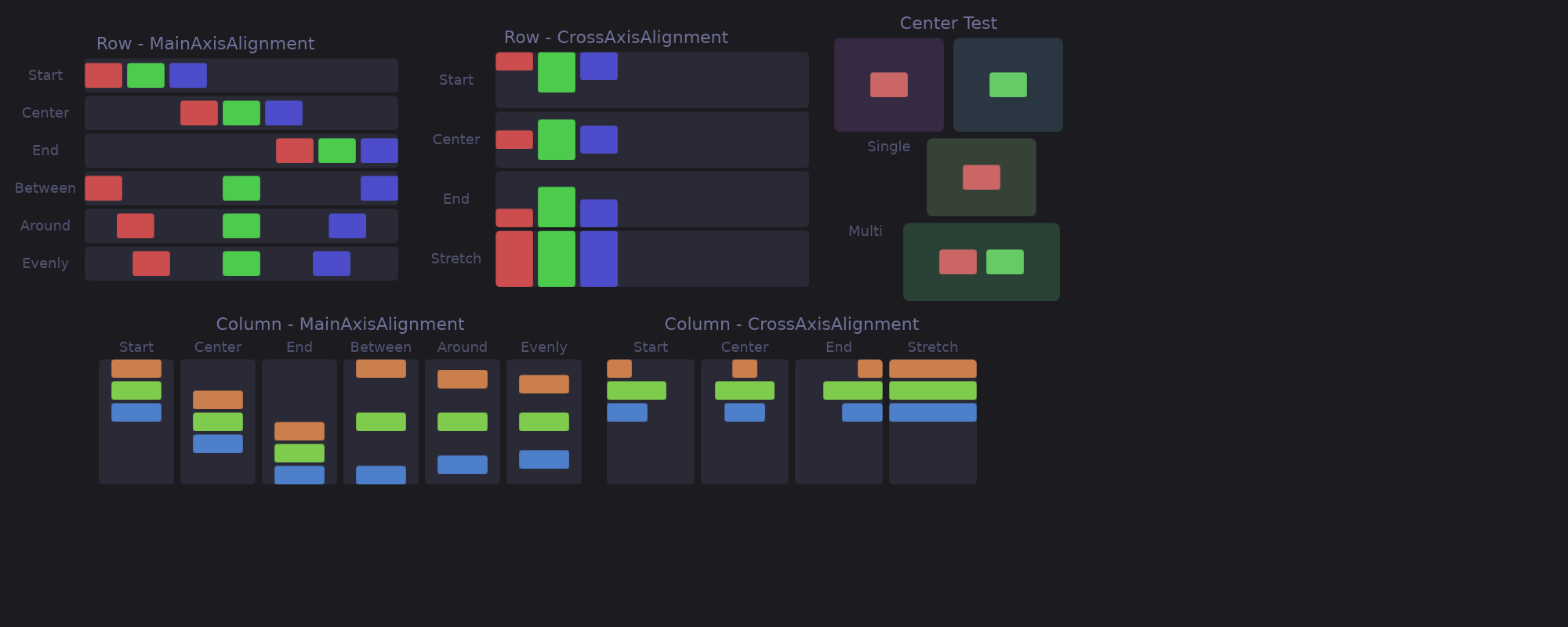
## Basic Layout
### Row (Horizontal)
```rust
# extern crate guido;
# use guido::prelude::*;
# fn main() {
container()
.layout(Flex::row())
.children([
text("Left"),
text("Center"),
text("Right"),
])
# ;
# }
```
### Column (Vertical)
```rust
# extern crate guido;
# use guido::prelude::*;
# fn main() {
container()
.layout(Flex::column())
.children([
text("Top"),
text("Middle"),
text("Bottom"),
])
# ;
# }
```
## Spacing
Add space between children:
```rust,ignore
# // not compiled: `[...]` stands in for the children; this block is about
# // the layout above them.
# extern crate guido;
# use guido::prelude::*;
# fn main() {
container()
.layout(Flex::row().spacing(8.0))
.children([...])
# ;
# }
```
## Main Axis Alignment
Control distribution along the layout direction:
```rust
# extern crate guido;
# use guido::prelude::*;
# fn main() {
Flex::row().main_alignment(MainAlignment::Center)
# ;
# }
```
### Options
| `Start` | Pack at the beginning |
| `Center` | Center in available space |
| `End` | Pack at the end |
| `SpaceBetween` | Equal space between, none at edges |
| `SpaceAround` | Equal space around each item |
| `SpaceEvenly` | Equal space including edges |
### Visual Examples
```text
Start: [A][B][C]
Center: [A][B][C]
End: [A][B][C]
SpaceBetween: [A] [B] [C]
SpaceAround: [A] [B] [C]
SpaceEvenly: [A] [B] [C]
```
## Cross Axis Alignment
Control alignment perpendicular to the layout direction:
```rust
# extern crate guido;
# use guido::prelude::*;
# fn main() {
Flex::row().cross_alignment(CrossAlignment::Center)
# ;
# }
```
### Options
| Alignment | Description |
|-----------|-------------|
| `Start` | Align to start of cross axis |
| `Center` | Center on cross axis |
| `End` | Align to end of cross axis |
| `Stretch` | Stretch to fill cross axis |
| `Baseline` | Line children up on the baseline of their text |
### Baseline
Text of different sizes in a row does not read as one line when the tops are
aligned — a 24px label and a 12px one float at unrelated heights. `Baseline`
puts them on the line they are written on:
```rust
# extern crate guido;
# use guido::prelude::*;
# fn main() {
container()
.layout(Flex::row().spacing(8.0).cross_alignment(CrossAlignment::Baseline))
.children([
container().child(text("28").font_size(24.0)),
container().child(text("°C").font_size(12.0)),
])
# ;
# }
```
A box reports no baseline of its own, so it is aligned by its bottom edge,
which is what CSS does with it. A container takes the baseline of its
content, so wrapping a text for styling does not lose the alignment. In a
column there is no shared line to sit on, and `Baseline` behaves as `Start`.
### Visual Example (Row)
```text
Start: ┌───┐┌─┐┌──┐
│ A ││B││ C│
└───┘│ │└──┘
└─┘
Center: ┌─┐
┌───┐│B│┌──┐
│ A │└─┘│ C│
└───┘ └──┘
End: ┌─┐
│B│
┌───┐└─┘┌──┐
│ A │ │ C│
└───┘ └──┘
Stretch: ┌───┐┌─┐┌──┐
│ ││ ││ │
│ A ││B││ C│
│ ││ ││ │
└───┘└─┘└──┘
```
## Centring
`center()` centres the children on both axes. It is shorthand for
`main_alignment(MainAlignment::Center)` together with
`cross_alignment(CrossAlignment::Center)`, and composes with the rest:
```rust
# extern crate guido;
# use guido::prelude::*;
# fn main() {
container()
.layout(Flex::column().spacing(4.0).center())
.children([text("Locked"), text("Type your password")])
# ;
# }
```
## Complete Example
```rust
# extern crate guido;
# use guido::prelude::*;
# fn main() {
container()
.layout(
Flex::row()
.spacing(16.0)
.main_alignment(MainAlignment::SpaceBetween)
.cross_alignment(CrossAlignment::Center)
)
.padding(20.0)
.children([
container().child(text("Left").font_size(24.0)),
container()
.layout(Flex::column().spacing(4.0))
.children([
text("Center"),
text("Items"),
]),
container().child(text("Right").font_size(24.0)),
])
# ;
# }
```
## Nested Layouts
Combine rows and columns for complex layouts:
```rust
# extern crate guido;
# use guido::prelude::*;
# fn main_content() -> Container { container() }
# fn sidebar() -> Container { container() }
# fn main() {
container()
.layout(Flex::column().spacing(16.0))
.children([
// Header row
container()
.layout(Flex::row().main_alignment(MainAlignment::SpaceBetween))
.children([
text("Logo"),
text("Menu"),
]),
// Content row
container()
.layout(Flex::row().spacing(16.0))
.children([
sidebar(),
main_content(),
]),
// Footer row
container()
.layout(Flex::row().main_alignment(MainAlignment::Center))
.child(text("Footer")),
])
# ;
# }
```
## Size Constraints
Control how children size within layouts:
### Fixed Size
```rust
# extern crate guido;
# use guido::prelude::*;
# fn main() {
container()
.width(200.0)
.height(100.0)
# ;
# }
```
### Minimum/Maximum
```rust
# extern crate guido;
# use guido::prelude::*;
# fn main() {
container().width(at_least(100.0).at_most(300.0))
# ;
# }
```
### At Least
Request at least a certain size:
```rust
# extern crate guido;
# use guido::prelude::*;
# fn main() {
container()
.width(at_least(200.0)) // At least 200px, can grow
# ;
# }
```
### Fill Available Space
Make a container expand to fill all available space:
```rust
# extern crate guido;
# use guido::prelude::*;
# fn main() {
container()
.height(fill()) // Fills available height
.width(fill()) // Fills available width
# ;
# }
```
This is particularly useful for root containers that should fill their surface, or for creating layouts where children are centered within the full available space:
```rust
# extern crate guido;
# use guido::prelude::*;
# fn main() {
container()
.height(fill())
.layout(Flex::row().center())
.child(text("Centered in available space"))
# ;
# }
```
## Layout Without Explicit Flex
Containers without `.layout()` use `Flex::column()`:
```rust
# extern crate guido;
# use guido::prelude::*;
# fn main() {
// Same as .layout(Flex::column())
container()
.children([
text("first"),
text("second"),
])
# ;
# }
```
## Stacking Children (ZStack)
`ZStack` places every child at the same position, stacked along the Z axis —
later children paint on top:
```rust
# extern crate guido;
# use guido::prelude::*;
# fn main() {
# fn background() -> Container { container() }
# fn content() -> Container { container() }
container()
.layout(ZStack::new())
.child(background())
.child(content()) // drawn on top
# ;
# }
```
### Leaders and Followers
The stack takes the size of its largest child, but a child that declares
`fill()` on an axis **follows** the stack instead of leading it: it never
contributes to that axis and is laid out against the size the other children
established.
That is how a decoration is sized to its sibling without measuring anything:
```rust
# extern crate guido;
# use guido::prelude::*;
# fn card_content() -> Container { container() }
# fn main() {
container()
.layout(ZStack::new())
// Follower: exactly as wide and tall as the card below it
.child(
container()
.width(fill())
.height(fill())
.background(Color::rgb(0.2, 0.2, 0.3))
)
// Leader: the stack is as big as this card
.child(card_content())
# ;
# }
```
Without this rule the background would expand to all the available space,
and sizing it to its sibling would need a [WidgetRef](../advanced/widget-ref.md)
round-trip — one frame behind, and zero on the first frame.
The two axes are decided independently, which is what makes the status-bar
case work: a child with only `.height(fill())` fills the bar height and still
leads the width.
```rust
# extern crate guido;
# use guido::prelude::*;
# fn now_playing() -> Container { container() }
# fn visualizer() -> Container { container() }
# fn main() {
container()
.height(fill())
.layout(ZStack::new())
// Follows both axes
.child(container().width(fill()).height(fill()).child(visualizer()))
// Fills the bar height, leads the width
.child(container().height(fill()).child(now_playing()))
# ;
# }
```
When *every* child fills an axis there is no size to follow, and the stack
takes all the space it was offered on that axis.
### Positioning Inside the Stack
Every child sits at the stack's origin. To place a follower elsewhere, let it
fill both axes and use its own layout:
```rust
# extern crate guido;
# use guido::prelude::*;
# fn icon_widget() -> Container { container() }
# fn main() {
container()
.layout(ZStack::new())
.child(icon_widget())
// Alert dot pinned to the icon's top-right corner
.child(
container()
.width(fill())
.height(fill())
.layout(Flex::row().main_alignment(MainAlignment::End))
.child(
container()
.width(4)
.height(4)
.corners(2)
.background(Color::RED)
)
)
# ;
# }
```
## API Reference
### Flex Builder
```text
Flex::row() -> Flex; // Horizontal layout
Flex::column() -> Flex // Vertical layout
.spacing(f32) -> Flex // Space between children
.main_alignment(MainAlignment) -> Flex
.cross_alignment(CrossAlignment) -> Flex
```
### MainAlignment
```rust
# extern crate guido;
# use guido::prelude::*;
# fn main() {
MainAlignment::Start;
MainAlignment::Center;
MainAlignment::End;
MainAlignment::SpaceBetween;
MainAlignment::SpaceAround;
MainAlignment::SpaceEvenly
# ;
# }
```
### CrossAlignment
```rust
# extern crate guido;
# use guido::prelude::*;
# fn main() {
CrossAlignment::Start;
CrossAlignment::Center;
CrossAlignment::End;
CrossAlignment::Stretch
# ;
# }
```
### ZStack
```rust,ignore
# // not compiled: a signature listing — these declarations have no bodies.
# extern crate guido;
# use guido::prelude::*;
# fn main() {
ZStack::new() -> ZStack // Children stacked at the same origin
# ;
# }
```