# Borders & Corners
Guido renders crisp, anti-aliased borders using SDF (Signed Distance Field) techniques.
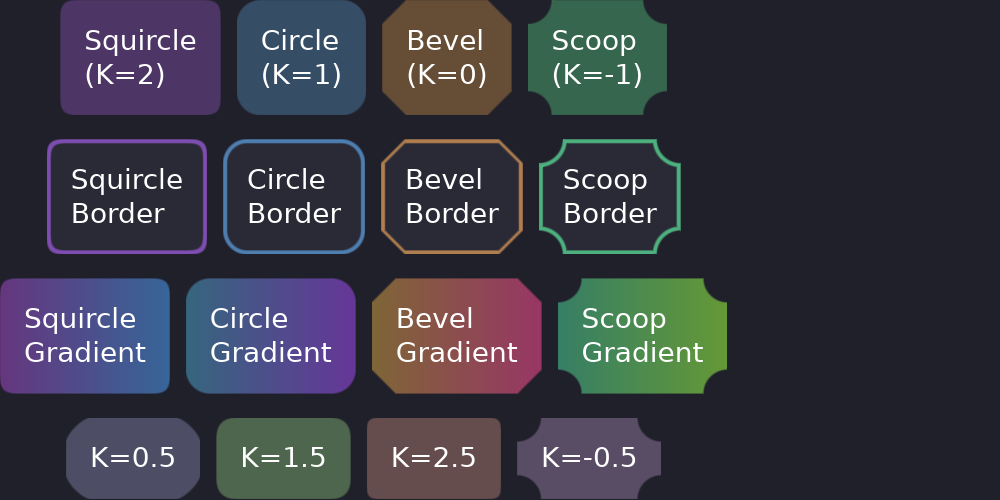
## Basic Border
```rust
# extern crate guido;
# use guido::prelude::*;
# fn main() {
container()
.border(2.0, Color::WHITE) // 2px white border
# ;
# }
```
A border is always both halves at once — everywhere. A width with no colour and
a colour with no width are the same thing, which is no border, so there is
nothing for a half-declaration to mean, and no way to write one. Each half takes
a signal of its own, which covers anything that has to change:
```rust
# extern crate guido;
# use guido::prelude::*;
# #[derive(Clone, Copy)]
# struct Theme { text: Color, text_weak: Color, weak: Color, strong: Color, line: Color, accent: Color, error: Color, danger: Color, surface: Color }
# impl Default for Theme { fn default() -> Self { let c = Color::WHITE; Self { text: c, text_weak: c, weak: c, strong: c, line: c, accent: c, error: c, danger: c, surface: c } } }
# fn main() {
# let failed = create_signal(false);
# let theme = Theme::default();
container().border(1.5, move || if failed.get() { theme.danger } else { theme.line })
# ;
# }
```
A state layer says it the same way, and replaces the whole border:
```rust
# extern crate guido;
# use guido::prelude::*;
# #[derive(Clone, Copy)]
# struct Theme { text: Color, text_weak: Color, weak: Color, strong: Color, line: Color, accent: Color, error: Color, danger: Color, surface: Color }
# impl Default for Theme { fn default() -> Self { let c = Color::WHITE; Self { text: c, text_weak: c, weak: c, strong: c, line: c, accent: c, error: c, danger: c, surface: c } } }
# fn main() {
# let theme = Theme::default();
container()
.border(1.5, theme.line)
.when_focused(|s| s.border(1.5, theme.accent))
# ;
# }
```
## Corner Radius
### Uniform Radius
```rust
# extern crate guido;
# use guido::prelude::*;
# fn main() {
container().corners(8.0) // 8px radius on all corners
# ;
# }
```
## Corner Curvature (Superellipse)
Control the shape of corners using CSS K-values. This determines how the corner curves from the edge to the arc.
### Squircle (K=2)
iOS-style smooth corners. The curve starts further from the corner for a smoother transition.
```rust
# extern crate guido;
# use guido::prelude::*;
# fn main() {
container()
.corners(Corners::squircle(12.0))
# ;
# }
```
### Circle (K=1)
Standard circular corners. This is the default.
```rust
# extern crate guido;
# use guido::prelude::*;
# fn main() {
container()
.corners(12.0) // Default is circular
# ;
# }
```
### Bevel (K=0)
Diagonal cut corners. Creates a chamfered look.
```rust
# extern crate guido;
# use guido::prelude::*;
# fn main() {
container()
.corners(Corners::bevel(12.0))
# ;
# }
```
### Scoop (K=-1)
Concave/inward corners. Creates a scooped appearance.
```rust
# extern crate guido;
# use guido::prelude::*;
# fn main() {
container()
.corners(Corners::scoop(12.0))
# ;
# }
```
### Custom Curvature
For values between the presets:
```rust
# extern crate guido;
# use guido::prelude::*;
# fn main() {
container()
.corners(Corners::superellipse(12.0, 1.5))
// Between circle and squircle
# ;
# }
```
## Curvature Reference
| Style | K Value | Description |
|-------|---------|-------------|
| Squircle | 2.0 | Smooth, iOS-style |
| Circle | 1.0 | Standard rounded (default) |
| Bevel | 0.0 | Diagonal/chamfered |
| Scoop | -1.0 | Concave inward |
## Animated Borders
A border is declared as a pair and each half carries its own timing, so the
width and the colour can move on curves of their own:
```rust
# extern crate guido;
# use guido::prelude::*;
# fn main() {
container()
.border(
1.0.transition(150.0),
Color::rgb(0.3, 0.3, 0.4).transition(150.0),
)
.when_hovered(|s| s.border(2.0, Color::rgb(0.5, 0.5, 0.6)))
.when_pressed(|s| s.border(3.0, Color::rgb(0.7, 0.7, 0.8)))
# ;
# }
```
## Borders with Different Curvatures
Borders respect corner curvature:
```rust
# extern crate guido;
# use guido::prelude::*;
# fn main() {
container()
.border(2.0, Color::rgb(0.5, 0.3, 0.7))
.corners(Corners::squircle(12.0))
// Border follows squircle shape
# ;
# }
```
## Borders with Gradients
Borders work with gradient backgrounds:
```rust
# extern crate guido;
# use guido::prelude::*;
# fn main() {
container()
.gradient(LinearGradient::horizontal(
Color::rgb(0.3, 0.1, 0.4),
Color::rgb(0.1, 0.3, 0.5),
))
.corners(8.0)
.border(2.0, Color::rgba(1.0, 1.0, 1.0, 0.3)) // Semi-transparent white
# ;
# }
```
## Complete Example
```rust
# extern crate guido;
# use guido::prelude::*;
fn card_with_border() -> Container {
container()
.padding(16.0)
.background(Color::rgb(0.12, 0.12, 0.16))
.corners(Corners::squircle(12.0))
.border(
1.0.transition(150.0),
Color::rgb(0.2, 0.2, 0.25).transition(150.0),
)
.when_hovered(|s| s
.border(2.0, Color::rgb(0.4, 0.6, 0.9))
.lighter(0.03)
)
.child(container().child(text("Hover to see border change").color(Color::WHITE)))
}
# fn main() {}
```