# Building UI
This section covers the visual styling options in Guido. Learn how to create polished, professional-looking interfaces.
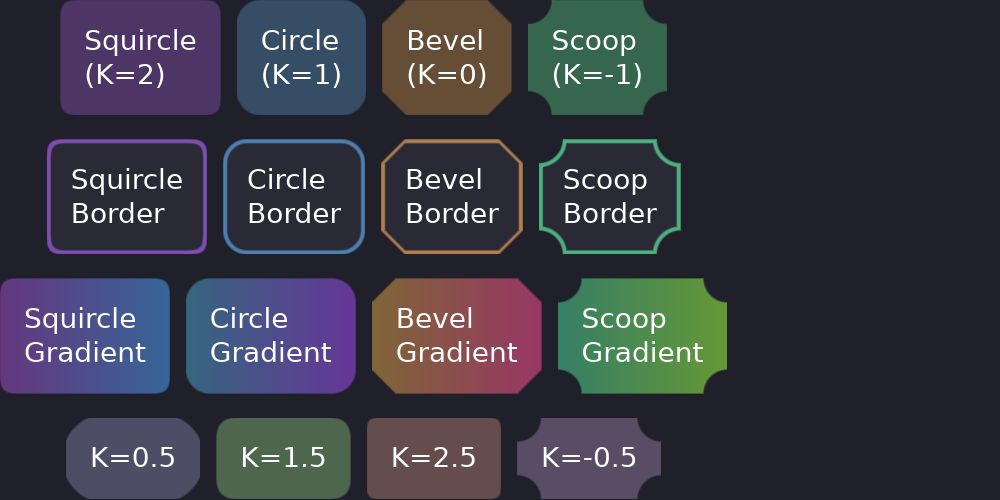
## Styling Philosophy
Guido uses a **builder pattern** for styling - each method returns the widget, allowing chained calls:
```rust
# extern crate guido;
# use guido::prelude::*;
# fn main() {
container()
.padding(16.0)
.background(Color::rgb(0.2, 0.2, 0.3))
.corners(8.0)
.border(1.0, Color::WHITE)
# ;
# }
```
All styling is done in Rust code, not external CSS files. This provides type safety and IDE support.
## In This Section
- [Styling Overview](styling.md) - Complete styling reference
- [Colors](colors.md) - Color creation and manipulation
- [Borders & Corners](borders.md) - Borders, corner radius, and curvature
- [Shadows](shadows.md) - offset, blur, spread and colour
- [Text](text.md) - Text styling and typography
## Quick Reference
```rust
# extern crate guido;
# use guido::prelude::*;
# fn main() {
# let start = Color::rgb(0.2, 0.2, 0.3);
# let end = Color::rgb(0.3, 0.3, 0.4);
# container()
// Background
.background(Color::rgb(0.2, 0.2, 0.3))
.gradient(LinearGradient::horizontal(start, end))
// Corners
.corners(Corners::squircle(8.0))
// iOS-style smooth
// Border
.border(2.0, Color::WHITE)
// Shadow
.shadow(Shadow::simple((0.0, 4.0), 8.0, Color::rgba(0.0, 0.0, 0.0, 0.2)))
// Spacing
.padding(16.0)
.padding([10.0, 20.0]) // [vertical, horizontal]
// Size
.width(100.0)
.height(50.0)
# ;
# }
```