<div align="center">

<br>
[](https://github.com/pemistahl/grex/actions/workflows/rust-build.yml)
[](https://github.com/pemistahl/grex/actions/workflows/python-build.yml)
[](https://docs.rs/grex)
[](https://codecov.io/gh/pemistahl/grex)
[](https://deps.rs/crate/grex/1.4.4)
[](https://pemistahl.github.io/grex-js/)
[](https://crates.io/crates/grex)
[](https://crates.io/crates/grex)
[](https://lib.rs/crates/grex)

[](https://pypi.org/project/grex)
[](https://www.apache.org/licenses/LICENSE-2.0)
[](https://github.com/pemistahl/grex/releases/download/v1.4.4/grex-v1.4.4-x86_64-unknown-linux-musl.tar.gz)
[](https://github.com/pemistahl/grex/releases/download/v1.4.4/grex-v1.4.4-x86_64-apple-darwin.tar.gz)
[](https://github.com/pemistahl/grex/releases/download/v1.4.4/grex-v1.4.4-aarch64-apple-darwin.tar.gz)
[](https://github.com/pemistahl/grex/releases/download/v1.4.4/grex-v1.4.4-x86_64-pc-windows-msvc.zip)
</div>
<br>

<br>
## 1. What does this tool do?
*grex* is a library as well as a command-line utility that is meant to simplify the often
complicated and tedious task of creating regular expressions. It does so by automatically
generating a single regular expression from user-provided test cases. The resulting
expression is guaranteed to match the test cases which it was generated from.
This project has started as a Rust port of the JavaScript tool
[*regexgen*](https://github.com/devongovett/regexgen) written by
[Devon Govett](https://github.com/devongovett). Although a lot of further useful features
could be added to it, its development was apparently ceased several years ago. The plan
is now to add these new features to *grex* as Rust really shines when it comes to
command-line tools. *grex* offers all features that *regexgen* provides, and more.
The philosophy of this project is to generate the most specific regular expression
possible by default which exactly matches the given input only and nothing else.
With the use of command-line flags (in the CLI tool) or preprocessing methods
(in the library), more generalized expressions can be created.
The produced expressions are [Perl-compatible regular expressions](https://www.pcre.org) which are also
compatible with the regular expression parser in Rust's [*regex* crate](https://crates.io/crates/regex).
Other regular expression parsers or respective libraries from other programming languages
have not been tested so far, but they ought to be mostly compatible as well.
## 2. Do I still need to learn to write regexes then?
**Definitely, yes!** Using the standard settings, *grex* produces a regular expression that is guaranteed
to match only the test cases given as input and nothing else.
This has been verified by [property tests](https://github.com/pemistahl/grex/blob/main/tests/property_tests.rs).
However, if the conversion to shorthand character classes such as `\w` is enabled, the resulting regex matches
a much wider scope of test cases. Knowledge about the consequences of this conversion is essential for finding
a correct regular expression for your business domain.
*grex* uses an algorithm that tries to find the shortest possible regex for the given test cases.
Very often though, the resulting expression is still longer or more complex than it needs to be.
In such cases, a more compact or elegant regex can be created only by hand.
Also, every regular expression engine has different built-in optimizations. *grex* does not know anything
about those and therefore cannot optimize its regexes for a specific engine.
**So, please learn how to write regular expressions!** The currently best use case for *grex* is to find
an initial correct regex which should be inspected by hand if further optimizations are possible.
## 3. Current Features
- literals
- character classes
- detection of common prefixes and suffixes
- detection of repeated substrings and conversion to `{min,max}` quantifier notation
- alternation using `|` operator
- optionality using `?` quantifier
- escaping of non-ascii characters, with optional conversion of astral code points to surrogate pairs
- case-sensitive or case-insensitive matching
- capturing or non-capturing groups
- optional anchors `^` and `$`
- fully compliant to [Unicode Standard 15.0](https://unicode.org/versions/Unicode15.0.0)
- fully compatible with [*regex* crate 1.9.0+](https://crates.io/crates/regex)
- correctly handles graphemes consisting of multiple Unicode symbols
- reads input strings from the command-line or from a file
- produces more readable expressions indented on multiple using optional verbose mode
- optional syntax highlighting for nicer output in supported terminals
## 4. How to install?
### 4.1 The command-line tool
You can download the self-contained executable for your platform above and put it in a place of your choice.
Alternatively, pre-compiled 64-Bit binaries are available within the package managers [Scoop](https://scoop.sh)
(for Windows), [Homebrew](https://brew.sh) (for macOS and Linux), [MacPorts](https://www.macports.org) (for macOS), and [Huber](https://github.com/innobead/huber) (for macOS, Linux and Windows).
[Raúl Piracés](https://github.com/piraces) has contributed a [Chocolatey Windows package](https://community.chocolatey.org/packages/grex).
*grex* is also hosted on [crates.io](https://crates.io/crates/grex),
the official Rust package registry. If you are a Rust developer and already have the Rust
toolchain installed, you can install by compiling from source using
[*cargo*](https://doc.rust-lang.org/cargo/), the Rust package manager.
So the summary of your installation options is:
```
### 4.2 The library
In order to use *grex* as a library, simply add it as a dependency to your `Cargo.toml` file:
```toml
[dependencies]
grex = { version = "1.4.4", default-features = false }
```
The dependency *clap* is only needed for the command-line tool.
By disabling the default features, the download and compilation of clap is prevented for the library.
## 5. How to use?
Detailed explanations of the available settings are provided in the [library section](#52-the-library).
All settings can be freely combined with each other.
### 5.1 The command-line tool
Test cases are passed either directly (`grex a b c`) or from a file (`grex -f test_cases.txt`).
*grex* is able to receive its input from Unix pipelines as well, e.g. `cat test_cases.txt | grex -`.
The following table shows all available flags and options:
```
$ grex -h
grex 1.4.4
© 2019-today Peter M. Stahl <pemistahl@gmail.com>
Licensed under the Apache License, Version 2.0
Downloadable from https://crates.io/crates/grex
Source code at https://github.com/pemistahl/grex
grex generates regular expressions from user-provided test cases.
Input:
[INPUT]... One or more test cases separated by blank space
-f, --file <FILE> Reads test cases on separate lines from a file
Digit Options:
-d, --digits Converts any Unicode decimal digit to \d
-D, --non-digits Converts any character which is not a Unicode decimal digit to \D
Whitespace Options:
-s, --spaces Converts any Unicode whitespace character to \s
-S, --non-spaces Converts any character which is not a Unicode whitespace character to \S
Word Options:
-w, --words Converts any Unicode word character to \w
-W, --non-words Converts any character which is not a Unicode word character to \W
Escaping Options:
-e, --escape Replaces all non-ASCII characters with unicode escape sequences
--with-surrogates Converts astral code points to surrogate pairs if --escape is set
Repetition Options:
-r, --repetitions
Detects repeated non-overlapping substrings and converts them to {min,max} quantifier
notation
--min-repetitions <QUANTITY>
Specifies the minimum quantity of substring repetitions to be converted if --repetitions
is set [default: 1]
--min-substring-length <LENGTH>
Specifies the minimum length a repeated substring must have in order to be converted if
--repetitions is set [default: 1]
Anchor Options:
--no-start-anchor Removes the caret anchor `^` from the resulting regular expression
--no-end-anchor Removes the dollar sign anchor `$` from the resulting regular expression
--no-anchors Removes the caret and dollar sign anchors from the resulting regular
expression
Display Options:
-x, --verbose Produces a nicer-looking regular expression in verbose mode
-c, --colorize Provides syntax highlighting for the resulting regular expression
Miscellaneous Options:
-i, --ignore-case Performs case-insensitive matching, letters match both upper and lower case
-g, --capture-groups Replaces non-capturing groups with capturing ones
-h, --help Prints help information
-v, --version Prints version information
```
### 5.2 The library
#### 5.2.1 Default settings
Test cases are passed either from a collection via [`RegExpBuilder::from()`](https://docs.rs/grex/1.4.4/grex/struct.RegExpBuilder.html#method.from)
or from a file via [`RegExpBuilder::from_file()`](https://docs.rs/grex/1.4.4/grex/struct.RegExpBuilder.html#method.from_file).
If read from a file, each test case must be on a separate line. Lines may be ended with either a newline `\n` or a carriage
return with a line feed `\r\n`.
```rust
use grex::RegExpBuilder;
let regexp = RegExpBuilder::from(&["a", "aa", "aaa"]).build();
assert_eq!(regexp, "^a(?:aa?)?$");
```
#### 5.2.2 Convert to character classes
```rust
use grex::RegExpBuilder;
let regexp = RegExpBuilder::from(&["a", "aa", "123"])
.with_conversion_of_digits()
.with_conversion_of_words()
.build();
assert_eq!(regexp, "^(\\d\\d\\d|\\w(?:\\w)?)$");
```
#### 5.2.3 Convert repeated substrings
```rust
use grex::RegExpBuilder;
let regexp = RegExpBuilder::from(&["aa", "bcbc", "defdefdef"])
.with_conversion_of_repetitions()
.build();
assert_eq!(regexp, "^(?:a{2}|(?:bc){2}|(?:def){3})$");
```
By default, *grex* converts each substring this way which is at least a single character long
and which is subsequently repeated at least once. You can customize these two parameters if you like.
In the following example, the test case `aa` is not converted to `a{2}` because the repeated substring
`a` has a length of 1, but the minimum substring length has been set to 2.
```rust
use grex::RegExpBuilder;
let regexp = RegExpBuilder::from(&["aa", "bcbc", "defdefdef"])
.with_conversion_of_repetitions()
.with_minimum_substring_length(2)
.build();
assert_eq!(regexp, "^(?:aa|(?:bc){2}|(?:def){3})$");
```
Setting a minimum number of 2 repetitions in the next example, only the test case `defdefdef` will be
converted because it is the only one that is repeated twice.
```rust
use grex::RegExpBuilder;
let regexp = RegExpBuilder::from(&["aa", "bcbc", "defdefdef"])
.with_conversion_of_repetitions()
.with_minimum_repetitions(2)
.build();
assert_eq!(regexp, "^(?:bcbc|aa|(?:def){3})$");
```
#### 5.2.4 Escape non-ascii characters
```rust
use grex::RegExpBuilder;
let regexp = RegExpBuilder::from(&["You smell like 💩."])
.with_escaping_of_non_ascii_chars(false)
.build();
assert_eq!(regexp, "^You smell like \\u{1f4a9}\\.$");
```
Old versions of JavaScript do not support unicode escape sequences for the astral code planes
(range `U+010000` to `U+10FFFF`). In order to support these symbols in JavaScript regular
expressions, the conversion to surrogate pairs is necessary. More information on that matter
can be found [here](https://mathiasbynens.be/notes/javascript-unicode).
```rust
use grex::RegExpBuilder;
let regexp = RegExpBuilder::from(&["You smell like 💩."])
.with_escaped_non_ascii_chars(true)
.build();
assert_eq!(regexp, "^You smell like \\u{d83d}\\u{dca9}\\.$");
```
#### 5.2.5 Case-insensitive matching
The regular expressions that *grex* generates are case-sensitive by default.
Case-insensitive matching can be enabled like so:
```rust
use grex::RegExpBuilder;
let regexp = RegExpBuilder::from(&["big", "BIGGER"])
.with_case_insensitive_matching()
.build();
assert_eq!(regexp, "(?i)^big(?:ger)?$");
```
#### 5.2.6 Capturing Groups
Non-capturing groups are used by default.
Extending the previous example, you can switch to capturing groups instead.
```rust
use grex::RegExpBuilder;
let regexp = RegExpBuilder::from(&["big", "BIGGER"])
.with_case_insensitive_matching()
.with_capturing_groups()
.build();
assert_eq!(regexp, "(?i)^big(ger)?$");
```
#### 5.2.7 Verbose mode
If you find the generated regular expression hard to read, you can enable verbose mode.
The expression is then put on multiple lines and indented to make it more pleasant to the eyes.
```rust
use grex::RegExpBuilder;
use indoc::indoc;
let regexp = RegExpBuilder::from(&["a", "b", "bcd"])
.with_verbose_mode()
.build();
assert_eq!(regexp, indoc!(
r#"
(?x)
^
(?:
b
(?:
cd
)?
|
a
)
$"#
));
```
#### 5.2.8 Disable anchors
By default, the anchors `^` and `$` are put around every generated regular expression in order
to ensure that it matches only the test cases given as input. Often enough, however, it is
desired to use the generated pattern as part of a larger one. For this purpose, the anchors
can be disabled, either separately or both of them.
```rust
use grex::RegExpBuilder;
let regexp = RegExpBuilder::from(&["a", "aa", "aaa"])
.without_anchors()
.build();
assert_eq!(regexp, "a(?:aa?)?");
```
### 5.3 Examples
The following examples show the various supported regex syntax features:
```shell
$ grex a b c
^[a-c]$
$ grex a c d e f
^[ac-f]$
$ grex a b x de
$ grex abc bc
^a?bc$
$ grex a b bc
$ grex [a-z]
^\[a\-z\]$
$ grex -r b ba baa baaa
^b(?:a{1,3})?$
$ grex -r b ba baa baaaa
$ grex y̆ a z
^(?:y̆|[az])$
Note:
Grapheme y̆ consists of two Unicode symbols:
U+0079 (Latin Small Letter Y)
U+0306 (Combining Breve)
$ grex "I ♥ cake" "I ♥ cookies"
Input containing blank space must be
surrounded by quotation marks.
```
The string `"I ♥♥♥ 36 and ٣ and 💩💩."` serves as input for the following examples using the command-line notation:
```shell
$ grex <INPUT>
^I ♥♥♥ 36 and ٣ and 💩💩\.$
$ grex -e <INPUT>
^I \u{2665}\u{2665}\u{2665} 36 and \u{663} and \u{1f4a9}\u{1f4a9}\.$
$ grex -e --with-surrogates <INPUT>
^I \u{2665}\u{2665}\u{2665} 36 and \u{663} and \u{d83d}\u{dca9}\u{d83d}\u{dca9}\.$
$ grex -d <INPUT>
^I ♥♥♥ \d\d and \d and 💩💩\.$
$ grex -s <INPUT>
^I\s♥♥♥\s36\sand\s٣\sand\s💩💩\.$
$ grex -w <INPUT>
^\w ♥♥♥ \w\w \w\w\w \w \w\w\w 💩💩\.$
$ grex -D <INPUT>
^\D\D\D\D\D\D36\D\D\D\D\D٣\D\D\D\D\D\D\D\D$
$ grex -S <INPUT>
^\S \S\S\S \S\S \S\S\S \S \S\S\S \S\S\S$
$ grex -dsw <INPUT>
^\w\s♥♥♥\s\d\d\s\w\w\w\s\d\s\w\w\w\s💩💩\.$
$ grex -dswW <INPUT>
^\w\s\W\W\W\s\d\d\s\w\w\w\s\d\s\w\w\w\s\W\W\W$
$ grex -r <INPUT>
^I ♥{3} 36 and ٣ and 💩{2}\.$
$ grex -er <INPUT>
^I \u{2665}{3} 36 and \u{663} and \u{1f4a9}{2}\.$
$ grex -er --with-surrogates <INPUT>
^I \u{2665}{3} 36 and \u{663} and (?:\u{d83d}\u{dca9}){2}\.$
$ grex -dgr <INPUT>
^I ♥{3} \d(\d and ){2}💩{2}\.$
$ grex -rs <INPUT>
^I\s♥{3}\s36\sand\s٣\sand\s💩{2}\.$
$ grex -rw <INPUT>
^\w ♥{3} \w(?:\w \w{3} ){2}💩{2}\.$
$ grex -Dr <INPUT>
^\D{6}36\D{5}٣\D{8}$
$ grex -rS <INPUT>
^\S \S(?:\S{2} ){2}\S{3} \S \S{3} \S{3}$
$ grex -rW <INPUT>
^I\W{5}36\Wand\W٣\Wand\W{4}$
$ grex -drsw <INPUT>
^\w\s♥{3}\s\d(?:\d\s\w{3}\s){2}💩{2}\.$
$ grex -drswW <INPUT>
^\w\s\W{3}\s\d(?:\d\s\w{3}\s){2}\W{3}$
```
## 6. How to build?
In order to build the source code yourself, you need the
[stable Rust toolchain](https://www.rust-lang.org/tools/install) installed on your machine
so that [*cargo*](https://doc.rust-lang.org/cargo/), the Rust package manager is available.
**Please note**: Rust >= 1.70.0 is required to build the CLI. For the library part, Rust < 1.70.0 is sufficient.
```shell
git clone https://github.com/pemistahl/grex.git
cd grex
cargo build
```
The source code is accompanied by an extensive test suite consisting of unit tests, integration
tests and property tests. For running them, simply say:
```shell
cargo test
```
Benchmarks measuring the performance of several settings can be run with:
```shell
cargo bench
```
## 7. Python extension module
With the help of [PyO3](https://github.com/PyO3/pyo3) and
[Maturin](https://github.com/PyO3/maturin), the library has been compiled to a
Python extension module so that it can be used within any Python software as well.
It is available in the [Python Package Index](https://pypi.org/project/grex) and can
be installed with:
```shell
pip install grex
```
To build the Python extension module yourself, create a virtual environment and install
[Maturin](https://github.com/PyO3/maturin).
```shell
python -m venv /path/to/virtual/environment
source /path/to/virtual/environment/bin/activate
pip install maturin
maturin build
```
The Python library contains a single class named `RegExpBuilder` that can be imported like so:
```python
from grex import RegExpBuilder
```
## 8. WebAssembly support
This library can be compiled to [WebAssembly (WASM)](https://webassembly.org) which allows to use *grex*
in any JavaScript-based project, be it in the browser or in the back end running on [Node.js](https://nodejs.org).
The easiest way to compile is to use [`wasm-pack`](https://rustwasm.github.io/wasm-pack). After the installation,
you can, for instance, build the library with the web target so that it can be directly used in the browser:
wasm-pack build --target web
This creates a directory named `pkg` on the top-level of this repository, containing the compiled wasm files
and JavaScript and TypeScript bindings. In an HTML file, you can then call *grex* like the following, for instance:
```html
<script type="module">
import init, { RegExpBuilder } from "./pkg/grex.js";
init().then(_ => {
alert(RegExpBuilder.from(["hello", "world"]).build());
});
</script>
```
There are also some integration tests available both for Node.js and for the browsers Chrome, Firefox and Safari.
To run them, simply say:
wasm-pack test --node --headless --chrome --firefox --safari
If the tests fail to start in Safari, you need to enable Safari's web driver first by running:
sudo safaridriver --enable
The output of `wasm-pack` will be hosted in a [separate repository](https://github.com/pemistahl/grex-js) which
allows to add further JavaScript-related configuration, tests and documentation. *grex* will then be added to the
[npm registry](https://www.npmjs.com) as well, allowing for an easy download and installation within every JavaScript
or TypeScript project.
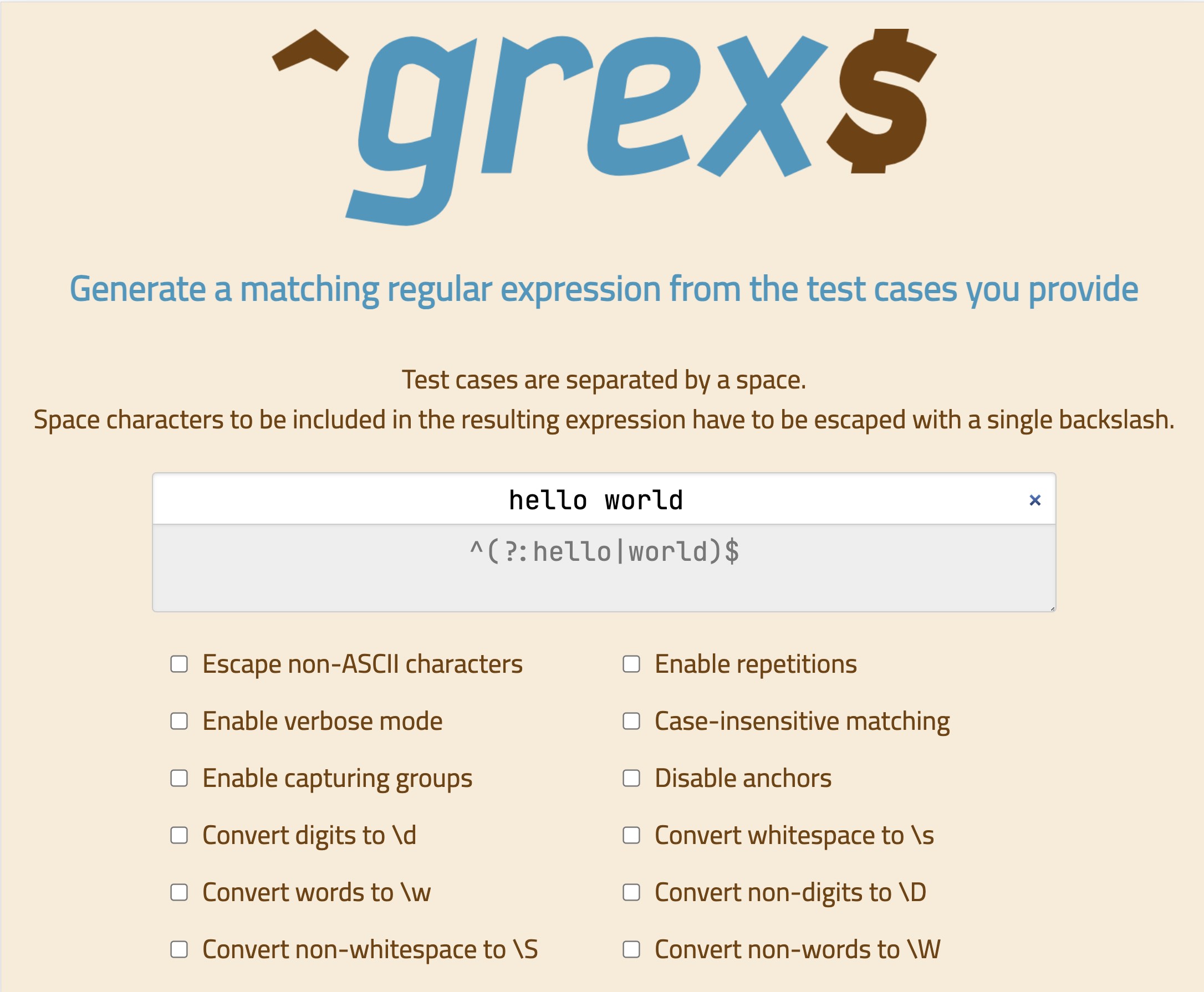
There is a [demo website](https://pemistahl.github.io/grex-js/) available where you can give grex a try.
## 9. How does it work?
1. A [deterministic finite automaton](https://en.wikipedia.org/wiki/Deterministic_finite_automaton) (DFA)
is created from the input strings.
2. The number of states and transitions between states in the DFA is reduced by applying
[Hopcroft's DFA minimization algorithm](https://en.wikipedia.org/wiki/DFA_minimization#Hopcroft.27s_algorithm).
3. The minimized DFA is expressed as a system of linear equations which are solved with
[Brzozowski's algebraic method](http://cs.stackexchange.com/questions/2016/how-to-convert-finite-automata-to-regular-expressions#2392),
resulting in the final regular expression.
## 10. What's next for version 1.5.0?
Take a look at the [planned issues](https://github.com/pemistahl/grex/milestone/5).
## 11. Contributions
In case you want to contribute something to *grex*, I encourage you to do so.
Do you have ideas for cool features? Or have you found any bugs so far?
Feel free to open an issue or send a pull request. It's very much appreciated. :-)


