
grafia
Interactive 2D Cubic Bézier, Spline, Vector & Typography Canvas Widget for egui



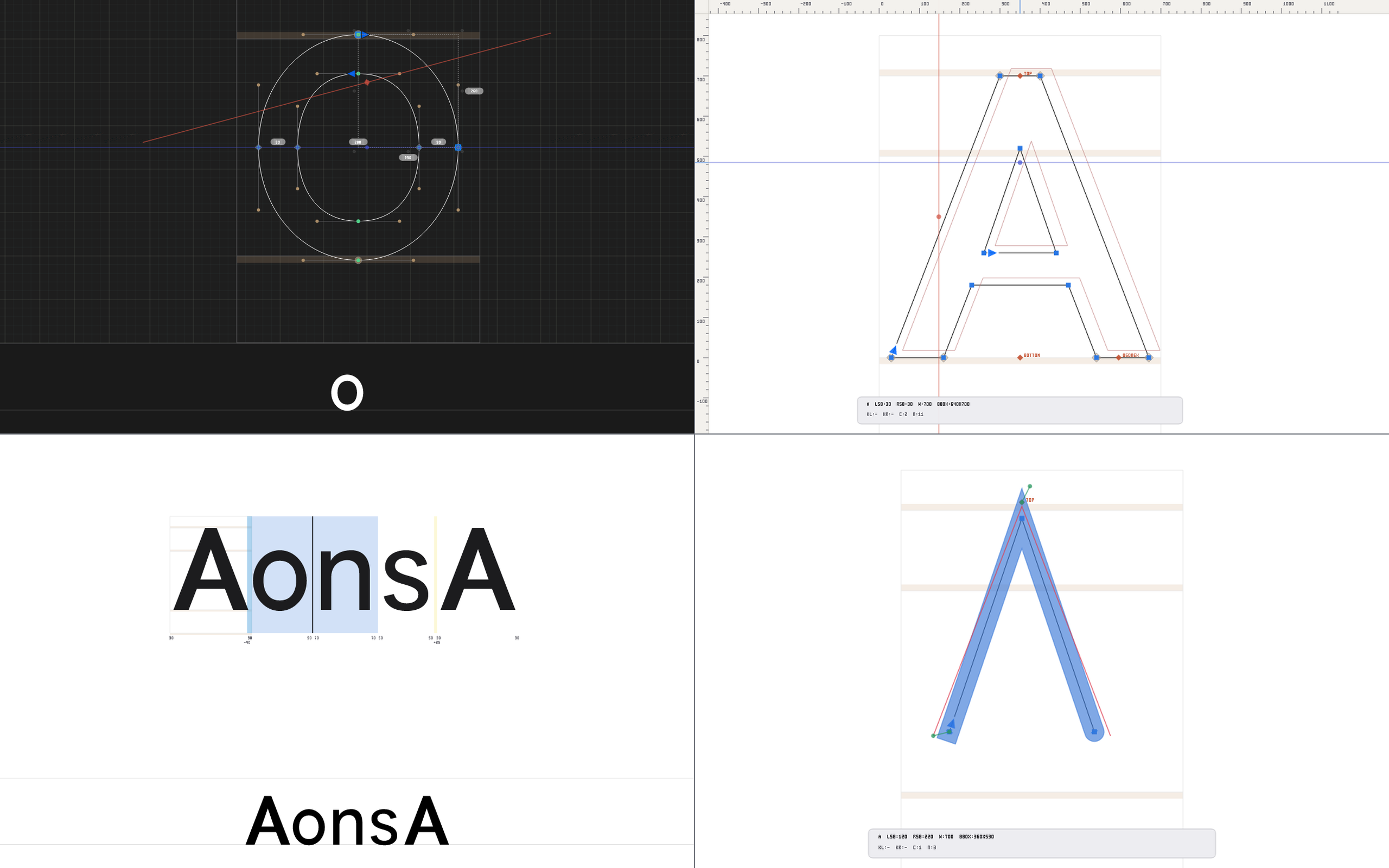
Try the live interactive desktop showcase in one command:
1. Why grafia?
grafia is a zero-unsafe, battery-efficient, drop-in 2D vector and spline canvas widget for egui, built on the Linebender geometry stack (kurbo), lyon_tessellation, and tiny-skia.
Rather than locking your application into a rigid document format or monolithic editor shell, grafia operates as a Hexagonal Data-In / Event-Out View & Controller: your host application feeds pure 2D scene geometry into [GrafiaCanvasState], renders [GrafiaCanvasWidget] inside any egui::Ui, and drains strongly-typed semantic events and mutations from the host-port queues.
Built for Four Core Domains
- Vector Illustration & SVG Editors
- Persistent cubic Bézier pen & select state machines, tension-controlled Hobby splines (
NodeType::HobbyStar) and $G^2$ Euler/Spiro spirals (NodeType::EulerSpiro). - Exact Boolean Pathfinder operations (
remove_overlap_in_contours,subtract_contours,intersect_contours), recursive De Casteljau Knife slicing, geometric Primitives (rectangles, ellipses), freehand Pencil curve fitting, and Multi-Layer Vector Color/Gradients (Solid,LinearGradient,RadialGradient,SweepGradient,Bitmap,ClippingMask) with interactive on-canvas gradient stop handles.
- Persistent cubic Bézier pen & select state machines, tension-controlled Hobby splines (
- Typeface & Font Engineering
- Native UPM (
FontUnit/FontPoint) coordinate space, foreground/background layers, 2D Anchors with diacritic mark-cloud overlays (GhostMarkPath), and pre-resolved Components with parametric Smart Handles (CanvasSmartHandle). - Interactive Multi-Glyph Text Streams (
WritingDirection::LeftToRighthorizontal andWritingDirection::TopToBottomvertical CJK layout) with live in-canvas spacing (LSB/RSB/TSB/BSB) and pair kerning deltas. - Variable-font Companion Master Compatibility diagnostics, Higher-Order Interpolation (
HOI) control-polygon overlays, and PostScript / TrueType Hinting visual instructors.
- Native UPM (
- 2D CAD, CAM, Plotter & Profile Editors
- Type-safe bijective coordinate transforms (
FontPoint$\leftrightarrow$ScreenPoint), domain-agnostic Custom Reference Frames (CustomReferenceFramewith outer/inner bounds, $N_x \times N_y$ grids, keyline circles, and zoom-scaling band lines), top/left UPM rulers, magnetic SnapEngine, and live Measurement Rays with typographic angle and span readouts.
- Type-safe bijective coordinate transforms (
- Bitmap-to-Vector Digitization
- Built-in deterministic 7-stage Bitmap & Camera Auto-Trace (
trace_background_image) featuring Sauvola integral-image adaptive thresholding, $3\times 3$ homography perspective deskew, marching squares, Ramer-Douglas-Peucker simplification, and Schneider least-squares cubic Bézier fitting.
- Built-in deterministic 7-stage Bitmap & Camera Auto-Trace (
2. Quick Start
Add grafia to your Cargo.toml and drop [GrafiaCanvasWidget] into any egui::Ui:
use ;
// 1. Initialize the theme and canvas state once in your application struct:
let theme = sonoma_default;
let mut state = new;
// 2. Load a 2D vector shape or glyph into the hexagonal Data-In port:
let contour = new;
let glyph = Glyph ;
state.load_glyph;
// 3. Inside your egui update loop, render the widget and poll Event-Out requests:
3. Visual Feature Showcase
| Dark Mode Cubic Bézier & Measurement Guides | Light Mode Rulers, Background Layer & 2D Anchors |
|---|---|
 |
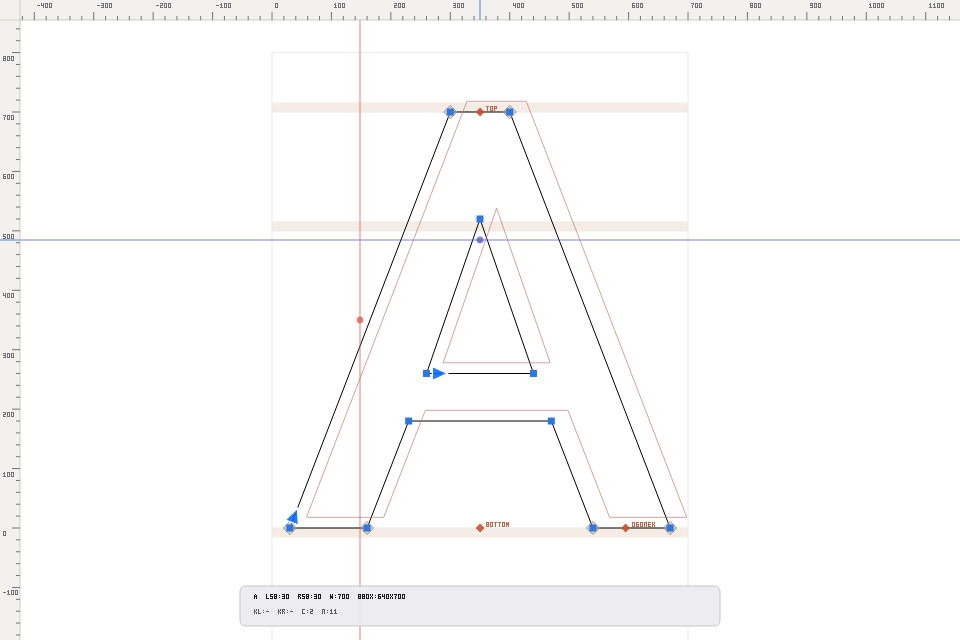 |
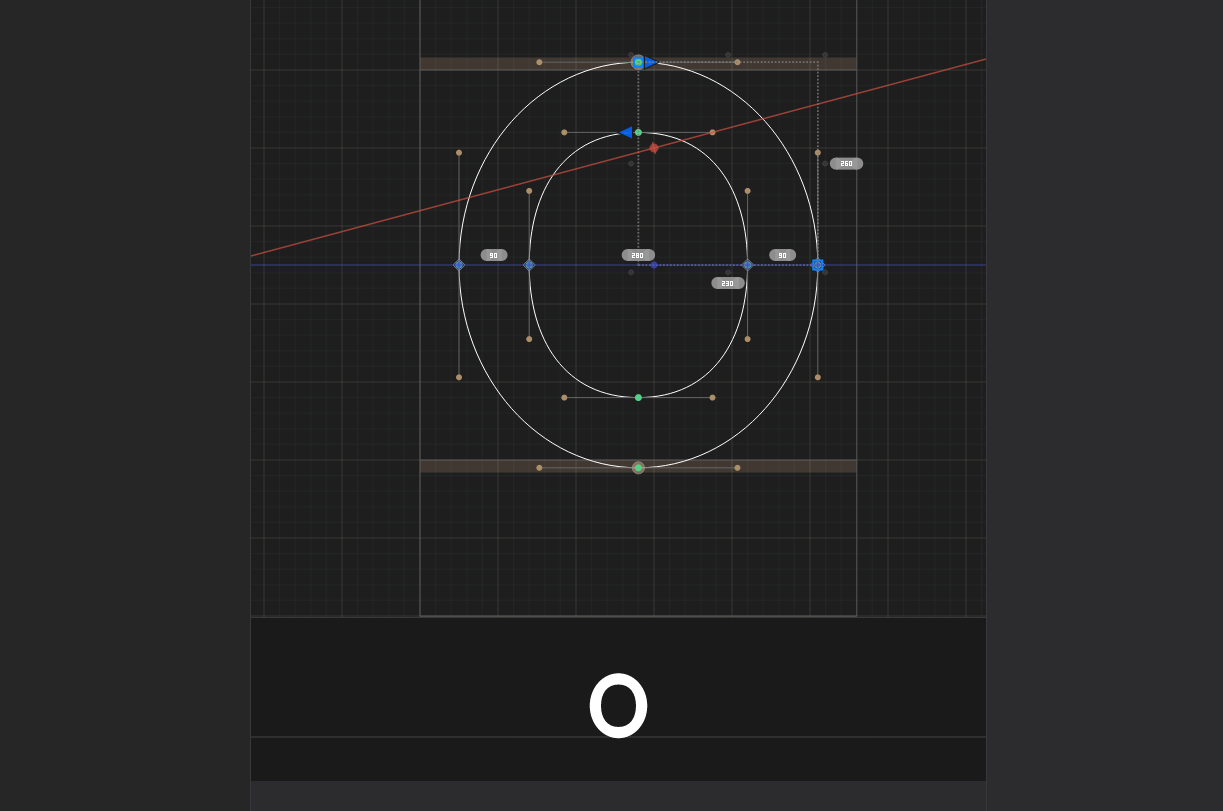
| Full dark-mode wireframe editing with cubic off-curve handles, angled measurement guide with live span/angle telemetry pills, alignment zone badges, and bottom filled preview strip. | Precision top/left UPM rulers with cursor hairlines, rose background reference layer, named 2D anchors (top, bottom, ogonek), and live glyph metrics HUD. |
| Multi-Glyph Text Stream & Live Kerning | Live Contour Stroke & Master Compatibility |
 |
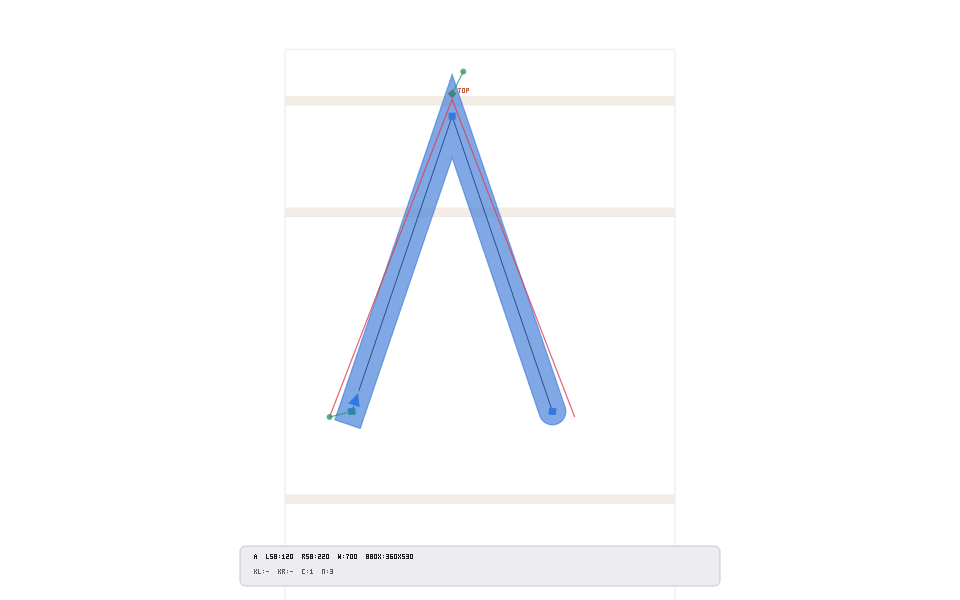 |
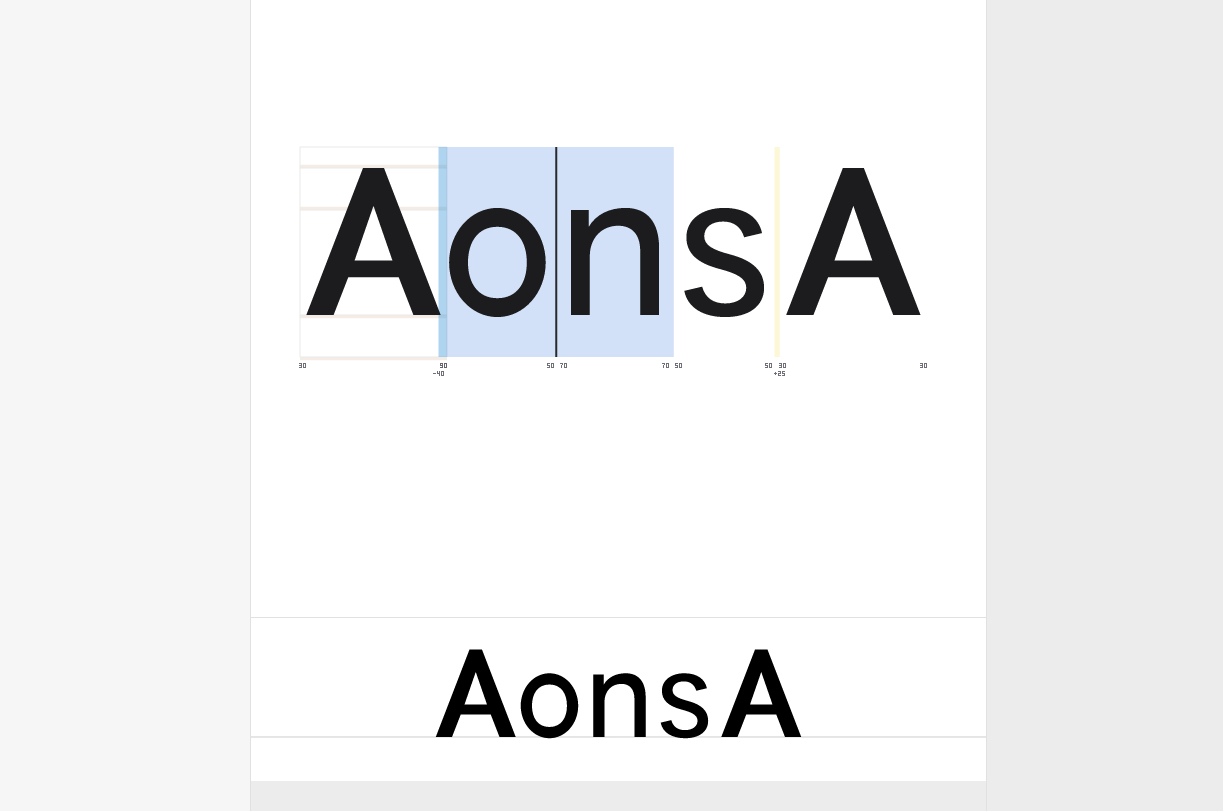
Interactive multi-glyph text run (AonsA) with caret navigation, text range selection, beneath-slot LSB/RSB/kerning readouts, and synchronized separable-blur bottom preview strip. |
Non-destructive calligraphic stroke expansion (ContourStrokeStyle with round caps/joins) alongside variable-font companion master compatibility diagnostics. |
4. Hexagonal Host-Port Architecture (Data-In / Event-Out)
grafia never couples your application to a specific disk format (such as UFO, OTF/TTF, SVG, or DXF). All communication flows through deterministic, serializable Rust value types:
flowchart LR
    Host["Host Application<br/>(Font Editor / SVG Studio / CAD Tool)"]
    State["GrafiaCanvasState<br/>(2D CAGD Solvers, 14 Tools, Undo/Redo)"]
    Widget["GrafiaCanvasWidget<br/>(5-Pass egui::Painter & tiny-skia Verifier)"]

    Host -->|"Data-In: Glyph, CanvasTextStream,<br/>CanvasColorSublayer, CustomReferenceFrame,<br/>GrafiaPreferences"| State
    State -->|"content_generation() Cache Gate<br/>(0% CPU Idle)"| Widget
    State -->|"Event-Out: CanvasHostRequest,<br/>SpacingDelta, KerningDelta,<br/>SelectionInfoAction"| Host
5. Feature Matrix
| Capability Pillar | Highlights |
|---|---|
| Curve & Spline Mathematics | Cubic Béziers (Corner, Smooth, OffCurve), tension-controlled Hobby splines (NodeType::HobbyStar), $G^2$ Euler/Spiro spirals (NodeType::EulerSpiro), 4-mode inverse-Bernstein belly dragging (apply_cubic_segment_belly_drag), curve-healing deletion (heal_delete_nodes), De Casteljau splitting, extremum & inflection insertion, and 8-step fit_selected_curves_step (apply_fit_curve_ratio_to_contours). |
| 14 Interactive Canvas Tools | Select (V), Lasso (Shift+V), Pen (P), Rotate (R), Scale (S), Zoom (Z), Knife (E), Primitives (F), Measurement (L), Annotation (A), Pencil (B), Pixel (X), Text (T), TrueTypeInstructor, and Hoi. |
| Boolean Pathfinder & Topology | Exact cubic-cubic intersection graph solver for Union (remove_overlap_in_contours), Subtract (subtract_contours), and Intersect (intersect_contours), plus correct_path_direction_layer, tidy_up_contours, align_selected_nodes, and virtual self-intersection ExtraNodes. |
| Snapping, Rulers & Reference Frames | Magnetic SnapEngine across metric lines, alignment zones, local/global guides (GuideThickness::ScreenDp and zoom-scaling GuideThickness::FontUnits), nodes, 2D anchors, background contours, and CustomReferenceFrame grids/keyline circles. |
| Multi-Glyph Text & Typography | Horizontal (LeftToRight) and vertical CJK (TopToBottom) multi-glyph streams (CanvasTextStream), double-click slot activation, keyboard spacing (LSB/RSB/TSB/BSB) & pair kerning adjustments, 2D CanvasAnchors with GhostMarkPath clouds, CanvasComponents with parametric CanvasSmartHandles, PostScript stem/ghost hints, and TrueType visual instructions. |
| Color Layers & Bitmap Auto-Trace | Multi-layer vector paint (Solid, LinearGradient, RadialGradient, SweepGradient, Bitmap, ClippingMask) with Porter-Duff SrcOver compositing and on-canvas gradient handles; 7-stage deterministic bitmap & camera auto-trace (trace_background_image). |
| Performance & Safety Guarantees | #![forbid(unsafe_code)], #![forbid(dead_code)], zero .unwrap() / .expect() in production code, monotonic content_generation() cache gating for 0% CPU idle frames, and 1:1 visual parity between egui::Painter and headless tiny_skia::Pixmap. |
6. Architecture, Module Map & Developer Guides (src/)
Each module includes an in-depth mathematical and conceptual guide rendered on docs.rs (with KaTeX formula support):
| Module | docs.rs Developer Guide |
Responsibility |
|---|---|---|
[core] |
Core Math, Splines, Topology & Auto-Trace | Type-safe coordinates (FontUnit, FontPoint, ScreenDp, ScreenPoint, ViewportTransform), cubic Bézier & Hobby/Euler-Spiro spline math, 4-case inverse-Bernstein belly dragging, boolean pathfinder, knife, primitives, measurement rays, color layers, hinting/HOI models, and 7-stage Sauvola/Schneider bitmap auto-trace. |
[interaction] |
Tool State Machines & Transactional Undo/Redo | Deterministic finite state machines (SelectToolState, PenToolState, CanvasGesture), keyboard modifiers, and atomic CommandHistory (GlyphSnapshot undo/redo). |
[snapping] |
Magnetic Snapping, Guides & Reference Frames | Priority-based magnetic SnapEngine, local and global Guide management (ScreenDp vs. zoom-scaling FontUnits), AlignmentZone overshoot badges, CustomReferenceFrame, and GlyphMetrics. |
[render] |
5-Pass Pipeline, Tessellation & Zero-CPU Caching | GPU tessellation (tessellate_contours_nonzero, tessellate_contours_even_odd), view-mode projections (EditWireframe, PreviewFilled, ShapeThumbnail), separable Gaussian blur GrafiaPreviewWidget (PreviewStripCache), and content_generation() cache gating. |
[locator] |
Minimap Projections | ShapeLocatorRenderer & ShapeLocatorWidget 2-layer vector minimap with Non-Zero Winding counter reconstruction and CCW/CW winding indicators. |
[adapters] |
Hexagonal Host-Port & Headless Verification | GrafiaCanvasState (with load_glyph, export_glyph, load_document_scene, and hexagonal host ports), GrafiaCanvasWidget, 5-pass CanvasPainter, InputDispatcher, validate_invariants, and tiny-skia headless offscreen verifier. |
[tokens] |
Theme, Keymap & Preference Tokens | Data-driven theme, color, metric, cursor, keymap (GrafiaKeymap), and preference (GrafiaPreferences) tokens (Light, Dark, and System appearance modes). |
7. Verification & Development Commands
# Launch the interactive desktop vector canvas demo:
# Run the full test suite (unit, integration, property-based & headless visual parity):
# Run architectural & clean-room guardrails:
# Run rustdoc doctests & verify documentation links:
# Run strict static analysis (zero warnings):
License
Licensed under either of:
- Apache License, Version 2.0 (https://www.apache.org/licenses/LICENSE-2.0)
- MIT license (https://opensource.org/licenses/MIT)
at your option.