
gpui_interop
Display frames rendered by external graphics engines, hardware video decoders, or separate processes directly inside a GPUI window without copying pixels through the CPU.
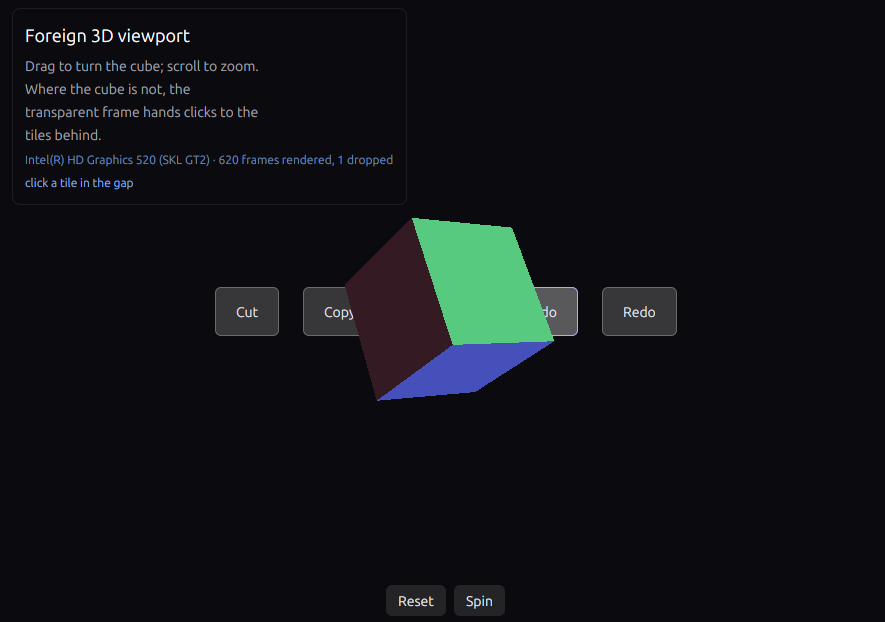
The interop_cube_drag example: a separate Vulkan renderer draws the 3D cube and passes it to GPUI
as a dma-buf. GPUI composites the transparent frame directly into the scene, drawing the background
tiles underneath it and the UI panel and buttons on top.
Normally, GPUI can only sample textures that live on its own GPU device. If you are embedding a 3D
engine (such as a custom Vulkan renderer or a wgpu viewport) or a hardware video decoder that
manages its own GPU device, standard texture sharing will not work without downloading the frame to
system RAM and re-uploading it.
gpui_interop avoids that CPU round-trip. Your renderer draws a frame on its own device, exports an
OS-level handle (a dma-buf on Linux or a shared texture on Windows), and passes it to GPUI's
surface() element. GPUI's renderer imports that handle and samples the texture directly on the GPU.
This crate is experimental. It is built against the bite-gpui 1.25 line — the published
bite-gpui, bite-gp-engine, bite-gp-wgpu and bite-gp-windows packages.
Install
The crate's public API speaks GPUI's types, so a consumer also needs the facade as a direct dependency. The published packages are aliased back to their standard crate names:
[]
= { = "0.2", = ["gpui", "wgpu"] }
= { = "bite-gpui", = "1.25", = false, = ["platform"] }
= { = "bite-gp-wgpu", = "1.25" }
Drop platform for a producer that does not open a window. A producer that renders on wgpu
needs this crate's wgpu feature; the viewport input helpers need gpui; the guest runner needs
guest and a backend renderer such as gpui_wgpu's headless feature.
Features
| Feature | Description |
|---|---|
| (default) | Core library and platform transport types (SharedBuffer, SharedSurface, Fence) for Linux and Windows. |
wgpu |
Adapter::wgpu, WgpuSurface and, on Linux, WgpuSharedBuffer. |
gpui |
The viewport input helpers (surface_input, SurfaceInput, SurfaceEvent, SurfacePoint). |
guest |
Guest, the headless worker-thread runner that hands frames to a foreign host loop. |
example |
Dependencies for the three library examples; not needed by consumers. |
readback-test, wgpu-test, input-test, guest-test |
The opt-in integration suites. |
Supported platforms
| Platform | Handle types | How it works |
|---|---|---|
| Linux | SharedBuffer → gpui::DmaBufHandle |
Exports a Vulkan image as a dma-buf with its DRM format modifier (linear or driver-tiled, single-plane or two-plane NV12). SharedBuffer::new lets the driver choose the layout; SharedBuffer::export_at pushes one the producer declares. A Fence exports the sync_file that orders the hand-off. |
| Windows | SharedSurface + Fence |
Exports a shared texture from a Direct3D 12 renderer and opens it on GPUI's Direct3D 11 device, using a shared fence to synchronize the two GPU queues. |
| macOS | IOSurface |
Not yet implemented. Planned support will wrap an external renderer's IOSurface in an MTLTexture. |
A wgpu producer has two shapes, both starting from Adapter::wgpu:
WgpuSharedBuffer(Linux) renders into an exportable image and hands GPUI adma-bufwith its modifier and async_file— the cross-device shape another backend imports withpaint_surface.WgpuSurfaceis the same-device fast path, composited withpaint_texture: no export and no fence.WgpuSharedBufferRingowns threeWgpuSharedBufferslots and their release eventfds for a producer that renders continuously.begin()hands out a free slot,submit()exports the frame, andpresent()returns only a frame whose acquire fence has already signalled — or repeats the last good one while a new frame is still running. GPUI therefore never polls a pending fence.
Quick start
The bridge is installed inside GPUI's gpu_canvas callback, where the window's renderer and its GPU
device exist:
use ;
On Windows with the Direct3D 11 renderer, Adapter::wgpu matches the adapter by LUID and creates a
separate DX12 device on it, for the native SharedSurface hand-off. A Vulkan producer that owns its
device uses interop.adapter().gpu_device() instead.
Examples and full guide
The repository has five demos. The three small ones are examples in this package and build with the
example feature: interop_linux, interop_cube and interop_cube_drag. The two producer demos
are separate crates in the workspace: interop_wgpu and interop_bevy.
See the repository README for the full
walkthrough, the Linux dma-buf code, the guest runner, the measured producer numbers, and the
design notes.
Requirements
- Linux: a Vulkan loader (
libvulkan.so.1) and a driver that supportsdma-bufexport (VK_EXT_external_memory_dma_bufandVK_EXT_image_drm_format_modifier). On Debian or Ubuntu:sudo apt-get install -y libvulkan1 mesa-vulkan-drivers. - Windows: Direct3D 11 and Direct3D 12 support, including the Windows SDK resource compiler.
- Rust: edition 2024.
License
Licensed under the Apache-2.0 License. See LICENSE-APACHE.