
gpui-kit-grid
A live GPUI data grid, for applications built with gpui-kit: a real-time table of hundreds of thousands of rows that takes thousands of updates per second from any thread, with change highlight and with sorting, filtering, grouping and trees in the background.
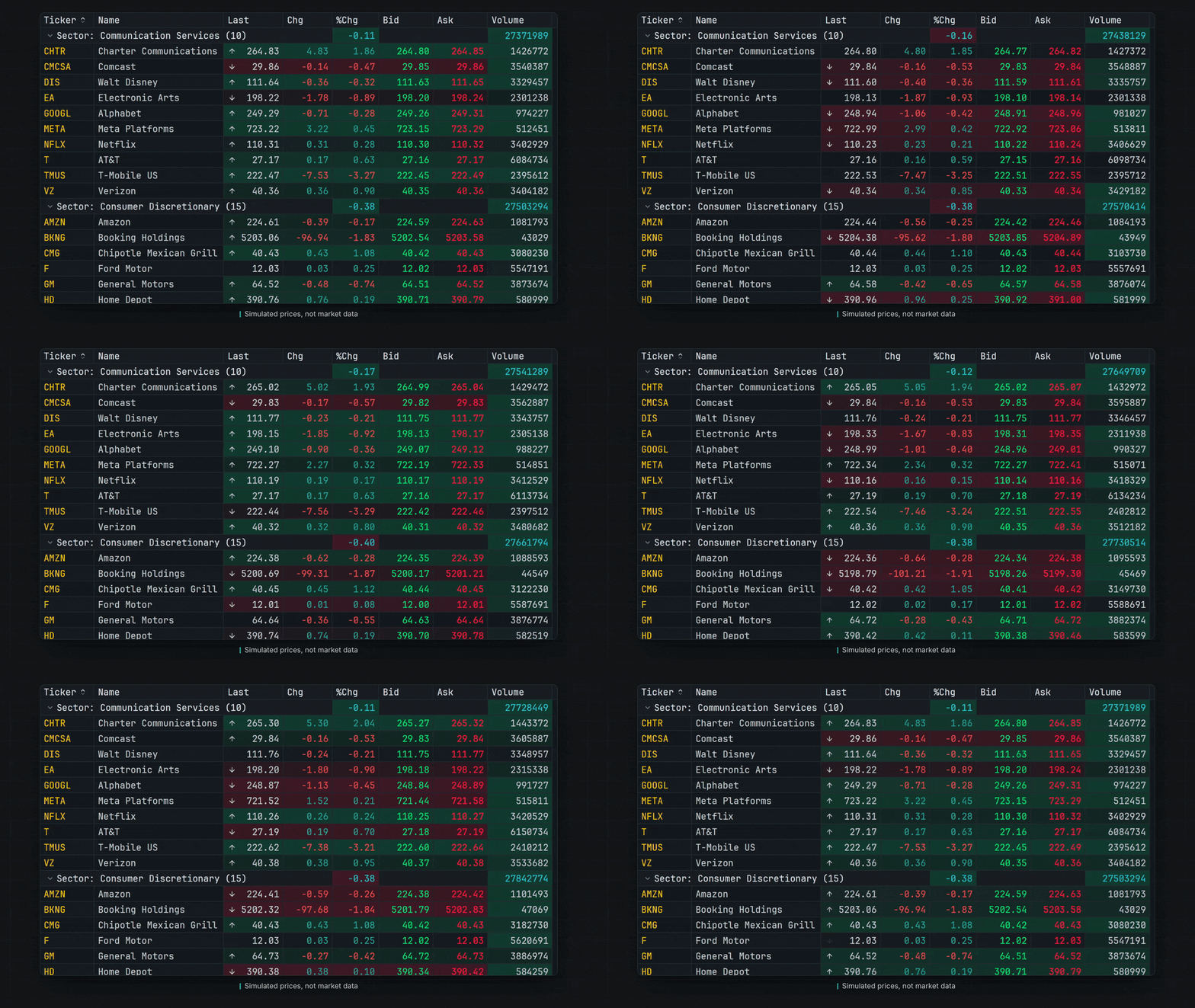
The quotes example: every change highlighted as it arrives, live totals per sector. Run it in the browser, where the examples are compiled to WebAssembly and drawn with WebGPU: the WebGPU demo page says how, and the trade blotter page has one to fill.
It is a separate crate on top of gpui-kit. Rows are addressed by key and written from any thread; a background ingest collapses updates by key and publishes snapshots; the order on screen is rebuilt in the background; one custom element paints the visible cells. The ideas come from the LiveGrid grid (WinForms), rethought for GPUI.
Documentation: https://gkg.giglabo.com/ · Getting started · Examples · Live demos · API
Status: stages 1–3 are done: the live core, grouping, aggregates and trees, then editing, elements in cells, export and drag and drop. The API will still change. What may come next is in ROADMAP.md.
Why a new grid when gpui-kit has DataTable
DataTable builds an element for each cell, addresses rows by index and calls its delegate through &mut on the UI thread. That is enough for static tables, not for live data: with 1500 visible cells under 2k updates a second a frame takes 12–14 ms, and after a re-sort the selection points at a different row.
DataTable |
gpui-kit-grid |
|
|---|---|---|
| Painting | An element per cell | One custom element, glyphs painted directly |
| Frame, 1500 cells, 2k updates/s | 12–14 ms | ~1.1 ms |
| Rows and selection | By index | By key: survive re-sorting and removal |
| Data | &mut delegate on the UI thread |
GridWriter from any thread, background ingest |
| Sorting and filtering | Synchronous, on click | In the background, automatic when data changes |
| Change highlight | No | Yes, with direction arrows and fading removed rows |
| Structure | Flat rows | Grouping, aggregates, totals and trees, built in the background |
| Editing and export | No | Editors under live updates; copy as TSV, CSV and custom formats in the background |
Measured with the headless spike_bench example (release, macOS); the Performance page has every scenario.
Install
[]
= "0.10"
= "2"
Each major version of the grid is built against one minor release of gpui-kit, which pins its GPUI snapshot exactly:
| gpui-kit-grid | gpui-kit | Rust |
|---|---|---|
| 2 | 0.10 | 1.98 |
1.0 (GitHub only, tag v1.0.0) |
git revision 146ab45 |
1.95 |
decimal (exact money values) and derive (#[derive(GridColumns)]) are off by default; Getting started walks through a first grid.
Quick start
A row is an immutable value with a key; value borrows from it and must not allocate:
// 2. Rows: an immutable value with a key. `value` must not allocate: it runs
// for every visible cell on every frame and for every row when sorting.
The grid state gets a schema, a delegate for styling, a store of its own and a sort:
// 5. The grid state: schema, delegate, its own store, a sort.
let schema = new
.with_frozen
.column
.column
.column
.column
.column;
let grid = cx.new;
Any thread writes rows by key:
// 7. Data from any thread: replace everything, then upsert by key.
let writer = grid.read.writer;
spawn;
The window shows LiveGrid::new(&grid), and the application calls gpui_kit_grid::init(cx) after gpui_kit::init(cx) for the grid's keys. The whole program is crates/grid/examples/quickstart.rs; Getting started walks through it, with installation.
Examples
| Example | What it shows |
|---|---|
quickstart |
The smallest application: 1000 trades from a producer thread |
cookbook |
Recipes: a reload with progress, a held order, a saved layout, a custom export, a WebSocket feed |
blotter |
Every feature of stages 1 and 2 on a trade blotter: grouping, totals, change arrows, a held order, a status bar on LiveGridHandle |
portfolio |
A live tree of funds, desks, books and positions |
dock_layout |
Grids in a dock, with layouts saved and restored |
orders |
Orders edited in place under live updates: every editor, elements in cells, CSV export, drag and drop |
desk, ladder, wire, broker |
Trading screens over a simulated market |
ops |
A data-centre console in a simulated alert storm |
orbit |
About 17,000 satellites from CelesTrak's public data |
transit |
Munich by the timetable, and Helsinki live |
wiki |
Wikimedia's live edits, a row per wiki |
ships |
Every vessel around Finland, live from AIS |
perf |
This machine's processes and GPU, live (macOS and Linux) |
spike_bench |
The headless benchmark (macOS) |
Run one with cargo run --release -p gpui-kit-grid --example <name> (spike_bench also needs --features test-support). Each example lists its environment variables at the top of its main.rs. The showcase examples' fonts are downloaded with python3 -I script/fetch-example-fonts, and orbit's and transit's data with script/fetch-orbit-data and script/fetch-transit-data. desk, broker, ops, orbit, transit, wiki and ships also run in the browser, with a quotes page beside them (crates/grid-web; see Web).
Documentation
- Concepts: rows by key, ingest and snapshots, background rebuilds, and what the grid is for.
- Replaceable behaviors: every default is a strategy you can replace.
- Guides: grouping, tree, live changes, cells, editing, export, drag and drop, columns, keyboard, settings.
- Cookbook, Performance, Web, Embedding.
The site is built from site/ (Astro Starlight): bun install --cwd site --frozen-lockfile, then bun run --cwd site build and bun test --cwd site. Code on its pages comes from // #region blocks of compiled files, and bun test checks that this README's snippets match them. The site also ships as a container image, ghcr.io/giglabocom/gpui-kit-grid-site (nginx, docker/site/), released on its own tags; see "Releases" in CONTRIBUTING.md.
Development
Requires Rust 1.98 (rust-toolchain.toml). gpui-kit comes from crates.io, on one minor release (Cargo.lock holds the exact one); to build against a local gpui-kit checkout instead, see "A local gpui-kit checkout" in CONTRIBUTING.md.
| Path | Contents |
|---|---|
crates/grid |
The grid (gpui-kit-grid): model, store, engine, policy, state, element; property and headless UI tests; the examples |
crates/grid-macros |
#[derive(GridColumns)], behind the derive feature |
crates/grid-web |
The browser pages, a separate workspace built for wasm32-unknown-unknown |
crates/grid-feed, crates/grid-gateway |
The quotes feed protocol and its WebSocket gateway |
crates/products |
The examples' "More from GigLabo" button and dialog (giglabo-products, not released) |
site |
The documentation site |
script, docker/linux |
Gate checks, data downloads, the benchmark charts; Linux builds and the end-to-end suite |
RUSTC_BOOTSTRAP=1
&& &&
Linux in Docker: docker/linux/test.sh, docker/linux/smoke.sh and docker/linux/e2e.sh. Rules: CONTRIBUTING.md and AGENTS.md.
Data in the examples
The examples download their data with the scripts above; nothing is committed.
| Example | Source | Licence |
|---|---|---|
orbit |
CelesTrak, derived from the US Space Force's public catalog | No redistribution granted; fetched at most once per update |
transit (Munich) |
MVV's GTFS feed "Soll-Fahrplandaten MVV-Gesamtnetz", © Münchner Verkehrs- und Tarifverbund GmbH, via opendata.muenchen.de | CC BY 4.0; scheduled, not real-time |
transit (Helsinki) |
© HSL, high-frequency positioning and GTFS | CC BY 4.0 |
wiki |
Wikimedia EventStreams; titles by Wikimedia contributors | CC BY-SA 4.0 |
ships |
Source: Fintraffic / digitraffic.fi | CC BY 4.0 |
quotes, desk, ladder, wire, broker |
Simulated prices, not market data | — |
ops |
Simulated: a made-up data center | — |
perf |
This machine's processes and GPU, read locally; nothing leaves the machine | — |
The live examples keep their sources' rules: one connection each, backoff with jitter on reconnect, and no personal data kept. Licenses lists what the web demos serve and their third-party notices.
Sponsor
If the grid is useful to you, consider sponsoring its development.
License
Software source and examples: Apache-2.0, as in gpui-kit.
- Built on gpui-kit by Longbridge, also Apache-2.0. gpui-kit in turn is built on GPUI, the UI framework from Zed Industries, also Apache-2.0.
- Contribution rules, gates and agent guidance (
AGENTS.md,CONTRIBUTING.md,.agents/) are adapted from gpui-kit and extended.