# ✨ glitter
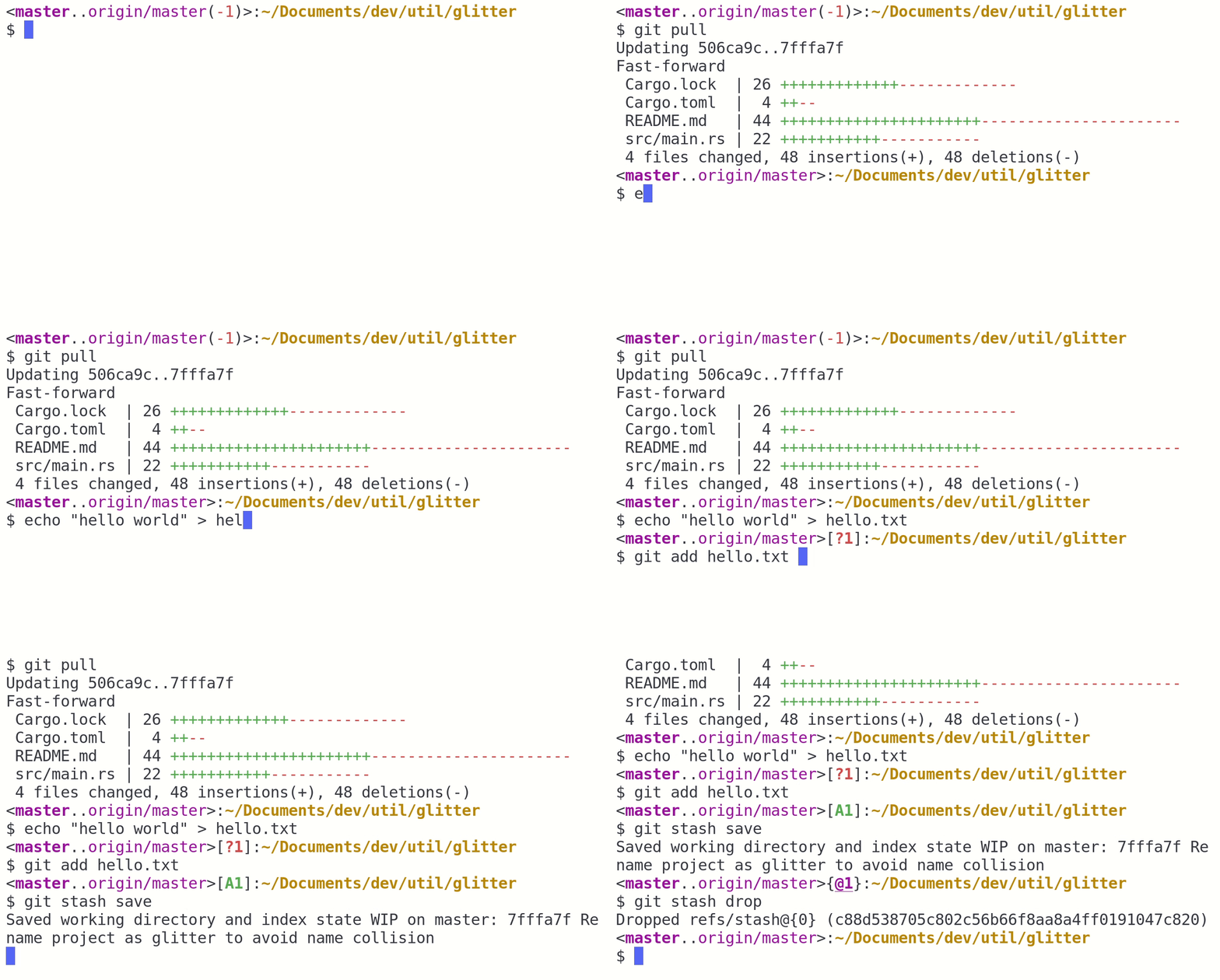
**Git status summary with custom formats, perfect for your shell prompt**
[](https://crates.io/crates/glit)[](https://travis-ci.org/glfmn/glitter)
**Get instant feedback from every action taken.**

**Change your format to suit your needs and tastes.**

# Installation
As long as you have the rust tool-chain set up, `cmake` and `openssl` installed, getting `glit` is as easy as:
```
$ cargo install glit
```
## Setting your shell to use `glit`
Too add a glitter format to your shell prompt if you are in a bash shell, add the following snippet to your `~/.bashrc`:
```bash
# Use environment variables to store formats if you want to be able to easily
# change them from your shell by just doing:
#
# $ export GIT_FMT="#r;*('TODO')"
# Format to use inside of git repositories or their sub-folders
export GIT_FMT="\<#m;*(\b)#m(\B(#~('..')))\(#g(\+)#r(\-))>\[#g;*(\M\A\R\D)#r;*(\m\a\u\d)]\{#m;*;_(\h('@'))}':'#y;*('\w')'\n\$ '"
# Format to use outside of git repositories
export PS1_FMT="#g(#*('\u')'@\h')':'#b;*('\w')'\$ '"
# Prompt command which is used to set the prompt, includes some extra useful
# functionality such as showing the last exit code
__set_prompt() {
# Capture last command exit flag
local EXIT="$?"
PS1=""
# If the last command didn't exit 0, display the exit code
[ "$EXIT" -ne "0" ] && PS1="$EXIT "
# Render the appropriate format depending on whether we are in a git repo
PS1+="$(glit "$GIT_FMT" -b -e "$PS1_FMT")"
}
export PROMPT_COMMAND=__set_prompt
```
Where the variable **GIT_FMT** contains your glitter format and **PS1_FMT** contains a fallback to use outside of git repositories. Here are a few examples you might want to try out on your system.
| `"\<#m;*(\b)#m(\B(#~('..')))\(#g(\+)#r(\-))>\[#g;*(\M\A\R\D)#r;*(\m\a\u\d)]\{#m;*;_(\h('@'))}"` |  |
| `"\(#m;*(\b)#g(\+)#r(\-))\[#g(\M\A\R\D)#r(\m\a\u\d)]\{#m;_(\h('@'))}':'"` |  |
| `"#g;*(\b)#y(\B(#~('..')))\[#g(\+(#~('ahead ')))]\[#r(\-(#~('behind ')))]' '#g;_(\M\A\R\D)#r;_(\m\a\u\d)"` |  |
## Dependencies
You can download the rust toolchain at [rustup.rs](http://rustup.rs/).
### MacOSX
```
brew install cmake openssl
```
### Ubuntu/Debian
```
apt-get install cmake openssl
```
## Usage
Basic usage for `glit` is:
```
$ glit <FORMAT>
```

Learn more and get help with:
```
$ glit help
```
## Background
Most shells provide the ability to customize the shell prompt which appears before every command. On my system, the default looks like:
```
gwen@tpy12:~/Documents/dev/util/glitter$
```
Its intended to provide useful information about your shell. However, it normally does not include information about git repositories, requiring the near constant use of `git status` to understand the state of the repository. The solution is to set a prompt command and dynamically update your shell with the information you want. `glit` is made for precisely this purpose: you can provide a format, and glitter will interpret it, inserting the information in the format you want.
## Making your own glitter format
An example format looks like:`"\<\b\(\+\-)>\[\M\A\R\D':'\m\a\u\d]\{\h('@')}':'"`. `glit` interprets this into something that might look like `<master(+1)>[M1:D3]{@5}:` where
- `master` is the name of the current branch.
- `+1`: means we are 1 commit ahead of the remote branch
- `M1`: the number of staged modifications
- `D3`: is the number of unstaged deleted files
- `@5`: is the number of stashes
`glit` expressions also support inline format expressions to do things like making text red or bold or italic, making your background white, or setting RGB colors for your git information.
`glit` will only accept your format string if your current directory is a **git repository**.
`glit` expressions have four components:
1. Named expressions
2. Format expressions
3. Group expressions
4. Literals
### Literals
Any characters between single quotes are literals. Literals are left untouched. For example, `'literal'` outputs `literal`.
```
$ glit "'hello world'"
$ glit "'\n\w\n\u'"
$ glit "'separate'' ''words'"
```
### Named expressions
Named expressions represent information about your git repository.
| `\b` | branch name or head commit id | `master` |
| `\B` | remote name | `origin/master` |
| `\+` | # of commits ahead remote | `+1` |
| `\-` | # of commits behind remote | `-1` |
| `\m` | # of unstaged modified files | `M1` |
| `\a` | # of untracked files | `?1` |
| `\d` | # of unstaged deleted files | `D1` |
| `\u` | # of merge conflicts | `U1` |
| `\M` | # of staged modified files | `M1` |
| `\A` | # of added files | `A1` |
| `\R` | # of renamed files | `R1` |
| `\D` | # of staged deleted files | `D1` |
| `\h` | # of stashed files | `H1` |
You can provide other expressions as arguments to expressions which replace the default prefix which appears before the result or file count. For example, `\h('@')` will output `@3`
instead of `H3` if your repository has 3 stashed files. You can provide an arbitrary number of valid expressions as a prefix to another named expression.
```
$ glit "\b"
$ glit "\b('on branch ')"
```
Expressions generally only render any output if their corresponding values aren't empty; in other words, if there are no added files, `glit` will not produce `A0` as the output of `\A`, but instead will output an empty string.
### Group Expressions
Glitter will surround grouped expressions with parentheses or brackets, and will print nothing if the group is empty.
| `\[]` | empty |
| `\()` | empty |
| `\<>` | empty |
| `\{}` | empty |
| `\{\b}` | `{master}` |
| `\<\+\->` | `<+1-1>` |
| `\[\M\A\R]` | `[M1A3]` where `\R` is 0 |
| `\[\r\(\a)]`| empty, when `\r`, `\a` are 0 |
```
$ glit "\b\<\M>"
```
### Format Expressions
Glitter expressions support ANSI terminal formatting through the following styles:
| `#~(` '...' `)` | reset |
| `#_(` '...' `)` | underline |
| `#i(` '...' `)` | italic text |
| `#*(` '...' `)` | bold text |
| `#r(` '...' `)` | red text |
| `#g(` '...' `)` | green text |
| `#b(` '...' `)` | blue text |
| `#m(` '...' `)` | magenta/purple text |
| `#y(` '...' `)` | yellow text |
| `#w(` '...' `)` | white text |
| `#k(` '...' `)` | bright black text |
| `#[01,02,03](` '...' `)` | 24 bit RGB text color |
| `#R(` '...' `)` | red background |
| `#G(` '...' `)` | green background |
| `#B(` '...' `)` | blue background |
| `#M(` '...' `)` | magenta/purple background |
| `#Y(` '...' `)` | yellow background |
| `#W(` '...' `)` | white background |
| `#K(` '...' `)` | bright black background |
| `#{01,02,03}(` '...' `)` | 24 bit RGB background color |
| `#01(` '...' `)` | Fixed terminal color |
Format styles can be combined in a single expression by separating them with semicolons:
| `#w;K(` '...' `)` | white text, black background |
| `#r;*(` '...' `)` | red bold text |
| `#42(` '...' `)` | a forest greenish color |
| `#_;*(` '...' `)` | underline bold text |
```
$ glit "#r;*('hello world')"
$ glit "#g;*(\b)"
$ glit "#[255,175,52]('orange text')"
$ glit "#G('green background')"
```
`glit` can understand and respects complicated nested styles, providing maximum flexibility.
```
$ glit "#g('green text with some '#*('bold')' green text')"
$ glit "#g;*(\b(#~('on branch ')))"
```