# gitui-view
[](https://crates.io/crates/gitui-view)
[](https://docs.rs/gitui-view)
[](LICENSE)
A terminal-based Git repository browser with inline and side-by-side diff views, built with [ratatui](https://github.com/ratatui/ratatui).
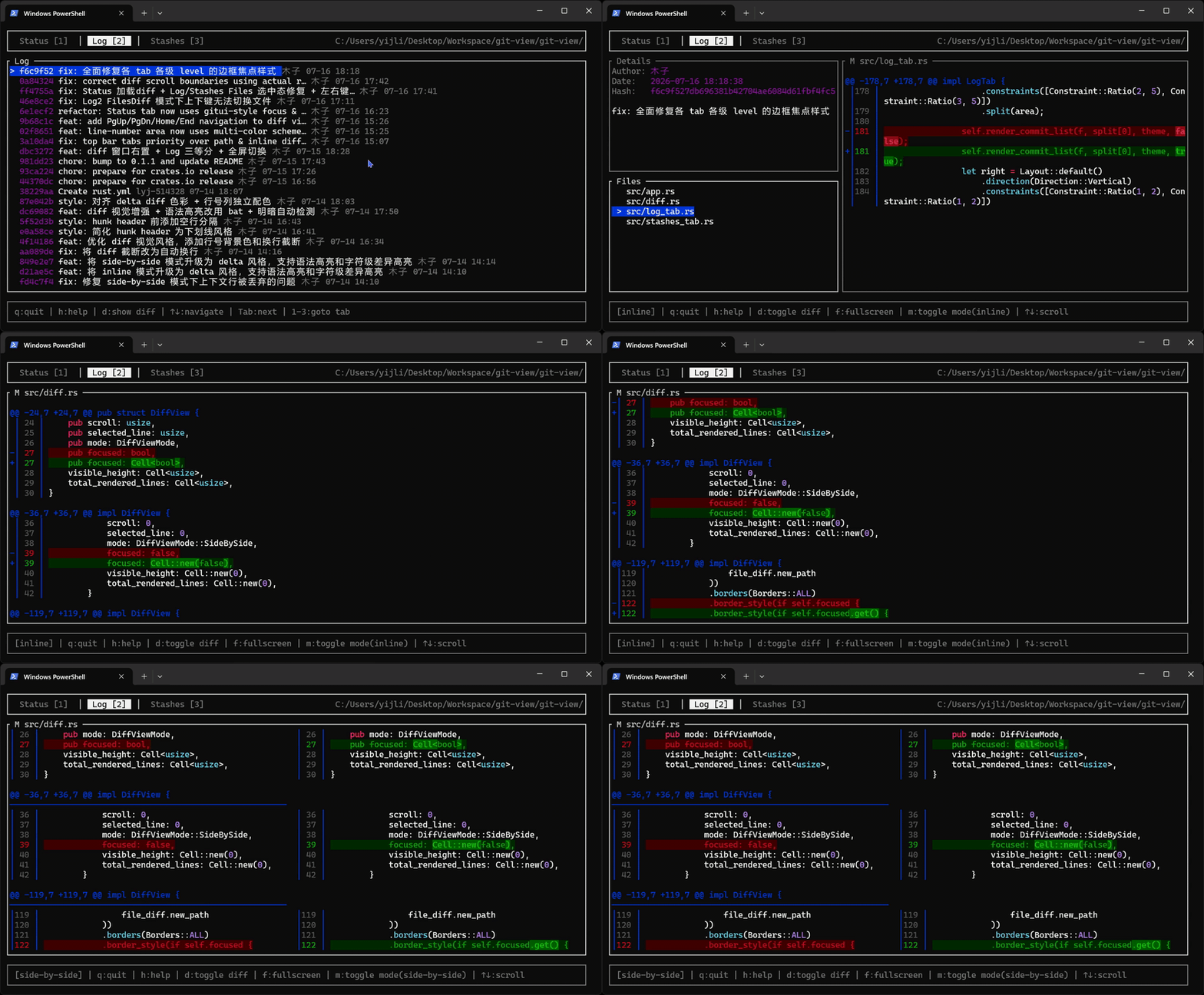
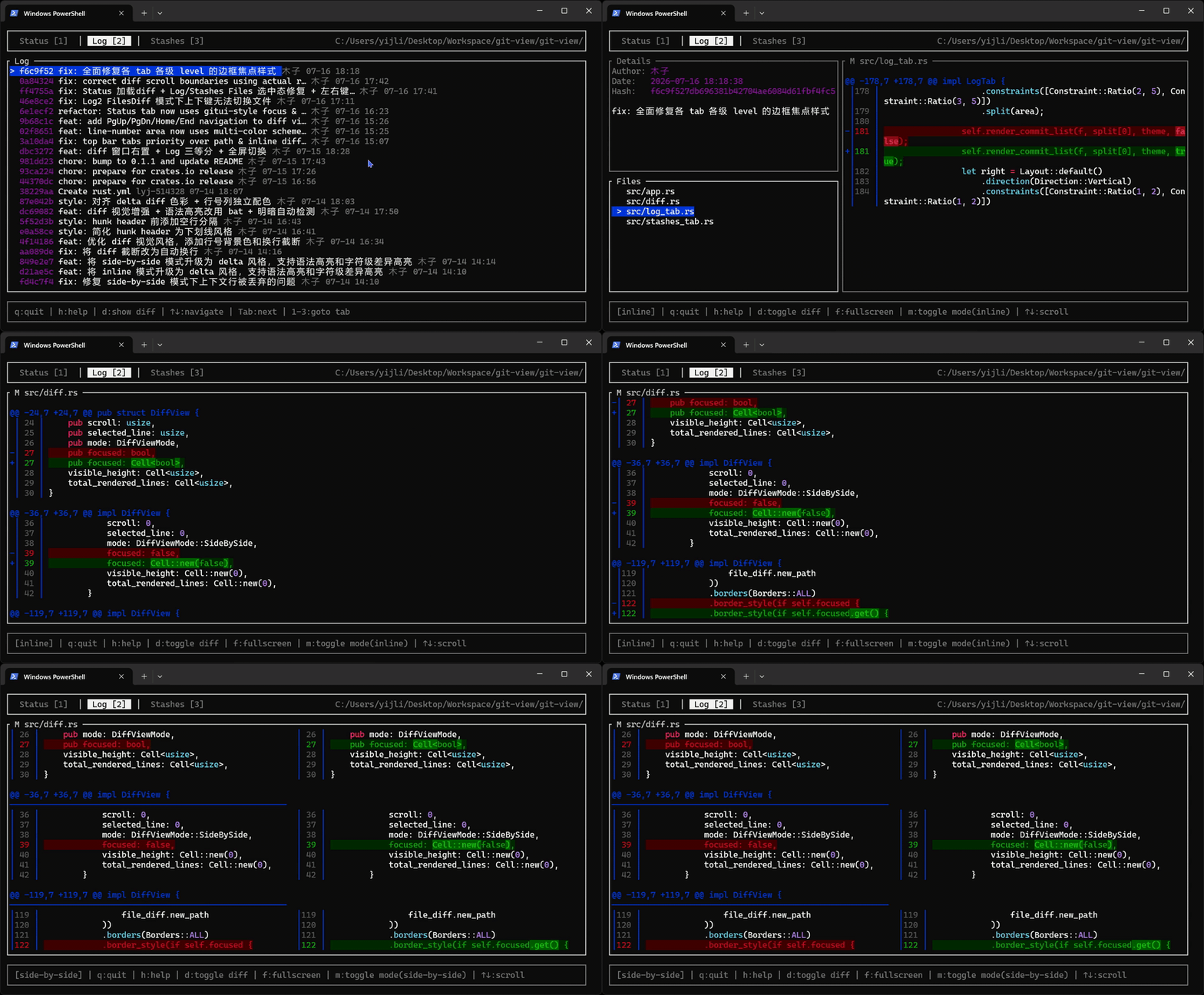
gitui-view is a lite version of [gitui](https://github.com/gitui-org/gitui), drawing inspiration from [delta](https://github.com/dandavison/delta) for diff rendering. It focuses on the core Git browsing experience — status, log, stashes, and diff review — with a clean and minimal interface.
## Features
- **Status Tab** — View staged and unstaged file changes with file-level diff panel
- **Log Tab** — Browse commit history with 4-level depth navigation:
- **Level 1 (Commits)** — Full-screen commit list
- **Level 2 (Details)** — Commit list + commit details & file list side-by-side
- **Level 3 (FilesDiff)** — Commit details & file list + file diff side-by-side
- **Level 4 (Diff)** — Full-screen diff view
- **Stashes Tab** — List and inspect stashed changes with the same 4-level depth navigation
- **Diff View** — Review diffs in inline or side-by-side mode, with syntax highlighting and binary file size display
- **Auto Theme Detection** — Automatically picks light or dark theme based on your terminal color scheme
- **Custom Themes** — Load custom themes via RON files
- **Keyboard-driven** — Vim-style navigation with `j`/`k`, depth-based tab navigation, and quick-jump keys
## Keybindings
| `q` | Quit |
| `h` | Toggle help |
| `Tab` / `Shift+Tab` | Switch tabs (Status ↔ Log ↔ Stashes) |
| `1` / `2` / `3` | Go to Status / Log / Stashes tab |
| `↑` `↓` / `k` `j` | Navigate list / scroll diff |
| `Enter` / `→` | Enter next level (List → Details → FilesDiff → Diff) |
| `Esc` | Return to previous level |
| `←` | Status tab: switch between staged/unstaged panel |
| `d` | Enter / exit diff view (context-dependent) |
| `f` | Toggle fullscreen diff |
| `m` | Toggle inline / side-by-side diff mode |
| `PageUp` / `PageDown` | Scroll diff by page |
| `Home` / `End` | Go to diff top / bottom |
## Usage
```bash
# Open the repository in the current directory
gitui-view
# Open a specific repository
gitui-view /path/to/repo
# Use a custom theme file
gitui-view --theme my_theme.ron
```
## Installation
### From crates.io
```bash
cargo install gitui-view
```
### From source
```bash
git clone https://github.com/lyj-514328/gitui-view.git
cd gitui-view
cargo install --path .
```
## Configuration
Themes can be customized via RON files. See the built-in light and dark themes in [src/theme.rs](src/theme.rs) for available fields.
```bash
gitui-view --theme ~/.config/gitui-view/theme.ron
```
## Dependencies
- [ratatui](https://github.com/ratatui/ratatui) — Terminal UI framework
- [git2](https://github.com/rust-lang/git2-rs) — libgit2 bindings
- [crossterm](https://github.com/crossterm-rs/crossterm) — Terminal manipulation
- [syntect](https://github.com/trishume/syntect) — Syntax highlighting
- [chrono](https://github.com/chronotope/chrono) — Date/time formatting
## License
Licensed under the MIT License. See [LICENSE](LICENSE) for details.