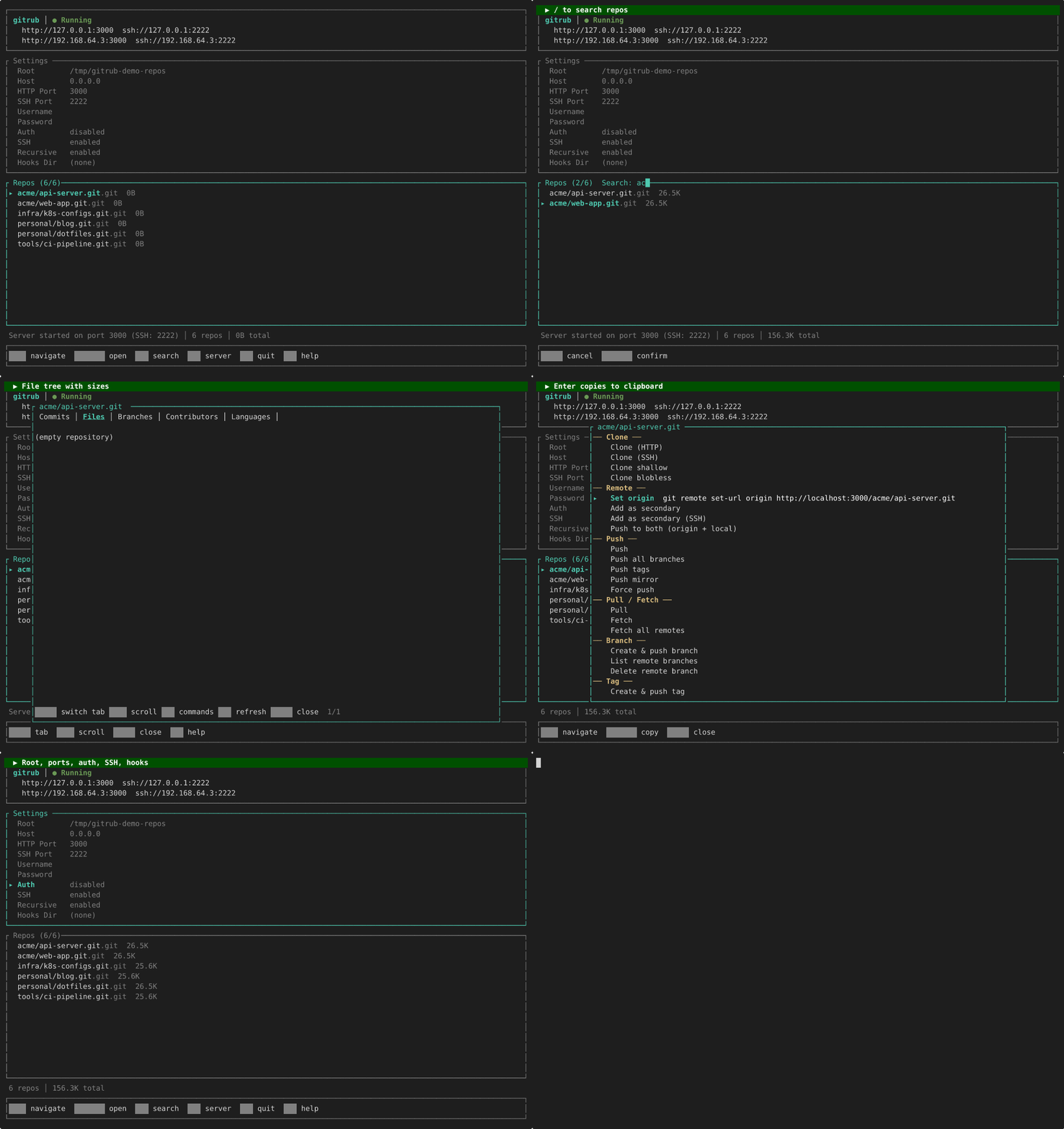
# gitrub
Local GitHub replacement. Push, pull, clone over HTTP and SSH. Supports LFS, shallow/partial clones, protocol v2, server-side hooks, and archive downloads.

## Install
```
cargo install gitrub
```
Or build from source:
```
cargo build --release
```
## Run
```
gitrub [OPTIONS]
Options:
--root <DIR> Repository root (default: ./repos)
--host <ADDR> Bind address (default: 0.0.0.0)
--port <PORT> HTTP port (default: 3000)
--ssh-port <PORT> SSH port (default: 2222)
--user <USER> Username for auth
--pass <PASS> Password for auth
--noauth Skip auth
--hooks-dir <DIR> Copy hooks into new repos
--no-ssh Disable SSH server
--recursive List repos recursively (include nested paths)
```
## Examples
```bash
# No auth, defaults
gitrub --noauth
# With auth
gitrub --user admin --pass secret
# Custom ports + hooks
gitrub --noauth --port 8080 --ssh-port 2222 --hooks-dir ./my-hooks
```
## Usage
```bash
# HTTP
git clone http://localhost:3000/user/project.git
git clone http://admin:secret@localhost:3000/user/project.git
# SSH
git clone ssh://git@localhost:2222/user/project.git
# Shallow clone
git clone --depth 1 http://localhost:3000/user/project.git
# Partial clone (blobless)
git clone --filter=blob:none http://localhost:3000/user/project.git
# Download archive
curl -O http://localhost:3000/user/project.git/archive/main.tar.gz
curl -O http://localhost:3000/user/project.git/archive/v1.0.zip
# Switch from GitHub (replace origin)
git remote set-url origin http://localhost:3000/user/project.git
# Keep GitHub as primary, add gitrub as secondary
git remote add local http://localhost:3000/user/project.git
git push local main
# Push to both at once
git remote set-url --add --push origin git@github.com:user/project.git
git remote set-url --add --push origin http://localhost:3000/user/project.git
git push origin main # pushes to GitHub AND gitrub
```
Repos auto-create on first push. Any path depth works.
## Using alongside GitHub
Most users keep GitHub as their primary remote. Here's how to add gitrub as a secondary backup or local mirror:
### Option 1: Separate remote (recommended)
Add gitrub as a named remote alongside `origin`:
```bash
# Your repo already has GitHub as origin
git remote -v
# origin git@github.com:user/project.git (fetch)
# origin git@github.com:user/project.git (push)
# Add gitrub as a second remote called "local"
git remote add local http://localhost:3000/user/project.git
# Push to gitrub
git push local main
# Push all branches + tags
git push local --all
git push local --tags
# Pull still defaults to GitHub
git pull # pulls from origin (GitHub)
git pull local main # pulls from gitrub
```
### Option 2: Push to both at once
Configure `origin` to push to GitHub **and** gitrub simultaneously:
```bash
# Add gitrub as an additional push URL on origin
git remote set-url --add --push origin git@github.com:user/project.git
git remote set-url --add --push origin http://localhost:3000/user/project.git
# Now every push goes to both
git push origin main # pushes to GitHub AND gitrub
# Verify
git remote -v
# origin git@github.com:user/project.git (fetch)
# origin git@github.com:user/project.git (push)
# origin http://localhost:3000/user/project.git (push)
```
> **Note:** Fetch still pulls from GitHub only. This is usually what you want — GitHub is the source of truth, gitrub is a local backup.
### Mirror an existing GitHub repo
```bash
# Clone from GitHub, then push everything to gitrub
git clone --mirror git@github.com:user/project.git
cd project.git
git push --mirror http://localhost:3000/user/project.git
```
## Features
| Push / Pull / Clone | ✅ HTTP + SSH |
| Branches & Tags | ✅ |
| Force push / Delete branch | ✅ |
| Git Protocol v2 | ✅ |
| Shallow clones (`--depth`) | ✅ |
| Partial clones (`--filter`) | ✅ |
| Git LFS | ✅ Batch API + basic transfer |
| SSH transport | ✅ Built-in server (Ed25519) |
| Archive download | ✅ tar, tar.gz, zip |
| Server-side hooks | ✅ `--hooks-dir` |
| HTTP Basic auth | ✅ |
| Auto-create repos on push | ✅ |
| Nested paths (`org/team/repo`) | ✅ |
| Activity tracking | ✅ Last push/pull timestamps |
| Repo detail view | ✅ Commits, files, branches |
| Recursive repo listing | ✅ `--recursive` flag |
## TUI Keybindings
| `↑`/`↓` | Navigate repos or settings |
| `Tab` | Switch focus (settings ↔ repos) |
| `Enter` | Open repo detail view / edit setting |
| `c` | Open command palette for selected repo |
| `/` | Search / filter repos |
| `s` | Start / stop server |
| `r` | Refresh repo list |
| `q` | Quit |
### Repo Detail View
| `Tab` | Switch tab (Commits → Files → Branches) |
| `↑`/`↓` | Scroll |
| `PgUp`/`PgDn` | Scroll by page |
| `c` | Open command palette |
| `r` | Refresh detail data |
| `Esc` | Close detail view |
## Server-side hooks
Create a hooks directory with executable scripts:
```bash
mkdir hooks
cat > hooks/post-receive << 'EOF'
#!/bin/sh
echo "Push received!"
EOF
chmod +x hooks/post-receive
gitrub --noauth --hooks-dir ./hooks
```
Hooks are copied into each new repo's `hooks/` directory. Supported hooks: `pre-receive`, `post-receive`, `update`, and any other git hook.
## LFS
gitrub implements the [Git LFS Batch API](https://github.com/git-lfs/git-lfs/blob/main/docs/api/batch.md). Configure your repo to use it:
```bash
cd my-project
git lfs install
git lfs track "*.bin"
git add .gitattributes
git commit -m "track binaries with LFS"
git push
```
LFS objects are stored under `<root>/<repo>/lfs/objects/`.
## Test
```
cargo test
```
28 integration tests covering push, pull, clone, branches, tags, force push, branch deletion, auth, shallow clones, partial clones, protocol v2, archive, hooks, and LFS.
## Author
[Eugene Hauptmann](https://github.com/eugenehp)
## License
MIT — see [LICENSE](LICENSE) for details.