# gitfetch-rs
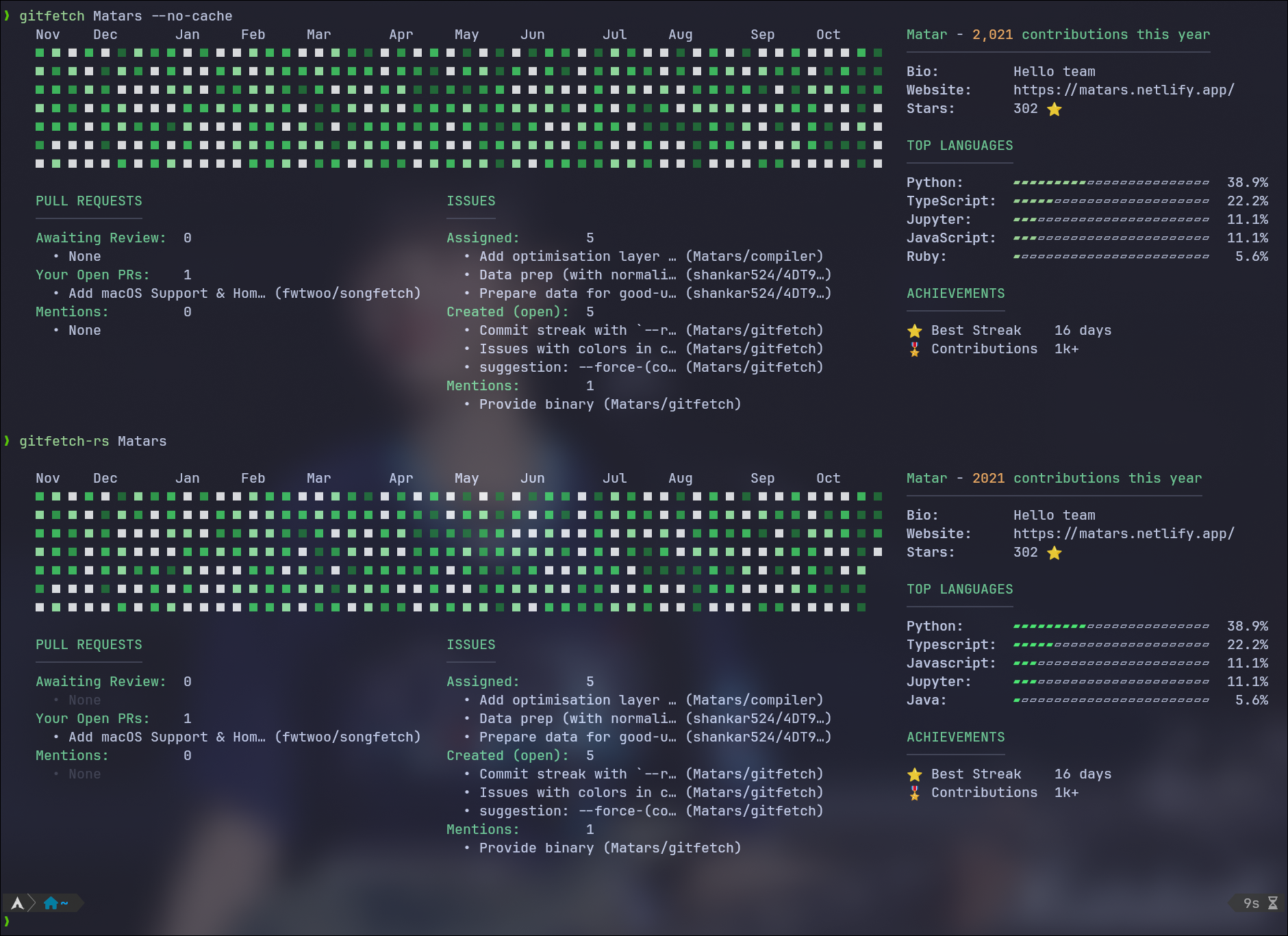
A blazing-fast Rust port of [gitfetch](https://github.com/Matars/gitfetch) - a neofetch-style CLI tool for displaying git provider statistics.
## Features
- 🚀 **Multi-Provider Support**: GitHub, GitLab, Gitea/Forgejo, Sourcehut
- 📊 **Contribution Graphs**: Visualize your coding activity
- 🎨 **Customizable Output**: Multiple layout modes and visual options
- ⚡ **Fast & Efficient**: Written in Rust with SQLite caching
- 🔒 **Privacy-First**: Uses official CLI tools (gh, glab) for authentication
## Installation
```bash
# From crates.io (recommended)
cargo install gitfetch-rs
# Or build from source
git clone https://github.com/AbletonPilot/gitfetch-rs
cd gitfetch-rs
cargo build --release
```
## Requirements
- For GitHub: [GitHub CLI (gh)](https://cli.github.com/)
- For GitLab: [GitLab CLI (glab)](https://gitlab.com/gitlab-org/cli)
- For Gitea: API token (configure with `--change-provider`)
## Usage
```bash
# Show your GitHub stats
gitfetch-rs
# Show stats for a specific user
gitfetch-rs octocat
# Change git provider
gitfetch-rs --change-provider
# Show only contribution graph
gitfetch-rs --graph-only
# Custom width and box character
gitfetch-rs --width 26 --custom-box "█"
```
## Options
### General
- `--version` - Show version information
- `--no-cache` - Bypass cache and fetch fresh data
- `--clear-cache` - Clear the cache and exit
- `--change-provider` - Change the configured git provider
### Visual Customization
- `--graph-only` - Show only the contribution graph
- `--graph-timeline` - Show git timeline graph (git log --graph style)
- `--width <N>` - Custom width for contribution graph (default: 52 weeks)
- `--height <N>` - Custom height for contribution graph (default: 7 days, max: 7)
- `--custom-box <CHAR>` - Custom character for contribution blocks
- `--no-date` - Hide month/date labels
### Display Control
- `--no-grid` - Hide contribution grid/graph
- `--no-account` - Hide account information
- `--no-achievements` - Hide achievements section
- `--no-languages` - Hide language statistics
- `--no-issues` - Hide issues section
- `--no-pr` - Hide pull requests section
### Layout
- `--spaced` - Use spaced layout (custom box character + space, Kusa-style)
- `--not-spaced` - Use compact layout (background-colored blocks, default)
### Simulation
- `--text <TEXT>` - Simulate contribution graph with text (A-Z and space only)
- `--shape <SHAPE>` - Simulate contribution graph with predefined shapes (heart, octocat, etc.)
### Local Analysis
- `--local` - Analyze local git repository (requires .git folder)
## Examples
```bash
# Minimal graph (half year, 3 rows)
gitfetch-rs --graph-only --width 26 --height 3 --no-date
# Spaced layout (Kusa-style)
gitfetch-rs --spaced --custom-box "█"
# Compact layout (background colors, default)
gitfetch-rs --not-spaced --width 52
# Text simulation
gitfetch-rs --text "RUST"
gitfetch-rs --text "HELLO WORLD" --spaced
# Shape simulation
gitfetch-rs --shape heart
gitfetch-rs --shape octocat --custom-box "●"
# Local repository analysis
gitfetch-rs --local
gitfetch-rs --local --graph-only --no-date
# Hide specific sections
gitfetch-rs --no-achievements --no-languages
# Custom appearance
gitfetch-rs --custom-box "●" --no-date
# Full width graph
gitfetch-rs --width 52
```
## Configuration
Configuration is automatically stored in platform-specific directories:
- Linux: `~/.config/gitfetch/config.toml`
- macOS: `~/Library/Application Support/gitfetch/config.toml`
- Windows: `%APPDATA%\gitfetch\config.toml`
Cache database is stored in:
- Linux: `~/.local/share/gitfetch/cache.db`
- macOS: `~/Library/Application Support/gitfetch/cache.db`
- Windows: `%LOCALAPPDATA%\gitfetch\cache.db`
## Architecture
```
gitfetch-rs/
├── src/
│ ├── main.rs # Entry point
│ ├── lib.rs # Library interface
│ ├── cli/ # CLI argument parsing
│ ├── config/ # Configuration management
│ ├── cache/ # SQLite caching
│ ├── fetcher/ # API integrations
│ │ ├── github.rs # GitHub (via gh CLI + GraphQL)
│ │ ├── gitlab.rs # GitLab (REST API)
│ │ ├── gitea.rs # Gitea/Forgejo (REST API)
│ │ └── sourcehut.rs # Sourcehut (GraphQL API)
│ ├── display/ # Terminal output
│ │ ├── formatter.rs # Layout rendering
│ │ ├── graph.rs # Contribution graph
│ │ └── text_patterns.rs # Text/shape simulation
│ ├── models/ # Data structures
│ └── utils/ # Git helpers & timeline
```
## License
This program is free software licensed under **GPL-2.0-only**, the same license as the original Python project.
### Copyright Notice
```
gitfetch-rs - Rust Port
Copyright (C) 2025 AbletonPilot
Based on gitfetch by Matars
Original: https://github.com/Matars/gitfetch
Original License: GPL-2.0
This program is free software; you can redistribute it and/or modify
it under the terms of the GNU General Public License as published by
the Free Software Foundation; either version 2 of the License, or
(at your option) any later version.
```
See [LICENSE](LICENSE) for the full GPL-2.0 license text and [NOTICE](NOTICE) for complete attribution details.
## Credits
- **Original Project**: [gitfetch](https://github.com/Matars/gitfetch) by **Matars** (GPL-2.0)
- **Rust Port**: [gitfetch-rs](https://github.com/AbletonPilot/gitfetch-rs) by **AbletonPilot**
This Rust implementation is a derivative work - a complete rewrite based on the design,
functionality, and visual style of the original Python version by Matars.