# git-tailor

An interactive terminal tool for tidying up Git commits on a branch — squash,
reorder, split, drop, and reword commits before submitting a pull request or
pushing to a shared branch.
The left panel shows your commits. The right panel shows a **hunk group matrix**
— a visual aid that instantly reveals which commits touch the same lines of
code, and whether combining them would be safe or risky.
> **⚠ Data safety — please read before use**
>
> This tool rewrites history. Always push your branch to a remote before running
> it. The author takes **no responsibility** for data loss of any kind. Use at
> your own risk. See [LICENSE](LICENSE) for the full disclaimer.
>
> This tool was developed entirely through AI-assisted ("vibe coded") sessions
> using AI agents. It has been reviewed and tested, but may contain bugs.
## Installation
```sh
cargo install --locked git-tailor
```
Requires Rust 1.85 or later.
## Usage
```sh
gt <base>
```
`<base>` identifies the branch or point you forked from — typically the target
branch of your pull request (e.g. `main` or `origin/main`). It does not need to
be a direct ancestor of `HEAD`: the **merge-base** (common ancestor) between
`<base>` and `HEAD` is used as the reference point. All commits between that
merge-base and `HEAD` are shown.
```sh
gt main # commits on top of main
gt origin/main # commits not yet pushed
gt v1.2.3 # commits since a tag
```
**Flags:**
| `--reverse` / `-r` | Show oldest commit at the top |
| `--full` / `-f` | Show every raw hunk group column without deduplication |
| `--static` / `-s` | Print the hunk group matrix to stdout and exit (no TUI) |
| `--no-color` | Disable colors in `--static` output |
| `--squashable-scope` | controls whether yellow connectors mean per-hunk-group or per-commit squashability |
## The interface
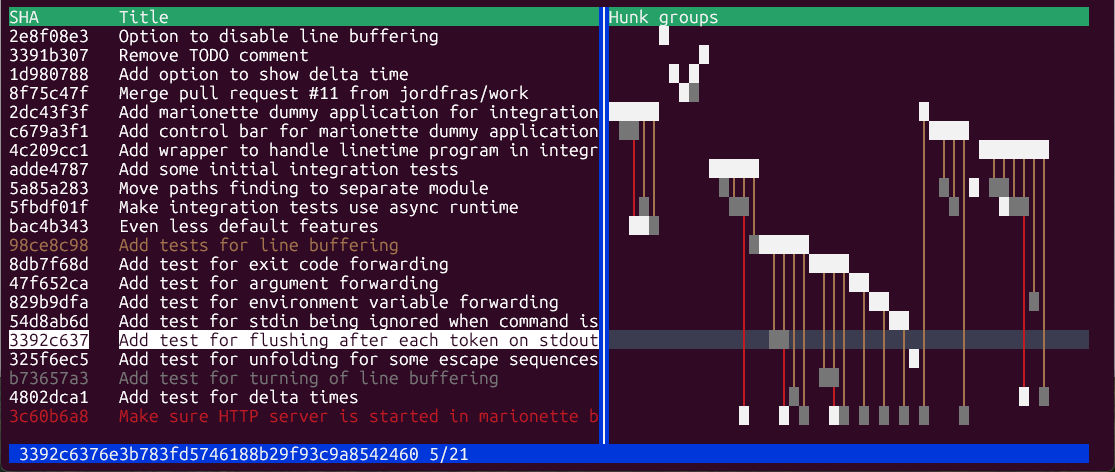
Each **column** in the hunk group matrix represents a group of related hunks (a
contiguous set of lines in a file that is touched by one or more commits). A
square `█` in a column means that commit modifies lines in that hunk group. A
vertical line `│` between two squares is a **connector** — it means the two
commits touch the same hunk group but are separated by other commits.
### Color legend — hunk group matrix
| White square | This commit touches a hunk group that also appears in another commit — potential conflict |
| Dark gray square | This commit's changes in this hunk group can be cleanly squashed with the related, earlier commit |
| Yellow connector | From dark gray square, the two commits can be cleanly squashed |
| Red connector | The two commits touching this hunk group have **conflicting** changes, reordering or squashing risks a merge conflict |
Note that even though the colors indicate cleanly squashable, git may consider
the squash causing conflict since git-tailor considers no extra lines of context
while git does.
### Color legend — commit list
When you select a commit, the other commits are colored relative to it:
| Yellow | Squashable partner — the currently selected commit can be cleanly squashed into the yellow or vice versa depending on order |
| Red | Conflicting — the currently selected commit touches the same lines as the red commit; squashing or reordering may cause conflicts |
| Dark gray | Fully squashable — every hunk group the grey commit touches is squashable; a good candidate to merge into another commit |
| Normal | No shared hunk groups with the currently selected commit |
## Key bindings
### Navigation
| `↑` / `↓`, `j` / `k` | Move selection up/down |
| `PgUp` / `PgDn` | Move one page up/down |
| `←` / `→` | Scroll hunk group matrix left/right |
| `Ctrl ←` / `Ctrl →` | Move the panel separator left/right |
### Operations
| `s` | **Squash** — merge the selected commit into an earlier one, message can be edited |
| `f` | **Fixup** — like squash, but discards the selected commit's message |
| `m` | **Move** — pick a new position for the selected commit |
| `p` | **Split** — divide the selected commit into smaller commits |
| `r` | **Reword** — edit the commit message |
| `d` | **Drop** — delete the selected commit entirely |
### Views and other
| `Enter` / `i` | Toggle commit detail view (diff) |
| `h` | Show help dialog |
| `u` | Refresh commit list from HEAD |
| `Esc` / `q` | Close dialog / quit |
## Attribution
Git-tailor is inspired by [tig](https://github.com/jonas/tig) and
[fragmap](https://github.com/amollberg/fragmap).
The source code of **fragmap** has been used by AI agents to produce code for
this tool — it is derived from or inspired by fragmap, which is licensed under
the Apache License, Version 2.0.
See [NOTICE](NOTICE) for full details.
## License
Apache License, Version 2.0 — see [LICENSE](LICENSE).